• Which the release of FS2020 we see an explosition of activity on the forun and of course we are very happy to see this. But having all questions about FS2020 in one forum becomes a bit messy. So therefore we would like to ask you all to use the following guidelines when posting your questions:

    • Tag FS2020 specific questions with the MSFS2020 tag.
    • Questions about making 3D assets can be posted in the 3D asset design forum. Either post them in the subforum of the modelling tool you use or in the general forum if they are general.
    • Questions about aircraft design can be posted in the Aircraft design forum
    • Questions about airport design can be posted in the FS2020 airport design forum. Once airport development tools have been updated for FS2020 you can post tool speciifc questions in the subforums of those tools as well of course.
    • Questions about terrain design can be posted in the FS2020 terrain design forum.
    • Questions about SimConnect can be posted in the SimConnect forum.

    Any other question that is not specific to an aspect of development or tool can be posted in the General chat forum.

    By following these guidelines we make sure that the forums remain easy to read for everybody and also that the right people can find your post to answer it.

FSX Airport Elevations

Messages
30
Country
us-michigan
Hi everyone. I was wondering if someone could give me a simple, detailed, step-by-step list of instructions on how to change the altitude of an airport within FSX using ADE. I am an experienced simmer, but I know absolutely ZERO about Airport Design for FS. If any of you could help me, it would be greatly appreciated. Thanks!
hamoody
(By the way, I asked for help on this issue on avsim but it didnt seem to be getting anywhere. Here is a link to the thread: http://forum.avsim.net/topic/377429-changing-airport-elevations-in-fsx/)
 
I am not sure quite what else you are expecting. Anyway having said that of course we will try to help.


Can you tell us here then what the issue is?

EDIT
OK I see for the other thread that George suggested you post here for help with ADE.
 
Last edited:
All default airports have flattens. Unfortunately the only way to "see" them is to use TmfViewer.

With your airport open in ADE, it displays the name of the file containing airport information, in the case of OSDI, this is Dir 0702/File 57200.

The flatten is therefore defined in FSX\Scenery\0702\Scenery\cvx5720.bgl:


You will need to zoom-in and "Jump" to the aiport position to see it.

In the case of OSDI, it would be sufficient to draw an exclusion polygon in ADE which encompasses the red circle which defines the airport radius.
 
All default airports have flattens. Unfortunately the only way to "see" them is to use TmfViewer.

With your airport open in ADE, it displays the name of the file containing airport information, in the case of OSDI, this is Dir 0702/File 57200.

The flatten is therefore defined in FSX\Scenery\0702\Scenery\cvx5720.bgl:

You will need to zoom-in and "Jump" to the aiport position to see it.

In the case of OSDI, it would be sufficient to draw an exclusion polygon in ADE which encompasses the red circle which defines the airport radius.

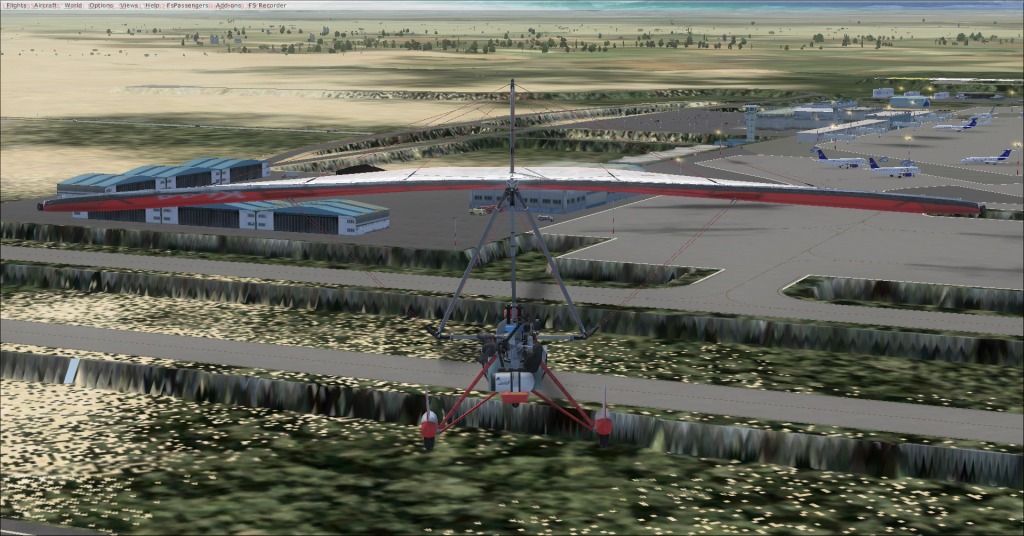
Ok, so what I did was put a polygon around the airport (within the red circle), and set it as an "Exclude General" with the tag "Airport Backgrounds". I then drew another airport background on top of this, with the tag "Flatten Exclude AutoGen" The airport still sits on a plateau, though, and all of the taxiways/runways are elevated over the ground. Here is a screenshot:
2012-6-24_5-33-32-536.jpg
 
It seems that you are missing the ADE "ALT" file from FSX\Scenery\World\Scenery. FSX thinks that the airport is at the default height.


BTW. I did say to create the exclusion polygon outside of the red circle ;)
 
It seems that you are missing the ADE "ALT" file from FSX\Scenery\World\Scenery. FSX thinks that the airport is at the default height.
BTW. I did say to create the exclusion polygon outside of the red circle ;)
Oh, you DID say outside of the circle.. oops. Ok, so I deleted the exclusion poly that I made inside the circle, made a big square-ish one outside of it, then I found the ALT file that I had deleted (I wanted to start over, so I did a fresh install of the airport). The weird taxiway issue is gone, but the airport still sits on a plateau (with no other problems).
 
OK, start a flight at Gate A 104, press <Shift> Z until you see the height display.

If you are in the Trike, it should display 2004 ft.

 
We're getting there :)

In ADE, highlight your airport background poly and hit <Enter>. What altitude is displayed?

 
We're getting there :)

In ADE, highlight your airport background poly and hit <Enter>. What altitude is displayed?


It says 609 meters, but it is tagged only as 'flatten excluDe autogen' , not what you have selected. Do you think that this may be the problem?
 
It says 609 meters, but it is tagged only as 'flatten excluDe autogen' , not what you have selected. Do you think that this may be the problem?

That shouldn't matter.

It seems that you have another CVX file active with an elevation less than 609m.

Possibly the only way to find it is to inhibit all of your addon sceneries apart from Damascus and add them back one at a time until you find the rogue area.
 
That shouldn't matter.

It seems that you have another CVX file active with an elevation less than 609m.

Possibly the only way to find it is to inhibit all of your addon sceneries apart from Damascus and add them back one at a time until you find the rogue area.

Do you mean another cvx file for Damascus?
 
Do you mean another cvx file for Damascus?

Yes that is what George means. It is possible that there is another file setting the elevation. If you have compiled the airport multiple times then make sure that there is no left over _CVX file created by ADE. Make sure that only the latest one you created it present. Did you change the folder you are compiling to for example. I assume you have put the airport file and associated CVX into Addon Scenery\scenery.

If you have not created more than one set of Bgl files then, as George suggests, it is possible that some other addon for the airport is present in your setup and is trumping your file. In nearly all cases the last file that FSX reads is the one that trumps all the others. If you are aware of another addon then you can go directly to that and disable it to test. If not then turning off each scenery area in turn and checking is a PITA but it may identify where the problem file is.
 
Yes that is what George means. It is possible that there is another file setting the elevation. If you have compiled the airport multiple times then make sure that there is no left over _CVX file created by ADE. Make sure that only the latest one you created it present. Did you change the folder you are compiling to for example. I assume you have put the airport file and associated CVX into Addon Scenery\scenery.

If you have not created more than one set of Bgl files then, as George suggests, it is possible that some other addon for the airport is present in your setup and is trumping your file. In nearly all cases the last file that FSX reads is the one that trumps all the others. If you are aware of another addon then you can go directly to that and disable it to test. If not then turning off each scenery area in turn and checking is a PITA but it may identify where the problem file is.
EDIT: Never mind. I did this, and after unchecking all of the areas, OSDI was at a normal elevation. However, when I checked the 0702 area, it was on a plateau. Now that I've identified the culprit file, how would I fix it?
 
Last edited:
Check the altitude in OSDI_ADEX_xxx_ALT.xml which should be in FSX\Scenery\World\Scenery.

Note. xxx will be your initials.
 
I could not find any .xml files in that folder, and the only OSDI related one was a .bgl, AFX_OSDI_ALT

Are there other "ALT" bgls in that folder?

If not, would you attach AFX_OSDI_ALT.BGL to your reply.
 
That is ok, the height is set to 609m.

The only possibility is that your exclusion polygon isn't large enough, however, the default height is 515.696m so your airport should be sunken not raised.

Try the attached ADE file.
 
Last edited:
That is ok, the height is set to 609m.

The only possibility is that your exclusion polygon isn't large enough, however, the default height is 515.696m so your airport should be sunken not raised.

Try the attached ADE file.

Ok, I deleted all of the files that I made, loaded your file into ADE, compiled it, but the airport is still on a plateau. There are no extra files in the addon scenery/scenery folder, the addon scenery/OSDI folder or scenery/world scenery folder.
 
Back
Top