• Which the release of FS2020 we see an explosition of activity on the forun and of course we are very happy to see this. But having all questions about FS2020 in one forum becomes a bit messy. So therefore we would like to ask you all to use the following guidelines when posting your questions:

    • Tag FS2020 specific questions with the MSFS2020 tag.
    • Questions about making 3D assets can be posted in the 3D asset design forum. Either post them in the subforum of the modelling tool you use or in the general forum if they are general.
    • Questions about aircraft design can be posted in the Aircraft design forum
    • Questions about airport design can be posted in the FS2020 airport design forum. Once airport development tools have been updated for FS2020 you can post tool speciifc questions in the subforums of those tools as well of course.
    • Questions about terrain design can be posted in the FS2020 terrain design forum.
    • Questions about SimConnect can be posted in the SimConnect forum.

    Any other question that is not specific to an aspect of development or tool can be posted in the General chat forum.

    By following these guidelines we make sure that the forums remain easy to read for everybody and also that the right people can find your post to answer it.

P3D v2 Alouette 3

It is slightly.....see pic below, different from Artouste
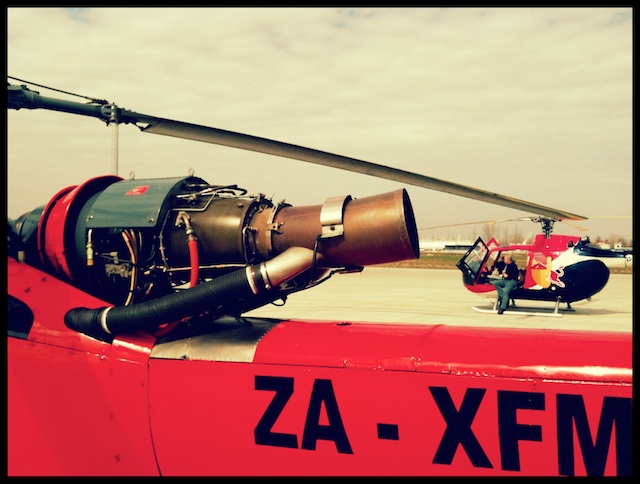
2011-03-14-BO-105-IMG_3992.jpg
 
Looks great! I'd step up the polycount on the exhaust, though. Seeing as though that's a more major part of the engine, not being able to see the edges as easily will make it look even better.
 
Looks great! I'd step up the polycount on the exhaust, though. Seeing as though that's a more major part of the engine, not being able to see the edges as easily will make it look even better.
OK, Will see if the users are able to view the engine that close then I will otherwise don't want any performance issues and who knows it better than you that each and every poly counts :)

So I started playing with lighting and this shiny thing came out

11.jpg
22.jpg
33.jpg
44.jpg
 
OK, Will see if the users are able to view the engine that close then I will otherwise don't want any performance issues and who knows it better than you that each and every poly counts :)

So I started playing with lighting and this shiny thing came out

<cut out pictures to keep quote smaller>

It's all about finding that perfect balance. If a part is large or has lots of detail surrounding it, you'll want to give it a higher poly count. The many details on the engine, for example, since they're small, you can keep the poly count low on. What I've read over the years (and haven't really been able to confirm or check out for myself) is that poly count doesn't affect performance.. It's the number of drawcalls. The more materials you have, the more drawcalls you'll have. The FSX compiler only allows 64k vertices per material (or less as you add spec maps and bump maps). Because of this, some groups of parts that rely on the same textures may have to be split up and use variations of the same material. High poly count doesn't directly affect performance, but as you keep adding more materials, you can start to decrease performance.

By the way, lookin' even better! I've learned a lot of modeling techniques over the past 5 years or so (by now, enough to make a full aircraft from start to finish, but haven't because of time restraints), but I've yet to find out if I have the patience to build anything that requires so many small details like you have. :D Impressive work!
 
It's all about finding that perfect balance. If a part is large or has lots of detail surrounding it, you'll want to give it a higher poly count. The many details on the engine, for example, since they're small, you can keep the poly count low on. What I've read over the years (and haven't really been able to confirm or check out for myself) is that poly count doesn't affect performance.. It's the number of drawcalls. The more materials you have, the more drawcalls you'll have. The FSX compiler only allows 64k vertices per material (or less as you add spec maps and bump maps). Because of this, some groups of parts that rely on the same textures may have to be split up and use variations of the same material. High poly count doesn't directly affect performance, but as you keep adding more materials, you can start to decrease performance.

By the way, lookin' even better! I've learned a lot of modeling techniques over the past 5 years or so (by now, enough to make a full aircraft from start to finish, but haven't because of time restraints), but I've yet to find out if I have the patience to build anything that requires so many small details like you have. :D Impressive work!

Yes, but also number of vertices does affect the performance doesn't it?

And as for your project, ALL YOU NEED IS A LITTLE PUSH! :P
 
After. The slightly wider supporting ribs around the windows are an improvement, IMHO.
 
Well I looked back at my photos, and on the first one you can compare it somewhat to that person's hand, you can see it's about the same height as it, so I'd say it's about 7cm wide
 
before, looks more like the photos i have seen and has more depth, less flat looking. Do in between and make everyone happy, LOL.
 
Well, I just edited the ribs a bit ... somewhere in the between but closer to after and also added the basic rotor assembly .... total triangles are 39801 and the computer is starting to feel it during wireframe modes

3.jpg

1.jpg

2.jpg
 
I would use the bend modifier in max to give the static drooped rotor blades. Since the AL3 has 3 blades, might want to do one blade at a time though. Looking very excellent mate:)
 
Looks great, nice bit of modeling! For rotor animation, I really hope you go with the older way of using a prop disc for the blurred prop. A few developers have used the actual mesh blade animation, but "I" don't find it very appealing visually.
Can't wait to see the VC progress..
 
Back
Top