• Which the release of FS2020 we see an explosition of activity on the forun and of course we are very happy to see this. But having all questions about FS2020 in one forum becomes a bit messy. So therefore we would like to ask you all to use the following guidelines when posting your questions:

    • Tag FS2020 specific questions with the MSFS2020 tag.
    • Questions about making 3D assets can be posted in the 3D asset design forum. Either post them in the subforum of the modelling tool you use or in the general forum if they are general.
    • Questions about aircraft design can be posted in the Aircraft design forum
    • Questions about airport design can be posted in the FS2020 airport design forum. Once airport development tools have been updated for FS2020 you can post tool speciifc questions in the subforums of those tools as well of course.
    • Questions about terrain design can be posted in the FS2020 terrain design forum.
    • Questions about SimConnect can be posted in the SimConnect forum.

    Any other question that is not specific to an aspect of development or tool can be posted in the General chat forum.

    By following these guidelines we make sure that the forums remain easy to read for everybody and also that the right people can find your post to answer it.

FSX Animation

Messages
694
Country
ca-quebec
Hi

I want to make an hoisting animation in my Halong Bay scenery.

I made one model with all objects (boat, helicopter, men) because I want to make it AI. In my chopper I have 2 animations : main and tail rotor (Ambient and Ambient2). I named the hoisted guy Ambient4. I dont animate Ambient4 and all display well as AI in FSX.
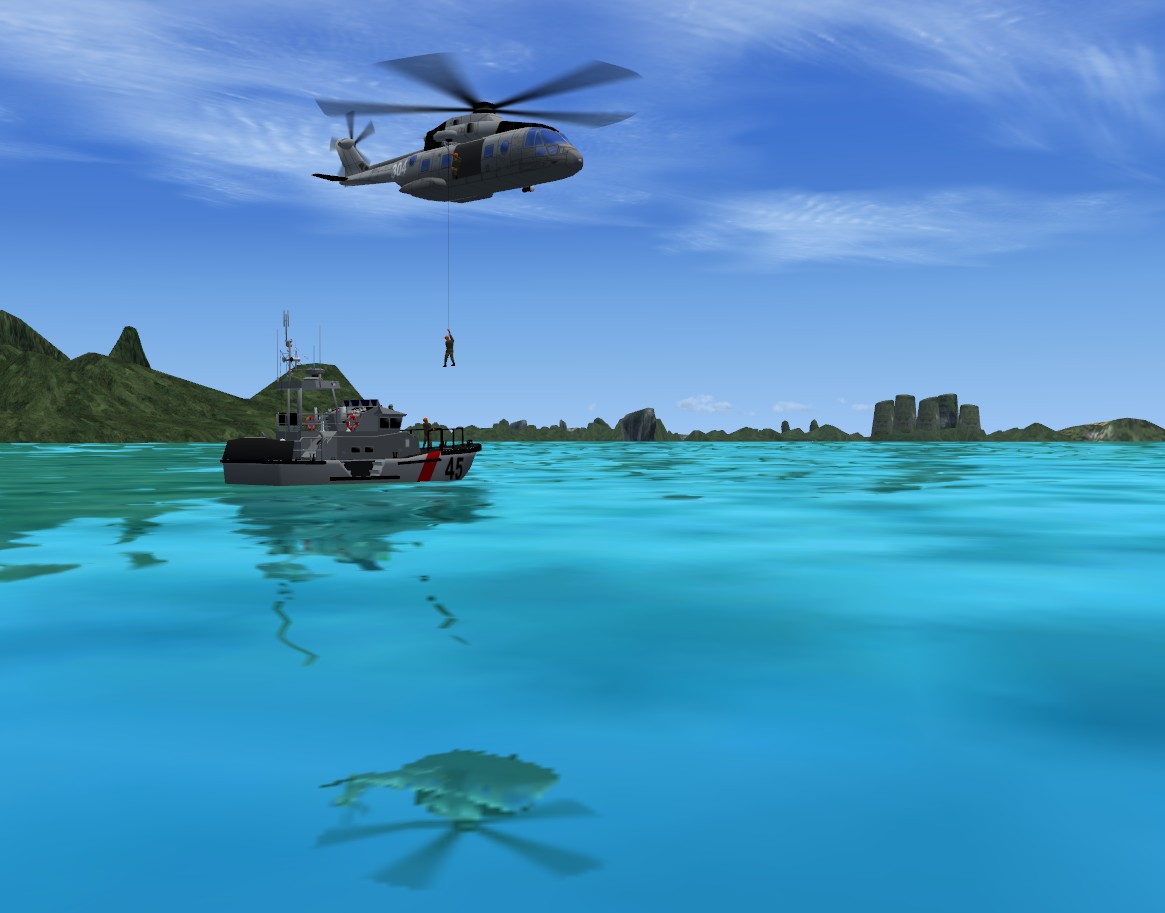
helitreuillage.jpg


But when I add animation (adding keyframes) to Ambient4 (go down then go up) it animates well but about 50 feet before the boat!

The axes orientation are good, no missing texture . What I have to check further?

Thanks.
 
Make sure to link your animated hoist part to an unanimated parent part? Some use a special tiny cube part located with its center at 0,0,0.
 
Thanks.
I have tried but with no satisfying result. Note that I never attach my animations and they always work well (except here...).
I replaced my guy by a simple cube and animate it : same wrong behevior... If the problem is not in my guy model, it is somewhere else in the MDL...
 
I tried a simple cube animation with the helicopter. I puted the cube just under the winch. In ModelConverter the cube is distant...
 
I may be wrong about this, but, I thought Ambient animations were for scenery models and are for rotations only. Sort of like the old "tick 18".

Best, Paul
 
Thanks.

That what I tough for a moment. But still there is a "Translate" option in FSDS...

I progressively shifted the animated guy behind the rope in FSDS to match them in ModelConverterX and FSX. That works for me. My partners are testing if it is the same in their FSX.

But it is a correction, not a solution...

I use "Tick" 18 only for conditionnal animations under FS9 SDK. I usually work with FSX SDK.
 
Thanks.

That what I tough for a moment. But still there is a "Translate" option in FSDS...

I progressively shifted the animated guy behind the rope in FSDS to match them in ModelConverterX and FSX. That works for me. My partners are testing if it is the same in their FSX.

But it is a correction, not a solution...

I use "Tick" 18 only for conditionnal animations under FS9 SDK. I usually work with FSX SDK.

You are correct; Ambient is the FSX version of the FS9 "Tick 18" so to speak. The translate idea is a neat trick; hope it works.

Best, Paul
 
Back
Top