• Which the release of FS2020 we see an explosition of activity on the forun and of course we are very happy to see this. But having all questions about FS2020 in one forum becomes a bit messy. So therefore we would like to ask you all to use the following guidelines when posting your questions:

    • Tag FS2020 specific questions with the MSFS2020 tag.
    • Questions about making 3D assets can be posted in the 3D asset design forum. Either post them in the subforum of the modelling tool you use or in the general forum if they are general.
    • Questions about aircraft design can be posted in the Aircraft design forum
    • Questions about airport design can be posted in the FS2020 airport design forum. Once airport development tools have been updated for FS2020 you can post tool speciifc questions in the subforums of those tools as well of course.
    • Questions about terrain design can be posted in the FS2020 terrain design forum.
    • Questions about SimConnect can be posted in the SimConnect forum.

    Any other question that is not specific to an aspect of development or tool can be posted in the General chat forum.

    By following these guidelines we make sure that the forums remain easy to read for everybody and also that the right people can find your post to answer it.

ADE Approach Creation Mode not Working Correctly

Messages
104
Country
unitedstates
Hi Everyone,
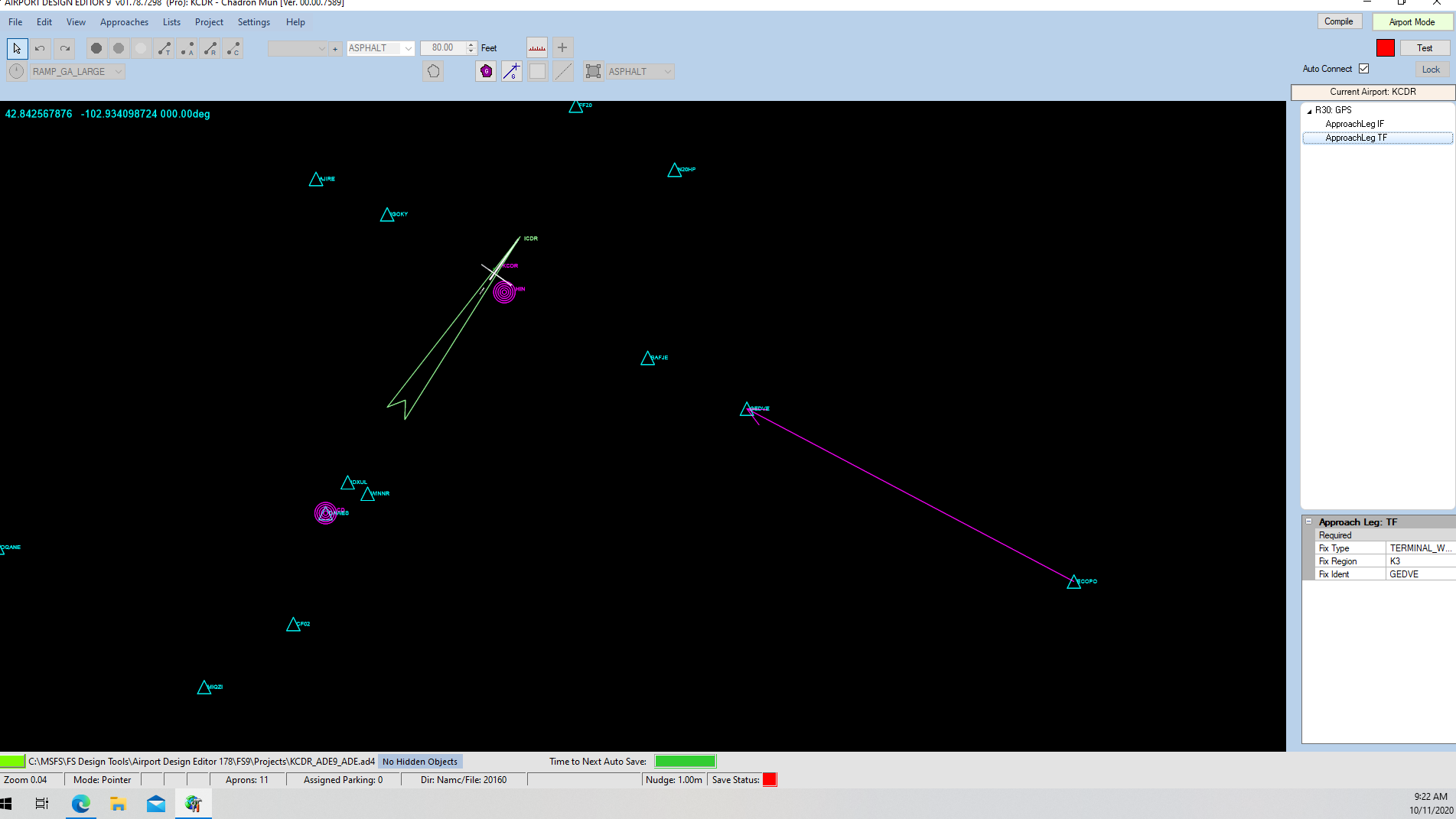
I have ADE 1.78 latest version and have an issue with the approach creation mode for FS9. I can access the approach screen and can start to create the approach, but none of the usual applicable items for editing the approach show up.
For example, I can start a GPS approach, but when you attempt to add the Approach Legs, none of the editable items like Course Type, Leg Basis, etc. show up when you highlight the Approach Waypoint in the list. I have never had this issue before, but had to reinstall everything on my system due to a motherboard failure. Everything else in the ADE program seems to be working with the exception of this issue and the fact that my Prokey is also not working correctly. Jon is working with me on the Prokey issue but asked me to post the approach issue here to elicit some help.
Thanks in advance for everyone's help.
Jeff
Screenshot (2).png
 
Sorry, I don't understand. The TF approach leg you show is correct - even in ADE 1.65 it only includes those same 3 items - Fix Type, Fix Region, and Fix Ident. There has been no change between these versions. BTW, it's the same for the IF leg - the same three lines. If you want a more complicated leg you will need to choose a different leg type.
 
Hi Tom,
I have always used the Tutorial Approach section here in the forum. It is at 14074 of the tutorial pages. However, here is an example of what I would normally be able to enter:

RWY 30
Type - GPS
Rwy # - 30
Rwy Descriptor - As required
Suffix - 0
GPS Overlay - Blank
Fix Type - Terminal Waypoint
Fix Ident - GEDVE (FAF)
Approach Fix Altitude - 5000 (FAF Alt)
Missed Alt Feet - 6300 (Missed Approach Point Alt.)
Heading Degree - 298 (Actual Approach Heading)
Rwy Heading - Set By ADE
__________________________________________________________
Approach Leg - IF
Fix Type - Terminal Waypoint
Fix Ident - ECOPO (Initial Approach Fix)
Altitude Descriptor - A
Altitude 1 Feet - 5900 (Initial Approach Fix Altitude)
Altitude 2 Feet - Blank
_____________________________________________________________
Approach Leg - TF
Fix Type - Terminal Waypoint
Fix Ident - GEDVE
Fly Over - Blank
Course Type - Magnetic
Course Degree - 0
Leg Basis - Distance
Distance Nautical Miles - 7.4
Alt Descriptor - A
Altitude 1 Feet - 5000
Altitude 2 Feet - Blank
_______________________________________________________________
Approach Leg - TF
Fix Type - Terminal Waypoint
Fix Ident - BAFJE
Fly Over - Blank
Course Type - Magnetic
Course Degree - 0
Leg Basis - Distance
Distance Nautical Miles - 2.2
Alt Descriptor - A
Altitude 1 Feet - 4300
Altitude 2 Feet - Blank
________________________________________________________________
Approach Leg - TF (Last TR is always the Runway)
Fix Type - Rwy
Fix Ident - Rwy 30
Fly Over - Blank
Course Type - Magnetic
Course Degree - 0
Leg Basis - Distance
Distance Nautical Miles - 3.1
Alt Descriptor - A
Altitude 1 Feet - 3298
Altitude 2 Feet - Blank
______________________________________________________________________
Missed Approach Leg - CA
Course Type - Magnetic
Course Degree - 298
Alt Descriptor - Plus
Altitude 1 Feet - 6300
Altitude 2 Feet - Blank
____________________________________________________________________
Missed Approach Leg - DF
Fix Type - Terminal Waypoint
Fix Ident - CABAX
Fly Over - Blank
Turn Direction - Right (As stated in the published approach)
Alt Descriptor - Plus
Altitude 1 Feet - 6300 (Missed Approach Point Elevation)
Altitude 2 Feet - Blank
_____________________________________________________________________
Missed Approach Leg - HM (This is the published approach hold)
Fix Type - Terminal Waypoint
Fix Ident - CABAX
Turn Direction - Right (As stated in the published approach)
Course Type - Magnetic
Course Degree - 118
Leg Basis - Distance (Can be either Distance or Time as required by the published approach)
Distance Nautical Miles - 7 (Can also be Time if Time is selected in Leg Basis
Alt Descriptor - Not Set
Altitude 1 Feet - Blank
Altitude 2 Feet - Blank
_________________________________________________________________________

That is the complete approach that I have always be able to put into both ADE1.65 and ADE1.78 for either a GPS approach or a RNAV approach.
None of the items in the boxes except for the first 3 are showing up. This is not the way the ADE Tutorial shows it, nor is it the way it worked in the past.

Thanks Jon for solving the Prokey issue........Give that man a STICKY!!!!!!
Thanks again for everyone's help.
Jeff
 
Ah, you want to use the Optional properties.

Approach Mode/Approaches/Show Optional Leg Properties.

Hope this helps,
 
Last edited:
Thanks Tom for all your help. I did not know that button existed. It was never not on before.
Thanks again,
Jeff
 
Back
Top