• Which the release of FS2020 we see an explosition of activity on the forun and of course we are very happy to see this. But having all questions about FS2020 in one forum becomes a bit messy. So therefore we would like to ask you all to use the following guidelines when posting your questions:

    • Tag FS2020 specific questions with the MSFS2020 tag.
    • Questions about making 3D assets can be posted in the 3D asset design forum. Either post them in the subforum of the modelling tool you use or in the general forum if they are general.
    • Questions about aircraft design can be posted in the Aircraft design forum
    • Questions about airport design can be posted in the FS2020 airport design forum. Once airport development tools have been updated for FS2020 you can post tool speciifc questions in the subforums of those tools as well of course.
    • Questions about terrain design can be posted in the FS2020 terrain design forum.
    • Questions about SimConnect can be posted in the SimConnect forum.

    Any other question that is not specific to an aspect of development or tool can be posted in the General chat forum.

    By following these guidelines we make sure that the forums remain easy to read for everybody and also that the right people can find your post to answer it.

Attached Object Editor not displaying all objects

Messages
21
Country
ca-manitoba
Hi Arno

This is a really minor issue and I'm not sure if it's a model issue or a MCX issue.

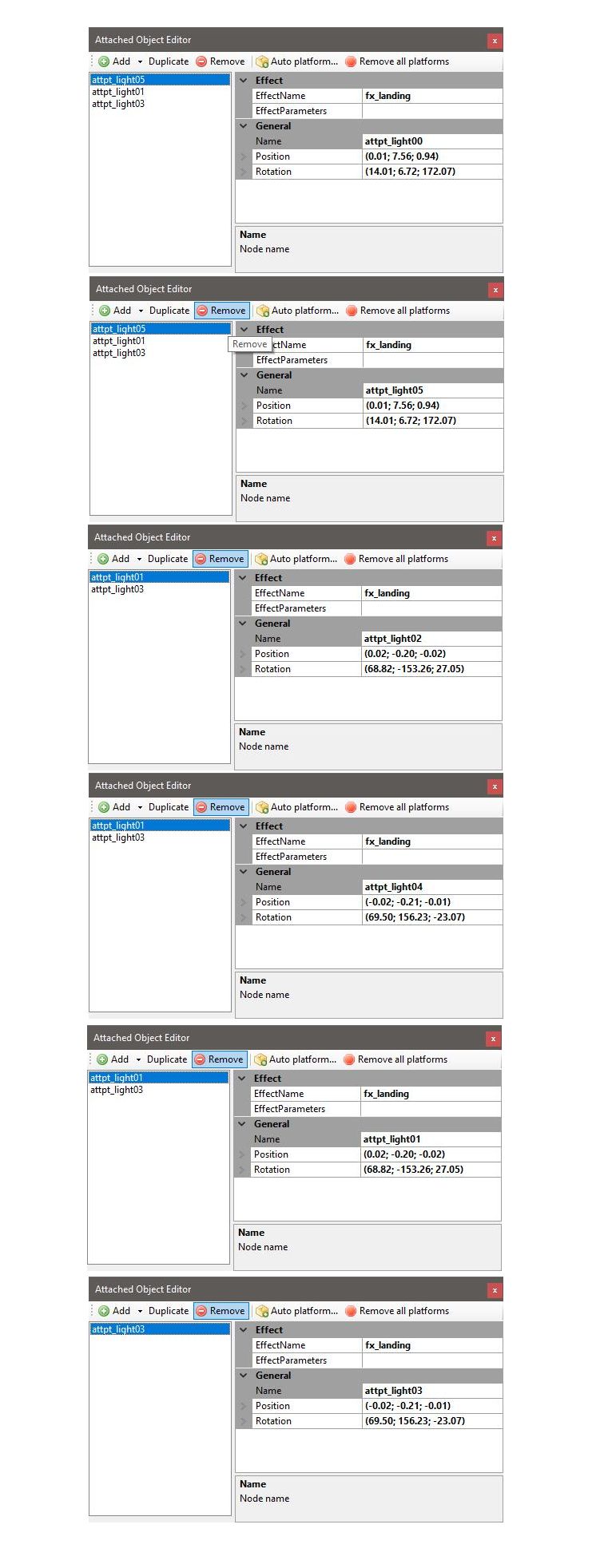
I've noticed it only on a couple of user aircraft. When the aircraft model is loaded into MCX and you open the "Attached Object Editor" not all of the "attpt_light" objects are displayed. When you delete the top object, then another object appears. While the list initially displays 3 objects, their are actually six objects. Here is one model that exhibits this behavior.

In the the first image, note that "attp_light05" is selected and the details are displaying object "attp_light00.
I then delete the top object.
In the second image, "attp_light05" is selected and the details are for "attp_light05".
I then delete the top object again.
In the third image, "attp_light01" is selected and the details are for "attp_light02".
I delete the top object again.
In the fourth image, "attp_light01" is selected and the details are for "attp_light04".
I delete the top object again.
In the fifth image, "attp_light01" is selected and the details are for "attp_light01".
I delete the top object again.
In the sixth image, "attp_light03" is selected and the details are for "attp_light03".

Maybe it has something to do with the same position/rotation of the objects (duplicates)?

Regards,
Rick

Edit: I tried MCX v1.8 and v1.9.2026.0706, and other development releases.
Objects.jpg
 
Last edited:
Sounds like a weird issue, I'll have a look if I can reproduce it here.
 
Hi,

I had a look at the issue. The model you linked does indeed have 6 attached effects (3 in the exterior model and 3 in the interior model). It seems like the attached object editor does not always select the right nodes to show, therefore removing does also remove the wrong one. Seems like a bug in that editor. I am going to see what causes it.
 
OK, I have found the bug. For objects with multiple representations (interior, exterior) the edit did indeed sometimes use the wrong index of the attached objects, resulting in an attached object to be shown in the property grid that was not in the list on the left. I will fix these issues in the next development release.
 
Hi Arno

What great news! When the next development package is released, I'll certainly use it. I have another user aircraft model that exhibits this issue. It uses two fx_navred.fx effects and two fx_navgre.fx effects that is unrealistically bright. I was unable to remove the duplicate objects, because they were not listed.

Regards, and best wishes Arno.
Rick
 
OK, I have found the bug. For objects with multiple representations (interior, exterior) the edit did indeed sometimes use the wrong index of the attached objects, resulting in an attached object to be shown in the property grid that was not in the list on the left. I will fix these issues in the next development release.

Hi Arno

There are only 3 objects listed now using v1.9.2026.0713 on the model mentioned above.
Are the remaining 3 objects interior or exterior and what happened to the missing 3 objects?

If I import this model, then export it (changing nothing), the brightness of the fx_landing effect is dimmer. This happens in V1.7, v1.8 and v1.9.2026.0713. I'm I missing a setting on export? How can I retain the original brightness?

Regards,
Rick

Original model landing_fx brightness

Original Model.jpg


Exported model landing_fx brightness (very dim)

Exported Model.jpg
 
I assume that if you are seeing the three objects in the exterior model, if you switch to the interior model you will then see the other three objects?

When creating models with GMAX the brightness is determined by the color settings. I can’t remember if you can change that in the effects editor or not?
 
I assume that if you are seeing the three objects in the exterior model, if you switch to the interior model you will then see the other three objects?
Correct, that is what the editor does.
When creating models with GMAX the brightness is determined by the color settings. I can’t remember if you can change that in the effects editor or not?
I need to check, might be that I'm missing something on export.
 
Back
Top