• Which the release of FS2020 we see an explosition of activity on the forun and of course we are very happy to see this. But having all questions about FS2020 in one forum becomes a bit messy. So therefore we would like to ask you all to use the following guidelines when posting your questions:

    • Tag FS2020 specific questions with the MSFS2020 tag.
    • Questions about making 3D assets can be posted in the 3D asset design forum. Either post them in the subforum of the modelling tool you use or in the general forum if they are general.
    • Questions about aircraft design can be posted in the Aircraft design forum
    • Questions about airport design can be posted in the FS2020 airport design forum. Once airport development tools have been updated for FS2020 you can post tool speciifc questions in the subforums of those tools as well of course.
    • Questions about terrain design can be posted in the FS2020 terrain design forum.
    • Questions about SimConnect can be posted in the SimConnect forum.

    Any other question that is not specific to an aspect of development or tool can be posted in the General chat forum.

    By following these guidelines we make sure that the forums remain easy to read for everybody and also that the right people can find your post to answer it.

Bug in SPLITGRID Step ?

Hi,

If anybody has a simple shapefile that only contains a few features it would be easier to debug. With big shapefiles with hundreds of features the splitgrid step often gives thousands of cells, that makes it hard for me to debug. So if somebody can isolate the problem that would help a lot.
 
im sorry the data was too big

from the little i know; i suspect a memory leak somewhere around 1.5Gb usage,
i thought large file might be needed

you can try Mediterranean.sea.shp it only contains 1 feature in it that takes forever to split

Chris,
 
Last edited:
Hi,

But that one feature still covers around 500 kilometers or so. So that still gives thousands of small polygons after using splitgrid. And that makes it quite hard to figure out what goes wrong and where. So a polygon that reproduces the problem and only covers a handful of autogen tiles is much easier :)
 
got it,

not sure if this is related
as soon as i changed lines in original residential.shp (ogr split from roads.shp) to buffered lines/poly's,
this issue became noticeable

before, i used residential line not buffered to poly (80088 features) for lights, that got divided close to 400,000 features
and scenProc eat that with no problem, along with other steps

Chris,
 
Last edited:
Hi,

Now I'm sure that my bug came from Shape with hole in. :rolleyes:

I can post a simple shapefile with only one feature and with 1 or 2 hole in it if you want Arno. I could do it at the end of afternoon...
 
Hi,

Thanks, I'll check that file.

If it is the holes, I might not be able to fix it quickly. I tried to support holes a while ago, but that made the importing so slow that it was not workable. It is still on my todo list to support holes better.
 
Hi,

I have improved the reading of features with holes a bit. At least the corrupt polygons as you encountered are solved. They were not caused by the SPLITGRID step, but already during IMPORTSHP.

But with this "fix" still the holes are not supported. So if you have a forest polygon with holes, there will still be trees placed in the holes as well. I'll try to improve that later on as well.
 
can someone enlighten me please, im not sure what im doing wrong

im running this simple job, about 2000 closed water poly's
with one complicated ploy in there (long), the rest are small

this is the job
Code:
#
IMPORTSHP|C:\water\Main.Water.Source.shp|*|NOREPROJ
#
SPLITGRID|AGN|*
#
SETAGNBUILDINGHEIGHT|*|1.0;0.0;0.0;0.0
#
CREATEAGNPOLYVEG|FTYPE=POLYGON;FROMFILE=Main.Water.Source.shp|{00000000-0000-0000-0000-000000000100}
#
WRITEAGNFILES|FSX|C:\water\Mask

this will stall and will not complete (build #448)
if i run SPLITGRID|AGN|FROMFILE=Main.Water.Source.shp
the job completes successfully in 5 minutes

TIA

Chris,
 
Hi Chris,

How big is the area covered by your data? If it is similar to your previous data than scenproc has to split the polygons in tens of thousands of new polygons. That will take quite some time.

If you add the third argument to SPLITGRID you are telling it to not split the features that match that filter. This is in general used to prevent that houses are split in two. Instead of splitting the feature is put in the agn tile where the center is.

Obviously for forest or water polygons that approach won't give the right results, so it should only be used for houses.

Last question, what is the purpose of the autogen you make? Placing zero guid objects means nothing will appear. So what effect are you trying to achieve?
 
Thank you Arno

the area is fairly large and is similar in size to the one in my previous post
i allowed well over 5 hours for completion before i manually killed the task
should i have allowed more time?

the autogen im trying to make with blank GUID
will first be used for creating a mask
later this will be used again (with replaced GUID) to pull features out

i was introduced to the mask technique by Vogel
as part of his tool arsenal

this allows us to use the poly features as mask imprint
to remove trees off roads and other area they shouldn't be in

we use this twice, first to exclude trees (deleting them off)
second time (after replacing GUID) we merge all remaining features into final results


Chris,
 
Hi,

While the split grid step is running you should see a progress bar at the bottom of the screen showing how many tiles should still be done. How far had the progress bar progressed in 5 hours?

I have sample projects here where it can take 1 or 2 hours to split all features. But they cover less area than your data. Also I think that one huge feature might slow things down. If you could already split it into a few parts, I think things will be faster.

I am not sure if I understand the masking approach. If you make a new autogen file without trees or with different trees, that will suppress previous autogen trees anyway.
 
Hi,

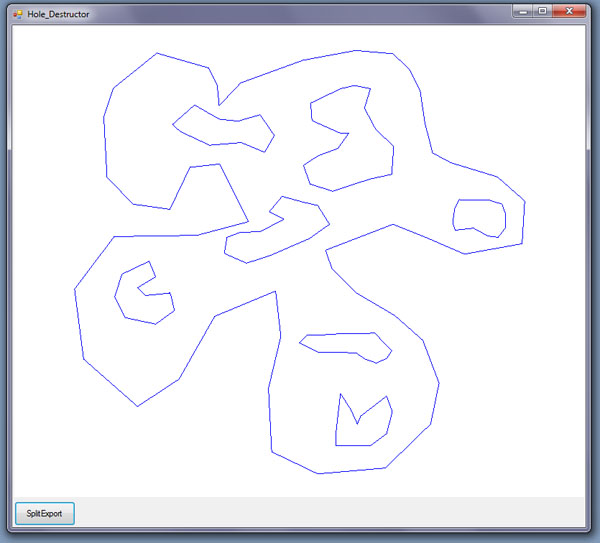
I think, I'm near to succeed into split Hole easily and quickly, I've made a ltlle tool (not yet terminated) to do it. through the Flugwerk's post on "Hole" I tried to reproduice the principles... and the result are not so bad.

here is a screenshot of an example polygon with Hole... before and after...

Before:
hole_destructor_avant.jpg


After:
hole_destructor_apres.jpg


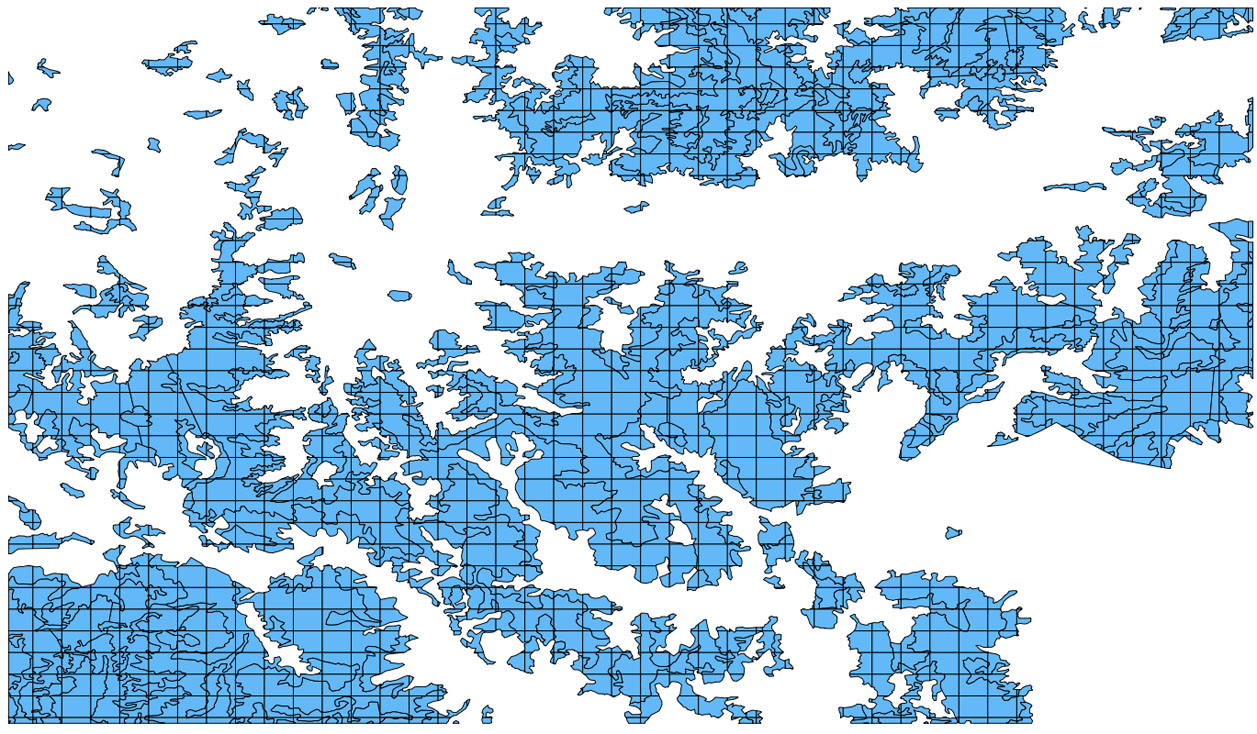
And here is a screenshot of the same work that I told you at start of this post, as you can see there is no more visible bug.
splitGrid_aftersplitting.jpg


And the result I've got before:
spligrid_both.jpg


Ready to give you my binary/Source Arno although it is probably not very understandable (cause disorganized).

The principles:
- import .shp file

-> For each Features:
- Order in one object Envelope (first Polygon as usual) and a List of Holes
- Sort Holes from up to down (Ymax) cause the connection start from top of Hole in my algorythm (to avoid disturbing connections to the outside envelope).
-> for each Hole:
- Get the top left point of first Hole and set it as Hole_startIn_point ("vert1" the first vertical will cross by this point)
- caculate the Hole_Out_point by calculate intersect with a vertical "vert2" shifted lightly (I use 0.000001) from Hole_startin_point.
- caculate intersect with outside enveloppe (keep only intersect over and nearest of Hole Top) Env_StartIn_point cross the "vert2" and Env_Out_point cross the vertical wich pass by Hole_startIn_point "vert1".
- replace the envelope polygon by a new simple polygon created with all points in right order:
* Env_StartIn_point
* all other point of envelope (caculate index to start near the point)
* Hole_startIn_point
* All other point af Hole (caculate index to start near the point)
* Hole_Out_point
* Env_Out_point
-> and proceed with next Hole etc....
->and proceed with newt features
 
Last edited:
Hi,

While the split grid step is running you should see a progress bar at the bottom of the screen showing how many tiles should still be done. How far had the progress bar progressed in 5 hours?

Thank you Arno

the bar was right over where the word message begin, about a 1/3 total progress
in some attempts the progress bar when entering SPLITGRID step; would not show progress (mainly with a big job)

as for AGN mask; this is useful when there is no assignment with another object for the same spot
in roads for example there are no visible object to overlap
running the masks technique allows us to removed generated trees from roads mainly
and gives us a clean tree spread with untouched roads

Hi,

I think, I'm near to succeed into split Hole easily and quickly, I've made a ltlle tool (not yet terminated) to do it.

Great initiative Vogel, and a very nice tutorial


Thank you guys

Chris,
 
Last edited:
Hi,

I have just tested if I can use my boolean operator code for the holes. I used the test file from Vogel for this. It seems to work fine, but it is a bit slow. Instead of taking 0.2 seconds, it now takes over 10 seconds to load the polygon. So I need to see if I can optimize the code a bit more.
 

Attachments

  • holes.png
    holes.png
    155.4 KB · Views: 461
Thanks, I'll have a look at it.

Send from my phone using Tapatalk, so excuse the short sentences and possible typos
 
Back
Top