• Which the release of FS2020 we see an explosition of activity on the forun and of course we are very happy to see this. But having all questions about FS2020 in one forum becomes a bit messy. So therefore we would like to ask you all to use the following guidelines when posting your questions:

    • Tag FS2020 specific questions with the MSFS2020 tag.
    • Questions about making 3D assets can be posted in the 3D asset design forum. Either post them in the subforum of the modelling tool you use or in the general forum if they are general.
    • Questions about aircraft design can be posted in the Aircraft design forum
    • Questions about airport design can be posted in the FS2020 airport design forum. Once airport development tools have been updated for FS2020 you can post tool speciifc questions in the subforums of those tools as well of course.
    • Questions about terrain design can be posted in the FS2020 terrain design forum.
    • Questions about SimConnect can be posted in the SimConnect forum.

    Any other question that is not specific to an aspect of development or tool can be posted in the General chat forum.

    By following these guidelines we make sure that the forums remain easy to read for everybody and also that the right people can find your post to answer it.

MSFS20 Custom aerial texture below the default one

Messages
331
Hi all

I hope I'm on the good forum.
For the first time, I've a problem with my custom aerial textures under msfs 2020.
I build them with Qgis. I use "zoom 20", I think it's the zoom recommanded by the sdk.
After that, I compile into cgl file with fspackagetool.

But, under MSFS2020, my texture appear below the defaut texture. However, it work under MSFS2024
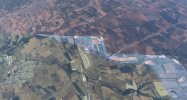
I join 2 screenshots to show the problem.

Please, anyone has an idea ?

Luc
 

Attachments

  • msfs2020.jpg
    msfs2020.jpg
    160 KB · Views: 35
  • msfs2024.jpg
    msfs2024.jpg
    280.2 KB · Views: 29
Hello:

I have not looked at the info in the MSFS SDK Docs for Aerial Imagery in a while, but IIRC, that info appears to have changed.

I would look at the info for Projected Mesh to see what can be done regarding Priority, Draw Order / Draw Before etc.


AFAIK, Aerial Imagery can use texture image resolutions that are higher than the limits of Projected Mesh and 3D G-Polys with assigned Depth Bias.

Texture image resolutions are an important part- but not the only part- of what determines the ability of Aerial Imagery to display on top of other layers.


I just cannot seem to find the details that I thought I saw regarding zoom level for Aerial Imagery; IIRC, it was 21 and not 20 to ensure display on top.

This is MSFS' SDK criteria comparable to the FS2Kx SDK that Aerial Imagery made via Resample be at least LOD-13 / QMID-15 to ensure display on top.


But I will probably find that info and update it shortly this morning, after I have had my morning coffee. :coffee:


UPDATE:

Here are some threads that discuss the zoom level threshold for max display of MSFS "default" mapped terrain texture resolution:

https://www.fsdeveloper.com/forum/threads/custom-aerials-in-msfs2024.459669/post-931740

https://www.fsdeveloper.com/forum/threads/msfs-sdk-vs-imported-textures-textures-resolution.459973/

https://www.fsdeveloper.com/forum/t...-colour-patches-from-custom-sat-image.459867/

https://forums.flightsimulator.com/t/option-for-aerials-texture-resolution-zoom-level/732517?page=3


https://docs.flightsimulator.com/msfs2024/html/2_DevMode/Project_Editor/File_Formats/CGL_Files.htm?rhhlterm=pixels pixel

"Aerial Image Format

Aerial image files are created at a very high map LOD level (LOD20), which has the following approximate values:
 
Level of DetailMap Width and Height (pixels)Ground Resolution (meters / pixel)Map Scale
(at 96 dpi)
20268,435,4560.14931 : 564.25
 
NOTE: You can find full details of the different LOD values as well as other things related to how map tiles are calculated here.
 
All image files for aerial images should be authored as 16bit PNG with a fixed size of 256x256px, and the build process will automatically generate the images for the lower levels of detail as part of the generated CGL file. Note that the alpha channel of the provided aerial image PNG is used to blend between the image and the in-game aerial, where a pixel with alpha 0 means the in-game aerial pixel is used, and 1 means the provided aerial pixel is used. Any value in-between will create a linear interpolation between the in-game aerial and the provided aerial."


Aerial Imagery and G-Polys can have higher mapped terrain texture resolution than Airport imagery background, Apron, or RWY polygons if we do not use the Property parameter "Ground Merging"

Aerial Imagery and G-Polys can have higher mapped terrain texture resolution than Airport imagery background, Apron, or RWY polygon.

But... one might wonder if it is possible Airport imagery background, Apron, or RWY polygons can have even higher mapped terrain texture resolution if we do not use the Property parameter "Ground Merging" and do not apply certain "transforms" in MSFS SDK DevMode Scenery Editor:

https://docs.flightsimulator.com/msfs2024/html/3_Models_And_Textures/Textures/Texturing_Technical_Info.htm?rhhlterm=pixel pixels


https://www.google.com/search?q=site:+docs.flightsimulator.com/msfs2024/+"Ground+Merging"&sca_esv=32ed2d6df950acda&biw=1088&bih=504&ei=7J7jadnUKKCwruEP_r_bqAc&ved=0ahUKEwjZ-vq91_eTAxUgmCsGHf7fFnUQ4dUDCBE&uact=5&oq=site:+docs.flightsimulator.com/msfs2024/+"Ground+Merging"&gs_lp=Egxnd3Mtd2l6LXNlcnAiOXNpdGU6IGRvY3MuZmxpZ2h0c2ltdWxhdG9yLmNvbS9tc2ZzMjAyNC8gIkdyb3VuZCBNZXJnaW5nIjIIEAAYiQUYogQyBRAAGO8FMgUQABjvBTIFEAAY7wVInDZQ_wxY-C5wAXgBkAEAmAHLAaAByQKqAQUwLjEuMbgBA8gBAPgBAZgCA6ACpgPCAgoQABhHGNYEGLADwgIHECEYChigAZgDAIgGAZAGBJIHBTEuMS4xoAfYCbIHBTAuMS4xuAeMA8IHAzMtM8gHL4AIAQ&sclient=gws-wiz-serp


GaryGB
 
Last edited:
Thank you so much Gary

I looked at these threads.
But :
I use, as usually, Zoom 20 or 21 and 256x256 tiles (png) in QGIS.
Concretely, for this airport (as I always do when necessary), I captured an image in Google, I reworked it with Gimp (Color, Alpha....) and exported it in PNG format. After that, I georeference it on QGIS who generate my outputiles files in 256x256 png, zoom 20.
Finally I compile with fspackagetool.
For this airport I made 2 areas, one for the airport and one for the large area around to correct the default one.
The first (airport area) work well but not the second (the large one) : this one appears only at altitude, from afar, then disappears on approach below the MSFS default one.

On the other hand, on MSFS 2024, there are no problems. These 2 areas work perfectly.

Maybe it's a bug with the MSFS2020 version ?
 
I am not certain whether this is because of:

* how MSFS 2020 SDK FSPackageTool compiler works with Aerial Imagery source data that has 2 sets of resolutions

* how MSFS 2020 SDK runtime rendering engine works with Aerial Imagery source data that has 2 sets of coverage extents.


Your description of how this occurs only at altitude from afar using both of 2 compiled Aerial Imagery source data sets raises questions about LODs.

MSFS 2024 requires LODs, or objects do not show until user aircraft camera's distance away can "see" a specific vertical axis diameter pixel extent size.

That may work differently in MSFS 2020.

Generally speaking, I would want to know what LODs are getting made by the source data creation process when QGIS makes your Aerial Imagery "tiles".


Are you using QGIS to make "sliced image files" that are Geo-refernced ?

Or are you instead using QGIS to make "image tiles" that are Geo-refernced ?


These may be different, as IIUC, making tiles creates a pyramid of multiple LODs of imagery that the MSFS uses to make a compiled Aerial Imagery CGL.

Perhaps Dick (aka "rhumbaflappy") may know how the MSFS 2020 and 2024 compilers each work with "tiles" and 'LODs' to create Aerial Imagery CGLs.

GaryGB
 
Interesting to see what this actually means (according to a 'Google AI Reply', at least):

https://www.google.com/search?q=MSF...yBMIHBzItMi4zLjHIB0aACAE&sclient=gws-wiz-serp


As soon as I read this I started wondering if the \Tile folder chain from SBuilderX can be selectively copied to supply the tiles, then convert to PNG source.

But probably it would be easier to build the tiles in QGIS with proper source extents and input instructions. :scratchch

GaryGB
 
Last edited:
Dick : no, they have separate numbers. And i make my tries with only the second image, who has the problem.
The airport area, the smaller, that works well is built at zoom 21. Maybe I should try again to use the same level for the other, just to see the result (even if this give many many tiles !!!).

Gary : the problem occurs only on MSFS2020.
QGIS create 256x256 tiles from the georeferenced image.

Does the zoom level in QGIS correspond to the LOD in MSFS and the priority of the texture ? Or maybe I missed something. If not, I don't know how to determine it.
 
Last edited:
Dick would likely be more familiar than I am with QGIS, as I use Global Mapper for GIS work.

However, AFAIK, most web tile servers use EPSG:3857 256x256 tiles, although some use JPG or other format instead of PNG tiles.


AFAIK, "zoom level" is either very close dimension-ally on the ground, or identical ...in various GIS and web tile server schemes.


IIUC, you specify that "Tiles" are to be output by QGIS, and not just 256x256 pixel sliced 'files' ?


You could test physical extent of coverage on the ground versus zoom level using source imagery gathered via SASPlanet: :idea:

https://www.fsdeveloper.com/forum/threads/3d-characters-sunken-into-ground.460809/post-939736


SASPlanet allows use of a custom sized selection rectangle to output tiles at assigned zoom levels to (1) Geo-refernced image.

QGIS (or Global Mapper) GIS app can then be used to output "Tiles".

GaryGB
 
Last edited:
I don't know exactly how QGIS work but it build 256x256 tiles (png) in a "outputfiles" folder from the georeferenced image.

What I don't understand is why my small "airport" area works correctly, but not the larger zone that covers the surrounding area and appears below the default texture. Even they're both builded by the same way !
Furthermore, I've already created some fairly large zones without problem.

Gary, I can try it with SAS planet
 

Attachments

  • tiles.jpg
    tiles.jpg
    42.2 KB · Views: 16
the area is approximately 15 km by 15 km
I wonder if it's not much too big.
I tried dividing it into two parts with the sale result but dividing it into, say 5 zones would solve the problem in this case.
But I don't know if there is a maximum, except for the file size
 
Hi again, Lumat:

Just had a minute free while on the road to/from KORD.

IIUC, Dick is asking the Geographic coordinates for the Latitude and Longitude boundaries of your Aerial Imagery coverage area(s) cited in your OP above. ;-)

GaryGB
 
Oups !!! Thank you Gary and Sorry Dick
I was focus on the size of my area and I didn't pay attention to your last post :oops:
Approximately :
North : 43.867784° 4.396627°
South : 43.731723° 4.417114°
East : 43.790064° 4.477968°
West : 43.782183° 4.345914°
 
At Zoom level 20, that extent of coverage would result in a very large BGL (if MSFS SDK CGL Compiler can handle that source size).

The Nimes-Courbessac Aerodrome itself is 355MB as a non-compressed, non-compiled source GeoTIFF via SASPlanet at ZL21.

Google Satellite has very sharp imagery at that particular location. :cool:

GaryGB
 
Last edited:
Yes Gary, My CGL is about 2Mo.
I must divide the area.
I Use Google sat because it's correct at this location. Bing too (except the airport himself which is blurred) but still not in MSFS ! Unfortunately.
 
Well,
I tried dividing my area into 11 smaller areas (roughly the size of the airport area, which is works well). I build this one like the airport area (same metod and same parameters under Qgis)
In zoom 20 or 21 it doesn't work
I see the area in the free flight menu but in the game, i see it only far away (as shown in the attached images)

I don't understand. I suppose that if it works in MSFS 2024, it means the tiles are correctly constructed and the area is correctly compiled. So, why doesn't the zone work under MSFS2020 when the same package placed under MSFS2024 works perfectly?
 

Attachments

  • Prob1.jpg
    Prob1.jpg
    697.9 KB · Views: 5
Try turning off photogrammetry in your settings (under Data). I think that may be the problem.
 
Yeeesssss !!!!
It work with the photogrammetry turned off :)
thank you so much You and Gary

I'm curious, I don't know if you have the responses. But without wanting to take up too much of your time (You've already helped me a lot).
why does the photogrammetry disrupt the display of the custom area ?
Why is the airport area not affected ? Maybe because it is blurred in MSFS, I see only this difference entre my two aeras ?
Is it a problem with the actual version of MSFS2020 ? I never had this problem before
 
Me neither. As I said, I hadn't had this problem before with MSFS2020, even on large aeras.

Turning photgrammetry off is a good temporary solution that works well. But this option will cause other problems.
If it's a bug with the actual version of MSFS, I hope this will be fixed. If not, how fix this problem ?
 
Back
Top