
-
Which the release of FS2020 we see an explosition of activity on the forun and of course we are very happy to see this. But having all questions about FS2020 in one forum becomes a bit messy. So therefore we would like to ask you all to use the following guidelines when posting your questions:
- Tag FS2020 specific questions with the MSFS2020 tag.
- Questions about making 3D assets can be posted in the 3D asset design forum. Either post them in the subforum of the modelling tool you use or in the general forum if they are general.
- Questions about aircraft design can be posted in the Aircraft design forum
- Questions about airport design can be posted in the FS2020 airport design forum. Once airport development tools have been updated for FS2020 you can post tool speciifc questions in the subforums of those tools as well of course.
- Questions about terrain design can be posted in the FS2020 terrain design forum.
- Questions about SimConnect can be posted in the SimConnect forum.
Any other question that is not specific to an aspect of development or tool can be posted in the General chat forum.
By following these guidelines we make sure that the forums remain easy to read for everybody and also that the right people can find your post to answer it.
You are using an out of date browser. It may not display this or other websites correctly.
You should upgrade or use an alternative browser.
You should upgrade or use an alternative browser.
MSFS24 Custom aerials in MSFS2024
- Thread starter Sauron
- Start date


- Messages
- 6,533
- Country

2020 aerials show fine for me.
All my 2020 aerials have worked as expected in 2024, up until the SP1 beta. No CGL aerials show up now, whether built by the 2020 or 2024 SDK. I did post this as a regression on the official website, but I was told that this is not a beta issue. Maybe custom aerials via CGL are not a thing any more, rather than just being broken. I guess we'll just wait and see when SP1 goes live.
Does anyone see their CGLs using the latest beta?
Does anyone see their CGLs using the latest beta?
- Messages
- 67
- Country

weird; lots of addons use cgl will be crazy act of self destruction to do if 'is not a thing any more'.
Don't take that too seriously, I have just been thinking of a reason why this wasn't accepted as a bug in the beta, and one explanation is that it isn't a bug, but a feature.weird; lots of addons use cgl will be crazy act of self destruction to do if 'is not a thing any more'.
Could be anything, though, such as a change in the way CGLs need to be prioritized, or that the sim now chooses the highest resolution imagery, even if it is the default.
But I'm still hanging out for a bug.
When I posted on the official forum, and then here, I was hoping someone would say 'yeah, that was explained previously, it'll all be ok.' I was late to the beta, so it was possible that it was noted somewhere as a fix, or that it'll mean a change to the SDK. But the fact that not many folk seem to have noticed is a bit disconcerting. Maybe this works for some people, still. If you're using the beta, please check your CGLs!
It was strongly suggested that I post on the SDK forum, but I just want to see how others are affected by this first, and people are a lot easier to deal with here on FSDeveloper.
EDIT: Well, CGLs do still work, but not in my projects.
Last edited:
- Messages
- 6,533
- Country
I'm quite suspicious of the whole SU1 beta thing. If I were developing for 2024, I would not waste a minute on their Beta process, and in fact, I don't. It changes daily. There is no telling what the final release will be. It seems to be one step forward and two steps back. This should have been done in-house. I do know my 2020 aerials show up in the released version, as long as they are at a greater LOD number than the default. I'll wait and see what the actual released SU1 brings.
There are a lot of problems with 2024, and Asobo is trying to solve them. But this is similar to previous versions of Flight Simulator, in that little attempt was made to look at the sim from the 3rd party developers viewpoint. How is this excluded? How is this covered up? What are we restricting and why?
For example, the new restrictive object LOD system, and the sim deciding at what level LODs are displayed. The sim itself overrides the LODs which are made to their specifications. Some of their own custom models violate the principles by adding the huge invisible box or plane. So it's OK for them to hog the FPS if they have a 'good' reason... But we should not. I'm guessing if you have a Marketplace offering that uses the huge invisible trick, it will be rejected.
The fluidity of the updates won't be ironed out until SU2 at the very least. Asobo is juggling aircraft, scenery, game elements and a list of old 2020 problems that have been inherited. Much like 2020, they released an alpha version and are scrambling to update it to a beta. It could be a couple of years before we see a true release version. And it casts disparagement on the 3rd party developers, as if their non-working packages are their fault, when in fact it is Asobo's fault.
End of rant.
There are a lot of problems with 2024, and Asobo is trying to solve them. But this is similar to previous versions of Flight Simulator, in that little attempt was made to look at the sim from the 3rd party developers viewpoint. How is this excluded? How is this covered up? What are we restricting and why?
For example, the new restrictive object LOD system, and the sim deciding at what level LODs are displayed. The sim itself overrides the LODs which are made to their specifications. Some of their own custom models violate the principles by adding the huge invisible box or plane. So it's OK for them to hog the FPS if they have a 'good' reason... But we should not. I'm guessing if you have a Marketplace offering that uses the huge invisible trick, it will be rejected.
The fluidity of the updates won't be ironed out until SU2 at the very least. Asobo is juggling aircraft, scenery, game elements and a list of old 2020 problems that have been inherited. Much like 2020, they released an alpha version and are scrambling to update it to a beta. It could be a couple of years before we see a true release version. And it casts disparagement on the 3rd party developers, as if their non-working packages are their fault, when in fact it is Asobo's fault.
End of rant.
You are right on all points, Dick. I didn't consider the beta until the consensus was that it was almost over. (I joined three days ago.) I knew that some aspects of my projects would be changed, so I just took a deep breath and dove in, as I knew that any work I did before the final release may be a waste of time. I didn't expect to find that my projects were unusable. Luckily I don't rely on this now that I'm retired, it's just a hobby. Maybe back to my model trains....
You said that your aerials work in 2024, and I didn't have any issues either until the beta. My understanding -- because it's in the manual -- is that aerial image files are created at the highest level of detail, LOD20. Mine certainly are. I'm not sure if I can increase this, does anyone have some ideas? The tool I use to prepare the aerials -- Global Mapper -- has a specific Bing exporter, but it won't go higher than LOD20, so I can't test this at the moment.
Sorry, Sauron, I didn't mean to hijack your thread, but I did think it was a good place to start this discussion. If you want, I can shift this to a new thread.
There are a lot of reasons to use custom aerials, not just to improve the resolution, in my case I just want to have the latest imagery, and overcome the fluro-green colour of the Bing imagery. Here in New Zealand we have access to all the government imagery, constantly updated, and licensed for free use, in freeware or payware projects. I know that there's been hints that since MSFS2020 Microsoft are not keen on this use of outside-sourced data, I guess because they don't what sort of license it has. A lot of people just grabbed huge chunks of Google imagery and uploaded projects when they didn't have a right to do so. I can see how that would scare Microsoft.
You said that your aerials work in 2024, and I didn't have any issues either until the beta. My understanding -- because it's in the manual -- is that aerial image files are created at the highest level of detail, LOD20. Mine certainly are. I'm not sure if I can increase this, does anyone have some ideas? The tool I use to prepare the aerials -- Global Mapper -- has a specific Bing exporter, but it won't go higher than LOD20, so I can't test this at the moment.
Sorry, Sauron, I didn't mean to hijack your thread, but I did think it was a good place to start this discussion. If you want, I can shift this to a new thread.
There are a lot of reasons to use custom aerials, not just to improve the resolution, in my case I just want to have the latest imagery, and overcome the fluro-green colour of the Bing imagery. Here in New Zealand we have access to all the government imagery, constantly updated, and licensed for free use, in freeware or payware projects. I know that there's been hints that since MSFS2020 Microsoft are not keen on this use of outside-sourced data, I guess because they don't what sort of license it has. A lot of people just grabbed huge chunks of Google imagery and uploaded projects when they didn't have a right to do so. I can see how that would scare Microsoft.
- Messages
- 6,533
- Country
I checked an aerial with LOD17 and it worked in 2024. The sim had LOD13. SVLB was the airport. It's on an island. The sim uses landclass for 2020 and 2024. If the aerials are not showing, it could be that the sim's LOD is the same or higher, and supersedes the addon. Or it could be the SU1 beta is being used. Eventually Asobo will sort it out... but maybe not as soon as we'd like. Meanwhile, the end-users are going to be angry, as they were promised that the 2020 collections of aircraft and scenery would work in 2024. Some will, some won't, and some won't work as expected. And that is actually to the advantage of the commercial 3rd party developers, as new scenery or aircraft are an opportunity for more money.

Hello:
I have no knowledge of any MSFS Betas, but IIRC the zoom level for default aerial imagery was 20 (even though IRL we still do not see that resolution available in the public domain very often... yet).
I recall wondering when I saw that in SDK Docs: how did MS suddenly come into possession of enough zoom level-20 imagery to cover the MSFS world ?
My speculative conclusion was that MSFS 2020 imagery is actually over-sampled.
Since most of what I see in Google Earth seems to be Zoom level-18 with nearly everything Zoom level-19 or higher apparently resampled, and since most- but not all- MS Virtual 'Earth' (aka "MSVE") / BING seems to be the same or even lesser pixel resolution, the possibility of widespread oversampling to cover the MSFS world would not be surprising to me.
Remembering "Zoom Level" is closer to QMID than to LOD in the MSVE / BING quad tile schema, and LOD+2=QMID, IIUC, the minimum LOD required to pre-empt display of MSFS default aerial imagery would match or exceed LOD-20 / QMID-22 at (3.75cm / 1.476378 inches), and perhaps even at LOD-21 / QMID-23 (1.875cm / 0.738189 inches) on the ground ...per pixel !
https://www.fsdeveloper.com/forum/threads/flattens.425495/post-633002
https://docs.flightsimulator.com/html/Samples_And_Tutorials/Samples/Sceneries/SimpleAerial.htm?rhhlterm=aerial aerials
"All image files for aerial images should be authored as 16bit PNG with a fixed size of 256x256px, and the build process will automatically generate the images for the lower levels of detail. Note that the alpha channel of the provided aerial image PNG is used to blend between the image and the in-game aerial, where a pixel with alpha 0 means the in-game aerial pixel is used, and 1 means the provided (custom / 3rd party) ...aerial pixel is used. Any value in-between will create a linear interpolation between the in-game aerial and the provided aerial."
CAVEAT: Beware of how some applications interpret a 4th Band in NIR aerial imagery ...it may be interpreted as a 0 (Black) Alpha Channel
https://www.fsdeveloper.com/forum/t...from-usgs-has-all-water-colored-white.443890/
But perhaps I should test this personally to see if LOD-20 custom imagery with alpha 0 is actually of sufficiently high resolution to achieve superimposition on default MSFS aerial imagery (or swapped-in 'default' MSFS land class) ...before speculating.
Speaking of the sim using "land class", I previously have seen MSFS 2020 rapidly toggle between what AFAIK was textures as bad- or worse- than FSX land class quality, and actual aerial imagery with the superimposed 'detail' texture, when the Azure (..."As You Were" ? / ..."Aw, Sure" ?) servers repeatedly flaked online and offline on 'A Bad Day' at MSFS in Multi-Player Mode.
IIRC, at the time, MSFS 2020 also popped up a status message acknowledging loss of connection with server, not being able to access content, and switching to locally cached content while still allowing MSFS to run.
I foresee major issues if MS attempts to prevent local access due to resolving authentication of license, or worse yet, an attempt to prevent use of cached or custom aerial imagery content from local disk, or proxy content (ex: Google or other 3rd party) via online data streams.
Thankfully, I have noticed the improved appearance of many MSFS 2024 aerial imagery textures, and have wondered if MS is dynamically adding land class textures superimposed on top of the aerial imagery, and if so, how can we utilize those "land class enhanced' meta-objects for our own custom development purposes ...is there a MSFS 'Terrain.Cfg equivalent' with GUIDs we can access somewhere ?
GaryGB
I have no knowledge of any MSFS Betas, but IIRC the zoom level for default aerial imagery was 20 (even though IRL we still do not see that resolution available in the public domain very often... yet).
I recall wondering when I saw that in SDK Docs: how did MS suddenly come into possession of enough zoom level-20 imagery to cover the MSFS world ?
My speculative conclusion was that MSFS 2020 imagery is actually over-sampled.
Since most of what I see in Google Earth seems to be Zoom level-18 with nearly everything Zoom level-19 or higher apparently resampled, and since most- but not all- MS Virtual 'Earth' (aka "MSVE") / BING seems to be the same or even lesser pixel resolution, the possibility of widespread oversampling to cover the MSFS world would not be surprising to me.
Remembering "Zoom Level" is closer to QMID than to LOD in the MSVE / BING quad tile schema, and LOD+2=QMID, IIUC, the minimum LOD required to pre-empt display of MSFS default aerial imagery would match or exceed LOD-20 / QMID-22 at (3.75cm / 1.476378 inches), and perhaps even at LOD-21 / QMID-23 (1.875cm / 0.738189 inches) on the ground ...per pixel !
https://www.fsdeveloper.com/forum/threads/flattens.425495/post-633002
https://docs.flightsimulator.com/html/Samples_And_Tutorials/Samples/Sceneries/SimpleAerial.htm?rhhlterm=aerial aerials
"All image files for aerial images should be authored as 16bit PNG with a fixed size of 256x256px, and the build process will automatically generate the images for the lower levels of detail. Note that the alpha channel of the provided aerial image PNG is used to blend between the image and the in-game aerial, where a pixel with alpha 0 means the in-game aerial pixel is used, and 1 means the provided (custom / 3rd party) ...aerial pixel is used. Any value in-between will create a linear interpolation between the in-game aerial and the provided aerial."
CAVEAT: Beware of how some applications interpret a 4th Band in NIR aerial imagery ...it may be interpreted as a 0 (Black) Alpha Channel
https://www.fsdeveloper.com/forum/t...from-usgs-has-all-water-colored-white.443890/
But perhaps I should test this personally to see if LOD-20 custom imagery with alpha 0 is actually of sufficiently high resolution to achieve superimposition on default MSFS aerial imagery (or swapped-in 'default' MSFS land class) ...before speculating.
Speaking of the sim using "land class", I previously have seen MSFS 2020 rapidly toggle between what AFAIK was textures as bad- or worse- than FSX land class quality, and actual aerial imagery with the superimposed 'detail' texture, when the Azure (..."As You Were" ? / ..."Aw, Sure" ?) servers repeatedly flaked online and offline on 'A Bad Day' at MSFS in Multi-Player Mode.
IIRC, at the time, MSFS 2020 also popped up a status message acknowledging loss of connection with server, not being able to access content, and switching to locally cached content while still allowing MSFS to run.
I foresee major issues if MS attempts to prevent local access due to resolving authentication of license, or worse yet, an attempt to prevent use of cached or custom aerial imagery content from local disk, or proxy content (ex: Google or other 3rd party) via online data streams.
Thankfully, I have noticed the improved appearance of many MSFS 2024 aerial imagery textures, and have wondered if MS is dynamically adding land class textures superimposed on top of the aerial imagery, and if so, how can we utilize those "land class enhanced' meta-objects for our own custom development purposes ...is there a MSFS 'Terrain.Cfg equivalent' with GUIDs we can access somewhere ?
GaryGB
Last edited:
Asobo have now come up with a solution for those who wish to rebuild their projects, although they are trying to figure out a way to restore aerials without a rebuild. Apparently the CGL tool automatically creates LODs, whereas some of us include LODs in our source images, and these prevent display. By removing the LODs, you can rebuild successfully. It's great to see my aerials back!
Not sure if their final solution will be available in SU3.
Not sure if their final solution will be available in SU3.

- Messages
- 153
- Country

Hi,Asobo have now come up with a solution for those who wish to rebuild their projects, although they are trying to figure out a way to restore aerials without a rebuild. Apparently the CGL tool automatically creates LODs, whereas some of us include LODs in our source images, and these prevent display. By removing the LODs, you can rebuild successfully. It's great to see my aerials back!
Not sure if their final solution will be available in SU3.
could you please be more specific on this? I have a similar issue:

Hello,
I created a custom aerial for my scenery. However it wont show up in the sim. What I think is the cause - over my area (LKSZ) there was clearly a cloud, so MS decided to use some generic texture to cover it. And I cant override this with my package. Even when I open the package reorder tool, my scenery is not listed. Running latest SU2 beta. In FS2020 it works as it should.
Any ideas on this?
Thank you
I created a custom aerial for my scenery. However it wont show up in the sim. What I think is the cause - over my area (LKSZ) there was clearly a cloud, so MS decided to use some generic texture to cover it. And I cant override this with my package. Even when I open the package reorder tool, my scenery is not listed. Running latest SU2 beta. In FS2020 it works as it should.
Any ideas on this?
Thank you
- Fiideell
- aerial cgl
- Replies: 4
- Forum: MSFS SDK & DevMode
In FS2020 my CGL shows up fine. In FS2024 I cant force it to show up.
I'm not sure if yours is the same issue, but I'll assume it is for the moment. Here's the post from Asobo on the devsupport forum, where Silvain explains the issue.
I use Global Mapper to build my aerials, exporting as Bing Map tiles. The default export creates 5 levels of detail, which it calls Zoom Levels. By reducing this to 1 they build correctly in the SDK.
EDIT: I was using the SU3 beta in the hope that a fix would show up, but I've since reverted to SU2, but I don't think there's any fix yet for those who want to get their existing CGLs working as they did before SU2.
I use Global Mapper to build my aerials, exporting as Bing Map tiles. The default export creates 5 levels of detail, which it calls Zoom Levels. By reducing this to 1 they build correctly in the SDK.
EDIT: I was using the SU3 beta in the hope that a fix would show up, but I've since reverted to SU2, but I don't think there's any fix yet for those who want to get their existing CGLs working as they did before SU2.
- Messages
- 153
- Country
Hi,
what do you mean by LODs display. I am still struggling to get my FS20 aerial to show properly up in FS24. On my airfield there was a cloud so Asobo decided to put some weird mask on top of it. I can see my aerial but still not completly and coevered by the mentioned mask. Check screens. Any idea what to do?
Default
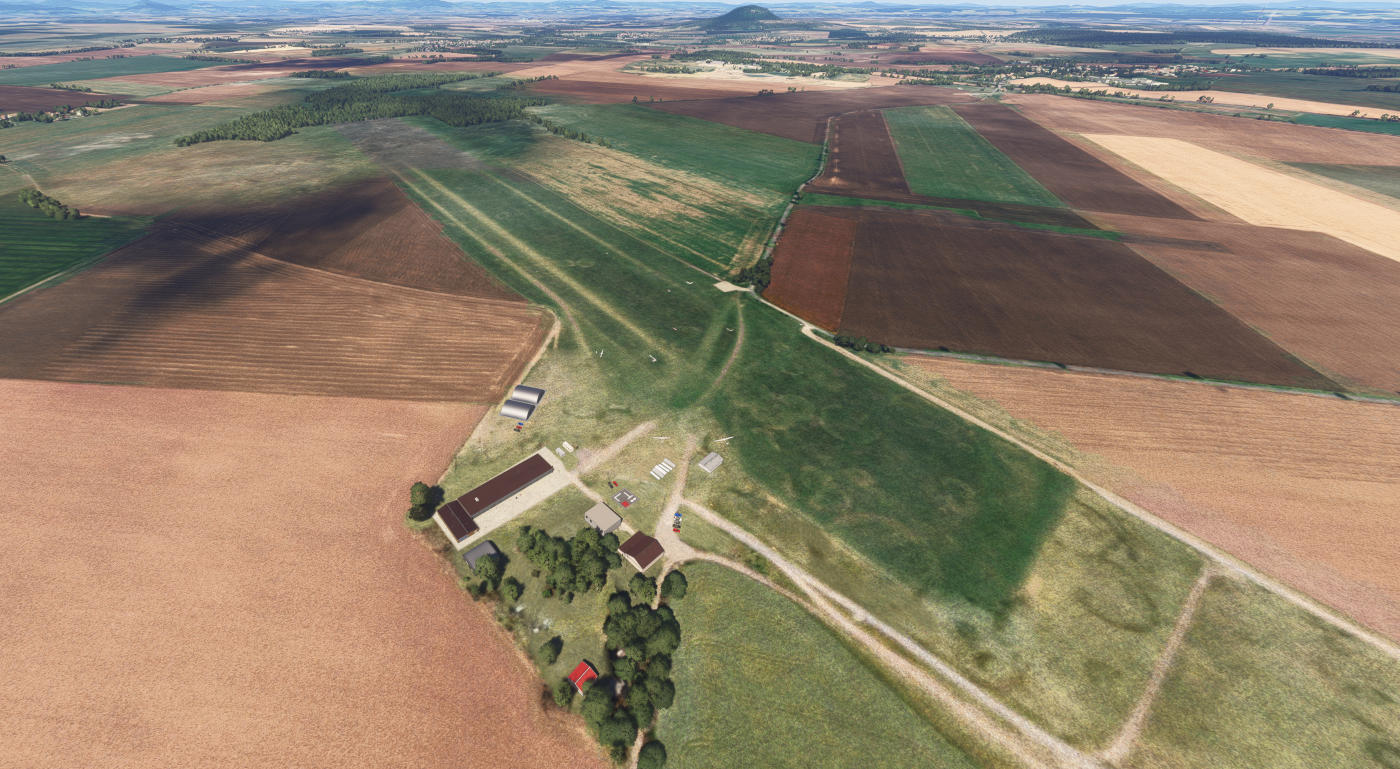
My CGL

When loading

The orto covers enough big area:
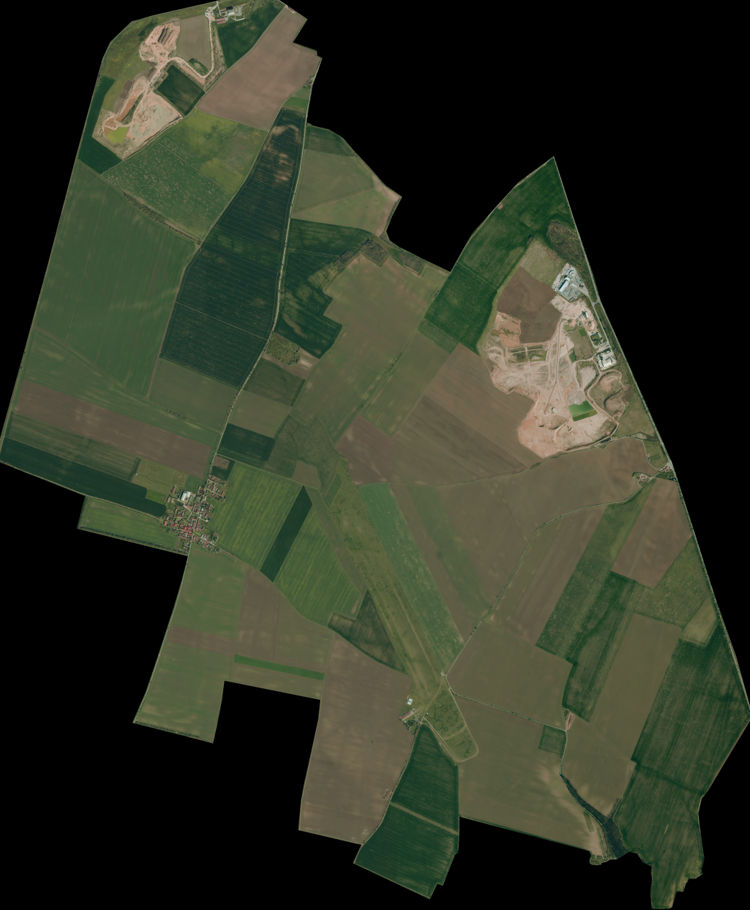
what do you mean by LODs display. I am still struggling to get my FS20 aerial to show properly up in FS24. On my airfield there was a cloud so Asobo decided to put some weird mask on top of it. I can see my aerial but still not completly and coevered by the mentioned mask. Check screens. Any idea what to do?
Default
My CGL
When loading
The orto covers enough big area:
Last edited:
Hi Fiideell:
Are you saying the 'weird Mask' is applied over the Bing aerial imagery in MSFS when you compare it with the imagery seen on the Bing (aka 'MS Virtual Earth') web map portal, or via a SBuilderX or SASPlanet imagery download ?
If so, IIUC, is this mask anomaly distinct from the overlaid "detail" decal that covers all MSFS aerial imagery by default ?
Also, is this imagery anomaly present in the current build of your scenery on flighrsim.to so we can examine the actual files involved ?
GaryGB
Are you saying the 'weird Mask' is applied over the Bing aerial imagery in MSFS when you compare it with the imagery seen on the Bing (aka 'MS Virtual Earth') web map portal, or via a SBuilderX or SASPlanet imagery download ?
If so, IIUC, is this mask anomaly distinct from the overlaid "detail" decal that covers all MSFS aerial imagery by default ?
Also, is this imagery anomaly present in the current build of your scenery on flighrsim.to so we can examine the actual files involved ?
GaryGB
- Messages
- 153
- Country
Hi, thanks fro replying.
There is dfefinitely some mask over my CGL, Ive never experienced this. My scenery is working fine in FS2020 but in FS2024 I have this weird behavior.
Unfortunately in FS24 we cannot disable online maps to check.
Yes if you download the LKSZ from flightsim.to you will experience this. Check video:
There is dfefinitely some mask over my CGL, Ive never experienced this. My scenery is working fine in FS2020 but in FS2024 I have this weird behavior.
Unfortunately in FS24 we cannot disable online maps to check.
Yes if you download the LKSZ from flightsim.to you will experience this. Check video:
Hi Fiideell:
Regarding the anomaly in your linked YouTube video, with your 2020 LKSZ installed, I do not see it in MSFS 2024 - SU3.
Regarding your "Masking" anomaly, that might best be explored in a separate dedicated thread within this same sub-forum.
FYI: The ability to disable and/or custom configure the default forced "Detail Map" used in MSFS 2020 discussed here:
https://www.fsdeveloper.com/forum/t...fault-land-detail-texture.456765/#post-912411
https://docs.flightsimulator.com/html/Developer_Mode/Menus/Options.htm
...has now changed in MSFS 2024 since at least SU2 and SU3:
https://msfsaddons.com/2024/09/25/m...out-msfs-2024-in-latest-developer-livestream/
https://devsupport.flightsimulator....ailed-maps-and-normal-maps-dont-work/10325/15
https://www.google.com/search?q=msfs+"2024"+"Detail+Map"&client=firefox-b-1-e&sca_esv=f7ff03d2126b0548&channel=entpr&biw=1440&bih=703&ei=9LOqaPa7NI7_ptQP56HG6Q8&ved=0ahUKEwj2hazD66KPAxWOv4kEHeeQMf04ChDh1QMIEA&uact=5&oq=msfs+"2024"+"Detail+Map"&gs_lp=Egxnd3Mtd2l6LXNlcnAiGG1zZnMgIjIwMjQiICJEZXRhaWwgTWFwIjIKECEYoAEYwwQYCjIKECEYoAEYwwQYCjIKECEYoAEYwwQYCkioCVCGBViGBXABeAGQAQCYAXegAXeqAQMwLjG4AQPIAQD4AQGYAgKgAocBwgIKEAAYsAMY1gQYR5gDAIgGAZAGCJIHAzEuMaAHxwWyBwMwLjG4B33CBwMyLTLIBwo&sclient=gws-wiz-serp
PS: The anomaly in your video looks similar to LOD-related Terrain Quad Tile display seen before SU3 with photogrammetry on:
https://www.fsdeveloper.com/forum/t...magery-and-photogrammetry.460150/#post-934937
That was reportedly related to a terrain merging layer transparency issue; it was resolved in 2024 - SU3; did you install it yet ?
GaryGB
Regarding the anomaly in your linked YouTube video, with your 2020 LKSZ installed, I do not see it in MSFS 2024 - SU3.
Regarding your "Masking" anomaly, that might best be explored in a separate dedicated thread within this same sub-forum.
FYI: The ability to disable and/or custom configure the default forced "Detail Map" used in MSFS 2020 discussed here:
https://www.fsdeveloper.com/forum/t...fault-land-detail-texture.456765/#post-912411
https://docs.flightsimulator.com/html/Developer_Mode/Menus/Options.htm
...has now changed in MSFS 2024 since at least SU2 and SU3:
https://msfsaddons.com/2024/09/25/m...out-msfs-2024-in-latest-developer-livestream/
https://devsupport.flightsimulator....ailed-maps-and-normal-maps-dont-work/10325/15
https://www.google.com/search?q=msfs+"2024"+"Detail+Map"&client=firefox-b-1-e&sca_esv=f7ff03d2126b0548&channel=entpr&biw=1440&bih=703&ei=9LOqaPa7NI7_ptQP56HG6Q8&ved=0ahUKEwj2hazD66KPAxWOv4kEHeeQMf04ChDh1QMIEA&uact=5&oq=msfs+"2024"+"Detail+Map"&gs_lp=Egxnd3Mtd2l6LXNlcnAiGG1zZnMgIjIwMjQiICJEZXRhaWwgTWFwIjIKECEYoAEYwwQYCjIKECEYoAEYwwQYCjIKECEYoAEYwwQYCkioCVCGBViGBXABeAGQAQCYAXegAXeqAQMwLjG4AQPIAQD4AQGYAgKgAocBwgIKEAAYsAMY1gQYR5gDAIgGAZAGCJIHAzEuMaAHxwWyBwMwLjG4B33CBwMyLTLIBwo&sclient=gws-wiz-serp
PS: The anomaly in your video looks similar to LOD-related Terrain Quad Tile display seen before SU3 with photogrammetry on:
https://www.fsdeveloper.com/forum/t...magery-and-photogrammetry.460150/#post-934937
That was reportedly related to a terrain merging layer transparency issue; it was resolved in 2024 - SU3; did you install it yet ?
GaryGB
Last edited:
- Messages
- 153
- Country
Hi, thats weird. And yes I am running SU3.
It appears when close to the ground, it seems like the default aerial map is appearing. When farther my custom aerial loads but still partially covered by the default. Thats what it llok like to me. And I dont know how to fix it. I think its beyond my knowledge
See here. It shows up ok but when I zoom it fucks up. How does it look on your side?
It appears when close to the ground, it seems like the default aerial map is appearing. When farther my custom aerial loads but still partially covered by the default. Thats what it llok like to me. And I dont know how to fix it. I think its beyond my knowledge
See here. It shows up ok but when I zoom it fucks up. How does it look on your side?
Last edited: