• Which the release of FS2020 we see an explosition of activity on the forun and of course we are very happy to see this. But having all questions about FS2020 in one forum becomes a bit messy. So therefore we would like to ask you all to use the following guidelines when posting your questions:

    • Tag FS2020 specific questions with the MSFS2020 tag.
    • Questions about making 3D assets can be posted in the 3D asset design forum. Either post them in the subforum of the modelling tool you use or in the general forum if they are general.
    • Questions about aircraft design can be posted in the Aircraft design forum
    • Questions about airport design can be posted in the FS2020 airport design forum. Once airport development tools have been updated for FS2020 you can post tool speciifc questions in the subforums of those tools as well of course.
    • Questions about terrain design can be posted in the FS2020 terrain design forum.
    • Questions about SimConnect can be posted in the SimConnect forum.

    Any other question that is not specific to an aspect of development or tool can be posted in the General chat forum.

    By following these guidelines we make sure that the forums remain easy to read for everybody and also that the right people can find your post to answer it.

MSFS20 Delete Records

scruffyduck

Administrator
Staff member
FSDevConf team
Resource contributor
Messages
34,981
Country
unitedkingdom
I am posting this since it is not made clear in the notes. MSFS (along with FSX/P3D) has an airport delete record which hides specific elements in the base file. ADE generally sets these flags to true and replaces them with a set that the user can manipulate. There is also a new Delete Navigation record which is outside the airport record and has similar delete flags to the airport record. Since ADE is incomplete in replacing all elements it excludes stuff goes missing. Over time ADE will do a full replacement. Meantime the Airport Delete Record and Delete Navigation Record are likely removing stuff that ADE can't currently replace. Jet ways is a good example,

Airport Delete and Delete Navigation elements are not in the base files but need to be in the addon files. ADE is adding them but they may need editing. I will update ADE now to not hide elements it cannot replace and update it over time.

ADE sets all the flags in the Delete Navigation Record to false so this should not have any effect nor need their settings changed.
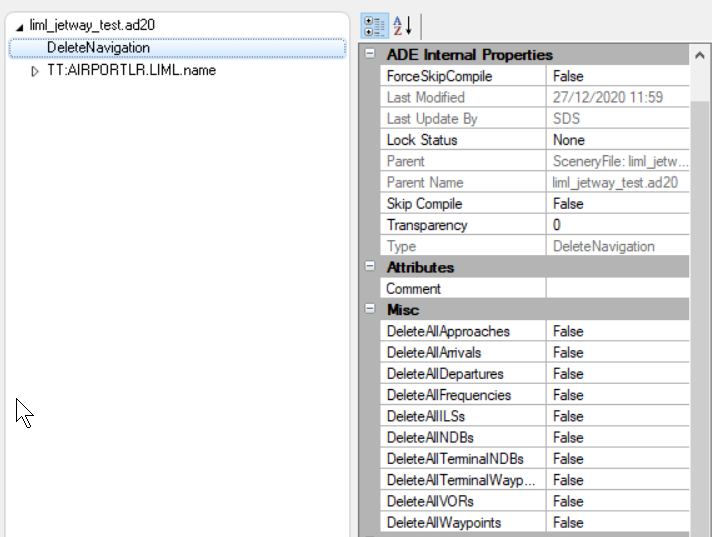
1609135668113.png


The Delete Airport Record should look like this for the state of ADE right now

1609135834600.png


So the following are not handled by ADE in the current alpha

  • Approaches
  • Frequencies
  • Jetways
  • Arrivals
  • Departures
  • ILS
  • Terminal NDBs
  • Terminal Waypoints
in effect these are all navigation elements except the jetway. I am updating ADE to default correctly when loading a stock airport

EDIT - I have also added boundary and blast fences. These are not currently handled by ADE but in any event don't seem to be honored in sim even if they build
 
Last edited:
I have noted that the default ILS at both ends of the runway still appears to work fine in my ADE-modified stock airport - probably because the ILS parameters are now defined in an external NAXxxxxx.bgl in the fs-base-nav folder rather than being embedded in the APX as in FSX/P3D.

I believe that RNAV approaches and waypoints are also contained in the new NAX file, rather than being contained in the APX. My home airport is missing all RNAV approaches in the default NavBlue data, but all are present when using the Navigraph Beta nav data. Navigraph overrides the NAX files.
 
Yes - I am planning to load the NAX data into ADE but haven't got there yet. ADE does not support navaids or approaches at the moment - so much left to do........
 
Yes - I am planning to load the NAX data into ADE but haven't got there yet. ADE does not support navaids or approaches at the moment - so much left to do........
As far as modifying stock airports that don’t require adding or deleting approaches, the approach data in the Asobo (or Navigraph) NAX files appears to work just fine with the ADE-modified airport.

Even though ADE is an alpha, it is working very well in my update project for KELM. I see that the taxiways appear to have been created as aprons, with lots of vertex points in curved sections. That was probably done to precisely cover up the underlying satellite imagery. They then put the paths (without pavement) over the aprons. I have fixed quite a few errors where the path width was too narrow, putting the taxi lights on the pavement, instead in the grass beyond the edges.

I found a bunch of errors with incorrect hold short lines (wrong line type, or facing the wrong direction). All these errors are probably an inevitable result of creating the non-custom default airports through a mostly automated process, with minimal human post-processing touch up.

I have added the new 2018 taxiways and removed the old ones, set all the taxiways to have the correct real-world designators, and fixed the signs to match, as well as adding several missing signs. A lot of the default signs were facing the wrong direction as well. As others have noted, the signs all seem to compile as size 1, even if a larger size is set in the properties.

The new CTRL-ENTER raw data interface is extremely useful to access all the new extended properties that MSFS provides.

Though all these mods could undoubtedly be done using the in-sim airport design tools, for me it is so much easier to use the familiar ADE interface. It is eminently useable even in its current alpha state. Thank you so much for making this available to the community.
 
Thanks for the feedback and kind words. It is nice to know that we are getting there even if there are issues. I do report back issues to my contacts in Asobo directly and sometimes that gets things done. I am looking at the markings. I need to work out if it is the decompile to XML (which is Matts code) or me taking it and mangling it. It sounds a bit as if the enumeration for painted line types is mixed up so we add one thing and get something different. I will try and look at that today. I am waiting on an update from Matt to his library to fix a culture problem which allows commas as decimal separator. I think I am just using and old version

We need to make a list somewhere of all the issues, I will add the ones you mention on signs and painted lines to ,y known issues list
 
We need to make a list somewhere of all the issues, I will add the ones you mention on signs and painted lines to ,y known issues list
Some of the incorrect line types may have been a translation error in the import process, but some were wrong in the original default airport, as were the reversed taxiway signs.
 
OK - thanks. I am seeing some transposition of painted line type between loading and building. If I round trip from the decompiled source through build and then load the compiled bgl I get a different value. Since both pass through the same decompile process that seems odd. More testing!
 
I think the line issues are a bad enum list on my part. I've updated and sent to Jon for testing...
 
I tried to override an existing airport within ADE alpha13, but I cannot access the delete airport folder do I have to do this within the SDK?
 
If you mean the Delete Airport Records then go to Tools > Raw Data View and expand the Airport Element of the tree

1610805425504.png


Then select DeleteAirport and set the flags as you wish. ADE automatically sets the most obvious ones for you
 
Back
Top