• Which the release of FS2020 we see an explosition of activity on the forun and of course we are very happy to see this. But having all questions about FS2020 in one forum becomes a bit messy. So therefore we would like to ask you all to use the following guidelines when posting your questions:

    • Tag FS2020 specific questions with the MSFS2020 tag.
    • Questions about making 3D assets can be posted in the 3D asset design forum. Either post them in the subforum of the modelling tool you use or in the general forum if they are general.
    • Questions about aircraft design can be posted in the Aircraft design forum
    • Questions about airport design can be posted in the FS2020 airport design forum. Once airport development tools have been updated for FS2020 you can post tool speciifc questions in the subforums of those tools as well of course.
    • Questions about terrain design can be posted in the FS2020 terrain design forum.
    • Questions about SimConnect can be posted in the SimConnect forum.

    Any other question that is not specific to an aspect of development or tool can be posted in the General chat forum.

    By following these guidelines we make sure that the forums remain easy to read for everybody and also that the right people can find your post to answer it.

DETECTFEATURES and rectangular vegetation

ollyau

Resource contributor
Messages
1,034
Country
us-california
This was mentioned earlier in the "Installing custom autogen configuration" thread, but since it wasn't really on topic, I'm opening a separate thread here. I've added the below quotes from the previous thread.

(I use tiny veg rectangles BTW which represent just a single tree as opposed to polys).

I recall you (or someone else) mentioning that previously, but couldn't find an exact source. This is even more off topic, but I was wondering if Arno could make the DETECTFEATURES step in scenProc output small vegetation rectangles for each tree instead of larger irregular polygon areas. The small rectangles seem more precise than the polygons, and it seems appropriate since scenProc seems to detect each tree individually (based on the texture filter editor display).

We are going a bit off-topic here, maybe we should do the vegetation discussion in a new thread and keep this one for merging configurations?

From my experience the detect feature logic doesn't really detect individual trees. Especially for a forest area you won't get each tree detected, you just get the area where the trees are. So that's why it outputs polygons now.

But I guess you could try to filter out the polygons that have only 4 vertices and have a small area (exact area depends on your border setting). These could then be represented by a rectangular vegetation object and the others with a polygonal vegetation object.

Would it be reasonable to add such a feature to the scenProc wishlist?
 
I would also welcome seeing this capability added to the feature set of ScenProc, and IMHO, it would save a lot of work for certain projects.

It might also make annotation results much more realistic, since individual tree crowns (of 'larger' single trees and shrubs worthy of representation by a Autogen tree object in FS at run time) should be clearly visible in most higher resolution aerial imagery being used to make custom photo-real land class scenery in FS. :)

IIUC, the 'color detection' part of the ScenProc scanning engine should be able to do this as, IIRC, it can already be done using AgenT and/or AutoTrees.

Perhaps too, ScenProc could decide what 'size' of vegetation object to place ...based on size of the "tree crown" as well as its imagery color. :idea:

Even if the vegetation type used by ScenProc initially was a 'generic placeholder' type more likely appropriate for that land class region in the FS world, we would at least have the QMID grid vector coordinate offset "RefPoint" available in FS SDK Annotator for editing later, to substitute any alternate desired individual object type / size ...via the methods that Jim Robinson recently described here:

http://www.fsdeveloper.com/forum/th...d-rather-than-grouping-id.429331/#post-679211


Many thanks in advance, Arno, for considering this as a 'possible' future enhancement to ScenProc's already outstanding feature set. :wizard:


BTW: Thanks as well, for keeping us posted on how ScenProc's 'scanner' is evolving: :teacher:

http://www.scenerydesign.org/category/video-tutorial/


PS: If Arno opts not to do this individual tree scanning at all, or finds it necessary to defer implementing that to a substantially later date, perhaps another option for those with an immediate need might be to use "AgenT" by Lars Hoyer & Ken Peters and/or "AutoTrees" by David J. Griffiths to scan for smaller and/or specifically colored vegetation objects, then use "AGN Merge Tool" by Vogel ...to consolidate results with that generated by using Arno's ScenProc ? :scratchch


CAVEAT: The color detection algorithms of the older scanning engines in AgenT and/or AutoTrees may result in numerous mis-identified areas ...which may require editing and/or deletion before using "AGN Merge Tool". ;)

[EDITED]

AGenT download (...inside 'fsx-uk-vfr-add-ons-scenery' package; includes AGenT with manual etc. as a "Step-2" installation):

http://flyawaysimulation.com/downloads/files/6800/fsx-uk-vfr-add-ons-scenery/


AutoTrees download:

http://simviation.com/1/search?submit=1&keywords=AutoTreesBeta01.zip&categoryId=&filename=Y


FYI: Example workflow for using AGenT and/or AutoTrees with FS9 and/or FSX format files:

http://www.fsdeveloper.com/forum/threads/agent-hangs-when-opening-a-bmp.426124/

[END_EDIT]

GaryGB
 
Last edited:
As far as I am aware, AGenT does not scan the photo tiles. And, it works only on FS9 photo-textures.
 
As far as I am aware, AGenT does not scan the photo tiles. And, it works only on FS9 photo-textures.

Hi George:

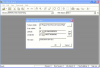
Although I have not yet used that particular feature in AGenT, Page 21 of 37 in the Manual "UKVFR_Libs_Handbook11.pdf" shows this, which suggests the FS9 SDK format 256x256 pixel terrain BMP image mapped to the LOD-13-sized AGN tile or "cell" may be what is scanned:

file_open_by_coordinates_page_8_of_37_ukvfr_libs_handbook11_pdf-png.28119


BTW
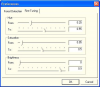
: Page 21 of 37 in the Manual "UKVFR_Libs_Handbook11.pdf" shows this:

forest_detection_page_21_of_37_ukvfr_libs_handbook11_pdf-png.28120


fine_tuning_page_21_of_37_ukvfr_libs_handbook11_pdf-png.28121


To your knowledge, was this AGenT feature finished to the point it was actually practical to use ? :scratchch

Thanks for any clarification you might offer on this. :)

GaryGB
 

Attachments

  • File_Open_by_Coordinates_Page_8_of_37_UKVFR_Libs_Handbook11_pdf.png
    File_Open_by_Coordinates_Page_8_of_37_UKVFR_Libs_Handbook11_pdf.png
    90.6 KB · Views: 1,947
  • Forest_Detection_Page_21_of_37_UKVFR_Libs_Handbook11_pdf.png
    Forest_Detection_Page_21_of_37_UKVFR_Libs_Handbook11_pdf.png
    82.4 KB · Views: 1,008
  • Fine_Tuning_Page_21_of_37_UKVFR_Libs_Handbook11_pdf.png
    Fine_Tuning_Page_21_of_37_UKVFR_Libs_Handbook11_pdf.png
    71.7 KB · Views: 1,096
Last edited:
Hi,

I can always add it to the wishlist, but at the moment I'm busy with other things, so it will take a while.

The way the detection algorithm currently works, I'm not sure that it will detect each tree crown. It just looks at colours to see if they are within the specified range.

For that kind of detection to work I guess it would be an interesting approach to take a kind of sample image of one tree and see if that can be detected within the image. But then you would more be looking at patterns than colours. Would be interesting project during a cold and boring winter....
 
What kind of images are you guys using? I just had a look at my 1 meter resolution set for Nantucket (it's a 4 band set with IR channel) and on that kind of resolution you can't really see the individual trees in a forest area.
 
Hi,

I can always add it to the wishlist, but at the moment I'm busy with other things, so it will take a while.

The way the detection algorithm currently works, I'm not sure that it will detect each tree crown. It just looks at colours to see if they are within the specified range.

For that kind of detection to work I guess it would be an interesting approach to take a kind of sample image of one tree and see if that can be detected within the image. But then you would more be looking at patterns than colours. Would be interesting project during a cold and boring winter....

Thanks Arno; looks like you've already got some excellent ideas on how this might be implemented ! :D

Hope all goes smoothly with your move to the new home. :)

GaryGB
 
Last edited:
What kind of images are you guys using? I just had a look at my 1 meter resolution set for Nantucket (it's a 4 band set with IR channel) and on that kind of resolution you can't really see the individual trees in a forest area.

Personally, I'd use either the US government public domain imagery loaded / exported via Global Mapper and/or captured tiles from the "best quality" aerial imagery servers via SBuilderX or FS Earth Tiles, so one has the sharpest imagery where individual tree detection may be desired.

Possibly one could define a Ex: KML polygon for areas to be scanned for individual tree crowns within designated portions of a aerial imagery coverage area ...and thus not necessarily include all of a coverage area, so that the scanning would not take too long, or generate un-manageable numbers of "trunk axis RefPoint" or tiny vegetation poly vector vertices ? :scratchch


The Google Maps / Google Earth imagery zoomed in to 100 or 200 Ft. 'eye altitude' should work in most areas for color "pattern recognition" of tree crowns / smaller tree groups ...even if aerial imagery is less sharp, such as seen in Google Earth at Nantucket National Wildlife Refuge (SE of Great Point).

In other areas (such as around Seattle), Google Earth imagery zoomed in to only 200 Ft. eye altitude should work extremely well, due to the sharper images of individual tree crowns seen there.


IMHO, one is only using the captured aerial imagery tiles as a temporary background to trace / scan over in the same manner as when using Google Earth's own "Add Polygon" digital drawing features to generate our own vector data, which IIUC is intended to be allowed by design without actual creation of a derivative product utilizing / re-distributing "visual image" portions of the original aerial imagery itself. ;)

BTW: Some of the Digital Globe aerial imagery has now been contributed for "non-watermarked" use via the "ESRI World Imagery" site:

http://www.fsdeveloper.com/forum/threads/gis-data-sources.213907/page-2


PS: It is an exciting idea that ScenProc use of IR data in aerial imagery could detect tree types for very realistic autogen creation (with even greater graularity than we presently can using the low-resolution SDK methods for implementing FS Land Class from "Olson Classification" Land Cover / Land Use data) ...as improved data sets are generated from forestry studies. :D

Hope this helps ! :)

GaryGB
 
Last edited:
Yeah, I'm in no big rush. Hope your move goes well. :)

I use the NAIP 1 meter/pixel, 4 band imagery from the USGS. I'm not really aware of any other freely available NIR imagery. Is it possible to get scenProc to use a JP2 for the texture filter editor and the DETECTFEATURES step?
 
Hi,

ScenProc should be able to read the jp2 imagery alreeds. Maybe only the texture filter editor can't read them, but you could save the samples to tune the filter with as plain bmp or so.

For Nantucket I also have 30 cm imagery from USGS, but the tree detection works better at 1 m with NIR in my experience. I guess it also depends on the season imagery was taken how well you can see the tree crowns.

On the other hand, are you not afraid of too many trees? I did some testing a week ago or so to try to place scrubs with rectangular autogen. What I did is try to fill a polygon with many small rectangles to get more density for the scrubs. But that gave so many objects that Annotator couldn't handle it anymore :)
 
Hi,
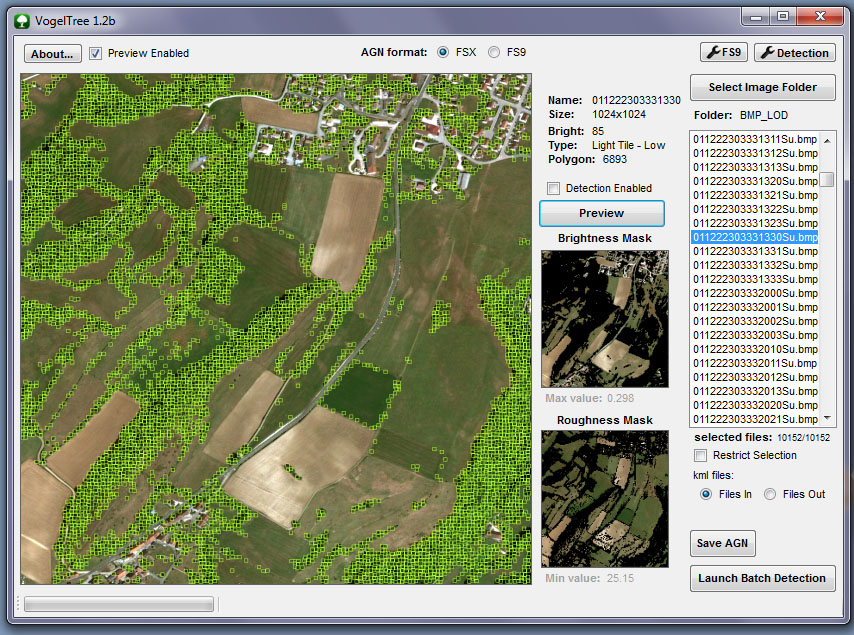
In my mind, VogelTrees is more powerfull and easier to use than olds AgenT or AutoTrees.
At the moment, the best "combo tool" is Scenproc for buildings (better if mixed with population density datas) and VogelTree for vegetation.
And AGNMergetools to mix both agn's collection ...
 
Back
Top