
-
Which the release of FS2020 we see an explosition of activity on the forun and of course we are very happy to see this. But having all questions about FS2020 in one forum becomes a bit messy. So therefore we would like to ask you all to use the following guidelines when posting your questions:
- Tag FS2020 specific questions with the MSFS2020 tag.
- Questions about making 3D assets can be posted in the 3D asset design forum. Either post them in the subforum of the modelling tool you use or in the general forum if they are general.
- Questions about aircraft design can be posted in the Aircraft design forum
- Questions about airport design can be posted in the FS2020 airport design forum. Once airport development tools have been updated for FS2020 you can post tool speciifc questions in the subforums of those tools as well of course.
- Questions about terrain design can be posted in the FS2020 terrain design forum.
- Questions about SimConnect can be posted in the SimConnect forum.
Any other question that is not specific to an aspect of development or tool can be posted in the General chat forum.
By following these guidelines we make sure that the forums remain easy to read for everybody and also that the right people can find your post to answer it.
You are using an out of date browser. It may not display this or other websites correctly.
You should upgrade or use an alternative browser.
You should upgrade or use an alternative browser.
Does any have tips for modeling cockpit windows ?
- Thread starter Osian
- Start date


tgibson
Resource contributor
- Messages
- 11,760
- Country

That area is usually the hardest place in the entire aircraft. I normally have to use the Slice Plane or similar technique to split up/combine the existing polygons until I have polygons the shapes of the windows, then place them into their correct locations. Then add and move polygons in the area until I have a correct (and smooth) shape. Others might have better techniques?

- Messages
- 212
- Country

Tom is Correct, Took a Long Time and Manny Trials, to Figure out a Methodology, and each Aircraft can be Different !! Try Creating Two Objects, the Fuselage forward of the Cockpit Area, and the Fuselage Aft of the cockpit area, Delete the Facing End Polygons, then use Create Poly Modifier to Connect the two areas together. this seems to Let the Fuselage shape its self, and You can See Exactly where the Glass Panels need to Go, of course this is for gmax/3dsmax, but the method should be the same for Blender ! Be Interesting to hear how others create this area, good Luck
- Johnman
- Johnman

Paul Domingue
Resource contributor
- Messages
- 1,532
- Country
I have to concur with Tom and Johnman. The cockpit windows are very difficult to make and a canopy is a nightmare for me. I have uncounted hours reworking over and over again the canopy on my latest project. Some will say a canopy is easier but I think what you are working on would be easier. I recommend that you cut the forward section of the aircraft off and export it to a separate file and work on it. Experiment with different modeling techniques until you find it acceptable. You may go through a lot of attempts before you are satisfied but every screw-up adds to your knowledge base so it's worth the time. My rule of thumb is beat the crap out of it until it conforms or dies. 

- Messages
- 683
- Country
My rule of thumb is beat the crap out of it until it conforms or dies.
My kind of guy

I wish there was an easy way to do it. I tend to do the main body (including the area in question) using the cross-section method and only working one half until I'm happy with the shape. A huge part of that is trying to massage the mesh such that it flows in a way that makes cutting the windows easy.
Unfortunately that is not exactly "easy" and involves a lot of time, beer, and an occasional sacrificial rubber chicken.
Last edited:

F747fly
Resource contributor
- Messages
- 1,713
- Country

Unfortunately that is not exactly "easy" and involves a lot of time, beer, and an occasional sacrificial rubber chicken.
I'd say the ratio for that would br yours to decide ofcourse.
The way I found it "acceptable" was by making the windows edge from the side view, then going to the fron view and move the verts you've created to.match the from view aswell and then do the same thing from the top view. Now you've got the "window" I usually extrude it and (hope I don't get shouted at right now) perfrom a boolean with it....

hairyspin
Resource contributor
- Messages
- 3,253
- Country

Part of the problem is getting really familiar with the shape of what you're modelling. Early in a project you think you know what the shapes are, then another photograph shows a different angle and you realise it's more complex than that. Or you get a look close up at the real thing and what seemed flat is subtly curved and none of your reference photos show this.
You know you've got it bad when a museum visit fills your head with thoughts of extrusions, modifiers and yes, Booleans. There's no one size fits all answer.
You know you've got it bad when a museum visit fills your head with thoughts of extrusions, modifiers and yes, Booleans. There's no one size fits all answer.

- Messages
- 1,451
- Country

Hello all
In my humble opinion, this is a matter of patience and a good understanding on what topology means. For a good review, I highly recommend this awesome videos. It doesn't matter what program you are using to model, all concepts apply:
In this playlist, videos 15-18 explain topology in detail:
https://www.youtube.com/playlist?list=PLxt9ZAGPLIpeB8TcHrpzxvEI4Ve3SfZBC
Once you have are more comfortable with this ideas, you only need to construct creating "loops" of edges around the points that match your windows... It's been said that an image worths a 1000 words:

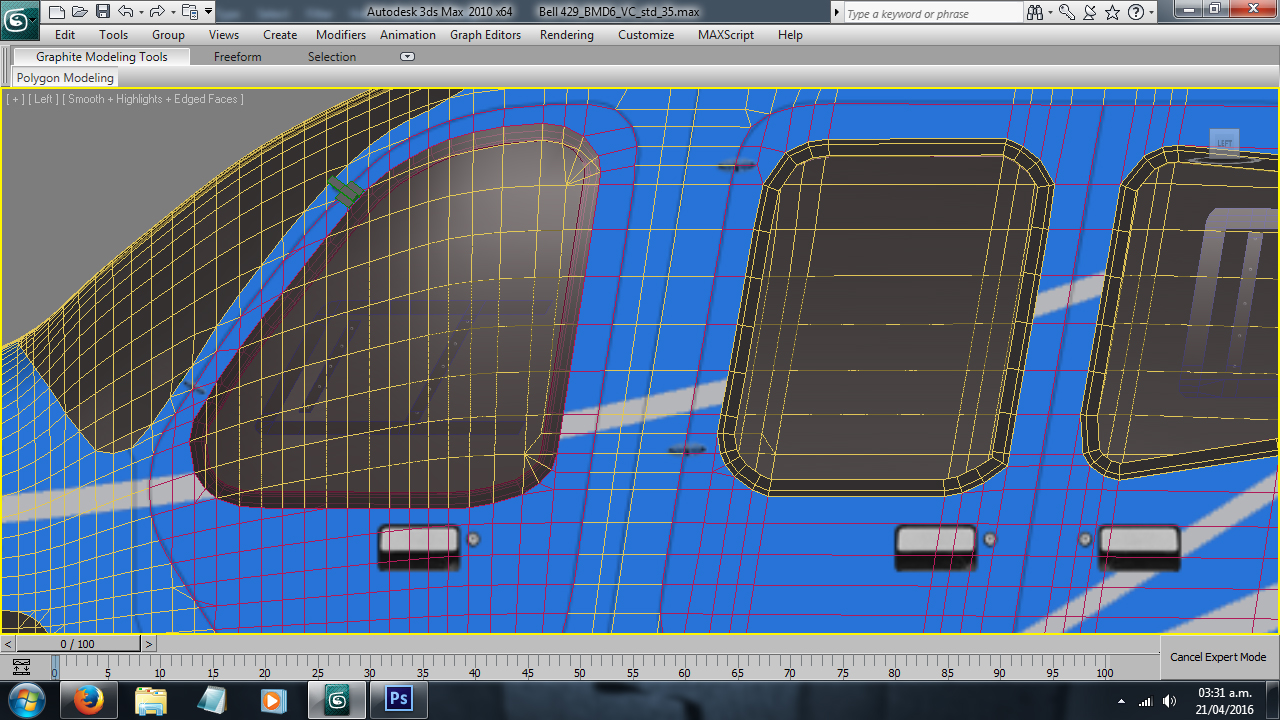


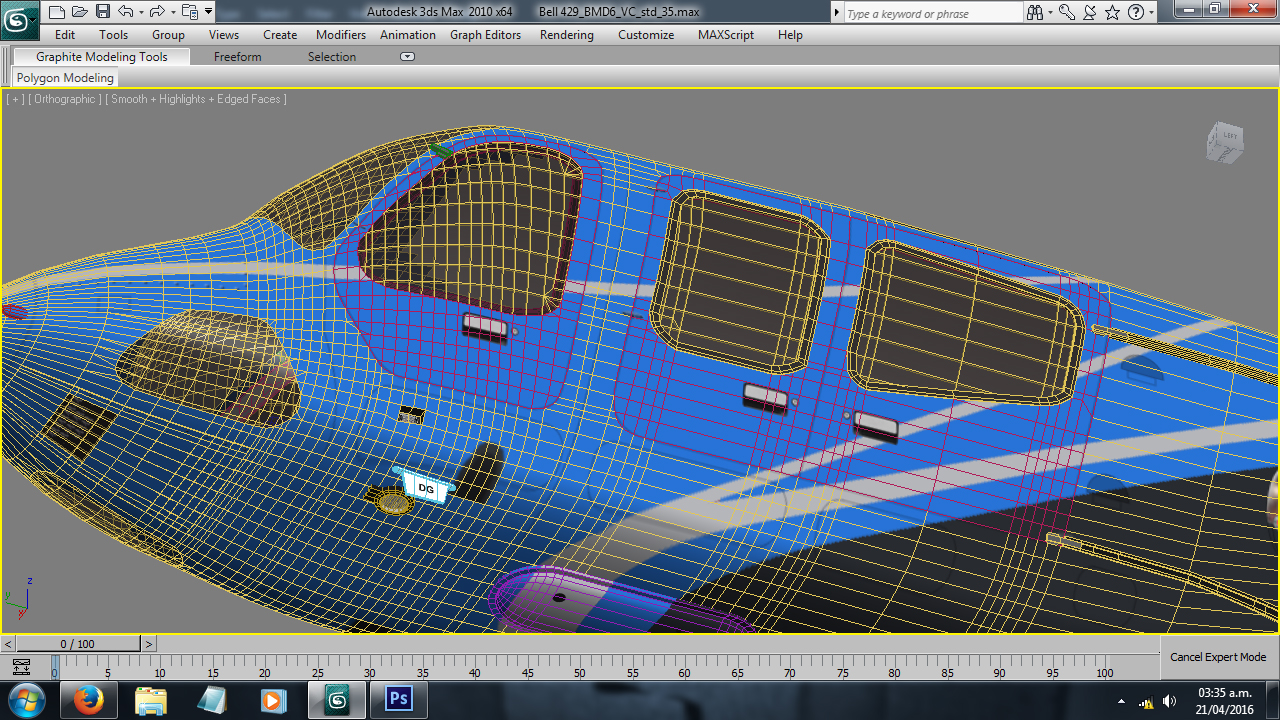
Of course, those are far away to be perfect and efficient; nevertheless, I hope this helps you to get more ideas.
Don't stop trying and working on your project.
All the best,
Sergio.
In my humble opinion, this is a matter of patience and a good understanding on what topology means. For a good review, I highly recommend this awesome videos. It doesn't matter what program you are using to model, all concepts apply:
In this playlist, videos 15-18 explain topology in detail:
https://www.youtube.com/playlist?list=PLxt9ZAGPLIpeB8TcHrpzxvEI4Ve3SfZBC
Once you have are more comfortable with this ideas, you only need to construct creating "loops" of edges around the points that match your windows... It's been said that an image worths a 1000 words:
Of course, those are far away to be perfect and efficient; nevertheless, I hope this helps you to get more ideas.
Don't stop trying and working on your project.
All the best,
Sergio.

- Messages
- 662
- Country

The way I learned to make cockpit windows is kind of a hybrid between the aforementioned techniques and the method that "MrFaosFX" showed me. Basically, I create cross section spline shapes for the nose in the front view that closely match a reference drawing or photo. Then I create and tweak 3D spline shapes for the window outlines, convert those to an editable poly and perform an inset for whatever polys are included on that specific window. This basically completes your windows, and you can extrude/reshape the mesh produced from your nose cross section splines to closely match your window frames. Then all you have to do is get clever with bridging and cutting polygons to make the mesh flow more smoothly. More edge loops or smoothing modifiers can be added as desired.
This general strategy has become a kind of rule for my modeling workflow: Model what you KNOW is correct first, then everything else should fall into place around it, producing a more accurate model than you would get by trying to build features on a potentially inaccurate base mesh.
This general strategy has become a kind of rule for my modeling workflow: Model what you KNOW is correct first, then everything else should fall into place around it, producing a more accurate model than you would get by trying to build features on a potentially inaccurate base mesh.