• Which the release of FS2020 we see an explosition of activity on the forun and of course we are very happy to see this. But having all questions about FS2020 in one forum becomes a bit messy. So therefore we would like to ask you all to use the following guidelines when posting your questions:

    • Tag FS2020 specific questions with the MSFS2020 tag.
    • Questions about making 3D assets can be posted in the 3D asset design forum. Either post them in the subforum of the modelling tool you use or in the general forum if they are general.
    • Questions about aircraft design can be posted in the Aircraft design forum
    • Questions about airport design can be posted in the FS2020 airport design forum. Once airport development tools have been updated for FS2020 you can post tool speciifc questions in the subforums of those tools as well of course.
    • Questions about terrain design can be posted in the FS2020 terrain design forum.
    • Questions about SimConnect can be posted in the SimConnect forum.

    Any other question that is not specific to an aspect of development or tool can be posted in the General chat forum.

    By following these guidelines we make sure that the forums remain easy to read for everybody and also that the right people can find your post to answer it.

MSFS20 ENKH - Kristiansand Hospital

Messages
410
Country
norway
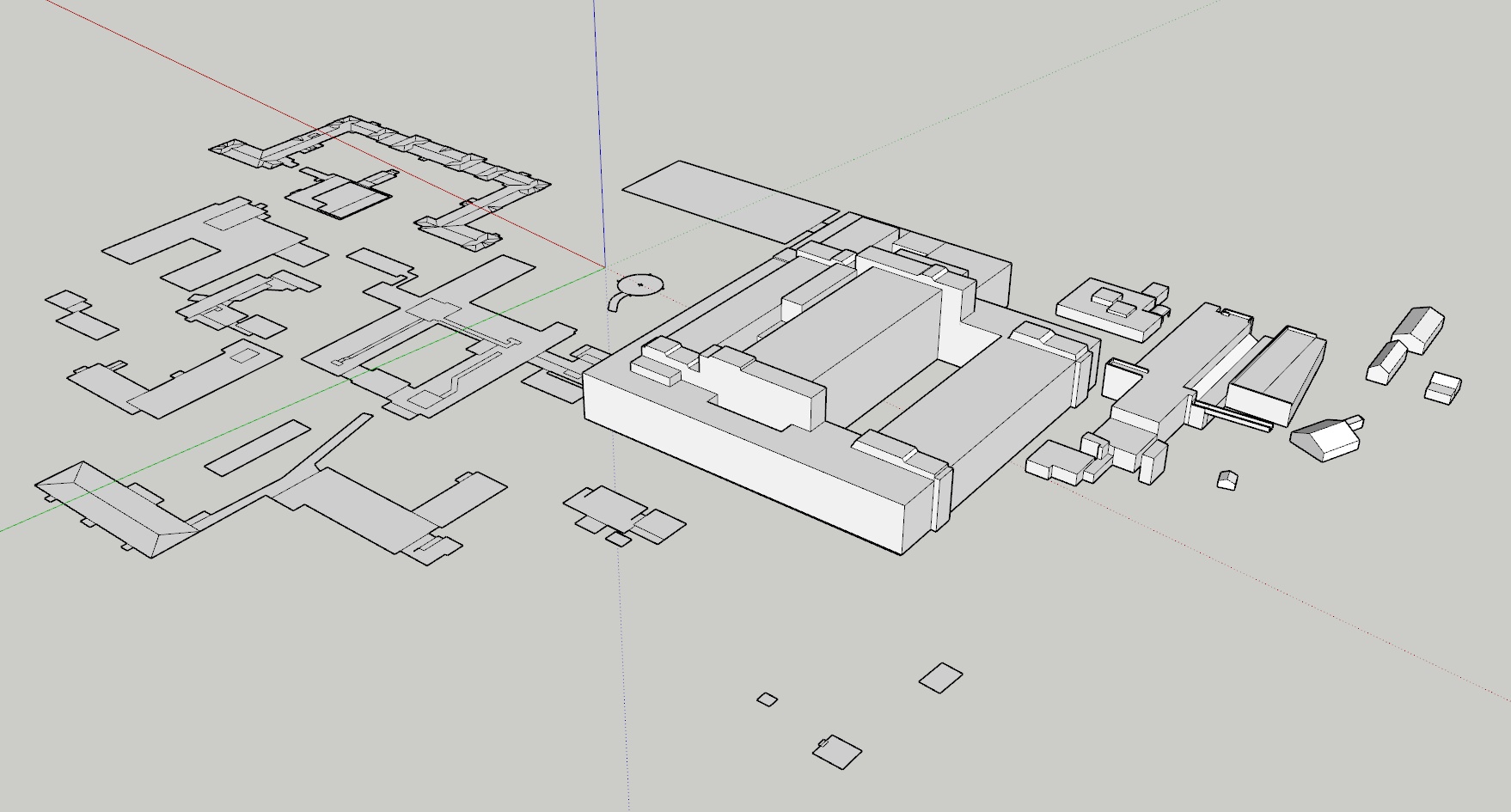
Parallel to the ENLX helibase creation I am also working on the Kristiansand Hospital with the ICAO ENKH.

The main issue with this one is going to be adaption to the "necessary" Enjoyitfly" photogrammetry, and I am going to need some help with that approach. It's my home city and I would really want to keep the details that Enjoyitfly photogrammetry provides, but also exclude the hospital mesh. Hope it can be done.

The goals for the project is mainly the same as both ENLX and ENKH, however this one will be more simple. It is a hospital with a single helipad in the middle of the hospital campus. There are no hangars, or any other helicopter related buildings other than the helipad itself.
I plan on making the area facing the helipad more detailed than the rest of the hospital, to both save space and time.

Current progress is going forward at a steady pace. I've made my workflow much more effective by measuring distance and height through google earth pro, instead of using the norwegian charts at www.hoydedata.no. I believe Hoydedata gives the most accurate measurements of the terrain and buildings, but google earth is sufficient at providing both ground level and building height in an effective and precise matter.

Screenshot 2025-01-24 214949.png


Screenshot 2025-01-24 214926.png
 
Hi Vetle:

I will be glad to take a look at the EnjoyItFly addon for ENKH area to see how it is structured, and what the "break points" are for the 3D tile sizes used.

Since the EnjoyItFly 'GEDOT' objects are likely again to be 3D, they can be eliminated from display via MSFS SDK DevMode GUI ExclusionRectangles placed / sized at origins of the tiles.

GaryGB
 
Last edited:
Hi Vetle:

I will be glad to take a look at the EnjoyItFly addon for ENKH area to see how it is structured, and what the "break points" are for the 3D tile sizes used.

Since the EnjoyItFly 'GEDOT' objects are likely again to be 3D, they can be eliminated from display via MSFS SDK DevMode GUI ExclusionRectangles placed / sized at origins of the tiles.

GaryGB
Thank you! I was hoping you would take a look. It seems it was not enjoyitfly, but this one: https://flightsim.to/file/34327/kristiansand. I am not sure how he built the photogrammetry scenery.
 
Hi Vetle:

The Vizipok "Kristiansand" photogrammetry scenery add-on you linked above is another "GEDOT" 3D Tile array.

"Many thanks:

- Jonah Hex 111 for Google Earth Decoder
- Thalixte for Google Earth Decoder optimization tools
" (aka "GEDOT")


With the above add-on in MSFS Community sub-folder, follow the steps previously described here:

https://www.fsdeveloper.com/forum/t...-party-photogrammetry-area.459478/post-930337


ENKH Hospital campus tile placement ReferencePoints for each 3D tile 'origin' at which to Add a ExclusionRectangle are:

* GUID={e8344872-7b0c-4fb2-83ea-8cde51a844d9}

lat="58.16162109375"
lon="7.9815673828125"


* GUID=6ace7908-dfe6-49c8-b3f3-5614668aed48

lat="58.16162109375"
lon="7.987060546875"


Feel free to inquire further if you require further clarification on how to exclude these 3D tiles in MSFS20 SDK DevMode GUI. :)


IMHO, part of the perceived enhancement provided by having loaded the above add-on is greater clarity of aerial imagery.

The MSFS default scenery is made as (CVX vector TIN ?) "photogrammetry" with local LIDAR, and draped local aerial imagery.

* MSFS default scenery has muted colors when local aerial imagery is draped onto (CVX vector TIN ?) "photogrammetry".

* MSFS default scenery has muted colors when local aerial imagery is draped onto terrain ground surfaces due to a "detail" decal.


It is possible greater aerial imagery clarity may be achieved via use of 3rd party aerial imagery to minimize "detail" decal effects.


I have not been able to access Norway GIS portal to see if freely available aerial imagery has greater clarity of aerial imagery.

Perhaps you can try to access that portal to see what is available ? :scratchch


You need not download a large area, but smaller tiles with greater clarity of aerial imagery may easily be added to MSFS 2020.

If find a worthy set of aerial imagery, I would recommend downloading the area of the entire ENKH Hospital campus.


You can visualize an area of low altitude flight near ENKH where I suggest replacing aerial imagery via this Google Earth KMZ:

https://www.fsdeveloper.com/forum/attachments/enkh-kristiansand-hospital-helipad_kmz-zip.95486/

With Google Earth Desktop Edition installed, download, un-ZIP, double-click this KMZ to launch Google Earth at ENKH. :pushpin:

Google Historical Imagery dated July 31, 2022 is particularly 'sharp', which may be helpful in resolving fine details at ENKH. :idea:

[EDITED]
Parallel to the ENLX helibase creation I am also working on the Kristiansand Hospital with the ICAO ENKH.

Current progress is going forward at a steady pace. I've made my workflow much more effective by measuring distance and height through google earth pro, instead of using the norwegian charts at www.hoydedata.no. I believe Hoydedata gives the most accurate measurements of the terrain and buildings, but google earth is sufficient at providing both ground level and building height in an effective and precise matter.

If GIS data ESRI *.SHP exports from https://hoydedata.no/LaserInnsyn2/ are WGS84 cartographic projection, it 'may' be "precise" to IRL when it is imported into Sketchup or Google Earth Desktop Edition,as the data is internally re-projected.


Screenshot- not GIS data ESRI *.SHP- files from https://hoydedata.no/LaserInnsyn2/ imported into Sketchup, will be in an incorrect ("warped", rotated clockwise, and vertically compressed) WGS84 (EPSG:4326) cartographic projection.

FS scenery should not be "warped"/rotated clockwise, or navigation over longer distances may deviate to an off-course heading.

ENKH_Hoydedata.png


GIS ESRI *.SHP files imported to Sketchup, must be correctly formatted in non-warped (EPSG:3857) cartographic projection. :alert:

ENKH_GE.png


https://epsg.io/4326

https://epsg.io/32633

https://epsg.io/25833

https://epsg.io/3857


If you already started 3D modeling using screenshot files imported into Sketchup from WGS84 (EPSG:4326) maps, let me know.

We can use a plugin to export Sketchup project Geometry data in GIS-compatible format that may be re-projected to (EPSG:3857).

Sketchup project Geometry data re-projected to (EPSG:3957) in GIS-compatible format may be re-imported to Sketchup via a plugin. :wizard:

All the above said, Google Earth Desktop Edition 'manual' screenshots imported into Sketchup will already be in (EPSG:3857).

[END_EDIT]

GaryGB
 

Attachments

Last edited:
Hi Vetle:

The Vizipok "Kristiansand" photogrammetry scenery add-on you linked above is another "GEDOT" 3D Tile array.

"Many thanks:

- Jonah Hex 111 for Google Earth Decoder
- Thalixte for Google Earth Decoder optimization tools
" (aka "GEDOT")


With the above add-on in MSFS Community sub-folder, follow the steps previously described here:

https://www.fsdeveloper.com/forum/t...-party-photogrammetry-area.459478/post-930337


ENKH Hospital campus tile placement ReferencePoints for each 3D tile 'origin' at which to Add a ExclusionRectangle are:

* GUID={e8344872-7b0c-4fb2-83ea-8cde51a844d9}

lat="58.16162109375"
lon="7.9815673828125"


* GUID=6ace7908-dfe6-49c8-b3f3-5614668aed48

lat="58.16162109375"
lon="7.987060546875"


Feel free to inquire further if you require further clarification on how to exclude these 3D tiles in MSFS20 SDK DevMode GUI. :)
Excellent! Thank you. May I ask how you find those coordinates which are relevant to where I want to place my ExclusionRectangle? Is it random within an area covering my relevant scenery area, or do you need some sort of calculations to find them?
IMHO, part of the perceived enhancement provided by having loaded the above add-on is greater clarity of aerial imagery.

The MSFS default scenery is made as (CVX vector TIN ?) "photogrammetry" with local LIDAR, and draped local aerial imagery.

* MSFS default scenery has muted colors when local aerial imagery is draped onto (CVX vector TIN ?) "photogrammetry".

* MSFS default scenery has muted colors when local aerial imagery is draped onto terrain ground surfaces due to a "detail" decal.


It is possible greater aerial imagery clarity may be achieved via use of 3rd party aerial imagery to minimize "detail" decal effects.


I have not been able to access Norway GIS portal to see if freely available aerial imagery has greater clarity of aerial imagery.

Perhaps you can try to access that portal to see what is available ? :scratchch


You need not download a large area, but smaller tiles with greater clarity of aerial imagery may easily be added to MSFS 2020.

If find a worthy set of aerial imagery, I would recommend downloading the area of the entire ENKH Hospital campus.


You can visualize an area of low altitude flight near ENKH where I suggest replacing aerial imagery via this Google Earth KMZ:

https://www.fsdeveloper.com/forum/attachments/enkh-kristiansand-hospital-helipad_kmz-zip.95486/

With Google Earth Desktop Edition installed, download, un-ZIP, double-click this KMZ to launch Google Earth at ENKH. :pushpin:

Google Historical Imagery dated July 31, 2022 is particularly 'sharp', which may be helpful in resolving fine details at ENKH. :idea:
So that I understand correctly; you are talking about replacing the ground texture with one with a better resolution, but not the buildings and such themselves?

[EDITED]


If GIS data ESRI *.SHP exports from https://hoydedata.no/LaserInnsyn2/ are WGS84 cartographic projection, it 'may' be "precise" to IRL when it is imported into Sketchup or Google Earth Desktop Edition,as the data is internally re-projected.


Screenshot- not GIS data ESRI *.SHP- files from https://hoydedata.no/LaserInnsyn2/ imported into Sketchup, will be in an incorrect ("warped", rotated clockwise, and vertically compressed) WGS84 (EPSG:4326) cartographic projection.

FS scenery should not be "warped"/rotated clockwise, or navigation over longer distances may deviate to an off-course heading.

View attachment 95491

GIS ESRI *.SHP files imported to Sketchup, must be correctly formatted in non-warped (EPSG:3857) cartographic projection. :alert:

View attachment 95490

https://epsg.io/4326

https://epsg.io/32633

https://epsg.io/25833

https://epsg.io/3857


If you already started 3D modeling using screenshot files imported into Sketchup from WGS84 (EPSG:4326) maps, let me know.

We can use a plugin to export Sketchup project Geometry data in GIS-compatible format that may be re-projected to (EPSG:3857).

Sketchup project Geometry data re-projected to (EPSG:3957) in GIS-compatible format may be re-imported to Sketchup via a plugin. :wizard:

All the above said, Google Earth Desktop Edition 'manual' screenshots imported into Sketchup will already be in (EPSG:3857).

[END_EDIT]

GaryGB
I have completed the modelling of ENKH, but detailing still remains. I am a bit unsure what I can/should consider about the above? Is it about the ground texturing/aerial imagery?

Screenshot 2025-01-26 210856.png
 
Excellent! Thank you. May I ask how you find those coordinates which are relevant to where I want to place my ExclusionRectangle? Is it random within an area covering my relevant scenery area, or do you need some sort of calculations to find them?

My description of the workflow begins in this post for your prior thread on ENSX:

https://www.fsdeveloper.com/forum/t...-party-photogrammetry-area.459478/post-929860


If one imports "ModelLib.bgl" into MCX, one may find 3D tiles at ENSX, then preview them in MCX' default View with a Grid.

The MCX 3D preview shows colored cross-hairs at the 3D model Origin of Axes (like MSFS SDK DevMode GUI "Gizmo").

The MCX colored cross-hairs are seen at the 3D model Origin of Axes, and that is located at the SW corner of each tile.


IIUC, 'GEDOT' uses that location at the SW corner of each tile as the 3D model Origin of Axes.

This is where 'placement' for MSFS is assigned using Geographic coordinates.

In FS SDK terminology, it is the 'Reference Point' for 'placement', which is found in the "Objects.bgl".


We view MCX Object Information for each 3D tile immediately adjacent to ENSX, and note all GUIDs to find in "Objects.bgl"

Scruffyduck's BGL2XML version 1.9 or newer de-compiles / outputs XML code.

https://www.fsdeveloper.com/forum/threads/bgl2xml-gui-v-1-10.448225/


Using NotePad or NotePad++, we search the XML output by BGL2XML for GUIDs of 3D tiles immediately adjacent to ENSX.

We can then copy / paste to NotePad, XML Element entries from de-compiled XML for for each GUID we seek / find ex:

<SceneryObject
lat="58.1588745117188" <-- Geographic Latitude of Reference Point used for placement
lon="7.9925537109375" <-- Geographic Longitude of Reference Point used for placement
alt="-116.809M"
altitudeIsAgl="FALSE"
pitch="0"
bank="0"
heading="0"
imageComplexity="VERY_SPARSE">
<LibraryObject
name="{195699e3-6fe5-4a09-8e21-b3b86bdcf7f3}" <-- GUID of 3D Tile ID'd / noted in MCX
scale="1.00"
/>
</SceneryObject>

Other posts in that thread show placements when we add their Geographic coordinates into Google Earth as 'Placemark' Pins.

Feel free to inquire further if you require more details.

So that I understand correctly; you are talking about replacing the ground texture with one with a better resolution, but not the buildings and such themselves?
Correct; we can add small tiles of aerial imagery or a custom graphic superimposed on top of the default aerial imagery.

We can also add numerous tiles of aerial imagery or a custom graphic superimposed on top of the default aerial imagery.


Aerial imagery 'may' be higher resolution, or it may simply have better clarity such as sharpness, contrast, color saturation etc.

MSFS terrain textures for all mesh-clinging / projected images are merged and sampled to the default resolution of LOD-21.

Actually LOD-21 is less common on web tile servers, as most imagery is limited in 'quality' to LOD-18; but clarity varies widely.

I have completed the modelling of ENKH, but detailing still remains. I am a bit unsure what I can/should consider about the above? Is it about the ground texturing/aerial imagery?

The issue with making 3D models using correctly projected screenshots is:

FS scenery should not be "warped"/rotated clockwise, or navigation over longer distances may deviate to an off-course heading.


If you PM me a ZIP of the MSFS project in its current build state, I can take a look and see if it needs to be re-projected.

That would be better to do before you proceed with applying Materials (but if you have already textured, it is still OK to 'test').

"Screenshot- not GIS data ESRI *.SHP- files from https://hoydedata.no/LaserInnsyn2/ imported into Sketchup, will be in an incorrect ("warped", rotated clockwise, and vertically compressed) WGS84 (EPSG:4326) cartographic projection.


When we trace over screenshots of maps that are not correctly projected for 3D modeling (such as that shown in https://hoydedata.no/LaserInnsyn2/, the background image may be in an incorrect ("warped", rotated clockwise, and vertically compressed) WGS84 (EPSG:4326) cartographic projection".

EPSG:4326 map traced 3D models may be incorrect ("warped", rotated clockwise, vertically compressed on the N-S "X" Axis).

Did you instead use a (EPSG:4326) map background image from https://hoydedata.no/LaserInnsyn2/ to 'trace' in Sketchup ? :scratchch


If you used a Google Earth Desktop Edition top-down screenshot map on a Face in Sketchup, it is OK, as it is not 'warped'. :)

GaryGB
 
Last edited:
My description of the workflow begins in this post for your prior thread on ENSX:

https://www.fsdeveloper.com/forum/t...-party-photogrammetry-area.459478/post-929860


If one imports "ModelLib.bgl" into MCX, one may find 3D tiles at ENSX, then preview them in MCX' default View with a Grid.

The MCX 3D preview shows colored cross-hairs at the 3D model Origin of Axes (like MSFS SDK DevMode GUI "Gizmo").

The MCX colored cross-hairs are seen at the 3D model Origin of Axes, and that is located at the SW corner of each tile.


IIUC, 'GEDOT' uses that location at the SW corner of each tile as the 3D model Origin of Axes.

This is where 'placement' for MSFS is assigned using Geographic coordinates.

In FS SDK terminology, it is the 'Reference Point' for 'placement', which is found in the "Objects.bgl".


We view MCX Object Information for each 3D tile immediately adjacent to ENSX, and note all GUIDs to find in "Objects.bgl"

Scruffyduck's BGL2XML version 1.9 or newer de-compiles / outputs XML code.

https://www.fsdeveloper.com/forum/threads/bgl2xml-gui-v-1-10.448225/


Using NotePad or NotePad++, we search the XML output by BGL2XML for GUIDs of 3D tiles immediately adjacent to ENSX.

We can then copy / paste to NotePad, XML Element entries from de-compiled XML for for each GUID we seek / find ex:

<SceneryObject
lat="58.1588745117188" <-- Geographic Latitude of Reference Point used for placement
lon="7.9925537109375" <-- Geographic Longitude of Reference Point used for placement
alt="-116.809M"
altitudeIsAgl="FALSE"
pitch="0"
bank="0"
heading="0"
imageComplexity="VERY_SPARSE">
<LibraryObject
name="{195699e3-6fe5-4a09-8e21-b3b86bdcf7f3}" <-- GUID of 3D Tile ID'd / noted in MCX
scale="1.00"
/>
</SceneryObject>

Other posts in that thread show placements when we add their Geographic coordinates into Google Earth as 'Placemark' Pins.

Feel free to inquire further if you require more details.
Thank you! I will follow up on this as soon as I start adapting the models to the msfs scenery. I have not yet started a new project within msfs, so I will need to wait and see how "bad/good" everything seems to be.
Correct; we can add small tiles of aerial imagery or a custom graphic superimposed on top of the default aerial imagery.

We can also add numerous tiles of aerial imagery or a custom graphic superimposed on top of the default aerial imagery.


Aerial imagery 'may' be higher resolution, or it may simply have better clarity such as sharpness, contrast, color saturation etc.

MSFS terrain textures for all mesh-clinging / projected images are merged and sampled to the default resolution of LOD-21.

Actually LOD-21 is less common on web tile servers, as most imagery is limited in 'quality' to LOD-18; but clarity varies widely.
I am struggling with argumenting for a solution to add a custom satelite/aerial imagery, due to the need to make it fill into the other scenery seemlessly. I am not sure I want to/really need to do this, but I will look into it as soon as I see the results. If the models are way off the area textures I may consider adding them, but I would rather skip that part...
The issue with making 3D models using correctly projected screenshots is:

FS scenery should not be "warped"/rotated clockwise, or navigation over longer distances may deviate to an off-course heading.
I am having some difficulties identifies this issue. I have not yet seen the effect you are mentioning, so I cannot picture how it looks and how I should approach it. I don't understand the relation between scenery and navigation 😬
If you PM me a ZIP of the MSFS project in its current build state, I can take a look and see if it needs to be re-projected.
I will do as soon as I have made a new msfs developer project :)
That would be better to do before you proceed with applying Materials (but if you have already textured, it is still OK to 'test').

"Screenshot- not GIS data ESRI *.SHP- files from https://hoydedata.no/LaserInnsyn2/ imported into Sketchup, will be in an incorrect ("warped", rotated clockwise, and vertically compressed) WGS84 (EPSG:4326) cartographic projection.


When we trace over screenshots of maps that are not correctly projected for 3D modeling (such as that shown in https://hoydedata.no/LaserInnsyn2/, the background image may be in an incorrect ("warped", rotated clockwise, and vertically compressed) WGS84 (EPSG:4326) cartographic projection".

EPSG:4326 map traced 3D models may be incorrect ("warped", rotated clockwise, vertically compressed on the N-S "X" Axis).

Did you instead use a (EPSG:4326) map background image from https://hoydedata.no/LaserInnsyn2/ to 'trace' in Sketchup ? :scratchch


If you used a Google Earth Desktop Edition top-down screenshot map on a Face in Sketchup, it is OK, as it is not 'warped'. :)
Just to clarify; you mean taking a screenshot of the buildings and projecting them on the 3d buildings within sketchup so that the windows and such are as accurate as possible?
 
Thank you! I will follow up on this as soon as I start adapting the models to the msfs scenery. I have not yet started a new project within msfs, so I will need to wait and see how "bad/good" everything seems to be.

I agree you should first load MSFS with Vizipok "Kristiansand" add-on to see how it looks adjacent to your own custom scenery.

I am struggling with argumentation for a solution to add a custom satellite/aerial imagery, due to the need to make it fill into the other scenery seamlessly. I am not sure I want to/really need to do this, but I will look into it as soon as I see the results. If the models are way off the area textures I may consider adding them, but I would rather skip that part...

MSFS20 ...with Vizipok "Kristiansand" add-on loaded:

ENKH - Kristiansand Hospital Helipad_MSFS20_Compare_Default+Add-on-1.jpg


MSFS24 ...with Vizipok "Kristiansand" add-on loaded:

ENKH - Kristiansand Hospital Helipad_MSFS24_Compare_Default+Add-on-2.jpg


If you have not already done so, you may wish to do a comparison at ENKH (MSFS20) vs. ENG4B (MSFS24) Helipad location. ;)


I am having some difficulties identifies this issue. I have not yet seen the effect you are mentioning, so I cannot picture how it looks and how I should approach it. I don't understand the relation between scenery and navigation 😬

Simply stated, the Hoydedata map imagery is +13 Degrees clockwise off-axis, and vertical size is compressed.

So if a screenshot of that map was imported to a Face on the ground plane in Sketchup to trace over, even if one scales the image to match the size of a structure in a screenshot from Google Earth Desktop Edition map viewer workspace, it will not be correctly projected.

Flying MSFS Helicopter rescue missions to / from Kristiansand Hopital will have inaccuracies with navigation to / from ENKH. :alert:

Nearby ENCN airport info:

Magnetic Variation: 3.7 E (as of January 2025 from WMM2020 model)
https://airportguide.com/airport/info/KRS


http://ww1.jeppesen.com/documents/aviation/notices-alerts/chart-alert/ENCN/ENCN_Charts.pdf

https://konbriefing.com/mad/approach-charts/no-norway/kristiansand-kjevik-airport.html

https://www.easa.europa.eu/sites/default/files/dfu/VFR-Guide-2016_English.pdf


I will do as soon as I have made a new msfs developer project :)

I shall await your reply.

Just to clarify; you mean taking a screenshot of the buildings and projecting them on the 3d buildings within Sketchup so that the windows and such are as accurate as possible?

To be more clear:

I assume you may have taken a screenshot or downloaded and saved an image of ENKH to import and map onto a Face in Sketchup as a background to be traced over and create building footprints to be extruded with the Push/Pull Tool.

If you used a screenshot of the map displayed in Hoydedata as your background for tracing in Sketchup, it will be a problem.

But I may be able to re-project a non-textured project traced over a Hoydedata map (at an early stage) ...to correct the project.


If you used a screenshot of the map displayed in Google Earth as your background for tracing in Sketchup, ...no problem.


Did you import a screenshot or other image onto a Face on the ground plane, and trace over it to create building footprints ?

If so, was that screenshot from Hoydedata or Google Earth ? :scratchch


PS: MSFS 2024 has used ENG4B as the Helipad ICAO :pushpin:

GaryGB
 
Last edited:
I agree it is a good idea to first inspect the 3rd party add-on to see how it looks adjacent to your own custom scenery.


MSFS20 ...with add-on loaded:

View attachment 95505

MSFS24 ...with add-on loaded:

View attachment 95506

If you have not already done so, you may wish to do a comparison at ENKH (MSFS20) vs. ENG4B (MSFS24) Helipad location. ;)
Ah! Thank you. I cannot remember the scenery being that bad, but then again it's been a while since I flew around there. I will certainly have to correct that 😳
Simply stated, the Hoydedata map imagery is +13 Degrees clockwise off-axis, and vertical size is compressed.

So if a screenshot of that map was imported to a Face on the ground plane in Sketchup to trace over, even if one scales the image to match the size of a structure in a screenshot from Google Earth Desktop Edition map viewer workspace, it will not be correctly projected.
I see! I have identified that issue, however only by using satelite/aerial imagery. The topograhpic maps seems fine?🤔 I only use Satelite/aerial imagery for detailing purposes, but not for outlining.
Flying MSFS Helicopter rescue missions to / from Kristiansand Hopital will have inaccuracies with navigation to / from ENKH. :alert:
Haha, I am sorry but I still do not get this. 😬🤭 In my mind; if the helipad is where it is supposed to be, how does that affect navigation?
To be more clear:

I assume you may have taken a screenshot or downloaded and saved an image of ENKH to import and map onto a Face in Sketchup as a background to be traced over and create building footprints to be extruded with the Push/Pull Tool.

If you used a screenshot of the map displayed in Hoydedata as your background for tracing in Sketchup, it will be a problem.

But I may be able to re-project a non-textured project traced over a Hoydedata map (at an early stage) ...to correct the project.


If you used a screenshot of the map displayed in Google Earth as your background for tracing in Sketchup, ...no problem.


Did you import a screenshot or other image onto a Face on the ground plane, and trace over it to create building footprints ?

If so, was that screenshot from Hoydedata or Google Earth ? :scratchch
I guess I replied somewhat to to this above, but have you identified an issue with both topograhpic maps and satelite/aerial imagery?
PS: MSFS 2024 has used ENG4B as the Helipad ICAO :pushpin:
Has to be corrected to ENKH then. :) Thanks!
 
Ah! Thank you. I cannot remember the scenery being that bad, but then again it's been a while since I flew around there. I will certainly have to correct that 😳

At least the ENKH local vegetation objects in both MSFS default and in the Vizipok "Kristiansand" add-on are a major issue

I see! I have identified that issue, however only by using satellite/aerial imagery. The topographic maps seems fine?🤔

I only use Satellite/aerial imagery for detailing purposes, but not for outlining.

IIUC, if you state "outlining", you mean 'tracing' to create 3D object footprints to be extruded via Push/Pull Tool ?

If so, I must again ask which background image do you trace (outline ?) for ENKH ?


Regardless, if you have not used EPSG:4326 projected imagery as a background for "outlining" / 'tracing', you are good to go. :pushpin:

Haha, I am sorry but I still do not get this. 😬🤭 In my mind; if the helipad is where it is supposed to be, how does that affect navigation?

I would hope that you do not limit your concept of 'navigation' only to flight planning and flight at higher Altitudes AGL.

You stated Khristiansand is your 'home city', so you may be familiar with seasonal / storm airflow over the hills West of ENKH.


Perhaps if you have a contact in a Helo flight crew that serves ENKH, they might share some insights about the local wind hazards.

https://www.heliopsmag.com/heliops/articles/the-unseen-danger/

https://helicopterforum.verticalreference.com/topic/21706-left-or-right-crosswind-let-the-fun-begin/

https://helicopterforum.verticalreference.com/topic/16907-myths-and-crosswinds-and-know-it-alls/

AFAIK, if ENKH Helipad is nestled between buildings that are oriented +13 degrees clockwise above local MagVar, that may be enough to put Helo flight at risk for wind hazards coming from the West depending on one's approach to the hospital campus.


IIUC, ENKH Hospital campus is a visual landmark for VFR navigation, and the Helipad is in close proximity to terrain / vegetation.

Rotor down-wash interaction with objects below, and other potential hazards such as ambient winds and premises airflow around buildings and over thermal updrafts etc. may all impact Helicopter flight dynamics.


ENKH Helipad is small, and generally is in a small area close to buildings, and near 'apparently' under-trimmed vegetation.

Some may wish to consider these factors in simulated Helo flight (even though in MSFS, we must acknowledge it is less accurate with its current Helo flight physics).

I anticipate we will see increased fidelity of MSFS Helo flight physics in the future, so precision in scenery may impact flight.

Certainly Helo pilots 'see' ENKH as a larger landmark, and must necessarily adapt flight at / near any buildings and the Helipad.


I am simply making the point that ENKH scenery should be positioned, oriented, and sized correctly for MSFS.

AFAIK, you want your scenery to be popular with a mix of MSFS pilots, some (most) of whom fly VFR only.

I am confident based on the exceptional quality of your work thus far, ENKH will look great, and will be popular.


We must also consider that the FS2Kx Community tolerated years of inaccurate airports 'traced' over EPSG:4326 imagery.

MSFS airports should now set a new standard for accuracy (easier to do, as we have EPSG:3857 aerial imagery as base scenery).

I guess I replied somewhat to to this above, but have you identified an issue with both topographic maps and satellite/aerial imagery?

Only with Hoydedata "WGS84" projected maps thus far; the detail is beautiful, but it should be re-projected to EPSG:3857.


Do I recall that you had an option to download that "topographic" / cadastral type map data as imagery (ex: GeoTiffs) ?

If so, I can quickly re-project any such downloaded GeoTiffs of the areas of interest, and output them in EPSG:3857 for you. ;)

Has to be corrected to ENKH then. :) Thanks!

I have not searched extensively, but IIUC, that ENG4B is fictional in MSFS24, and not used IRL.

GaryGB
 
Last edited:
At least the ENKH local vegetation objects in both MSFS default and in the Vizipok "Kristiansand" add-on are a major issue
I concur! I will give it a try to remove the relevant parts of the Vizipok scenery!
IIUC, if you state "outlining", you mean 'tracing' to create 3D object footprints to be extruded via Push/Pull Tool ?
Yes. Pardon my unprecise wording :)
If so, I must again ask which background image do you trace (outline ?) for ENKH ?

Regardless, if you have not used EPSG:4325 projected imagery as a background for "outlining" / 'tracing', you are good to go. :pushpin:
When inspecting hoydedata.no I get no hits on EPSG:4325, so I consider the projection to be something other than that.

I would hope that you do not limit your concept of 'navigation' only to flight planning and flight at higher Altitudes AGL.


ENKH Hospital campus is itself a visual landmark for VFR navigation in close proximity to terrain, vegetation, rotor downwash interaction with objects below, and other potential hazards such as ambient winds and premises airflow around buildings and over thermals that may impact Helicopter flight dynamics.


Some may wish to consider these factors in simulated Helo flight (even though in MSFS, we must acknowledge it is less accurate with its current Helo flight physics).

I anticipate we will see increased fidelity of MSFS Helo flight physics in the future, so precision in scenery may impact flight.

Certainly Helo pilots 'see' ENKH as a larger landmark, and must necessarily adapt flight at / near any buildings and the Helipad.

I am simply making the point that ENKH scenery should be positioned, oriented, and sized correctly for MSFS.

AFAIK, you want your scenery to be popular with a mix of MSFS pilots, some (most) of whom fly VFR only.
All of the above is offcourse important, indeed. I have no intention of doing anything less than make scenery that is as close to the real thing as practically possible to achieve at my level and with my tools. Both size and rotation is taken into careful attention :)
Only with Hoydedata "WGS84" projected maps thus far; the detail is beautiful, but it should be re-projected to EPSG:3857.


Do I recall that you had an option to download that "topographic" / cadastral type map data as imagery (ex: GeoTiffs) ?

If so, I can quickly re-project any such downloaded GeoTiffs of the areas of interest, and output them in EPSG:3857 for you. ;)
I am not familiar with any reprojecting methods at all and the concept is new to me. I have only used the snipping tool in microsoft to trace the WGS84 topography and aerial/satelite imagery from www.hoydedata.no, and then importing as an image into Sketchup. That was the same approach I used with ENSX. I have not been diving into the details of mapping at all. Are you referring to data downloaded from the page and then imported to Sketchup? Please excuse my lack of knowledge about this!

When inspecting the URL I get no results on EPSG:4325, but several on "EPSG+other different sets of numbers". I believe then that the projection with hoydedata.no is not EPSG:4325.

All-in-all, If I understand correctly; I have to consider the actual need to re-project the maps. It comes down to how much of a deviation one map presents differently to another and how they extend my current workflow. Are we talking several meters, or...? It seems to me atleast that the maps I currently use are sufficient in representing the buildings as they should, so I am a bit reluctant to extend the workflow (by downloading map information, reproject them and import) if the gains are minimal. Do you have any experiences with this?

I have not searched extensively, but IIUC, that ENG4B is fictional in MSFS24, and not used IRL.
That is correct. ENKH is the actual ICAO of the landing pad.
 
Hi again:

Sorry for the typographical error (the risk of 'typos' increases with the lateness of the night activities). o_O

I had corrected my typos from EPSG:4325 to EPSG:4326 ...after you logged off the forum thread.


WGS84 is part of the designation associated with EPSG:4326; we must use EPSG:3857 for background imagery / maps traced for 3D models.

Please post a link to an example "Satellite" image used as a screenshot for 'outlining' ENKH in Sketchup.

Pending analysis of what that map projection is, I shall explain this issue later tomorrow morning (Tuesday).


It would avoid delay if we find a process you can use when your need arises, to re-project downloaded GeoTiffs using a GIS utility (QGIS ?).

If you have a Sketchup SKP or KMZ file of ENKH that you can link via PM, I'll do an initial test of re-projecting 3D model geometry. :)

GaryGB
 
Last edited:
Hi again:

Sorry for the typographical error (the risk of 'typos' increases with the lateness of the night activities). o_O

I had corrected my typos from EPSG:4325 to EPSG:4326 ...after you logged off the forum thread.
Haha, I understand perfectly :D I cannot find any hits in the URL for EPSG:4326 either, so I assume it's okay.
WGS84 is part of the designation associated with EPSG:4326; we must use EPSG:3857 for background imagery / maps traced for 3D models.

Please post a link to an example "Satellite" image used as a screenshot for 'outlining' ENKH in Sketchup.
I am somehow unable to share a link as it won't refer to the exact rectangle, but if you go to Kristiansand Hospital in www.hoydedata.no, and outline the area below which is the one I use, maybe you can find the relevant information needed?

Satelite imagery: Only used to looking at and estimating details to the building. I do not use it to draw directly on top.
Screenshot 2025-01-28 121145.png


Topography: What I use to draw the buildings in Sketchup
Screenshot 2025-01-28 121210.png

It would avoid delay if we find a process you can use when your need arises, to re-project downloaded GeoTiffs using a GIS utility (QGIS ?).

If you have a Sketchup SKP or KMZ file of ENKH that you can link via PM, I'll do an initial test of re-projecting 3D model geometry. :)
I'll send you the .skp file as soon as I am home. Thanks! :)
 
Last edited:
Hi again:

I shall look forward to downloading the SKP file of the current build state for ENKH when you get a chance.

FYI: As described in prior posts above, although WGS84 / EUREF89 - UTM33 is somewhat useful for 'less warped' maps, one may get 'closer' to an optimal 3D modeling cartographic projection by setting Hoydedata maps to WGS84 / EUREF89 - UTM32.
However, there are still significant differences between WGS84 / EUREF89 - UTM32 vs. EPSG:3857 projection for 3D modeling.

I suggest using SBuilderX to download / output a BMP satellite image that is in EPSG:3857 projection for 3D modeling.

Using SBuilderX' Add Map > From Background feature


1.) Install SBuilderX

2.) SBuilderX Menu > Edit > Edit (SBuilderX) INI File

a.) In NotePad, set ReprojectMercatorTiles to FALSE > Save that edit > Return to SBuilderX' work-space

3.) SBuilderX Menu > File > New Project

a.) Project Name: ENKH_Helipad > [OK] button > Return to SBuilderX' work-space


4.) SBuilderX Menu > Edit > Tile Servers > Select Tile Server name > select: Google_api3_satellite

a.) Check checkbox to confirm that choice of Tile Server > [OK] button > Return to SBuilderX' work-space


5.) SBuilderX Menu > View > Show Background (F1) < Imagery begins to appear in work-space >

a.) SBuilderX Menu > View > Go To Position > Latitude: 58.164156 Longitude: 7.981848 > [OK] button

b.) Use Magnifying Glass Tool on Icon Toolbar to Center- and Zoom in- on desired area for Background Map

NOTE: Once centered on ENKH Hospital Campus, Zoom to level 17 using Mouse Scroll Wheel


6.) SBuilderX Menu > File > Save Project As >

a.) File Name: ENKH_Helipad.SBP > [Save] button


7.) SBuilderX Menu > File > Add Map > From Background

a.) Tick: Number of Tiles radio button to set Grid size; 'tick': 88 x 96 at Zoom = 20 / (Number of tiles = 4928)

b.) Click+Hold Left Mouse Button to draw a Red rectangle over Green grid lines to select desired tiles (disregard at ENKH)

c.) < Tile download status message appears > after initial tile download is done > click: [OK] button again


8.) When tile download is completed, 'Selected' Background Map tiles appear in SBuilderX Work-space

9.) SBuilderX writes a 1-piece *.BMP image and a *.TXT Geo-referencing file ...into:

[SBuilderX install path]\Tools\Work sub-folder

NOTE: [ alpha-numeric name prefix ] of the BMP and TXT may vary with world location and Zoom level of Background Map.

In this case at ENKH, it 'should' be "L20X1095032X1095119Y629808Y629863.BMP"


You should now have a SBuilderX project with a precise background satellite image for making vector scenery objects.

If exported as ESRI *.SHP files, these can import to MSFS SDK DevMode GUI as 'Primitives' to be edited into Polys / Rectangles


You should now also have a precisely Geo-located, sized, and proportioned background satellite image for 3D modeling.


10.) In Sketchup: Draw a non-Rotated Rectangle on the ground ex: 575 Meters Wide x 525 Meters High

a.) Sketchup Menu > File > Import > (browse dialog opens) > All Supported Image Types > Use Image As: 'tick': Texture >

b.) Browse / Select: [SBuilderX install path]\Tools\Work > L20X1095032X1095119Y629808Y629863.BMP > Click: [Import] button

b.) Sketchup GUI > Paint Tool > Left Mouse Button (LMB)+Hold > Drag to NE corner > watch for 'Point' inference ; Release LMB

c.) Sketchup GUI > Pencil / Line Tool > Draw a Line on top NW white roof border of Sørlandet Sykehus Kristiansand building

NOTE: This will be ~104 Meters if mapped properly onto the Face in Sketchup; now we re-size the mapped image / 3D model:


d.) Sketchup GUI > Tape Measure Tool > Draw a dotted Line on top of that Pencil Line @ NW white roof border of the building
Drag Tape Measure Tool over end of Pencil Line, watch for 'Point' inference, drag Tape Measure Tool to end of Pencil Line
-watch for 'Point' inference at end of line, and hold;
Release LMB


NOTE: This will be~ 104 Meters if mapped properly onto the Face in Sketchup; now we re-size the mapped image / 3D model:


e.) After releasing the LMB, immediately type in the Value Control Box (VCB): 112M, press <Enter> key

f.) (Message box prompt pops up): "Do you want to resize the model ?" > Click: [Yes] button (3D model is now resized)

g.) Sketchup GUI > Select / Pointer Tool > click on textured Face to 'Select' it

h.) Sketchup GUI > Tape Measure Tool > Draw a dotted Line at both Vertical and Horizontal 'Midpoint' inferences of the Face

i.) Sketchup GUI > Triple-Click on Face > Right-Click > Select + Click: "Make Group"

j.) Sketchup GUI > Triple-Click on Face > Right-Click > Select + Click: "Texture" > "Position"

k.) Sketchup GUI > "Texture" > "Position" mode (R-G-B-Y Pins visible - but do not move them):

LMB+Hold > move / center Helipad Cross-Hair onto Face dotted line intersection > Right-click: > Select + Click: [Done] button


m.) Sketchup GUI > Move Tool > LMB+Hold > move / center Grouped Face with mapped texture on workspace Origin Of Axes

n.) Sketchup GUI > Select / Pointer Tool > click on Grouped Face to Select it > Right-click: > Select + Click: Lock

o.) Sketchup GUI > Window > Model Info > Geo-location > [Set Manual Location] button

Edit - Geo-location info for Country and Location

Edit - Latitude: 58.164156 Longitude: 7.981848 > [OK] button


You should now have a precisely Geo-located, sized, and proportioned background satellite image as a Face for 3D modeling.

Let me know how this works for you. :)


GaryGB
 
Last edited:
Hi again:

I shall look forward to downloading the SKP file of the current build state for ENKH when you get a chance.

FYI: As described in prior posts above, although WGS84 / EUREF89 - UTM33 is somewhat useful for 'less warped' maps, one may get 'closer' to an optimal 3D modeling cartographic projection by setting Hoydedata maps to WGS84 / EUREF89 - UTM32.
However, there are still significant differences between WGS84 / EUREF89 - UTM32 vs. EPSG:3857 projection for 3D modeling.

I suggest using SBuilderX to download / output a BMP satellite image that is in EPSG:3857 projection for 3D modeling.

Using SBuilderX' Add Map > From Background feature


1.) Install SBuilderX

2.) SBuilderX Menu > Edit > Edit (SBuilderX) INI File

a.) In NotePad, set ReprojectMercatorTiles to FALSE > Save that edit > Return to SBuilderX' work-space

3.) SBuilderX Menu > File > New Project

a.) Project Name: ENKH_Helipad > [OK] button > Return to SBuilderX' work-space


4.) SBuilderX Menu > Edit > Tile Servers > Select Tile Server name > select: Google_api3_satellite

a.) Check checkbox to confirm that choice of Tile Server > [OK] button > Return to SBuilderX' work-space


5.) SBuilderX Menu > View > Show Background (F1) < Imagery begins to appear in work-space >

a.) SBuilderX Menu > View > Go To Position > Latitude: 58.164156 Longitude: 7.981848 > [OK] button

b.) Use Magnifying Glass Tool on Icon Toolbar to Center- and Zoom in- on desired area for Background Map

NOTE: Once centered on ENKH Hospital Campus, Zoom to level 17 using Mouse Scroll Wheel


6.) SBuilderX Menu > File > Save Project As >

a.) File Name: ENKH_Helipad.SBP > [Save] button


7.) SBuilderX Menu > File > Add Map > From Background

a.) Tick: Number of Tiles radio button to set Grid size; 'tick': 88 x 96 at Zoom = 20 / (Number of tiles = 4928)

b.) Click+Hold Left Mouse Button to draw a Red rectangle over Green grid lines to select desired tiles (disregard at ENKH)

c.) < Tile download status message appears > after initial tile download is done > click: [OK] button again


8.) When tile download is completed, 'Selected' Background Map tiles appear in SBuilderX Work-space

9.) SBuilderX writes a 1-piece *.BMP image and a *.TXT Geo-referencing file ...into:

[SBuilderX install path]\Tools\Work sub-folder

NOTE: [ alpha-numeric name prefix ] of the BMP and TXT may vary with world location and Zoom level of Background Map.

In this case at ENKH, it 'should' be "L20X1095032X1095119Y629808Y629863.BMP"


You should now have a SBuilderX project with a precise background satellite image for making vector scenery objects.

If exported as ESRI *.SHP files, these can import to MSFS SDK DevMode GUI as 'Primitives' to be edited into Polys / Rectangles


You should now also have a precisely Geo-located, sized, and proportioned background satellite image for 3D modeling.


10.) In Sketchup: Draw a non-Rotated Rectangle on the ground ex: 575 Meters Wide x 525 Meters High

a.) Sketchup Menu > File > Import > (browse dialog opens) > All Supported Image Types > Use Image As: 'tick': Texture >

b.) Browse / Select: [SBuilderX install path]\Tools\Work > L20X1095032X1095119Y629808Y629863.BMP > Click: [Import] button

b.) Sketchup GUI > Paint Tool > Left Mouse Button (LMB)+Hold > Drag to NE corner > watch for 'Point' inference ; Release LMB

c.) Sketchup GUI > Pencil / Line Tool > Draw a Line on top NW white roof border of Sørlandet Sykehus Kristiansand building

NOTE: This will be ~104 Meters if mapped properly onto the Face in Sketchup; now we re-size the mapped image / 3D model:


d.) Sketchup GUI > Tape Measure Tool > Draw a dotted Line on top of that Pencil Line @ NW white roof border of the building
Drag Tape Measure Tool over end of Pencil Line, watch for 'Point' inference, drag Tape Measure Tool to end of Pencil Line
-watch for 'Point' inference at end of line, and hold;
Release LMB


NOTE: This will be~ 104 Meters if mapped properly onto the Face in Sketchup; now we re-size the mapped image / 3D model:


e.) After releasing the LMB, immediately type in the Value Control Box (VCB): 112M, press <Enter> key

f.) (Message box prompt pops up): "Do you want to resize the model ?" > Click: [Yes] button (3D model is now resized)

g.) Sketchup GUI > Select / Pointer Tool > click on textured Face to 'Select' it

h.) Sketchup GUI > Tape Measure Tool > Draw a dotted Line at both Vertical and Horizontal 'Midpoint' inferences of the Face

i.) Sketchup GUI > Triple-Click on Face > Right-Click > Select + Click: "Make Group"

j.) Sketchup GUI > Triple-Click on Face > Right-Click > Select + Click: "Texture" > "Position"

k.) Sketchup GUI > "Texture" > "Position" mode (R-G-B-Y Pins visible - but do not move them):

LMB+Hold > move / center Helipad Cross-Hair onto Face dotted line intersection > Right-click: > Select + Click: [Done] button


m.) Sketchup GUI > Move Tool > LMB+Hold > move / center Grouped Face with mapped texture on workspace Origin Of Axes

n.) Sketchup GUI > Select / Pointer Tool > click on Grouped Face to Select it > Right-click: > Select + Click: Lock

o.) Sketchup GUI > Window > Model Info > Geo-location > [Set Manual Location] button

Edit - Geo-location info for Country and Location

Edit - Latitude: 58.164156 Longitude: 7.981848 > [OK] button


You should now have a precisely Geo-located, sized, and proportioned background satellite image as a Face for 3D modeling.

Let me know how this works for you. :)


GaryGB
Thank you Gary! This is quite the extensive manual to use SBuilderX! Impressive what you do and contribute with! I've seen nothing like it anywhere... :)

However I am spending too much time just figuring out how to install SBuilderX. All the links I can find either refer to some old version, is outdated, not found or considered a virus threat and stopped from downloading.


As mentioned earlier I am struggling with the motivation to "fix something that is not broken", and the amount of work currently "needed" (due to my limited knowledge - probably) to just install the program is delaying the progress significantly. My current workflow is working within it's intent and with relatively straight forward ease and accurate precision. I will come back to this approach if deemed necessary, or when I find some spare motivation to dive into it again...
 
Hi Vetle:

I have the Sketchup file you linked via PM.

I like the details you have again included, and as we have come to expect in your quality of 3D modeling thus far. :)

Here is a comparison of your 3D model superimposed on imported background images that are Geo-located and sized.

Hoydedata "Topographic" monochrome view:

ENKH - Kristiansand Hospital Helipad_Sketchup_Compare_3D_Model+Hoydedata-1.jpg


Google Earth "Satellite" color view:

ENKH - Kristiansand Hospital Helipad_Sketchup_Compare_3D_Model+GE-1.jpg


Your use of aerial / satellite imagery to assign position / rotation for ENKH 3D models is very close to that of EPSG:3857 projection.


Based on end results of your object positioning, I do not see a need to manually re-project what I see in the downloaded 3D model.


I do see some minor mis-alignments comparable to what we saw at ENSX allowing underlying aerial imagery to show at building edges.

This may be due to making "scene" objects consisting of 1-piece 3D models made of multiple objects, or map GIS projection.

This might be the result of tracing over background images projected in WGS-84 / EUREF89 - UTM32.


IIRC, these anomalies were compensated at ENSX by using color correction Polys to cover up underlying aerial imagery at building edges.

In the future, that extra work might be avoided by use of EPSG:3857 projected imagery as background images.

EPSG:3857 may even allow continued making of multi-obect "scenes", as UTM-type projections' inaccuracies can show up within <1-KM.


Alternatively (and AFAIK, this is what most FS scenery developers do): place each building object individually instead of making "scenes".


Overall, things look good thus far, and I anticipate another great scenery W.I.P. showcased in screenshots again sometime soon.


Feel free to inquire further if you encounter any procedural issues with ExclusionRectangles for the Vizipok "Kristiansand" photogrammetry scenery add-on.


I understand challenges newcomers to SBuilderX encounter finding / downloading / installing required Windows system runtimes etc..

I do see potential uses for SBuilderX in the future of your work; but I recognize you may prefer to maintain a focus on 3D modeling now.


When you are ready to take another look at SBuilderX, I have made a copy of rhumbaflappy's "SBX315_Full SbuilderX.zip" available here:

https://www.mediafire.com/file/9oq6h2uv96b9a4s/SBX315_Full_SbuilderX_v315_Rhumbaflappy.zip/file


Rhumbaflappy (aka "Dick" Ludowise), originally stated here:

https://www.fsdeveloper.com/forum/threads/sbuilderx-v315.441705/

"I have made a full zipped version of the program, with all folders filled for immediate use without a previous installation of version 314:

Full SbuilderX v315" <-- This link is dead; Dick: could you please 'resurrect' it, or place it elsewhere, and update the URL ?

IIRC, this "Full" version may not require any Windows system run-times to be updated installed in Win-10 or Win-11; if so let me know.

GaryGB
 

Attachments

  • ENKH - Kristiansand Hospital Helipad_Sketchup_Compare_3D_Model+Hoydedata-1.jpg
    ENKH - Kristiansand Hospital Helipad_Sketchup_Compare_3D_Model+Hoydedata-1.jpg
    414.5 KB · Views: 118
Last edited:
Hi Vetle:

I have the Sketchup file you linked via PM.

I like the details you have again included, and as we have come to expect in your quality of 3D modeling thus far. :)

Here is a comparison of your 3D model superimposed on imported background images that are Geo-located and sized.

Hoydedata "Topographic" monochrome view:

View attachment 95516

Google Earth "Satellite" color view:

View attachment 95518


Your use of aerial / satellite imagery to assign position / rotation for ENKH 3D models is very close to that of EPSG:3857 projection.


Based on end results of your object positioning, I do not see a need to manually re-project what I see in the downloaded 3D model.


I do see some minor mis-alignments comparable to what we saw at ENSX allowing underlying aerial imagery to show at building edges.

This may be due to making "scene" objects consisting of 1-piece 3D models made of multiple objects, or map GIS projection.

This might be the result of tracing over background images projected in WGS-84 / EUREF89 - UTM32.


IIRC, these anomalies were compensated at ENSX by using color correction Polys to cover up underlying aerial imagery at building edges.

In the future, that extra work might be avoided by use of EPSG:3857 projected imagery as background images.

EPSG:3857 may even allow continued making of multi-obect "scenes", as UTM-type projections' inaccuracies can show up within <1-KM.
Aha! Thanks for the visual representation above. I see what you mean about the different chart presentations. I do think however that it should be relatively easy to adjust the scenery by rotating the model with the gizmo tool so that it fits ontop of the satelite image. I will assess when I get so far as to place the model within msfs.
Alternatively (and AFAIK, this is what most FS scenery developers do): place each building object individually instead of making "scenes".
Thanks! I agree somewhat to the approach on making individual buildings and then placing them individually. I feel like I might loose some control and overview by doing it that way, but I did consider it. What I like about making a scene is that I can better follow the current process and also compare building size and placements in relation to eachother. It is also a way to keep buildings placed relatively correct both laterally and vertically in the terrain, and the adjust the msfs terrain - since the msfs terrain might be a bit misrepresented. What I can do, however, is to make everything as I do now, but save each building group as an individual model - so my approach is reversible should I find it necessary to place them individually.
Overall, things look good thus far, and anticipate another great scenery W.I.P. showcased in screenshots again sometime soon.


Feel free to inquire further if you encounter any procedural issues with ExclusionRectangles for the Vizipok "Kristiansand" photogrammetry scenery add-on.
Thank you! I will see how it goes, and let you know if I need more help on the topic :)

I understand challenges newcomers to SBuilderX encounter finding / downloading / installing required Windows system runtimes etc..

I do see potential uses for SBuilderX in the future of your work; but I recognize you may prefer to maintain a focus on 3D modeling now.


When you are ready to take another look at SBuilderX, I have made a copy of rhumbaflappy's "SBX315_Full SbuilderX.zip" available here:

https://www.mediafire.com/file/9oq6h2uv96b9a4s/SBX315_Full_SbuilderX_v315_Rhumbaflappy.zip/file


Rhumbaflappy (aka "Dick" Ludowise, originally stated here:

https://www.fsdeveloper.com/forum/threads/sbuilderx-v315.441705/

"I have made a full zipped version of the program, with all folders filled for immediate use without a previous installation of version 314:

Full SbuilderX v315" <-- This link is dead; Dick: could you please 'resurrect' it, or place it elsewhere, and update the URL ?

IIRC, this "Full" version may not require any Windows system run-times to be updated installed in Win-10 or Win-11; if so let me know.

GaryGB
Thank you so much. That link you are referring to is indeed dead, so I struggled to download it. I will try again and if it works fine without much tinkering I will reevaluate its use.
 
Last edited:
Thank you so much for your patience, Gary! That link you shared above was working perfectly together with your instructions. I believe I have aquired a very good sample of a satelite image of the relevant area. I do however see some issues with using it alone to trace lines on top of, due to shadows and other obstructions making tracing unprecise. But It is certainly very good to adjust rotation and size.

Screenshot 2025-01-30 125037.png
 
Hi again:

Congratulations on your successful install of SBuilderX and downloading the Google imagery in EPSG:3857. ;)

Indeed, Google satellite imagery clarity varies by date, and whether Google used proprietary 'warping" for off-Nadir images.

The latter issue of proprietary 'warping" for off-Nadir images can result in both projection distortion and exaggerated shadows.


With aircraft photos, one may see better and purposeful choice of optimal flight times and on-Nadir image captures.

That may result in less issues with projection distortion and shadowing due to greater control on photo captures.


Perhaps you may be able to download Geo-referenced local "aircraft" imagery files from this URL: ? :scratchch

https://www.norgeibilder.no/?x=4402...cts=&layers=&plannedOmlop=0&plannedGeovekst=0


It is not evident to me as a non-citizen of Norway who does not speak Norwegian or have an account for any Nordic GIS web portals, whether one can download imagery for the Map Viewer interface that is used to select the Topographic map background itself for download.

If GeoTiff were available, that would be ideal; but perhaps another image format may be downloadable with accompanying metadata, that might be used to Geo-reference a downloaded Map background image, to then be re-projected from EUREF89 - UTM32 into 'true' EPSG:3857 GIS format (note that one may choose the projection of UTM 32 / 33 / 35; UTM 32 is "better").

In the mean time, one could take screenshots of a Hoydedata Topographic Map background at maximum GPU resolution.

That image could then be mapped onto a ground plane rectangle and sized / rotated in Sketchup into alignment with Google or Bing / MS-VE imagery derived via SBuilderX tile downloader.

One could then trace and extrude the building footprints more easily compared to aerial imagery with inevitable shadow issues.

However, as we have seen above, your current manual workflow is getting output results very 'close' to EPSG:3857.

With the additional manual fine tuning achievable via placement of smaller building groups in sections, you may be "spot on".


I would recommend taking the additional step outlined above to move the background image of the Helipad cross-hairs into register at the center of the Face with the mapped background image, and then zoom in as far as possible using the original map source (such as SBuilderX, Google Earth, Hoydedata, Norge Bilder etc.) ...to log the Geographic coordinates for the Helipad cross-hairs.

Then, Geo-locate the Sketchup 3D model manually as described, since we 'may' in the future be able to establish a means of MCX retrieving that info when we also export a KMZ file from Sketchup.

When imported by MCX, the KMZ could then be used to output a MSFS SDK DevMode Project "Object.XML" placement entry for that 3D model when we make a ModelLib of our grouped sections of buildings for a project location (with LODs etc.)


BTW: You need not break up your Sketchup scenes into separate project files for export. :idea:

Instead, you can simply Group sections of buildings by location / size for greater control in MSFS SDK DevMode GUI placement/

This can be done by "Hiding" all but the 'section' group to be exported as a ex: glTF 3D model with [Options] set to NOT include other hidden object groups.

When that section group is exported as a stand alone 3D model for processing via MCX, "un-hide" it.

Then "hide" all but another (separate) section group to be exported as a ex: glTF 3D model with [Options] set to NOT include other hidden object groups.

That way you continue to have the intact "scene" in your Sketchup project file, on a precisely projected / sized / oriented background with all buildings at their original Geographic coordinates.


Keep up the great work; I'll be excited to see some 'textured' screenshots when you get to that phase at ENKH. :)

GaryGB
 
Last edited:
Status update: Working on detailing the hospital. Quite time consuming work, but still improving on workflow and effective use of shortcuts to make it quicker. Starting to look good, but I was hit with a lack of images surrounding the "back sides" of the hospital, i.e. the faces which are not faced towards the helipad. However the area surrounding the helipad itself is quite detailed which makes the job easier by using a screenshot and attaching to the model while drawing on top. I have done that with the old hospital building and I am somewhat happy with the result.

West side of the old hospital have been detailed further into 3d by adding "rooms", and structure in the walls. I will continue with this approach for the rest of the faces facing towards the helipad.

Screenshot 2025-02-09 121959.png


Screenshot 2025-02-11 195456.png

Screenshot 2025-02-11 195515.png


Screenshot 2025-02-11 195527.png
 
Back
Top