• Which the release of FS2020 we see an explosition of activity on the forun and of course we are very happy to see this. But having all questions about FS2020 in one forum becomes a bit messy. So therefore we would like to ask you all to use the following guidelines when posting your questions:

    • Tag FS2020 specific questions with the MSFS2020 tag.
    • Questions about making 3D assets can be posted in the 3D asset design forum. Either post them in the subforum of the modelling tool you use or in the general forum if they are general.
    • Questions about aircraft design can be posted in the Aircraft design forum
    • Questions about airport design can be posted in the FS2020 airport design forum. Once airport development tools have been updated for FS2020 you can post tool speciifc questions in the subforums of those tools as well of course.
    • Questions about terrain design can be posted in the FS2020 terrain design forum.
    • Questions about SimConnect can be posted in the SimConnect forum.

    Any other question that is not specific to an aspect of development or tool can be posted in the General chat forum.

    By following these guidelines we make sure that the forums remain easy to read for everybody and also that the right people can find your post to answer it.

FS2004 Flatten not working at LGIK Ikaria

Messages
104
Country
unitedstates
Hi everyone,
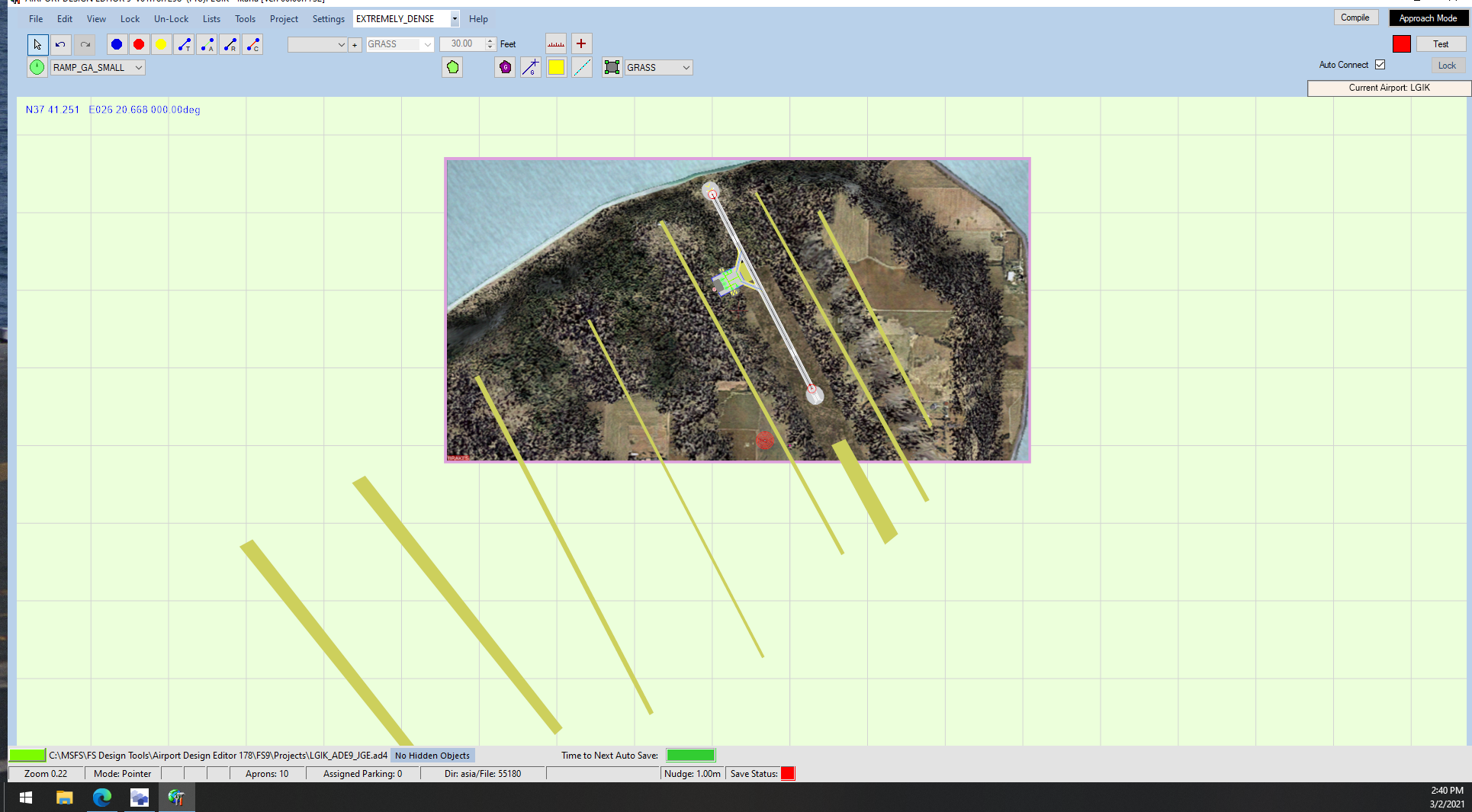
I am having a weird issue where I built LGIK and initially the flattens that I added to change the way the terrain around the airport was worked. I then went to the airport today to add a few new scenery objects and the flattens are gone. I have already tried deleting the airport out of my addon scenery file and recompiling the airport with no luck. Also, I check the File Priority Analyzer to see if there was anything other then the stock airport and items and there is not. I am including a screenshot of the overhead view that I used in ADE. Has anyone ever had this happen?
Thanks in advance for the help.
Jeff
Screenshot (31).png
 
Actually, as a follow-up, All of the airports I have worked on are not showing the flattens that I added. I am really at a loss as to what would cause that. Any help would be appreciated.
Thanks,
Jeff
 
As a further follow-up, I am not sure why the rest of the objects that I have added in ADE to the airports---(Buildings, Exclusions, Approaches, etc.) work just fine. I realize I am not using the flattens as intended, but it is the easiest way for me to fix elevations of a given area with out creating VP's. Also, I checked in FS9 and the Terrain BGL files that ADE creates separate from the airport file is there in the Addon Scenery folder. I would really like to get this figured out, so if anyone know what setting in FS9 might have changed, I would really appreciate the help. I have attached the ad4 file for someone to look at.
Thanks again in advance for all the help,
Jeff
 

Attachments

Last edited:
I am also posting the file I have made of the GANS (TFFA) airport. When you look at the flattens of this file and you compare the stock airport to the one I created, you will see that the flattens are working. I realize it may not be the best terrain solution, but it does work. So I am not sure why many of the other airports have suddenly failed.
Thanks again,
Jeff
Screenshot (32).png
 

Attachments

Hi Jeff:

I have loaded and tested your ADE FS9 projects attached above after having compiled them for output / use in FS9. :scratchch

I also do not see the ADE *TER.bgl SCASM Area 16N flattens displayed at run time in FS9.


I will de-compile those SCASM BGLs, then make LWM2 or LWM3 legacy format vector flattens in SBuilder for FS9, and test them tomorrow.

I'll also attach the resulting SBuilder project *.SBP and *.SBX files along with the compiled *.BGL(s) for your evaluation / use. ;)

GaryGB
 
Last edited:
Hi Jeff:

After challenges getting SBuilder For FS9 and other GIS software working in a new Windows 10 computer, Thursday 'timed out'. :laughing:

Unlike my first test at LGIK, FS9 now displays the ADE *TER.bgl SCASM Area 16N flattens at run time, so I need to test this a bit more. :scratchch

I'll have more to report on Friday. ;)


In the mean time, try using these parameter values in your active FS9.Cfg file located at: :idea:

C:\Users\[ user name ]\AppData\Roaming\Microsoft\FS9\FS9.Cfg

[TERRAIN]
TERRAIN_ERROR_FACTOR=100.000000
TERRAIN_MIN_DEM_AREA=10.000000
TERRAIN_MAX_DEM_AREA=100.000000
TERRAIN_MAX_VERTEX_LEVEL=19
TERRAIN_TEXTURE_SIZE_EXP=8
TERRAIN_AUTOGEN_DENSITY=5
TERRAIN_USE_GRADIENT_MAP=1
TERRAIN_EXTENDED_TEXTURES=1
TERRAIN_DEFAULT_RADIUS=0.000000
TERRAIN_EXTENDED_RADIUS=0.000000
TERRAIN_EXTENDED_LEVELS=0

GaryGB
 
Last edited:
Hi Jeff:

While I am still attempting to get a legacy FS utility up and running under Windows 10, I have yet another inquiry regarding your LGIK scenery.

Pending your reply regarding results of trying the recommended [TERRAIN] parameter values in your active FS9.Cfg file, I may need to load up a copy of the FS9 image you used to ID the location of the ADE *TER.bgl SCASM Area 16N flattens.

Would you be able to ZIP that image and the Geo-referencing info used to add it to ADE, then attach it here, or post a remote download link ?

Was Jim Keir's LWMViewer- or a manually captured / Geo-referenced screenshot of FS9 default land class scenery- ...used to get the image ? :scratchch

GaryGB
 
Hi Gary,

As to the first question - my FS9 Config contains the exact same data points as the one you posted above.

As to the question of where I obtained the data for the terrain flattens, I looked at a topographical map of the area I located on line and then took an educated guess as to placement of the terrain flattens. It has been my experience using this method is a little bit of trial and error since for some reason (I know the answer is out there but I did really look it up) FS9 creates unwanted results if the flattens are to large or small, or you try to raise an area to quickly. The image you see included in my ADE file is the Top Down View from FS9 obtained after I completed adding the flattens so that I could correctly align the scenery objects and such. If you want, you can go to Ikaria, Greece on the Elevation Map. Topographic Map of Ikaria, Greece. and see the basic elevations around the airport. I used this as a guide for creation and let FS9 kinda do the rest. Also, I only worked on the part of the island around the airport. Let me know what you find out, and again.....Thanks very much for all your efforts. I hope that if you can figure this one out, I will be able to apply the fix to the other airports that I am having the same issue with.
Jeff
 
Hi Gary,
I just wanted to follow up with a couple more observations.

First, it appears that of the airports I have worked on, only the one's in the USA, Canada, and Europe are affected by the lack of the terrain flatten working, even though the actual terrain bgl file that ADE creates is in the addon scenery file in FS9. (these airports are KLAM, KSBS, KTEX, 1V9, KSEZ, GE99-not originally in FS9, CYCG, and of course LGIK-which you are already working on. Interestingly however, all the Caribbean airports that I have fixed or added are working correctly.

Secondly, I tried redrawing the flattens in ADE and then recompiling the file. While FS9 acted like it saw new information, nothing actually changed at any of the airports I tried.

I am going out of town for the next few days for work, but would love to know what you find out, and if there is a solution or fix to this problem.
Thanks again for all your help and everyone else who has read these posts.
Jeff
 
Hi Jeff:

I'm on the road today, but will plan to look at this further tomorrow. ;)

After I get both versions of Jim Keir's LWMViewer working under Windows 10, I will make replacement flattens in SBuilder for FS9 (using a precise Geo-referenced background image of the default land class scenery in top-down view from FS9).

These will be made as LWM2 legacy format vector polygons using the same vertex coordinates and altitudes as the Area16N flattens, to see if there is a difference in whether / how the LWM2 flattens are rendered in FS9 at run time ...when compared to the Area16N flattens.

Those LWM2 flattens will be made in compliance with legacy vector object "LOD quad extent clipping" criteria required by FS9 Terrain SDK Quad Grid terrain source data structures. :coffee:

GaryGB
 
Last edited:
Hi Jeff:

I now have both versions of Jim Keir's LWMViewer working under Windows 10, and have made precisely Geo-rectified top-down images added as calibrated background map images in SBuilder For FS9 projects.

I have made "test" replacement LWM-type vector flattens in SBuilder for FS9, which will require comparison with the SCASM-coded Area16N flattens at run time in FS9 using several different terrain mesh quad grid vertex interval resolution settings.

Today, I must perform a NVMe drive data transfer onto a new higher speed model and capacity NVMe to test a new cooling system, for faster MSFS-2020 launches in the future; if all goes well, I can resume the final testing for your project above by sometime tomorrow (Wednesday).

I hope your current travels for work IRL are providing a welcome change of scenery. :cool:

GaryGB
 
Hi Gary,
just got back from my trip. All went well and thanks for your comment.

Just let me know when you find something out. I have never seen this happen before where one region works fine and another does not.

Jeff
 
Hi Jeff:

I finally finished the NVMe drive data transfer and related cooling for all NVMe's, as well as overclocking procedures for DRAMs. ;)

If all goes well, I can resume the final testing for your project above by sometime tomorrow (Friday). :coffee:


GaryGB
 
Hi Jeff:

Here is how your FS9 default land class scenery should look at LGIK using the above cited SCASM flattens you made with ADE:

NOTE: TERRAIN_MAX_VERTEX_LEVEL is aka "TMVL"


TMVL=19

lgik_tmvl_19-jpg.70413


TMVL=20
lgik_tmvl_20-jpg.70414


TMVL=21

lgik_tmvl_21-jpg.70415


Please move your ADE *TER.BGL into a \Scenery sub-folder nested under a top folder named ex: LGIK-Jellis.

Next, please position that sub-folder chain as a new Area layer at the top "Priority 1" position of FS9 Scenery Library GUI.

Then please post screenshots of your results in this thread, using the above specified TMVL settings in FS9.Cfg (saved as a '*.*' Cfg file type).

If needed, I can then compare those SCASM Area16N flatten results with legacy LWM2 type flattens in FS9.

GaryGB
 

Attachments

  • LGIK_TMVL_19.jpg
    LGIK_TMVL_19.jpg
    494.3 KB · Views: 432
  • LGIK_TMVL_20.jpg
    LGIK_TMVL_20.jpg
    494.3 KB · Views: 403
  • LGIK_TMVL_21.jpg
    LGIK_TMVL_21.jpg
    509.9 KB · Views: 416
Last edited:
Hi Gary,
Sorry it took so long to respond. RLGITW...

I did as you requested, except for changing the TMVL setting. Interestingly enough, the scenery now looks like it did before. What is strange though is that all the Caribbean airports I have worked on have not needed me to do this.

Any idea what might be going on? Do I need to do this for all the airports I have fixed/created

One other question, what effect does changing the TMVL setting have? I tried this once before and it cause issues with some of my addons.

Thanks for all your efforts,
Jeff
Screenshot (35).png
Screenshot (36).png
Screenshot (37).png
 
Just as a follow-up. Here is what my FS9 Config reads.

[PANELS]
IMAGE_QUALITY=1
UNITS_OF_MEASURE=0
QUICKTIPS=0
PANEL_MASKING=1
PANEL_STRETCHING=1
[Weather]
WindshieldPrecipitationEffects=1
MinGustTime=10
MaxGustTime=500
MinGustRampSpeed=1
MaxGustRampSpeed=200
MinVarTime=5
MaxVarTime=50
MinVarRampSpeed=10
MaxVarRampSpeed=75
TurbulenceScale=1.000000
DefaultVisibility=0
DynWx_MedianDewPointSpread=10.000000
DynWx_ProbCloudFormForMedianDewPoint=0.000500
DynWx_MaxDewPointSpread=50.000000
DynWx_ProbCloudFormForMaxDewPoint=0.000125
DynWx_ProbCloudFormForMinDewPoint=0.100000
DynWx_DryTempLapsePer1000Meters=9.000000
DynWx_ProbCloudFormForDryTempLapse=0.000500
DynWx_MoistTempLapsePer1000Meters=3.300000
DynWx_ProbCloudFormForMoistTempLapse=0.040000
DynWx_MaxProbCloudChangePerMinute=0.040000
DynWx_MultiplierForDynamicWeatherLevelMild=0.500000
DynWx_MultiplierForDynamicWeatherLevelNormal=1.000000
DynWx_MultiplierForDynamicWeatherLevelHigh=3.000000
DynWx_MultiplierForDynamicWeatherLevelExtreme=10.000000
DynWx_TempChangePercentageForOvercastClouds=0.750000
DynWx_TempChangePercentageForMinDewPoint=0.700000
DynWx_MaxTempChangePerMinute=0.060000
WeatherServerAddress=fs2k.zone.com
WeatherServerPort=80
WeatherGraphDataInDialog=0
DynamicWeather=4
LOADWEATHER=1
MAX_UNLIMITED_VIS=128747
CLOUD_DRAW_DISTANCE=8
3D_CLOUD_PERCENT=100
DETAILED_CLOUDS=1
CLOUD_COVERAGE_DENSITY=8
CloudsImpostorRingRadius=128000.000000
DownloadWindsAloft=0
DisableTurbulence=0
[INTERNATIONAL]
ASLAT=2
ASLON=0
MEASURE=0
[MISC]
COM_RATE=7
LOG_TIME=1
FOREIGN_TRANSLATOR=0
LOG_FILE=LOGBOOK
[STARTUP]
DEMO=0
LOADSIM=1
LOADWINDOW=1
SHOW_OPENING_SCREEN=1
STARTUP_DEMO=
[GRAPHICS]
FULL_SCREEN=0
PERFORMANCE_MODE=0
DEF_PERF_MODE=7
TEXT_SCROLL=0
AUTO_LOD=0
DETAIL_TEXTURE=2
WATER_EFFECTS=1
TERRAIN_USE_VECTOR_MAP=1
TERRAIN_USE_VECTOR_OBJECTS=1
EFFECTS_QUALITY=2
GROUND_SHADOWS=1
SMOOTH_VIEW=1
IMAGE_SMOOTHING=1
TEXTURE_MAX_LOAD=1024
COCKPIT_HIGH_LOD=1
AIRCRAFT_SHADOWS=1
LANDING_LIGHTS=1
IMAGE_QUALITY=0
TEXTURE_BLDG=1
TEXTURE_GND=1
TEXTURE_WATER=1
AIRCRAFT_TEXTURE=2
SEE_SELF=1
TEXTURE_QUALITY=3
LOD_TARGET_FPS=52
NUM_LIGHTS=6
[REALISM]
INDASPD=0
PFactor=1.000000
Torque=1.000000
GyroEffect=1.000000
CrashTolerance=1.000000
General=1.000000
UnlimitedFuel=False
TrueAirspeed=False
AutoCoord=False
RealMixture=True
StressDamage=True
GEffect=True
ManualLights=True
GyroDrift=False
CrashWithDyn=True
CrashDetection=1
[CONTROLS]
KBDAIL=64
KBDELEV=64
KBDRUD=64
PAN_RATE=400
[USERINTERFACE]
MAP_ORIENTATION=0
PAUSE_ON_LOST_FOCUS=1
PROMPT_ON_EXIT=1
PageID=3
OpenATCOnCreate=0
SITUATION=
SelectFlightLevel=0
SelectFlightTitle=0
[SOUND]
SOUND=1
SOUND_FADER1=0.200000
SOUND_FADER2=0.100000
SOUND_FADER3=0.250000
SOUND_FADER4=0.800000
SOUND_FADER5=0.500000
SOUND_FADER6=0.800000
SOUND_QUALITY=2
[DISPLAY.Device.AMD Radeon VII.0]
Mode=1920x1080x32
MipBias=8
AntiAlias=1
TriLinear=1
[DISPLAY]
UPPER_FRAMERATE_LIMIT=75
TEXTURE_BANDWIDTH_MULT=60
[TERRAIN]
TERRAIN_ERROR_FACTOR=100.000000
TERRAIN_MIN_DEM_AREA=10.000000
TERRAIN_MAX_DEM_AREA=100.000000
TERRAIN_MAX_VERTEX_LEVEL=19
TERRAIN_TEXTURE_SIZE_EXP=8
TERRAIN_AUTOGEN_DENSITY=5
TERRAIN_USE_GRADIENT_MAP=1
TERRAIN_EXTENDED_TEXTURES=1
TERRAIN_DEFAULT_RADIUS=0.000000
TERRAIN_EXTENDED_RADIUS=0.000000
TERRAIN_EXTENDED_LEVELS=0
[SCENERY]
IMAGE_COMPLEXITY=5
DYNAMIC_SCENERY=1
DYN_SCN_DENSITY=5
DAWN_DUSK_SMOOTHING=1
SUNGLARE=1
LENSFLARE=1
[AIRtoCONTAINER]
SIM1=Cessna Skylane 182R RG
SIM2=Learjet 45
SIM3=Schweizer 2-32 Sailplane
SIM4=Sopwith Camel
SIM5=Extra 300S
SIM6=Boeing 737-400
[APL]
CACHE_WAV_FILES=1
[TrafficManager]
TrafficDensity=100
IFROnly=0
EnableAirline=1
EnableGeneralAviation=1
[AContain]
ShowLabels=0
ShowUserLabel=0
ShowLabelManufacturer=1
ShowLabelModel=1
ShowLabelTailNumber=0
ShowLabelDistance=1
ShowLabelAltitude=1
ShowLabelAirline=0
ShowLabelAirlineAndFlightNumber=0
ShowLabelFlightPlan=0
ShowLabelContainerId=0
ShowLabelAirspeed=0
ShowLabelHeading=0
LabelDelay=1000
LabelColor=FFFF0000
[SLEW]
MaxLateralRate=40000.000000
MaxVerticalRate=1000.000000
MaxPitchRate=360.000000
MaxBankRate=360.000000
MaxHeadingRate=360.000000
[VirtualCopilot]
VirtualCopilotActive=0
[MULTIPLAYER]
ALWAYS_SHOW_INITIAL_DIALOG=1
SESSION_NAME=My Session
PLAYER_NAME=Unnamed Pilot
GUARANTEED_MESSAGES=0
MAX_PLAYERS=8
MAX_OBSERVERS=0
TICKS_PER_SYNC=90
PACKETS_PER_SEC=4
COLLISION_SECS=2
FOLLOWING_MULTIPLIER=5
ALLOW_PLANE_MODEL_SEND=0
ALLOW_PLANE_MODEL_RECEIVE=0
ALLOW_TEXTURE_SEND=0
ALLOW_TEXTURE_RECEIVE=0
MAX_SEGMENT_SIZE=100
MAX_SEGMENTS_PER_SEC=1
CONNECTION_TYPE=0
PROTOCOL_SELECTION=0
ALLOW_DESCRIPTIVE_SEND=1
ALLOW_DESCRIPTIVE_RECEIVE=1
AUTOPILOT_LOCK=0
DISTANCE_DISPLAY=0
ADF_TRACK=0
ALLOW_NAME_TAG_DISPLAY=1
CLIENT_CONNECT_USE_CUSTOM_PORT=0
CLIENT_CONNECT_PORT=23456
CLIENT_HOST_USE_CUSTOM_PORT=0
CLIENT_HOST_PORT=23456
HOST_CONNECT_USE_CUSTOM_PORT=0
HOST_CONNECT_PORT=23456
[SIM]
SYSCLOCK=1
[ATC]
AutoOpenAirTrafficWindow=0
UsePilotVoice=1
ShowATCText=0
PilotVoice=131073
[MAIN]
Location=632,249,1288,788
HideMenuNormal=0
HideMenuFullscreen=1
Maximized=1
[FACILITIES]
COUNTRY=
STATE=
CITY=
GTL_BUTTON=6225
[FlightPlanMap]
SHOW_AIRPORTS=1
SHOW_VORS=1
SHOW_NDBS=1
SHOW_APPROACHES=1
SHOW_INTERSECTIONS=1
SHOW_VICTOR=0
SHOW_JET=0
SHOW_AIRSPACE=1
SHOW_FLIGHTPLAN=1
SHOW_WEATHERSTATIONS=0
SHOW_WEATHERSYSTEMS=0
SHOW_DATATAGS=1
SHOW_TERRAIN=1
show_waypoints=1
show_airways=1
show_markers=1
show_volume_boundaries=1
show_ac_twr=1
[MAPVIEW_MAP]
SHOW_AIRPORTS=1
SHOW_VORS=1
SHOW_NDBS=1
SHOW_APPROACHES=1
SHOW_INTERSECTIONS=0
SHOW_VICTOR=0
SHOW_JET=0
SHOW_AIRSPACE=1
SHOW_FLIGHTPLAN=1
SHOW_WEATHERSTATIONS=0
SHOW_WEATHERSYSTEMS=0
SHOW_DATATAGS=1
SHOW_TERRAIN=1
show_flight_history=1
[JOYSTICK_MAIN {DF5606E0-5FD2-11EB-8002-444553540000}]
AXIS_EVENT_00=AXIS_AILERONS_SET
AXIS_SCALE_00=92
AXIS_NULL_00=1
AXIS_EVENT_01=AXIS_ELEVATOR_SET
AXIS_SCALE_01=92
AXIS_NULL_01=1
AXIS_EVENT_02=AXIS_THROTTLE1_SET
AXIS_SCALE_02=127
AXIS_NULL_02=1
AXIS_EVENT_03=AXIS_THROTTLE2_SET
AXIS_SCALE_03=127
AXIS_NULL_03=1
AXIS_EVENT_04=AXIS_PROPELLER1_SET
AXIS_SCALE_04=127
AXIS_NULL_04=0
BUTTON_DOWN_REPEAT_00=1
BUTTON_DOWN_EVENT_02=ELEV_TRIM_DN
BUTTON_DOWN_REPEAT_02=1
BUTTON_DOWN_EVENT_03=ELEV_TRIM_UP
BUTTON_DOWN_REPEAT_03=1
BUTTON_DOWN_EVENT_04=AILERON_TRIM_LEFT
BUTTON_DOWN_REPEAT_04=-2
BUTTON_DOWN_EVENT_05=AILERON_TRIM_RIGHT
BUTTON_DOWN_REPEAT_05=1
BUTTON_DOWN_EVENT_06=RUDDER_TRIM_LEFT
BUTTON_DOWN_REPEAT_06=1
BUTTON_DOWN_EVENT_07=RUDDER_TRIM_RIGHT
BUTTON_DOWN_REPEAT_07=1
BUTTON_DOWN_EVENT_08=VIEW_MODE
BUTTON_DOWN_EVENT_09=GEAR_TOGGLE
BUTTON_DOWN_EVENT_14=YAW_DAMPER_TOGGLE
BUTTON_DOWN_EVENT_15=PARKING_BRAKES
BUTTON_DOWN_EVENT_16=TOGGLE_PROPELLER_DEICE
BUTTON_DOWN_EVENT_17=TOGGLE_FLIGHT_DIRECTOR
BUTTON_DOWN_EVENT_18=TOGGLE_STRUCTURAL_DEICE
BUTTON_DOWN_EVENT_19=TOGGLE_PROPELLER_SYNC
BUTTON_DOWN_EVENT_20=DECREASE_THROTTLE
BUTTON_DOWN_REPEAT_20=1
BUTTON_DOWN_EVENT_21=THROTTLE_DECR_SMALL
POV_MOVE_EVENT_00=PAN_VIEW
POV_MOVE_REPEAT_00=1
[JOYSTICK_SLEW {DF5606E0-5FD2-11EB-8002-444553540000}]
AXIS_EVENT_00=AXIS_SLEW_SIDEWAYS_SET
AXIS_SCALE_00=92
AXIS_NULL_00=1
AXIS_EVENT_01=AXIS_SLEW_AHEAD_SET
AXIS_SCALE_01=92
AXIS_NULL_01=1
AXIS_EVENT_03=AXIS_SLEW_HEADING_SET
AXIS_SCALE_03=127
AXIS_NULL_03=1
BUTTON_DOWN_EVENT_00=SLEW_RESET
BUTTON_DOWN_EVENT_01=VIEW_MODE
BUTTON_DOWN_EVENT_02=SLEW_ALTIT_PLUS
BUTTON_DOWN_EVENT_03=SLEW_ALTIT_MINUS
BUTTON_DOWN_EVENT_04=SLEW_PITCH_PLUS
BUTTON_DOWN_EVENT_05=SLEW_PITCH_MINUS
BUTTON_DOWN_EVENT_06=SLEW_BANK_MINUS
BUTTON_DOWN_EVENT_07=SLEW_BANK_PLUS
BUTTON_DOWN_EVENT_08=SLEW_FREEZE
BUTTON_DOWN_EVENT_09=SLEW_RESET
POV_MOVE_EVENT_00=PAN_VIEW
POV_MOVE_REPEAT_00=1
[JOYSTICK_MAIN {DF5606E0-5FD2-11EB-8004-444553540000}]
AXIS_EVENT_00=AXIS_PROPELLER2_SET
AXIS_SCALE_00=127
AXIS_NULL_00=2
AXIS_EVENT_01=AXIS_MIXTURE1_SET
AXIS_SCALE_01=127
AXIS_NULL_01=1
AXIS_EVENT_02=AXIS_MIXTURE2_SET
AXIS_SCALE_02=127
AXIS_NULL_02=1
BUTTON_DOWN_EVENT_00=BRAKES
BUTTON_DOWN_REPEAT_00=1
BUTTON_DOWN_EVENT_01=TOGGLE_AUTOFEATHER_ARM
BUTTON_DOWN_EVENT_02=ELEV_TRIM_DN
BUTTON_DOWN_REPEAT_02=1
BUTTON_DOWN_EVENT_03=ELEV_TRIM_UP
BUTTON_DOWN_REPEAT_03=1
BUTTON_DOWN_EVENT_04=FLAPS_INCR
BUTTON_DOWN_EVENT_05=FLAPS_DECR
BUTTON_DOWN_EVENT_06=KNEEBOARD_VIEW
BUTTON_DOWN_EVENT_07=GEAR_TOGGLE
BUTTON_DOWN_EVENT_08=VIEW_MODE
BUTTON_DOWN_EVENT_09=GEAR_TOGGLE
[JOYSTICK_SLEW {DF5606E0-5FD2-11EB-8004-444553540000}]
AXIS_EVENT_00=AXIS_SLEW_SIDEWAYS_SET
AXIS_SCALE_00=127
AXIS_NULL_00=2
AXIS_EVENT_01=AXIS_SLEW_AHEAD_SET
AXIS_SCALE_01=127
AXIS_NULL_01=1
BUTTON_DOWN_EVENT_00=SLEW_RESET
BUTTON_DOWN_EVENT_01=VIEW_MODE
BUTTON_DOWN_EVENT_02=SLEW_ALTIT_PLUS
BUTTON_DOWN_EVENT_03=SLEW_ALTIT_MINUS
BUTTON_DOWN_EVENT_04=SLEW_PITCH_PLUS
BUTTON_DOWN_EVENT_05=SLEW_PITCH_MINUS
BUTTON_DOWN_EVENT_06=SLEW_BANK_MINUS
BUTTON_DOWN_EVENT_07=SLEW_BANK_PLUS
BUTTON_DOWN_EVENT_08=SLEW_FREEZE
BUTTON_DOWN_EVENT_09=SLEW_RESET
[JOYSTICK_MAIN {DF5606E0-5FD2-11EB-8005-444553540000}]
AXIS_EVENT_00=AXIS_LEFT_BRAKE_SET
AXIS_SCALE_00=-93
AXIS_NULL_00=1
AXIS_EVENT_01=AXIS_RIGHT_BRAKE_SET
AXIS_SCALE_01=-93
AXIS_NULL_01=1
AXIS_EVENT_05=AXIS_RUDDER_SET
AXIS_SCALE_05=93
AXIS_NULL_05=1
BUTTON_DOWN_EVENT_00=BRAKES
BUTTON_DOWN_REPEAT_00=1
BUTTON_DOWN_EVENT_01=VIEW_MODE
BUTTON_DOWN_EVENT_02=ELEV_TRIM_DN
BUTTON_DOWN_REPEAT_02=1
BUTTON_DOWN_EVENT_03=ELEV_TRIM_UP
BUTTON_DOWN_REPEAT_03=1
BUTTON_DOWN_EVENT_04=FLAPS_INCR
BUTTON_DOWN_EVENT_05=FLAPS_DECR
BUTTON_DOWN_EVENT_06=KNEEBOARD_VIEW
BUTTON_DOWN_EVENT_07=GEAR_TOGGLE
BUTTON_DOWN_EVENT_08=VIEW_MODE
BUTTON_DOWN_EVENT_09=GEAR_TOGGLE
[JOYSTICK_SLEW {DF5606E0-5FD2-11EB-8005-444553540000}]
AXIS_EVENT_00=AXIS_SLEW_SIDEWAYS_SET
AXIS_SCALE_00=-93
AXIS_NULL_00=1
AXIS_EVENT_01=AXIS_SLEW_AHEAD_SET
AXIS_SCALE_01=-93
AXIS_NULL_01=1
AXIS_EVENT_05=AXIS_SLEW_HEADING_SET
AXIS_SCALE_05=93
AXIS_NULL_05=1
BUTTON_DOWN_EVENT_00=SLEW_RESET
BUTTON_DOWN_EVENT_01=VIEW_MODE
BUTTON_DOWN_EVENT_02=SLEW_ALTIT_PLUS
BUTTON_DOWN_EVENT_03=SLEW_ALTIT_MINUS
BUTTON_DOWN_EVENT_04=SLEW_PITCH_PLUS
BUTTON_DOWN_EVENT_05=SLEW_PITCH_MINUS
BUTTON_DOWN_EVENT_06=SLEW_BANK_MINUS
BUTTON_DOWN_EVENT_07=SLEW_BANK_PLUS
BUTTON_DOWN_EVENT_08=SLEW_FREEZE
BUTTON_DOWN_EVENT_09=SLEW_RESET
[KEYBOARD_MAIN]
SELECT_1=49,8
SELECT_2=50,8
SELECT_3=51,8
SELECT_4=52,8
MINUS=189,8
PLUS=187,8
ZOOM_1X=8,8
SOUND_TOGGLE=81,8
ENGINE=69,8
SIM_RATE=82,8
XPNDR=84,8
SLEW_TOGGLE=89,8
EGT=85,8
SMOKE_TOGGLE=73,8
STROBES_TOGGLE=79,8
PAUSE_TOGGLE=80,8
ATC=192,8
ADF=65,8
VIEW_MODE=83,8
DME=70,8
ANTI_ICE_TOGGLE=72,8
JET_STARTER=74,8
JOYSTICK_CALIBRATE=75,10
SITUATION_SAVE=186,8
VIEW_WINDOW_TO_FRONT=222,8
FREQUENCY_SWAP=88,8
COM_RADIO=67,8
VOR_OBS=86,8
NAV_RADIO=78,8
MAGNETO=77,8
SPOILERS_TOGGLE=191,8
SITUATION_RESET=186,10
VIEW=111,8
ELEV_TRIM_DN=36,8
ELEV_DOWN=38,8
ELEV_TRIM_UP=35,8
ELEV_UP=40,8
VIEW_FORWARD=38,41
VIEW_FORWARD_RIGHT=33,41
VIEW_RIGHT=39,41
VIEW_REAR_RIGHT=34,41
VIEW_REAR=40,41
VIEW_REAR_LEFT=35,41
VIEW_LEFT=37,41
VIEW_FORWARD_LEFT=36,41
VIEW_DOWN=12,41
EXIT=67,10
ABORT=3,10
READOUTS_FLIGHT=90,9
PANEL_TOGGLE=219,9
VIEW_MODE_REV=83,9
PANEL_LIGHTS_TOGGLE=76,9
LANDING_LIGHTS_TOGGLE=76,10
MINUS_SHIFT=189,9
PLUS_SHIFT=187,9
PROP_PITCH_LO=115,10
PROP_PITCH_INCR_SMALL=114,10
PROP_PITCH_DECR=113,10
PROP_PITCH_HI=112,10
SCRIPT_EVENT_1=219,10
SCRIPT_EVENT_2=221,10
CENTER_NT361_CHECK=57,11
CLOSE_VIEW=221,8
NEW_VIEW=219,8
NEW_MAP=221,9
NEXT_VIEW=9,10
PREV_VIEW=9,11
VIEW_TYPE=83,10
VIEW_TYPE_REV=83,11
RADIO_VOR1_IDENT_TOGGLE=49,10
RADIO_VOR2_IDENT_TOGGLE=50,10
RADIO_DME1_IDENT_TOGGLE=52,10
RADIO_ADF_IDENT_TOGGLE=53,10
GEAR_PUMP=71,10
LANDING_LIGHT_UP=38,11
LANDING_LIGHT_DOWN=40,11
LANDING_LIGHT_LEFT=37,11
LANDING_LIGHT_RIGHT=39,11
LANDING_LIGHT_HOME=12,11
PAN_RESET=46,9
KNEEBOARD_VIEW=121,8
MP_PLAYER_CYCLE=84,11
MP_PLAYER_SNAP=70,11
MP_GO_OBSERVER=79,11
MP_CHAT=221,11
MP_ACTIVATE_CHAT=13,8
PANEL_1=49,9
PANEL_2=50,9
PANEL_3=51,9
PANEL_4=52,9
PANEL_5=53,9
PANEL_6=54,9
PANEL_7=55,9
PANEL_8=56,9
PANEL_9=57,9
AP_MACH_HOLD=77,10
VIEW_FORWARD_UP=38,42
VIEW_FORWARD_RIGHT_UP=33,42
VIEW_REAR_RIGHT_UP=34,42
VIEW_REAR_UP=40,42
VIEW_REAR_LEFT_UP=35,42
VIEW_FORWARD_LEFT_UP=36,42
VIEW_UP=12,42
INVOKE_HELP=191,10
TOGGLE_AIRCRAFT_LABELS=76,11
ENGINE_AUTO_START=69,10
INC_COWL_FLAPS=86,11
DEC_COWL_FLAPS=67,11
USER_INTERRUPT=27,8
TOGGLE_AFTERBURNER=115,9
TOGGLE_MASTER_BATTERY_ALTERNATOR=77,9
TOGGLE_AIRCRAFT_EXIT=69,9
PANEL_HUD_TOGGLE=87,8
SNAP_TO_PANEL=45,41
MARKER_SOUND_TOGGLE=51,10
TOGGLE_WATER_RUDDER=87,9
TOGGLE_PUSHBACK=80,9
KEY_CHASE_VIEW_NEXT=87,10
KEY_CHASE_VIEW_PREV=87,11
CHASE_VIEW_TOGGLE=81,10
EYEPOINT_UP=13,9
EYEPOINT_DOWN=8,9
EYEPOINT_RIGHT=13,11
EYEPOINT_LEFT=8,11
EYEPOINT_FORWARD=8,10
EYEPOINT_BACK=13,10
EYEPOINT_RESET=32,8
AIRSPEED_BUG_SELECT=82,11
TOGGLE_TAILWHEEL_LOCK=71,9
ROTOR_BRAKE=66,9
ROTOR_CLUTCH_SWITCH_TOGGLE=190,9
ROTOR_GOV_SWITCH_TOGGLE=188,9
VIRTUAL_COPILOT_TOGGLE=88,11
VIRTUAL_COPILOT_ACTION=88,10
[KEYBOARD_SLEW]
SLEW_TOGGLE=89,8
SLEW_ALTIT_UP_FAST=115,8
SLEW_ALTIT_UP_SLOW=114,8
SLEW_ALTIT_FREEZE=113,8
SLEW_ALTIT_DN_FAST=112,8
SLEW_ALTIT_PLUS=81,8
SLEW_ALTIT_MINUS=65,8
SLEW_PITCH_DN_FAST=119,8
SLEW_PITCH_DN_SLOW=118,8
SLEW_PITCH_FREEZE=117,8
SLEW_PITCH_UP_FAST=116,8
SLEW_PITCH_PLUS=57,8
SLEW_PITCH_MINUS=48,8
READOUTS_SLEW=90,9
SLEW_BANK_MINUS=36,8
SLEW_AHEAD_PLUS=38,8
SLEW_BANK_PLUS=33,8
SLEW_LEFT=37,8
SLEW_FREEZE=12,8
SLEW_RIGHT=39,8
SLEW_HEADING_MINUS=35,8
SLEW_AHEAD_MINUS=40,8
SLEW_HEADING_PLUS=34,8
SLEW_RESET=32,8
TOGGLE_AIRCRAFT_LABELS=76,11
EYEPOINT_UP=13,9
EYEPOINT_DOWN=8,9
EYEPOINT_RIGHT=13,11
EYEPOINT_LEFT=8,11
EYEPOINT_FORWARD=8,10
EYEPOINT_BACK=13,10


Thanks again,
Jeff
 
Hi Gary,

One further test I just did was to go back into the Priority List and move the LGIK-Jellis file down in the list to just above my Ultimate Terrain addons.
The result was that the airport still worked correctly.

Please let me know if this is what you expected.

Thanks,
Jeff
 
Hi Gary,
Sorry for all the updates but I wanted to let you know that just fixing that one flatten in the way you asked, except for the TMVL change has restored all the airports I have worked on. Very Strange indeed.
Please let me know if you expected this to happen.
Thanks again for all your support and efforts.
Jeff
 
Hi Gary,
Sorry it took so long to respond. RLGITW...

I did as you requested, except for changing the TMVL setting. Interestingly enough, the scenery now looks like it did before. What is strange though is that all the Caribbean airports I have worked on have not needed me to do this.

Any idea what might be going on? Do I need to do this for all the airports I have fixed/created

Hi Jeff:

I was on the road all day yesterday until rather late, and now have a moment to reply.

I considered the possibility that you may have incurred a conflict between 1 or more add-on scenery packages, and the custom scenery you had made, so when I read that your scenery had been loaded from [FS9 install path]\Addon Scenery\Scenery sub-folder, I knew it was likely that your scenery was loaded from a 'lower' priority Area layer in FS9 Scenery Library (...typically [Area.038] in a default FS9 installation). :scratchch


FYI: Ultimate Terrain add-ons for FS9 use numerous custom data sets compiled from SCASM / ASM (and other) FS2Kx SDK source code

Since there can be many permutations of interaction between FS9 default scenery and such 3rd party add-on packages as Ultimate Terrain with the additional variables imposed by ones own custom scenery, it would be rather challenging and time consuming to identify specific causes of terrain rendering anomalies between differing regions of the FS world.

In many cases, such anomalies may be resolved by positioning sub-folder chains for 3rd party add-on packages and/or ones own custom scenery as new Area layers at/near the top "Priority 1" position of FS9 Scenery Library GUI ...above default scenery in lower Area layers.

And, if a basic rule of "Exclude and Replace" is used in FS scenery creation, one may incur less- or even 'no'- terrain anomalies at run time.

This is the approach used by Allen (Richard ?) Kreisman of Scenery Solutions for the Ultimate Terrain add-on packages (sold by Flight1).

It may interest you to know that although FS2Kx and FSX versions of default scenery for Greece had major issues with terrain anomalies, IIUC, due to problems with available data sets for that area in the early 2000's, Ultimate Terrain Europe for FS9 did not seek to fix that specific FS scenery area at that time:


As developers, we can also fix such terrain anomalies in FS9 by using SBuilder for FS9 and "appending" default legacy format Terrain vector BGLs etc., although that may require some learning.

But again, one may be able to avoid anomalies by always creating a new Area layer at/near the top "Priority 1" position of FS9 Scenery Library GUI ...above 3rd party add-on packages and/or default scenery ...in lower Area layers.


CAVEAT: Be aware that every time the Ultimate Terrain Configuration GUI is run and the scenery which it loads is committed to "Active" mode, Ultimate Terrain Area layers will be forcibly moved to the top "Priority 1" position of FS9 Scenery Library GUI ...above 3rd party add-on packages and/or default scenery ...in lower Area layers.


BTW: In FSX and later, OrbX FTX Central offered an "Insertion Point" feature that allowed one to keep all OrbX scenery positioned below an assigned Priority number in the FS Scenery Library GUI stack of layers; I am not aware of any such feature or utility available for use in FS9.

So you must manually move ex: all Ultimate Terrain Area layers to a position in the FS9 Scenery Library GUI above 3rd party add-on packages and/or default scenery in lower Area layers ...but below Area layers for any custom scenery you have made.


NOTE: There are also a few other add-ons which use a configuration utility that also causes Area layers to be forcibly moved to the top "Priority 1" position of FS9 Scenery Library GUI ...above 3rd party add-on packages and/or default scenery ...in lower Area layers.

So, again, with such add-ons installed, after running their configuration utilities, you must manually move Area layers for those add-ons to a position in the FS9 Scenery Library GUI above default scenery in lower Area layers ...but below Area layers for Ultimate Terrain and custom scenery you have made.

Note also, that you must maintain the original 'installed' order of any group of Area layers for such add-ons if / when they are moved within FS9 Scenery Library GUI.

One other question, what effect does changing the TMVL setting have? I tried this once before and it cause issues with some of my addons.

Thanks for all your efforts,
Jeff

TERRAIN_MAX_VERTEX_LEVEL (aka "TMVL") allows a greater density of elevation data points to be displayed at smaller intervals of meters apart on the ground relative to the increased number of available Quad Mesh Area Point vertices within the FS terrain mesh quad grid.

Thus, as greater precision in rendering of data points in source data is made possible, so is rendering of im-precision in source data doints, and as such, when less accurate source data was used to make FS scenery, anomalies may appear at higher TMVL that are not rendered at lower TMVL settings.


For additional detailed info regarding the FS2Kx / FSX / P3D terrain quad mesh grid and related resolution / display parameter values, see:

https://www.fsdeveloper.com/forum/threads/flattens.425495/post-633002


Hi Gary,
Sorry for all the updates but I wanted to let you know that just fixing that one flatten in the way you asked, except for the TMVL change has restored all the airports I have worked on. Very Strange indeed.

Please let me know if you expected this to happen.

Thanks again for all your support and efforts.
Jeff

As explained above, sorting through the many permutations and interactions between the FS9 default, 3rd party add-ons, and your own custom scenery can be so challenging and time consuming to identify specific causes of terrain rendering anomalies between differing regions of the FS world, as to be impractical.

I would recommend for now, to implement a work-flow that loads all of your own custom scenery from a custom nested sub-folder chain created / added as a new Area layer at/near the top of FS9 scenery library (...and to NOT load from [FS9 install path]\Addon Scenery\Scenery sub-folder).

IMHO, [FS9 install path]\Addon Scenery\Scenery sub-folder is best reserved for use as a temporary test load location, or for 'certain' scenery fix BGLs. :tapedshut

Also, always check / edit Area layer positioning of your own custom scenery after installing / configuring any 3rd party add-ons that may have ended up being put into a higher priority layer in the scenery stack of the FS9 scenery library. :alert:

I'll post some more info related to this later (today ?) as time allows. ;)

GaryGB
 
Last edited:
Back
Top