• Which the release of FS2020 we see an explosition of activity on the forun and of course we are very happy to see this. But having all questions about FS2020 in one forum becomes a bit messy. So therefore we would like to ask you all to use the following guidelines when posting your questions:

    • Tag FS2020 specific questions with the MSFS2020 tag.
    • Questions about making 3D assets can be posted in the 3D asset design forum. Either post them in the subforum of the modelling tool you use or in the general forum if they are general.
    • Questions about aircraft design can be posted in the Aircraft design forum
    • Questions about airport design can be posted in the FS2020 airport design forum. Once airport development tools have been updated for FS2020 you can post tool speciifc questions in the subforums of those tools as well of course.
    • Questions about terrain design can be posted in the FS2020 terrain design forum.
    • Questions about SimConnect can be posted in the SimConnect forum.

    Any other question that is not specific to an aspect of development or tool can be posted in the General chat forum.

    By following these guidelines we make sure that the forums remain easy to read for everybody and also that the right people can find your post to answer it.

FS2004 Flatten not working at LGIK Ikaria

Hi Gary,
Like you, my real life gets in the way sometimes.

I would like to address your replies in order.
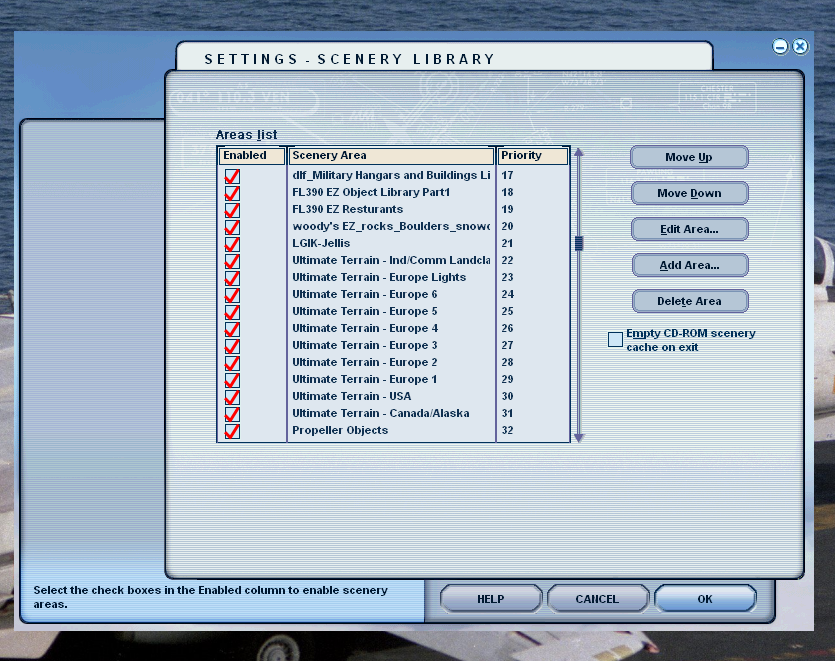
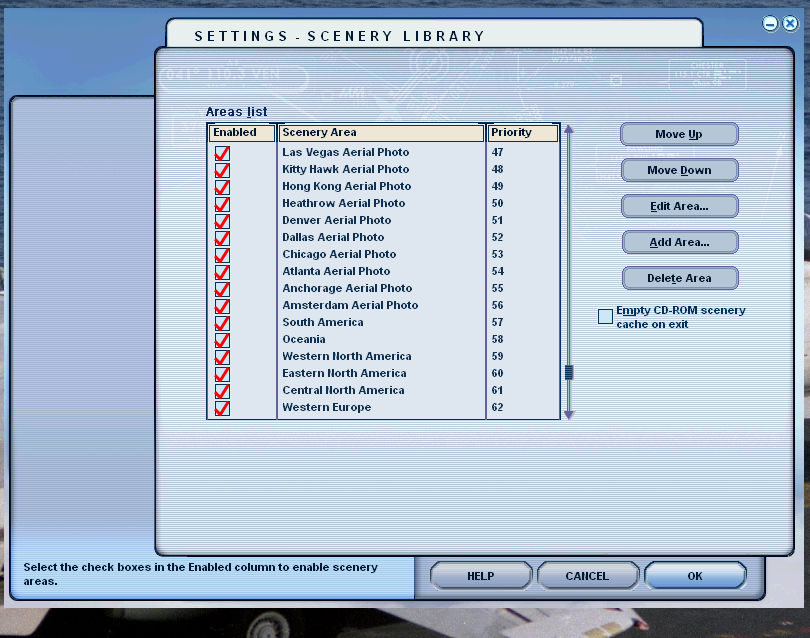
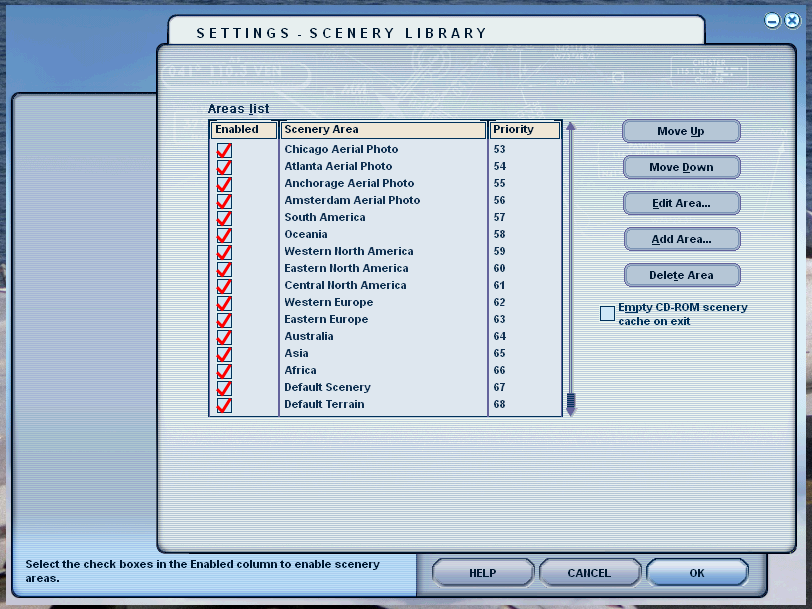
  1. As to the priority order of the scenery files, I have always made sure that the addon scenery is at the top of the list, and that all of the other addons are above Ultimate Terrain and Ultimate Traffic. Those as you will see from the screenshots below I ensure are above any standard files in FS9. When I first install FS9, I don't load any additional addons until I get UTerrain and UTraffic loaded and check that everything is working correctly. That is way I am so puzzled as to what caused this issue and why it only affected some areas. (See the Attached Screenshots at the end of the post.)
  2. As to the TMVL settings, Thanks for the clarification on what it does, but I tried changing that number before, and for some reason, some of my addons then had deep valleys (Holes) in the scenery. I can't be sure why that would be the case since it should give you more resolution, not less. If after looking at my file list below you have any ideas, I am ALL EARS!!!!
  3. In response to your last explanation of the work flow order, you will see from my Priority Order below that I always insure that the Addon Scenery and then the 3rd party scenery is above UT's addons, and I have never reran the set-up's of the UT files once they are installed. (Always installed before beginning the rebuilding process of FS9). I am just confused as to whether or not I need or should need to leave the ADE Terrain BGL file (only file in the LGIK-Jellis folder) in the LGIK-Jellis folder active or if it should be able to be removed and the Terrain file returned to its original location of Addon Scenery\Scenery? (This is of course the default location for ADE complied files.) I have never had to create a subfolder for any airports I have worked on in the past, and always make sure to run the File Priority Analyzer to insure that only the Stock and then the edited airport are listed as active.
Please let me know what I am missing, doing wrong, or don't understand correctly.

As I did state before, thanks to you, just placing the LGIK Terrain BGL in a separate sub folder and activating it has fixed the issue for now. ( So it seems anyway)

THANKS!!!!!! again for all your time and efforts helping someone who is using old programs.
Jeff

Screenshot (40).png
Screenshot (41).png
Screenshot (42).png
Screenshot (43).png
Screenshot (44).png
 
Hi Jeff:

IMHO, you should to leave the ADE *.TER (SCASM Area16N 'Terrain' Flatten BGL file) in the recently created new LGIK-Jellis folder, and not return it to your 'original location within [FS9 install path]\Addon Scenery\Scenery.


While it is true that the [FS9 install path]\Addon Scenery\Scenery sub-folder is 'empty' in a fresh install of FS9, and theoretically its Area layer can be moved and used at the top layer / priority position of the FS9 Scenery Library GUI, I recommend the procedure I described above, which places each add-on scenery in its own new Area layer, and keeps all FS default Area layers in their original positions as when FS9 was installed.


Normally one need not place a ADE *.TER (SCASM Area16N 'Terrain' Flatten BGL file in the [FS9 install path]\Scenery\World\Scenery sub-folder.


One cannot predict how precise the source data was for FS default and 3rd party scenery, so YMMV with a higher TMVL; if you are satisfied with how your FS9 scenery looks at run time using a TMVL parameter value of 19, it is OK to keep it at that setting. :)

GaryGB
 
Last edited:
Hi Gary,

Thanks again for your efforts and help. I will just leave ADE terrain flatten in the LGIK-Jellis folder active.

Just one final question.... Is it better to create a file folder for each airport I work on and in that folder put all the ADE files created? Or should I continue doing as I have always done and let ADE simply add the files to the Addon Scenery\Scenery sub-folder?

Thanks again,
Jeff
 
Just one final question.... Is it better to create a file folder for each airport I work on and in that folder put all the ADE files created?

Or should I continue doing as I have always done and let ADE simply add the files to the Addon Scenery\Scenery sub-folder?

Thanks again,
Jeff

IMHO, it is better to create a sub-folder chain for each airport project you work on, and put all ADE 'output' files created into that \Scenery sub-folder ex:

[ADE 178 install path]\FS9\Projects\LGIK_ADE9_JGE\Scenery


After creating a new sub-folder chain for your LGIK project, this is how I set up ADE v1.78 paths via: ADE Menu > Settings > Options

lgik_ade9_jge_project_paths-jpg.70588


GaryGB
 

Attachments

  • LGIK_ADE9_JGE_Project_Paths.jpg
    LGIK_ADE9_JGE_Project_Paths.jpg
    76 KB · Views: 323
Last edited:
Back
Top