• Which the release of FS2020 we see an explosition of activity on the forun and of course we are very happy to see this. But having all questions about FS2020 in one forum becomes a bit messy. So therefore we would like to ask you all to use the following guidelines when posting your questions:

    • Tag FS2020 specific questions with the MSFS2020 tag.
    • Questions about making 3D assets can be posted in the 3D asset design forum. Either post them in the subforum of the modelling tool you use or in the general forum if they are general.
    • Questions about aircraft design can be posted in the Aircraft design forum
    • Questions about airport design can be posted in the FS2020 airport design forum. Once airport development tools have been updated for FS2020 you can post tool speciifc questions in the subforums of those tools as well of course.
    • Questions about terrain design can be posted in the FS2020 terrain design forum.
    • Questions about SimConnect can be posted in the SimConnect forum.

    Any other question that is not specific to an aspect of development or tool can be posted in the General chat forum.

    By following these guidelines we make sure that the forums remain easy to read for everybody and also that the right people can find your post to answer it.

FS2004 FS2004 supplements for skinned objects?

arwasairl

Resource contributor
Messages
33
Country
southkorea
Hi all,

In the quest to making @FSMuseum 747 project with all original assets (instead of copying directly from CLS or POSKY models) I am in a bit of a bind when it comes to the variable camber slats on the 747.

FS9 does not support skinned objects like FSX+ does, so while it is technically simpler to make these slats, there are very visible seam lines in the shader (almost like setting zero smoothing groups) between each break in the slat caused by the fact that the normals of each vertex within each break is in different directions, which doesn't make it appear very smooth. I inspected PMDG's FS9 747 model and their slat appears to be very smooth, despite it also being variable camber and it having multiple individually modelled objects as well, similar to mine.
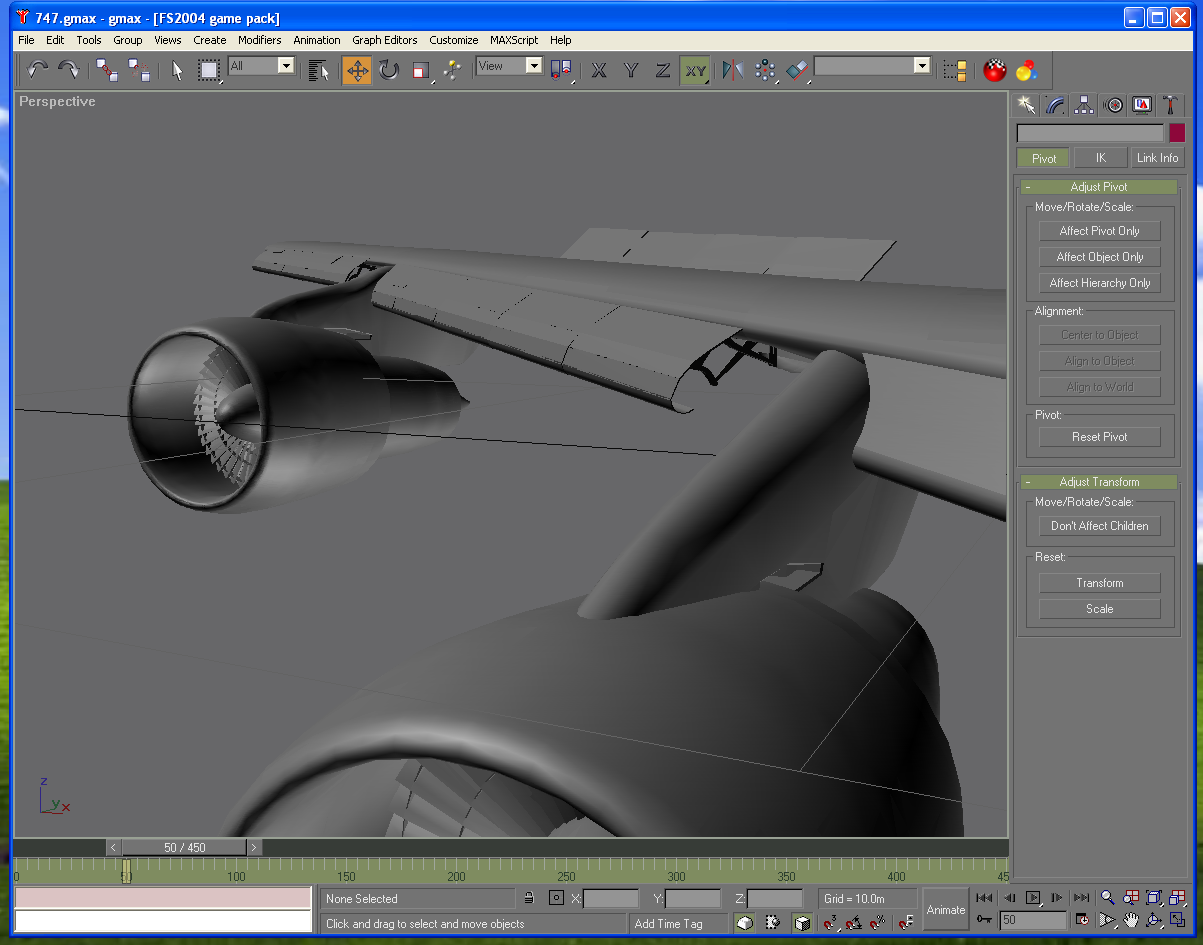
1767812882324.png


(Ignore those black(ish) lines between each break, they are just GMax's anti-aliasing failing me here, in reality the verticies are overlapping eachother to prevent visible clipping or gaps in the slat)
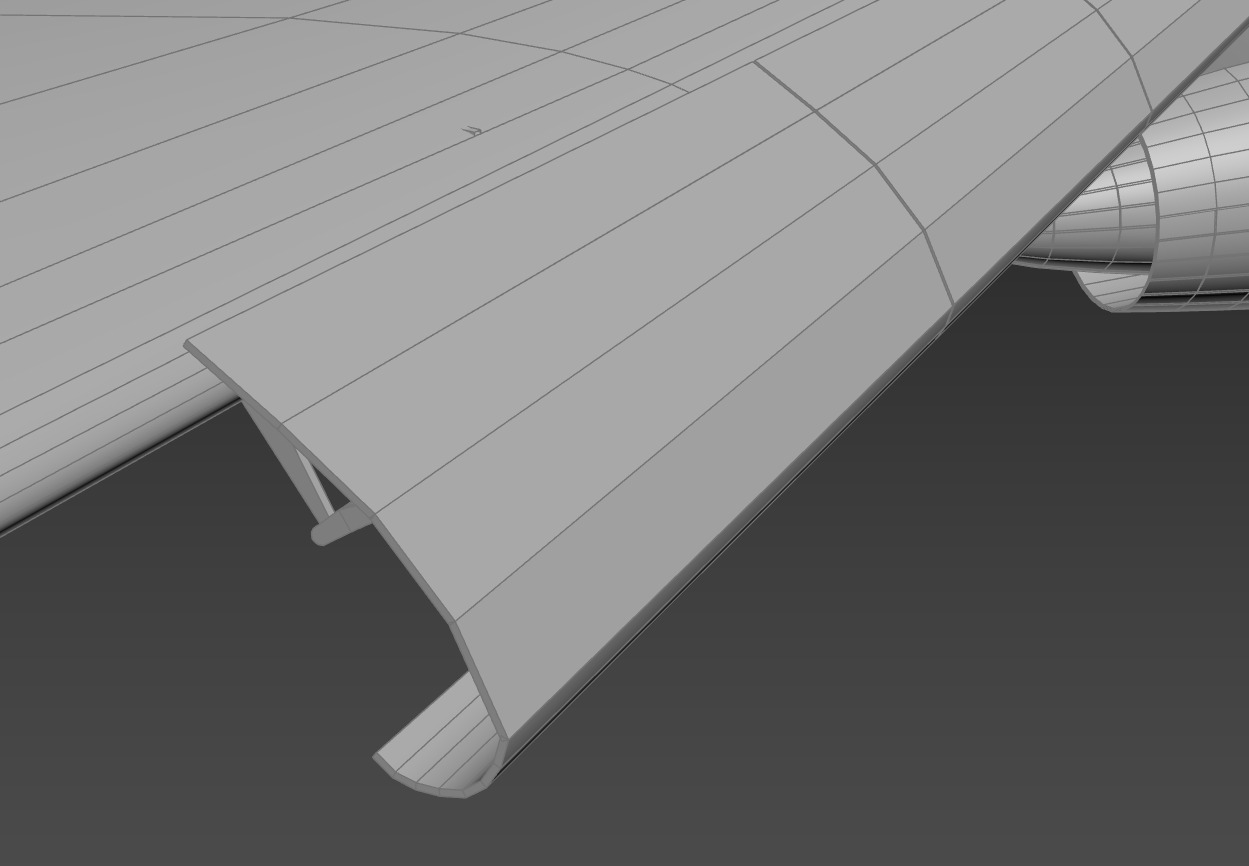
1767813026447.png

(3dsmax screenshot for reference, note that the edge view mode makes it harder to see, but the shading problems exist in 3dsmax as well)

I am aware there are other ways to "solve" this, like setting explicit normals, but this causes the slat to have bad shading when folded up, and it is unclear if FS2004 even supports explicit normals (I have not seen any evidence that it does or does not support it, mainly because it is so hard to tell with how primitive the FS9 rendering engine is).

I'm wondering how other FS9 modelers (however small they may be) tackle this issue.
 
Last edited:
Are all polygons of the flap connected together (front, back, and edges)? Smoothing works better when using enclosed shapes. To get sharp edges use smoothing groups.
 
Are all polygons of the flap connected together (front, back, and edges)? Smoothing works better when using enclosed shapes. To get sharp edges use smoothing groups.
They are not connected because they need to bend. The slats go from straight to bent on the 747 when extended, and FS9 does not support object deformations so the only way to bend it is to split the object up into pieces, and individually rotate them. At least from what I've seen, this is what POSKY and PMDG models did for FS9, except their results tended to have smoother results despite being separated objects (smoothing groups don't matter here because the normals will not averaged due to being separate pieces)
 
POSKY model doesn't bend .
Instead of try bending the VC flap , decided was make a curved surface from the 1st and fit at both VC's extended flap curve and wings bottom surface.
It's not a correct way but was a choice to do it on FS2004.
Also why did this way is how Human understand shape.
Human can't really see a small surface difference in same surface line.
So even the shape is a bit off .. at this case when stored .. doesn't look bad.
And looks so so when VC flap is extended.

Since doing at FS2004 You can't use skin animation.
So the way you can have a choice is
1. Accept the cut lines on the VC flap surface
2. Make several flap parts and switch during animation.
(Payware Aerosim used that way but just switched once.)
3.Accept the shape not really correct but looks so so well.
Anyway human can't see exact shape when moving.

Note: Just from a old creator.
I think you need to think about the total number of vertex use when making a FS2004 plane.
747 is huge and there is a parts like VC flap's mechanical parts which uses a lot of polygons means vertex too.
Managing a resource is very important factor on FS2004 when using standard SDK.
Can only use 65535 vertex.
So always needs to mind those , test export and check how much is left.
 

Attachments

  • Image3.jpg
    Image3.jpg
    174.1 KB · Views: 58
Last edited:
POSKY model doesn't bend .
It's from the limitaion of the FS2004.
You can't use skin animation.
So the way you can have a choice is accept the cut lines on the VC flap surface or make several flap parts and switch during animation.
(Payware Aerosim used that way but just switched once.)

But before that , I think you need to think about the total number of vertex use when making a FS2004 plane.
747 is huge and there is a parts like VC flap's mechanical parts which uses a lot of polygons means vertex too.
Managing a resource is very important factor on FS2004 when using standard SDK.
Can only use 65535 vertex.
I am using the ULE export method which allows over 65k verts as I export separate objects in batches that are under 65k, then recombine them. I believe it is what iFly uses as their 747 is way over the limit as well, and I dont intend on this running on some 2GHz Pentium system. With this, I am able to export the object to the sim without much problems.
1000006560.png


As for the switching, it is a possibility, as I recall older X-Plane addons also did the same, and I had forgotten about that method until you mentioned it. I was under the impression the POSKY bends but I guess not.
 
Okay then , that should work , but still keep in mind , there is one more limit .
The limit of BGL's call32
Can call data less then 32bit range.
I hit that when I made A350.
 
Okay then , that should work , but still keep in mind , there is one more limit .
The limit of BGL's call32
Can call data less then 32bit range.
I hit that when I made A350.
I estimate the total vertex amount to be around 150,000 vertices, so hopefully it will be OK.

Thank you for the help m(_ _)m
 
Just for a info .
About the limit by BGL_CALL_32


Image1.png


===============EXAMPLE SOURCE =======================

model_outside label BGLCODE
IFSIZEV LOD_0, 550,1000 ; lod = 100.000000
IFSIZEV LOD_1, 550,1000 ; lod = 100.000000

LOD_0 label BGLCODE
BGL_CALL_32 LOD_0L
LOD_1 label BGLCODE
BGL_CALL_32 LOD_1L

BGL_RETURN
model_inside label BGLCODE
BGL_RETURN
model_shadow label BGLCODE
IFSIZEV SHADOW_0, 550,1000 ; lod = 100.000000
IFSIZEV SHADOW_1, 550,1000 ; lod = 100.000000

SHADOW_0 label BGLCODE
BGL_CALL_32 LOD_0L
SHADOW_1 label BGLCODE
BGL_CALL_32 LOD_1L

LOD_0L label BGLCODE
include TDS_A320NEO_BODY_0.asm
LOD_1L label BGLCODE
include TDS_A320NEO_BODY_1.asm
 
Last edited:
Just for a info .
About the limit by BGL_CALL_32
Thank you for the info. I'm new to this method (and new to FS9 in general, I started in FSX).
When you say 32bit limit, is this a file size limit which adds all the asm files when they are included (4096MB)? Or is it an integer limit of the actual data (4,294,967,295)?
 
From my understanding it's data range.
Not sure if it includes sign bit or not (I'm feeling should)

My A350-1000 model's file size is 8043KB ( 4including sections ... 2 common between exterior and interior to make small)
 
Another way been thinking was ... making a call relay section between including sections
I haven't done that but may work.
Expected thing is performance will be a bit less but I feel won't be serious.
 
Last edited:
Also if you know
1 vertex includes Position data (X,Y,Z) , Reflection direction (X,Y,Z)) , Position on texture (X,Y) on percentage
If all those are same , several polygins will use same vertex data .
Can mange to save more number of vertex less on data.
 
Back
Top