
-
Which the release of FS2020 we see an explosition of activity on the forun and of course we are very happy to see this. But having all questions about FS2020 in one forum becomes a bit messy. So therefore we would like to ask you all to use the following guidelines when posting your questions:
- Tag FS2020 specific questions with the MSFS2020 tag.
- Questions about making 3D assets can be posted in the 3D asset design forum. Either post them in the subforum of the modelling tool you use or in the general forum if they are general.
- Questions about aircraft design can be posted in the Aircraft design forum
- Questions about airport design can be posted in the FS2020 airport design forum. Once airport development tools have been updated for FS2020 you can post tool speciifc questions in the subforums of those tools as well of course.
- Questions about terrain design can be posted in the FS2020 terrain design forum.
- Questions about SimConnect can be posted in the SimConnect forum.
Any other question that is not specific to an aspect of development or tool can be posted in the General chat forum.
By following these guidelines we make sure that the forums remain easy to read for everybody and also that the right people can find your post to answer it.
You are using an out of date browser. It may not display this or other websites correctly.
You should upgrade or use an alternative browser.
You should upgrade or use an alternative browser.
MSFS20 glTF support for ModelConverterX
- Thread starter arno
- Start date
- Status
- Not open for further replies.

- Messages
- 254
- Country

Have you got the correct version of .Net? You need .NET 4.7.2 or later. Also you’ll be prompted to download the current version of the Visual C++ runtimes.My latest version crashes with an Net Framework system out of memory error. I check on ORBX LOWI modelLib.BGL. There are three scenes. The first one loads without errors, the second (simple) with errors, the third (terminal) already loses textures and displays a bunch of errors about the failed to load textures. This was not the case in the previous release.
Do not think that someone is stupider than you. I have everything installed.Have you got the correct version of .Net? You need .NET 4.7.2 or later. Also you’ll be prompted to download the current version of the Visual C++ runtimes.
I tried to find something similar with the default files, but I still don't understand from which folder they are taking the texture. There is simply no folder specified in the config. It's easier for me to send you a faulty file in a PMDo you also have issues with some default MSFS files? Then I can try to reproduce.
- Messages
- 254
- Country
Do not think that someone is stupider than you. I have everything installed.
I tried to find something similar with the default files, but I still don't understand from which folder they are taking the texture. There is simply no folder specified in the config. It's easier for me to send you a faulty file in a PM
Don’t think there’s any need for that response.

- Messages
- 34,317
- Country

I just found out that by changing the target .NET framework ModelConverterX also ran as a 32 bit instead of a 64 bit process. So that might explain the out of memory errors. In the next development release it will run as 64 bit again.
This seems to explain everything, since the latest version required installing a 32-bit package Visual C++ runtimes.I just found out that by changing the target .NET framework ModelConverterX also ran as a 32 bit instead of a 64 bit process. So that might explain the out of memory errors. In the next development release it will run as 64 bit again.
Last edited:

Thanks to ModelConverterX, I put to FSX/P3D thousands of my own buildings. Yesterday I put my first building to MSFS, but first i had to manually rotate 180° each piece of the DDS texture. Additionally, textures had to be completely separate, this tip doesn't work for multitexture. It would help a lot if the textures were ready at once. Is there any chance that parallely to gltf, modelconverter x exports a set of MSFS-compatible textures?

- Messages
- 12,244
- Country

It can.Is there any chance that parallely to gltf, modelconverter x exports a set of MSFS-compatible textures?

- Messages
- 216
- Country
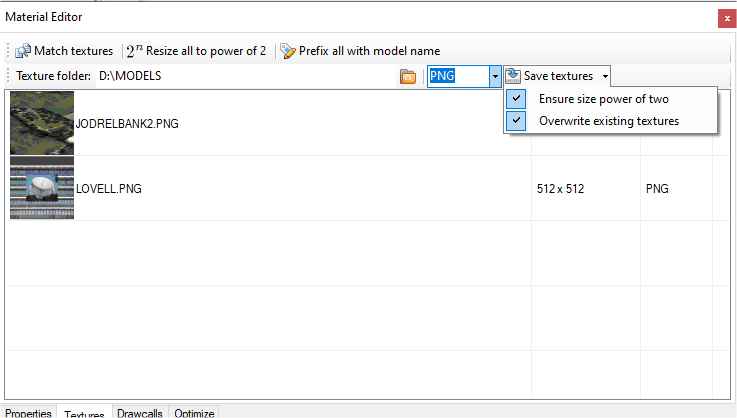
I have been thinking about an option to automatically save the textures to png for the glTF exporter. That would save a manual step.
Question then is where to put them relative to the model?
I think such a facility would be great please Arno!
I'm new to gITF and would like to know where my newly converted PNG (from the BMP which was associated with the old FS9 model I'm converting) should be placed relative to the scenery compiled by the SDK please? I currently have it in a TEXTURE folder within SCENERY... a suggestion I saw elsewhere, though to my mind these two folders should reside alongside one another, rather than nested? Right now my model appears with no textures (plain white) and I'm unsure if it is due to either 1) a mistake in compilation; 2) a mistake in conversion to PNG; or 3) the PNG being in the wrong place?
- Messages
- 254
- Country
Hi Arno, A "texture" folder on the same folder as the model is exported to would be a big help and fairly self explanatory. It would also mean that if you were exporting multiple models for the same project, they would have a common texture folder.I have been thinking about an option to automatically save the textures to png for the glTF exporter. That would save a manual step.
Question then is where to put them relative to the model?
Just my tuppence worth


- Messages
- 392
- Country

Which is compiled when you use the fspackagetool.the problem is that gltf file refers to dds textures.
- Messages
- 12,244
- Country
Save the textures as PNG before exporting the gltf.the problem is that gltf file refers to dds textures.
- Messages
- 12,244
- Country
To prevent this situation, I always have the models and textures in the same folder.Question then is where to put them relative to the model?
When converted I copy them tto the required folders.
- Status
- Not open for further replies.