• Which the release of FS2020 we see an explosition of activity on the forun and of course we are very happy to see this. But having all questions about FS2020 in one forum becomes a bit messy. So therefore we would like to ask you all to use the following guidelines when posting your questions:

    • Tag FS2020 specific questions with the MSFS2020 tag.
    • Questions about making 3D assets can be posted in the 3D asset design forum. Either post them in the subforum of the modelling tool you use or in the general forum if they are general.
    • Questions about aircraft design can be posted in the Aircraft design forum
    • Questions about airport design can be posted in the FS2020 airport design forum. Once airport development tools have been updated for FS2020 you can post tool speciifc questions in the subforums of those tools as well of course.
    • Questions about terrain design can be posted in the FS2020 terrain design forum.
    • Questions about SimConnect can be posted in the SimConnect forum.

    Any other question that is not specific to an aspect of development or tool can be posted in the General chat forum.

    By following these guidelines we make sure that the forums remain easy to read for everybody and also that the right people can find your post to answer it.

FSXA Ground Poly Wizard Cause bleed through?

jtanabodee

Resource contributor
Messages
3,924
Country
thailand
Hi Arno,
Thanks for making us a new tool Model ConverterX. I am using the development release version to convert groundpoly in FS9 to be FSX. I think it might help a lot, but I found some problems:
1. I make a ground poly for runway but the default texture bleed through. I check with TDcal to see if the surface is not even, but they are all the same level.
2. My texture for the runway has no alpha channel but I can still see through it and the default texture still can be seen.
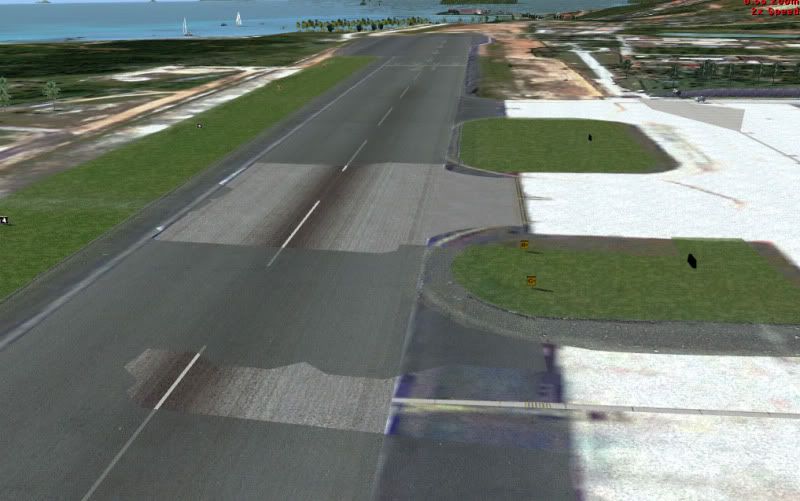
GroundPoly-1.jpg


I'm not sure what cause these problems. I'll try the classic way of FS2002 ground poly if they go away.
Best Regards,
Tic
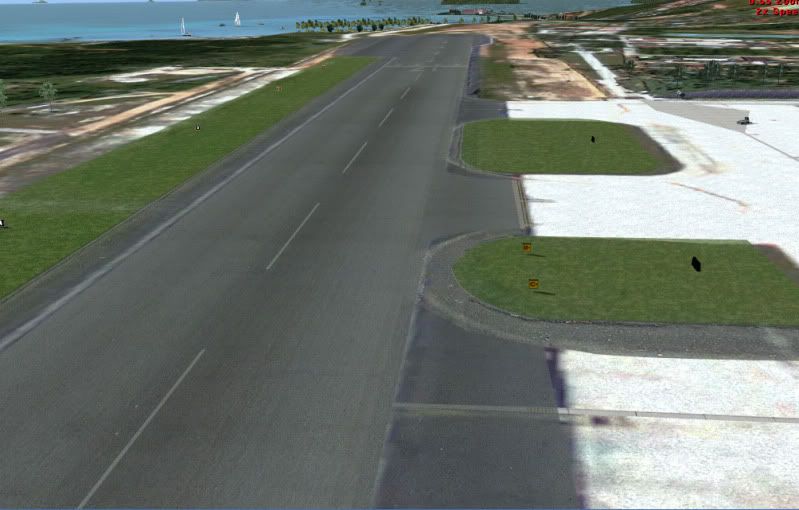
 
It is a bug of the program. I tried to convert the ground poly conventional way. Everything is fine.
GroundPoly-1-1.jpg
 
Sorry but I cannot help you, although I would like to.
I used the polygon wizzard (well, almost) without a problem some time ago but have not used it anymore after that and there have been at least three later updates.
 
Hi,

When you convert the polygons with ModelConverterX are you sure that you entered the correct elevation in the wizard? You need to enter the airport elevation there. That is because ModelConverterX does adjust for the curve of the earth.
 
Hi,

When you convert the polygons with ModelConverterX are you sure that you entered the correct elevation in the wizard? You need to enter the airport elevation there. That is because ModelConverterX does adjust for the curve of the earth.

Hi Arno,
I have exactly the same problem with my ground in my current project.
Set the airport size in MCX, ADEX airport alt and the flatten at the same altitude. The result is the same, the ADEX textures are visible at some parts of the ground. The strange thing is, that it is different on different machines. My development PC has no problem, ground looks good, on my second machine I got that problem.
I have no idea what to test :(
Jörg
 
Hi Jorg,

Humm, OK. Sounds like the curve of the earth might not be completely correctly calculated by ModelConverterX then. I have not yet seen this on my projects until now. Let me double check this.
 
Perhaps it is a conflict of the flatten I use (and need) and the FSX-mode of the Ground Poly Wizard? Yesterday I tested for several hours but got no progress. Tried to change the Layer from 0 to 4 as reported in other treads, tried to change the settings in ADEX and several other things. Another idea is to make a test switching to FS2004-mode in the Ground Poly Wizard. Perhaps the effect disappears in this mode, because it is a flat projection in this mode?

Jörg
 
Hi Jorg,

The problem with the FS2004 mode is that your polygons will get a small offset, they will not be exactly on the earth where you expect them. But you could always try to use that mode and still slice it. Then it should work in FSX as well (besides that offset).
 
Checked with FS2004 but the result is exactly the same. The runway and taxiways are flickering like in FSX mode. Even with the classical method of FS2002-SDK the result is the same.

With further tests I found out, that it is indeed a problem in combination of the MCX-groundfiles with the ADEX-files especially the _CVX file which holds the flatten-informations.

When I disable this _CVX file the flattens are no longer there but the ground-poly looks good.
Now I have no idea if the problem is a problem of MCX or ADEX.
I used MCX develop release 1113 and ADEX Pro version 1.46.16 so the last releases of both programs.

In case you want and can analyze the files, I append both ADEX-files.

Hope you find the solution, because I need the two flatten levels. If you need the source ADEX-file please let me know.

Jörg
 

Attachments

Hi,

What do you mean with two flatten levels? Do you mean the airport elevation, the flatten elevation and the elevation you entered in MCX are not the same?
 
Hi,

What do you mean with two flatten levels? Do you mean the airport elevation, the flatten elevation and the elevation you entered in MCX are not the same?

Hi Arno,
no no, the airport elevation, flatten etc. is the same. There is however 30 m away from the airport area a small industrial area which is some meter lower than the airport itself. So I need a second flatten but it is separated from the flatten under the airport.
For testing purposes I deleted this second flatten object but it makes no difference. I have a general problem with the config and more and more I think it is simply a problem of the ADEX configuration. But how to find out?
Jörg
 
I found a solution for the problem but not really an explanation. The airport altitude of the stock airport is 213.06 m, I set the airport altitude and all the flattens and the MCX altitude to 213.00 m.

When I changed all values to 213.06 it works.

Jörg
 
Back
Top