
-
Which the release of FS2020 we see an explosition of activity on the forun and of course we are very happy to see this. But having all questions about FS2020 in one forum becomes a bit messy. So therefore we would like to ask you all to use the following guidelines when posting your questions:
- Tag FS2020 specific questions with the MSFS2020 tag.
- Questions about making 3D assets can be posted in the 3D asset design forum. Either post them in the subforum of the modelling tool you use or in the general forum if they are general.
- Questions about aircraft design can be posted in the Aircraft design forum
- Questions about airport design can be posted in the FS2020 airport design forum. Once airport development tools have been updated for FS2020 you can post tool speciifc questions in the subforums of those tools as well of course.
- Questions about terrain design can be posted in the FS2020 terrain design forum.
- Questions about SimConnect can be posted in the SimConnect forum.
Any other question that is not specific to an aspect of development or tool can be posted in the General chat forum.
By following these guidelines we make sure that the forums remain easy to read for everybody and also that the right people can find your post to answer it.
You are using an out of date browser. It may not display this or other websites correctly.
You should upgrade or use an alternative browser.
You should upgrade or use an alternative browser.
Hangar with lights
- Thread starter l52
- Start date

dave hoeffgen
Resource contributor
- Messages
- 1,439
- Country

I linked this image from the wiki article.
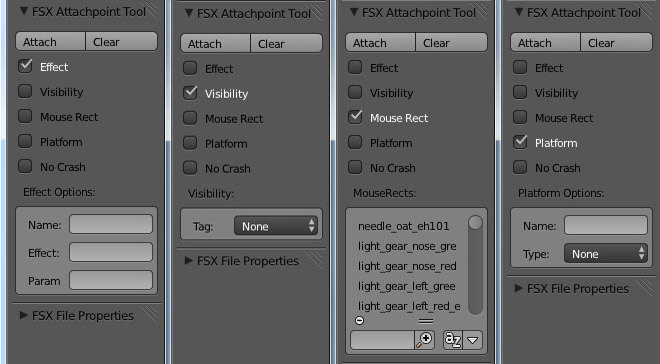
You find this toolbar in the left 'T' menu.
First of all create an object with its origin where the effect should be.
Check "Effect",
Name: [enter something unique like "attpt_light"]
Effect: the effect filename. No file path, no file extension.
Param: enter the conditions when the effect should show up. in your case "NIGHT=1;DAY=0"
last click "attach"
You find this toolbar in the left 'T' menu.
First of all create an object with its origin where the effect should be.
Check "Effect",
Name: [enter something unique like "attpt_light"]
Effect: the effect filename. No file path, no file extension.
Param: enter the conditions when the effect should show up. in your case "NIGHT=1;DAY=0"
last click "attach"
dave hoeffgen
Resource contributor
- Messages
- 1,439
- Country
MCX ignores the effect parameters sometimes afaik.
Did you set them correctly?
So if you set "NIGHT=1;DAY=0" you have to select night time in fsx for the effect to show.
Did you set them correctly?
So if you set "NIGHT=1;DAY=0" you have to select night time in fsx for the effect to show.

- Messages
- 99
- Country

Yes Dave, I set the parameters to
DAY=0;NIGHT=1
and in FSX I was looking at the expected position (top of a 220 m high stack) of the effects (fx_lightObsRedSteady) during the night.
Seen with the ModelConverter, the effects seem to work great: may be seen from quite far away ....
DAY=0;NIGHT=1
and in FSX I was looking at the expected position (top of a 220 m high stack) of the effects (fx_lightObsRedSteady) during the night.
Seen with the ModelConverter, the effects seem to work great: may be seen from quite far away ....
dave hoeffgen
Resource contributor
- Messages
- 1,439
- Country
OK I just tried it with these params and the effect file you use but it worked in my quick and dirty attempt 
dave hoeffgen
Resource contributor
- Messages
- 1,439
- Country
At this point I don't have any idea what you might have done wrong.
Could you send a screenshot of how your attach point object looks in Blender?
Could you send a screenshot of how your attach point object looks in Blender?
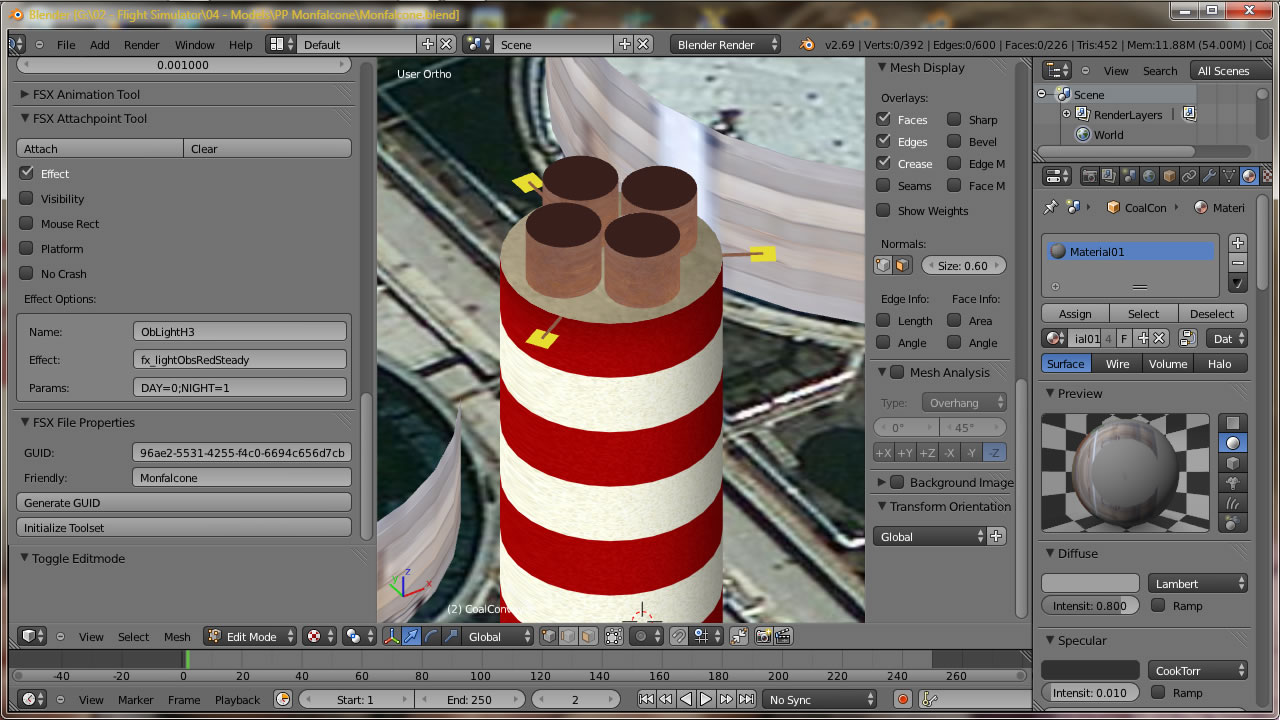
dave hoeffgen
Resource contributor
- Messages
- 1,439
- Country
Which scale do these planes have? Not sure but maybe it might help to apply the scale.
BTW the effect file is unchanged?
BTW the effect file is unchanged?
- Messages
- 99
- Country
May be I solved the problem, and eventually I was able to see the obstruction lights on top of my stack: the matter is that they are terribly thiny and barely visible fom some tenth meters !!!!
The appearance with MCX is by far better
I will try with some other effect !!!
Sorry for the confusion
The appearance with MCX is by far better
I will try with some other effect !!!
Sorry for the confusion
dave hoeffgen
Resource contributor
- Messages
- 1,439
- Country
I am curious if that solved the problem. Please report if it worked. 
- Messages
- 99
- Country
Dave ... just to be sure of the scale I used "Ctrl-A > Scale" exported the .mdl created the .bgl .... and the obstruction lights appeared !!!
But they are indeed very, very small and I was able to see them only after getting very close to them .... may be they were already in, but I missed to see them (may be) !
Thanks for the assistance
But they are indeed very, very small and I was able to see them only after getting very close to them .... may be they were already in, but I missed to see them (may be) !
Thanks for the assistance
dave hoeffgen
Resource contributor
- Messages
- 1,439
- Country
Nice to see this one was solved.
So the scale of the object seems to really affect the display size of the attached effect.
So the scale of the object seems to really affect the display size of the attached effect.
dave hoeffgen
Resource contributor
- Messages
- 1,439
- Country
How high are your in sim graphics settings?
Maybe effects attached to scenery objects are hidden
Maybe effects attached to scenery objects are hidden
dave hoeffgen
Resource contributor
- Messages
- 1,439
- Country
Do the effects stay invisible when getting very close using a helicopter or slew mode?