• Which the release of FS2020 we see an explosition of activity on the forun and of course we are very happy to see this. But having all questions about FS2020 in one forum becomes a bit messy. So therefore we would like to ask you all to use the following guidelines when posting your questions:

    • Tag FS2020 specific questions with the MSFS2020 tag.
    • Questions about making 3D assets can be posted in the 3D asset design forum. Either post them in the subforum of the modelling tool you use or in the general forum if they are general.
    • Questions about aircraft design can be posted in the Aircraft design forum
    • Questions about airport design can be posted in the FS2020 airport design forum. Once airport development tools have been updated for FS2020 you can post tool speciifc questions in the subforums of those tools as well of course.
    • Questions about terrain design can be posted in the FS2020 terrain design forum.
    • Questions about SimConnect can be posted in the SimConnect forum.

    Any other question that is not specific to an aspect of development or tool can be posted in the General chat forum.

    By following these guidelines we make sure that the forums remain easy to read for everybody and also that the right people can find your post to answer it.

MSFS20 How add night lights for MSFS - solution

Messages
52
Country
costarica
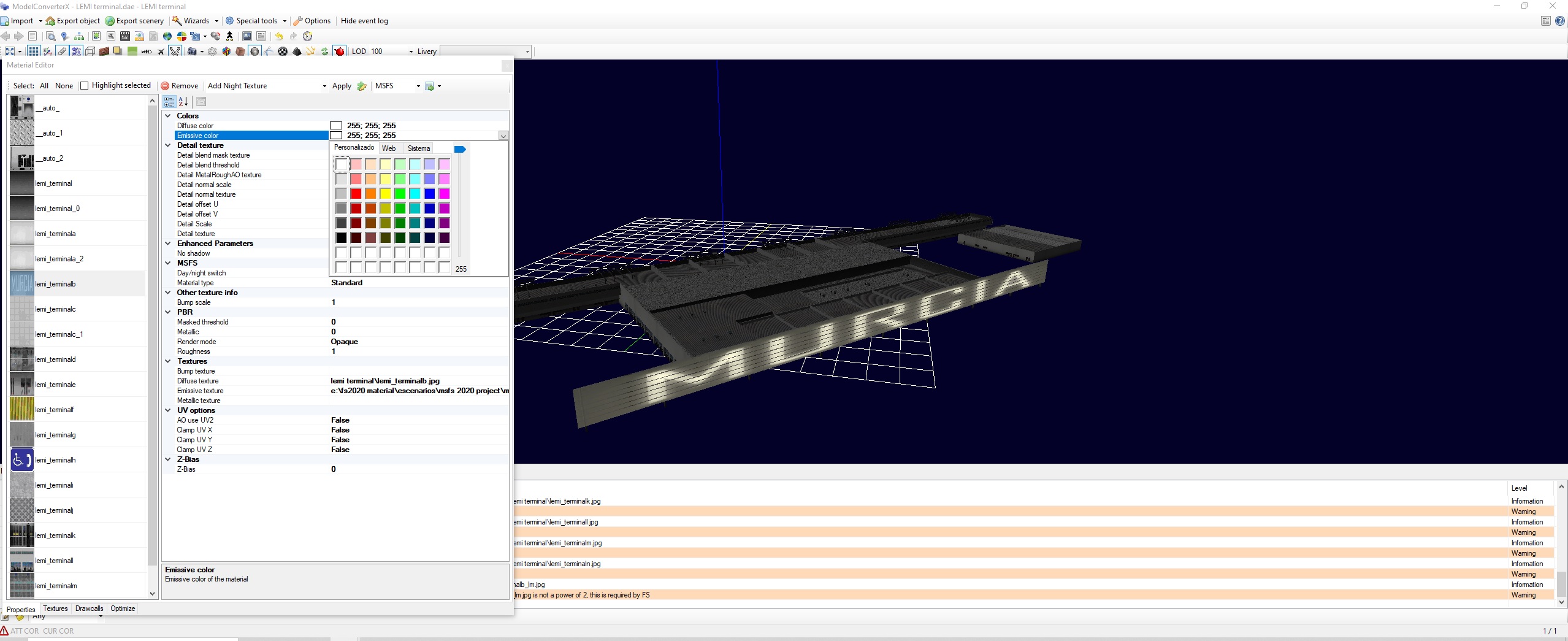
Hello guys, testing some tools; i found the way to add night lighting to your MSFS objects.
Really dont know if this solution was posted before, but...anyway, work so nice...

Sin título.jpg


Work your project as usuall in the ModelConverterX (Tks Arno), select your night texture and change the color black for white in the emissive color for each night texture, then; resize and export in .png format....
Sin título1.jpg


If someone know another metod (More easy), please share.
Enjoy guys.

Fer.
 
Take note in the last Dev version of McX, you need to set Emissive = White to False in exporter options.
 
I am having trouble using the night emission texture. For the example I took a bus with a night texture, converted it from MCX to gltf and applied the standard texture for MSFS 2020
Compiled it and ran it in MSFS 2020, but it doesn't work at night. What is wrong? my settings!!!
 

Attachments

  • S1.jpg
    S1.jpg
    158.5 KB · Views: 118
  • 2.jpg
    2.jpg
    151.4 KB · Views: 115
Back
Top