
-
Which the release of FS2020 we see an explosition of activity on the forun and of course we are very happy to see this. But having all questions about FS2020 in one forum becomes a bit messy. So therefore we would like to ask you all to use the following guidelines when posting your questions:
- Tag FS2020 specific questions with the MSFS2020 tag.
- Questions about making 3D assets can be posted in the 3D asset design forum. Either post them in the subforum of the modelling tool you use or in the general forum if they are general.
- Questions about aircraft design can be posted in the Aircraft design forum
- Questions about airport design can be posted in the FS2020 airport design forum. Once airport development tools have been updated for FS2020 you can post tool speciifc questions in the subforums of those tools as well of course.
- Questions about terrain design can be posted in the FS2020 terrain design forum.
- Questions about SimConnect can be posted in the SimConnect forum.
Any other question that is not specific to an aspect of development or tool can be posted in the General chat forum.
By following these guidelines we make sure that the forums remain easy to read for everybody and also that the right people can find your post to answer it.
You are using an out of date browser. It may not display this or other websites correctly.
You should upgrade or use an alternative browser.
You should upgrade or use an alternative browser.
How to do What The Mass Texture Editor Did in the Material Editor
- Thread starter caleb
- Start date


- Messages
- 1,068
- Country

that's all well and good for size or format but what about renaming like Version 1.3's MTE used to do so nicely. I saw somewhere you said to rename them in the Material editor and it looked like it worked but in the textures none of them were renamed. Sketchup has a tendency to export things named "material" and when you combine textures in a folder for FSX to use they give wrong textures to buildings with the same name.

- Messages
- 6,512
- Country

You can rename any texture. I often delete the extension.. for example, CONCRETE_03_COMP.PNG.DDS, can be named as NONSENSE_True, saved as PNG, and it becomes NONSENSE_True.PNG on saving to an appropriate folder. Exporting the glTF keeps the new name as well.
It would be good if we hade an option button here to delete the extensions before saving, if desired.
It would be good if we hade an option button here to delete the extensions before saving, if desired.

- Messages
- 34,327
- Country

You can rename them on the textures tab, when you click on the name you will get a prompt and can type.
You need to save the textures to disk again afterwards to store the rename in the texture folder as well.
You need to save the textures to disk again afterwards to store the rename in the texture folder as well.
- Messages
- 1,068
- Country
Thank you both. It takes two left clicks on the texture name in the texture tab but it highlighted it for me and I was able to rename it instead of "MATERIAL" and when I saved it to the dds folder it saved the correct name and it is the correct dds. Now I know how to do it next time.

=rk=
Resource contributor
- Messages
- 4,702
- Country

Yes and please have textures default to power of four, instead of power of two and also please, an option to not resize at all, because MCX converts models extremely well that don't necessarily have to conform to mipmap power of two or DDS power of four.It would be good if we hade an option button here to delete the extensions before saving, if desired.
Also if we could globally change those texture names, like when we have 27 variations of "Material," it would be really, really cool. Like Text Editor find and replace, we could control click each entry, change the name in one from "Material_1" to "MyMaterial_1" and that change would be reflected through all the highlighted entries. TYIA for even entertaining the idea of implementing it.
- Messages
- 1,068
- Country
That was what the OLD MTE did in Version 1.30 that I really liked, exactly what you are saying. Maybe Arno can implement that into the next revision in the Material Editor or in the Specials.
- Messages
- 34,327
- Country
MCX has had an option to prefix all textures for a long time. That way you can add the model name to make them unique.
I'll see if global renaming can be added, that might be useful indeed.
For the check for power of 2 or multiple of 4 it depends on the preferred FS version that is set. I would have to check if the default resize option is also linked to that.
Be aware that exporting to a format like dds without resizing won't work, that format requires the size to be a multiple of 4 at least.
I'll see if global renaming can be added, that might be useful indeed.
For the check for power of 2 or multiple of 4 it depends on the preferred FS version that is set. I would have to check if the default resize option is also linked to that.
Be aware that exporting to a format like dds without resizing won't work, that format requires the size to be a multiple of 4 at least.
=rk=
Resource contributor
- Messages
- 4,702
- Country
Right, but let's say, for example, That I wanted to display one of my models on Sketchfab, for example. A quick export of the model with the un resized .png would be all that is necessary.Be aware that exporting to a format like dds without resizing won't work, that format requires the size to be a multiple of 4 at least.
Their 3d render is possibly the best in existence, btw. It is mostly a site for showcasing models that also allows selling them. I even used it to vet a couple examples of a reception desk I built that ended up looking nothing like the examples. The artist has a great deal of control over the render, texture assignment and material attributes. The render window itself is precise, scrollable and has the point of view tightly constrained to the camera position, such that one can scroll and zoom through a model, like a diver exploring a conduit in a shipwreck.
MCX has similar precision, however the camera view is far enough removed from it's point of focus, that the sensation is that of having a very large body, or that one's only eyes are on a stalk a few feet out in front of one's body. What ends up happening, is that if we get too close, the object disappears and reveals whatever had been behind. There's a link in my sig if you want to check it out.
- Messages
- 6,512
- Country
Here's my 'problem':
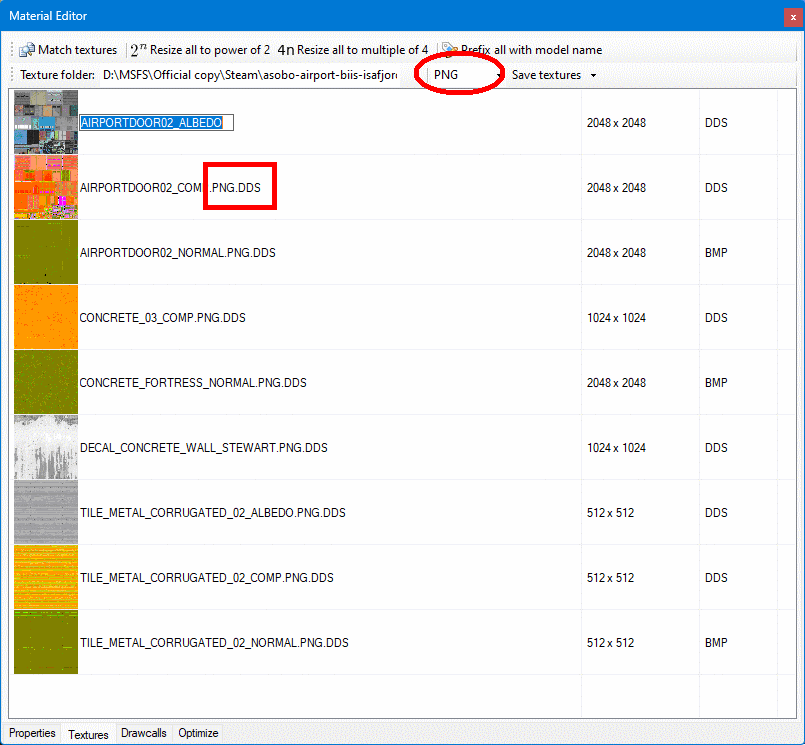
The first instance is corrected. It will save as AIRPORTDOOR02_ALBEDO.PNG
The rest must all manually be changed, or they will save as xxx.PNG.PNG
It would be fixed if all the double extensions could be stripped (optionally), else it is just tedious.
The first instance is corrected. It will save as AIRPORTDOOR02_ALBEDO.PNG
The rest must all manually be changed, or they will save as xxx.PNG.PNG
It would be fixed if all the double extensions could be stripped (optionally), else it is just tedious.
- Messages
- 1,068
- Country
I know that I can attach the model name to all the files and that makes them unique but in this airport instance and others there are common textures to 6-8 or maybe ten structures. If I attach the model name to each one I have 3 times the textures I need in the airport texture folder than having common ones that can be used by all of them. That is why it was nice to have the older version of renaming like "material*" being renamed to a unique name and the rest remaining to be common to all structures sharing them. Does that make sense? I did follow your previous instruction of renaming them in the textures in MDCx V1.50 and that works nicely but has to be done individually, a little more time consuming but not a "game-changer" by any means. Thank you immensely for creating MDCx and the other programs.
=rk=
Resource contributor
- Messages
- 4,702
- Country
One of the ways you can share textures and overcome this issue, is to process and compile one model first. It will have the unique texture names that distinguish this package. Then, as you process your additional models and build your library, in the Material Editor panel, in the Properties tab, where it shows the Albedo, Emissive, etc texture paths, take every instance of a shared texture and change it's source from the Collada folder, or Sketchup export, or wherever, downloaded FBX, to the texture folder you just created with the previous model. Then when MCX saves that batch of textures, it will find and link them. It seems like this process would work better automated, but if you are careful, you can share commonly named textures in a library this way.I know that I can attach the model name to all the files and that makes them unique but in this airport instance and others there are common textures to 6-8 or maybe ten structures. If I attach the model name to each one I have 3 times the textures
- Messages
- 1,068
- Country
Thank you for the tip. Since I learned how to change "material" to some other name for the model, I only need to add emissive texture if I am lighting it at night. When I copy and save each texture folder into the airport texture folder, it asks automatically as you know to replace and I do that and just end up with one of each common texture for all the hangers. Like yesterday, at KEFY Brown Airport I am completing there are 10 hangers that have a lot of common textures like the concrete floors and aprons; air conditioners etc. The best thing I learned from this thread is how to rename those "material" textures. I learned the hard way in the past to watch out for them in texture folders in MDCx and rename them. They use them a lot in DAE exports from Sketchup expecially jpg textures applied to surfaces.
- Messages
- 34,327
- Country
The first instance is corrected. It will save as AIRPORTDOOR02_ALBEDO.PNG
The rest must all manually be changed, or they will save as xxx.PNG.PNG
It would be fixed if all the double extensions could be stripped (optionally), else it is just tedious.
I never understood why MSFS has .PNG.DDS files. MCX will indeed only replace the last extension when it saves the file. Maybe I can add an option to strip others as well. I'll add it on the wishlist.
- Messages
- 34,327
- Country
I see what you mean. I forgot I had that kind of rename in the old mass texture editor. I'll add something similar back in the latest version, it's on the wishlist now.I know that I can attach the model name to all the files and that makes them unique but in this airport instance and others there are common textures to 6-8 or maybe ten structures. If I attach the model name to each one I have 3 times the textures I need in the airport texture folder than having common ones that can be used by all of them. That is why it was nice to have the older version of renaming like "material*" being renamed to a unique name and the rest remaining to be common to all structures sharing them. Does that make sense? I did follow your previous instruction of renaming them in the textures in MDCx V1.50 and that works nicely but has to be done individually, a little more time consuming but not a "game-changer" by any means. Thank you immensely for creating MDCx and the other programs.
=rk=
Resource contributor
- Messages
- 4,702
- Country
I believe it to be a visual indication that package build required .png format files, have been processed into a build and reformatted to .dds. I have trouble understanding what about Asobo models that will be rendered using .dds textures, requires them to be compiled using .png textures. It seems like changing formats is completely arbitrary.I never understood why MSFS has .PNG.DDS files.
When I "hack" default asobo models, those have to be run through the build process a second time and effectively nothing else changes, except those textures. So models would be interchangeable, just like the "old" days, except for the format change. Aside from the texture assignment, one could take a SimObject model from either side of a build and it would be identical. Going the other direction, "ripping" the model, I simply delete the .png pre suffix, export the part from MCX with the .dds textures saved as .png textures, flip my replacement textures upside down and go from there.
Last edited:
- Messages
- 6,512
- Country
Saved from MCX as JPG. then recompiled as MSFS gltf, reloaded to MCX:
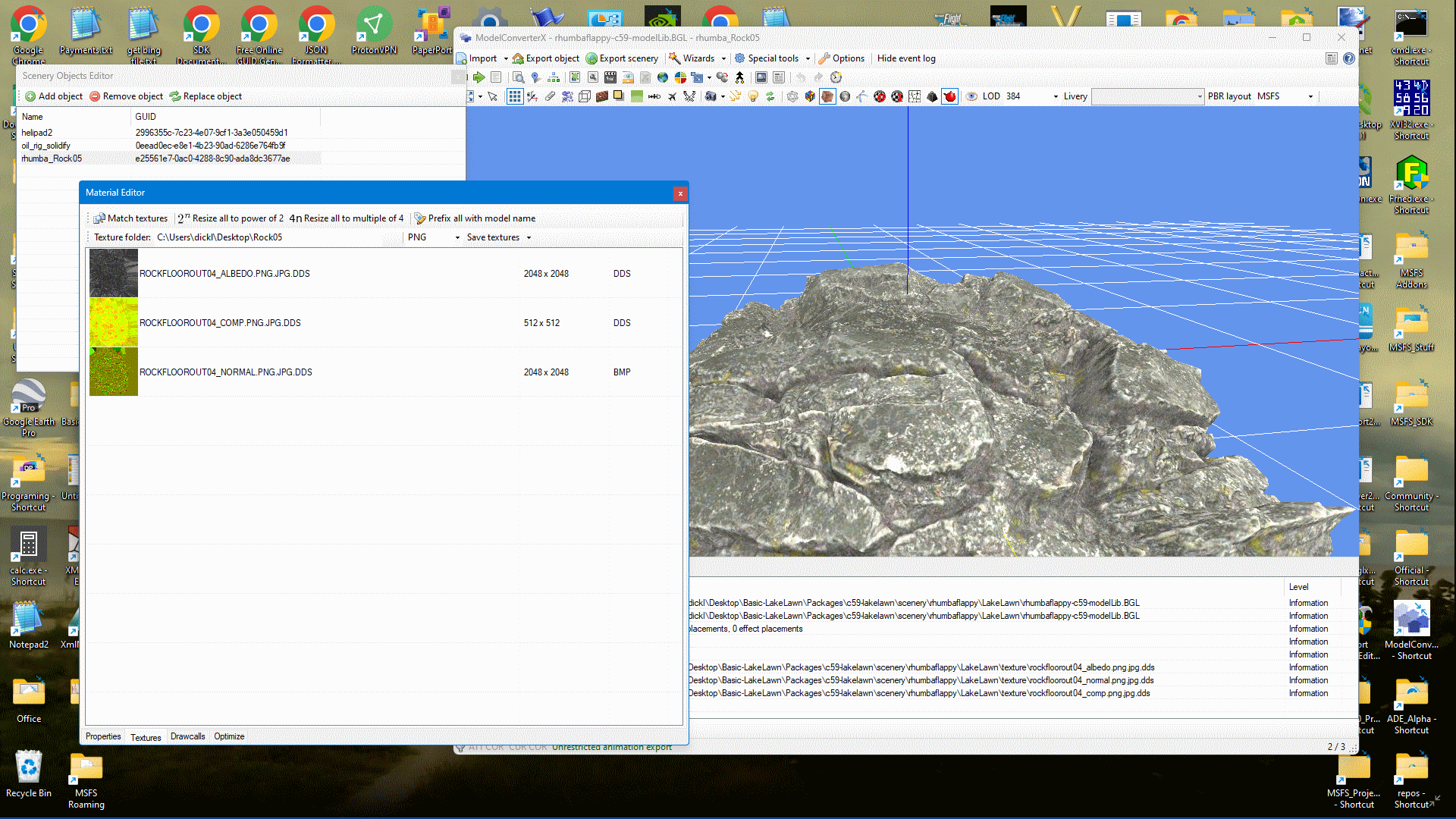
The extensions can go on forever. (JPG is a valid choice for MSFS, as well as PNG).
The extensions can go on forever. (JPG is a valid choice for MSFS, as well as PNG).
- Messages
- 34,327
- Country
One more reason to see if MCX can strip them off somehow, we don't want to end up with TEXTURE.PNG.JPG.DDS.PNG.PNG.DDS in the endThe extensions can go on forever. (JPG is a valid choice for MSFS, as well as PNG).
