To help FSDev index, and forum participants to follow- and perhaps contribute posts to- your thread(s), it will be important for you to:
* Please state which version of FS this thread pertains to; edit your first post (aka "Opening Post" aka "OP") to insert this info.
Choose a FS version that is the subject of a thread by clicking the 'down arrow' next to "(No prefix)" ...when starting a new thread.

Based on your statement above, you are using P3D v6, so you should
edit your opening post above and enter
P3D v6 in the pick-list.
This may help you attract forum respondents who have P3D and use it with ADE (AFAIK, very few have P3Dv5 and even less have P3Dv6).
ADE was not tested with P3Dv6, and was not reportedly tested extensively with P3Dv5 before development was discontinued, so YMMV.
[
EDITED]
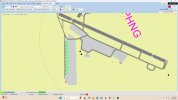
IIUC, your ADE "Map" view orientation is rotated within ADE's workspace; AFAIK, we can rotate an entire airport,
or just the view.

If that is done incorrectly, the Geographic coordinates of PHNG may have changed, and the airport is now going to be incorrectly positioned in the P3D run time world.
Rotating the view with < Ctrl >+< MouseWheel > is a completely separate function from rotating an entire Airport in XML source code.
But it possible you did intent to only rotate the
view, and not the entire airport in it XML source code; if so, please ignore my alert above.
https://www.fsdeveloper.com/forum/threads/how-to-rotate-view.442835/#post-799305
[
END_EDIT]
Regarding parked aircraft:
* Did you add some static Scenery Library Objects that you expected to see after compiling the project?
* Were you anticipating seeing some parked aircraft via default or custom 3rd party AI Traffic ?
BTW: Be certain
every Parking space you place is connected to the taxi system via 'links': CTDs and/or P3D.Cfg file damage may result.
The ADE downloads page has a link to last PDF format Manual (for version 1.65, but deals with nearly all basic features of ADE) ...here:
https://www.fsdeveloper.com/forum/threads/ade-downloads-page.459372/
GaryGB