• Which the release of FS2020 we see an explosition of activity on the forun and of course we are very happy to see this. But having all questions about FS2020 in one forum becomes a bit messy. So therefore we would like to ask you all to use the following guidelines when posting your questions:

    • Tag FS2020 specific questions with the MSFS2020 tag.
    • Questions about making 3D assets can be posted in the 3D asset design forum. Either post them in the subforum of the modelling tool you use or in the general forum if they are general.
    • Questions about aircraft design can be posted in the Aircraft design forum
    • Questions about airport design can be posted in the FS2020 airport design forum. Once airport development tools have been updated for FS2020 you can post tool speciifc questions in the subforums of those tools as well of course.
    • Questions about terrain design can be posted in the FS2020 terrain design forum.
    • Questions about SimConnect can be posted in the SimConnect forum.

    Any other question that is not specific to an aspect of development or tool can be posted in the General chat forum.

    By following these guidelines we make sure that the forums remain easy to read for everybody and also that the right people can find your post to answer it.

MSFS20 MCX Features

=rk=

Resource contributor
Messages
4,702
Country
us-washington
So I've been playing with the new package exporter and for what I do, it's a real convenience. The MSFS material constraints have seemed perplexing, I use Sketchup, with mostly photo derived textures and projecting those textures, requires more UV precision than MSFS is willing to calculate. Some of the projected texture models compile perfectly, or nearly so and others are a depressing mess. Sometimes I will change one thing and effectively destroy the model.
Ok, with the MSFS Package exporter, I can export a Collada from Sketchup, pick it up with MCX, save out some .png textures, immediately run that imported Collada through the MCX package exporter, take the texture folder I'd saved to, drop that into Package Sources, drop the MCX generated .XML onto the fspackagetool shortcut on my desktop and voila, I have a MSFS native glTF file, with associated png.dds textures, to review.

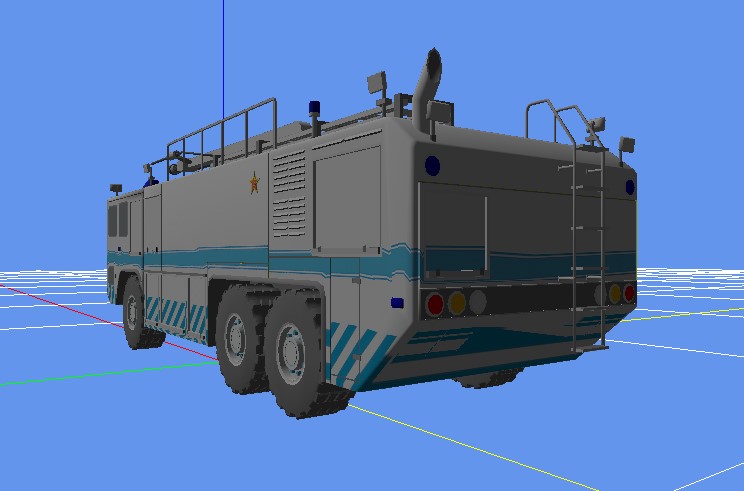
MCX panther.jpg
MSFS panther.jpg


We can see there is distortion along the stripe and especially under the rear and I feel I am very close to nailing down the transition, of when projected textures go skewey, so thanks very much.

One thing I'd wanted to mention to Arno, in case he's interested, is that fspackagetool.exe, seems very similar to XtoMDL.exe, bglcomp.exe, etc and it seems like MCX could just "whip out" a compiled MSFS model, in a very similar way, to which it whips out an FSX, or P3D ready model. My system is already convenient enough, just got to remember to copy that texture save, into the package source directory, but if we had "one click export," then conceivably, one could build an entire model library within MCX, then export that simulator ready library. I imagine if I were patient enough, I could set the whole process up using the Batch Converter, but the desktop icon is good for now, thanks again.
 
Hi,

With the package output I could call the package tool indeed. I have not implemented that as I suspect most developers will merge the MCX made output with other package content and then compile the combined package. Or do you think a package would only contain one library bgl?

As for the distortion, this is probably because the uv mapping is outside of the normal range. I guess MCX could correct for this before export.
 
You are most certainly correct, about the package merging and I've yet to explore the feature well enough to know if a pre compiled library is practical. I am thinking in terms of commonly used textures and having those in a single directory. However, calling fspackagetool.exe, seems like it would be a real hand up for people wanting to get a single bridge, or their own house, something like this into MSFS and not to be overly dramatic, but if you can correct for the distortion, I'll name my next son after you.
 
Would you have a sample object that shows the distortion? Then I can check what I can do.
 
Of course. I am starting to notice situations that might cause distortion. If I use a single texture and scale it differently for different areas, that seems to cause an issue. If a texture repeats, for example a cheat line on a fuselage, that apparently goes beyond the zero to one UV range, but there are other circumstances that are difficult to anticipate. This file includes the Collada, the .png textures I'd saved from the Collada in MCX and the compiled MSFS package.

kj500dae.jpg
kj500mdllib.jpg
 

Attachments

Thanks, let me have a look.
 
The texture mapping that SketchUp made will indeed give distortions. I see that the UV coordinates often have values of 30 or 50, while they should be between 0 and 1 to have no distortion. Now let me check if something can be done about that.
 
Problem solved :). I already had a function to normalize texture coordinates and running this on the model fixes the problem. Here is a screenshot of a new MSFS export that I made after fixing the texture coordinates.
For this test I manually ran the correction (added it in the hierarchy editor in the context menu). Running the function takes a few seconds, so I am not sure if I should do it automatically on each glTF export. That might give a delay which is not needed for all developers.

1648982764841.png
 
I have not discovered a way to determine actual UV values, if I could, I could probably learn to keep values within the range. Is the correction you used something we could apply, as needed?
 
In the hierarchy editor you can see all vertices (if enabled in the options). So there you can see the values.

The correction I did can not be applied yet. I will have to push the changes I made to the development release for that.
 
I also started working on a new shader that will show which parts of a model get the distortion. Those will be shown in red. Maybe the model you send me is not the best test model for that :D

1649014339348.png
 
Ha! Hopefully this one is a bit better. You can see the tail insignia is largely intact and the distortion is mainly confined within the nacelles, almost certainly a consequence of different scaling values for the same texture, for the same model.

y20dae.jpg
y20mdllib.jpg
 

Attachments

Thanks for the second test model. A quick look at the UV coordinates shows they are not really different, so I need to do some more checking why these show less distortion.
 
Hi,

I think I have the algorithm to define the amount of distortion worked out now. I am wondering what would be the most logical way to present it. My idea is to color the model based on the error caused by the distortion. But should I use the number of pixels that the error is or the percentage of the error? My thoughts are that the number of pixels are most logical, as that defines how much you will see the error.
 
It seems like presenting the percentage of distortion, will also show the pixels that are affected, if it is a visual representation that covers the entire model.
 
Yes and no. I guess I need to experiment with both ways a bit. If you have a 10% distortion in the mapping that is a 12.8 pixel offset on a 128 pixel texture, but a 204.8 pixel offset on a 2048 pixel texture. I think on the last texture the distortion will be more visible.
 
Maybe I can't think that deeply, because it seems like it's a matter of scale. If we scale either texture to fit any given area won't the 10% distortion remain relative? Tiling one or the other, will produce stripes, or patterns of the distortion, but according to the SDK, that distortion increases with distance, presumably from the "origin" texture, but how would one find that:

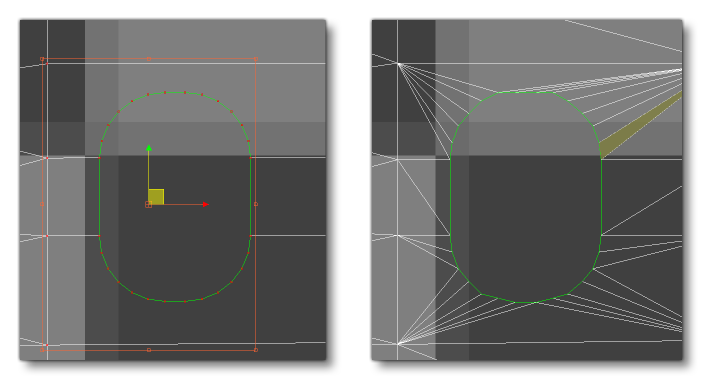
When you create a package for Microsoft Flight Simulator, models are processed by the package tool into compatible gLTF files that are optimised for use within the simulator. Part of this optimisation process involves storing the UV data as 2-byte floating point numbers, instead of regular floats, to save on memory usage. What this means is that UVs will have less precision, and if you have a UV that tiles too much, this lack of precision will become very noticeable. You can see this illustrated in the image below, where the left image is the original, and the right is after processing:

Image Illustrating Extreme UV Values And Their Effect
To resolve this issue, you should try and maintain the UV values as close to 0 as possible, since the further from that value the less precise the values will be. In general we recommend maintaining the UVs between 0 and 1, but if you require a texture that tiles, we understand that this may not be possible. In those cases, one trick is to shift the UVs to use negative values, for example, a UV of 0 to 10 could be shifted to be a UV of -5 to 5, and so keep precision errors to a minimum.

and is your algorithm using this trick of "balancing" the UV offset values, onto either side of zero? I really wish I could grasp these concepts better, sorry to be such a lug nut.
 
I guess it depends on how the sheet is designed and mapped indeed. No magic answer.

I don't use that center approach yet for the mapping. For your first test model it was not needed, but might be good to add that.
 
I have just uploaded a new development release that has this functions. And I have made a quick video tutorial to demonstrate them:

 
That is absolutely fascinating and extremely informative about the patterning of the distortion. The banding looks algorithmic to me and also like topographical lines.

I have a feeling Sketchups shortcut of piling some sort of mathematical imprecision into extreme UV values, that most rendering software will accomodate, encountered a conflict with Asobo's shortcut of limiting decimal places.

Thank you for bringing us this version.
 
Back
Top