=rk=
Resource contributor
- Messages
- 4,702
- Country

So I've been playing with the new package exporter and for what I do, it's a real convenience. The MSFS material constraints have seemed perplexing, I use Sketchup, with mostly photo derived textures and projecting those textures, requires more UV precision than MSFS is willing to calculate. Some of the projected texture models compile perfectly, or nearly so and others are a depressing mess. Sometimes I will change one thing and effectively destroy the model.
Ok, with the MSFS Package exporter, I can export a Collada from Sketchup, pick it up with MCX, save out some .png textures, immediately run that imported Collada through the MCX package exporter, take the texture folder I'd saved to, drop that into Package Sources, drop the MCX generated .XML onto the fspackagetool shortcut on my desktop and voila, I have a MSFS native glTF file, with associated png.dds textures, to review.

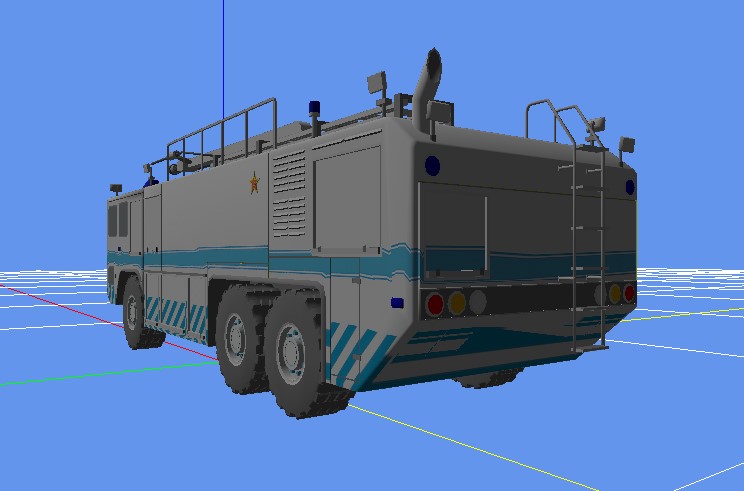
We can see there is distortion along the stripe and especially under the rear and I feel I am very close to nailing down the transition, of when projected textures go skewey, so thanks very much.
One thing I'd wanted to mention to Arno, in case he's interested, is that fspackagetool.exe, seems very similar to XtoMDL.exe, bglcomp.exe, etc and it seems like MCX could just "whip out" a compiled MSFS model, in a very similar way, to which it whips out an FSX, or P3D ready model. My system is already convenient enough, just got to remember to copy that texture save, into the package source directory, but if we had "one click export," then conceivably, one could build an entire model library within MCX, then export that simulator ready library. I imagine if I were patient enough, I could set the whole process up using the Batch Converter, but the desktop icon is good for now, thanks again.
Ok, with the MSFS Package exporter, I can export a Collada from Sketchup, pick it up with MCX, save out some .png textures, immediately run that imported Collada through the MCX package exporter, take the texture folder I'd saved to, drop that into Package Sources, drop the MCX generated .XML onto the fspackagetool shortcut on my desktop and voila, I have a MSFS native glTF file, with associated png.dds textures, to review.
We can see there is distortion along the stripe and especially under the rear and I feel I am very close to nailing down the transition, of when projected textures go skewey, so thanks very much.
One thing I'd wanted to mention to Arno, in case he's interested, is that fspackagetool.exe, seems very similar to XtoMDL.exe, bglcomp.exe, etc and it seems like MCX could just "whip out" a compiled MSFS model, in a very similar way, to which it whips out an FSX, or P3D ready model. My system is already convenient enough, just got to remember to copy that texture save, into the package source directory, but if we had "one click export," then conceivably, one could build an entire model library within MCX, then export that simulator ready library. I imagine if I were patient enough, I could set the whole process up using the Batch Converter, but the desktop icon is good for now, thanks again.


 . I already had a function to normalize texture coordinates and running this on the model fixes the problem. Here is a screenshot of a new MSFS export that I made after fixing the texture coordinates.