• Which the release of FS2020 we see an explosition of activity on the forun and of course we are very happy to see this. But having all questions about FS2020 in one forum becomes a bit messy. So therefore we would like to ask you all to use the following guidelines when posting your questions:

    • Tag FS2020 specific questions with the MSFS2020 tag.
    • Questions about making 3D assets can be posted in the 3D asset design forum. Either post them in the subforum of the modelling tool you use or in the general forum if they are general.
    • Questions about aircraft design can be posted in the Aircraft design forum
    • Questions about airport design can be posted in the FS2020 airport design forum. Once airport development tools have been updated for FS2020 you can post tool speciifc questions in the subforums of those tools as well of course.
    • Questions about terrain design can be posted in the FS2020 terrain design forum.
    • Questions about SimConnect can be posted in the SimConnect forum.

    Any other question that is not specific to an aspect of development or tool can be posted in the General chat forum.

    By following these guidelines we make sure that the forums remain easy to read for everybody and also that the right people can find your post to answer it.

MSFS20 MCX Placement To Shape Converter missing

Messages
9,031
Country
us-illinois
Hi Arno:

Where can we find MCX Placement To Shape Converter in recent builds of ModelConverterX ?

It seems to have disappeared from MCX Menu > Special Tools > Placement to SHP converter. :yikes:

"7.8 Placement to SHP converter
With the placement to SHP converter, see Figure 7.8, you can create a SHP file for the position of
each object in a scenery. This can be useful if you want to process the object placement information
in a GIS tool or import it in another system that uses SHP files.
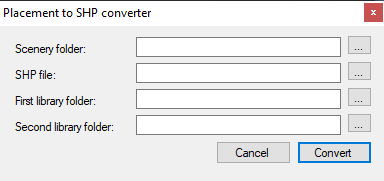
1768839480323.png


Figure 7.8: Placement to SHP converter

You need to specify the scenery folder of the scenery that you want to convert, the location where
the SHP file will be written and optionally you can provide two additional folders where the tool
will look for needed library BGL files. When you press Convert the SHP file will be written.

What the tool does is that it will check all BGL files in your scenery folder for object placement
information. For each placement a point feature in the SHP file will be written, with attributes
for the heading, scale, etc. The tool will also try to find the name of the placed objects, for this it
will scan all BGL files in the scenery and the two library folders you selected. When the object is
found in any of these files, an attribute with the name will be written."


I would like to simplify processing of placement info for Objects.bgls in several projects in order to create / place excludes (not 3D models).

Increased Google Earth 3D Rips via GEDOT workflows compels FS developers to make ExclusionRectangles for scene object 3D tile arrays.

We need some help making that process less cumbersome.


https://www.fsdeveloper.com/forum/t...-from-a-3rd-party-photogrammetry-area.459478/


Thus far I have used a manual method to calculate Geographic coordinates for RefPts of ModelPart sub-tiles in scene objects.


MCX Object Placement feature displays Geographic coordinates for 'scene' object 3D tile arrays as numbered entities selected in 3D Preview.

ModelPart sub-tiles can be displayed with a Red highlight when selected in MCX Hierarchy Editor.


MCX has no ModelPart Geographic RefPt info if we want to apply ExclusionRectangles to ModelPart sub-tiles in a 'scene' object tile array.

That puts us in a "World Of Hurt" doing manual Geographic coordinate derivation used for ExclusionRectangles, replacement objects etc.


MCX Placement To Shape Converter was useful to reduce some data derivation; but ideally FS developers would use a more robust solution.


Could you please help us develop a MCX extended feature set to document Geographic placement info for ModelParts in scene objects ?


Perhaps a checkbox in Hierarchy Editor might be used to select ModelParts of sub-tiles to be displayed / reported / exported may be a start ?

A 'Deluxe' version may be optional FS2Kx or MSFS source data (SHP / CSV / XML) output for use with scenery object placement etc.. :wizard:


Thanks very much in advance for considering this increasingly needed enhancement to MCX as we develop for the MSFS User Community. :)

GaryGB
 
Last edited:
Hi Gary,

That special tool was removed, because you can simply export a loaded BGL file to a Shapefile in the export scenery dialogue. ESRI Shapefile is one of the formats that you can select to export to.

1768851364086.png


I am not sure if I fully understand what kind of processing you want to do. If you want to make Shapefiles with the exact footprint of each tile, it might be better to use scenProc. It has an ImportBGL function that can load placed object as their footprint polygon, which can then be exported to SHP as well if you like (or used directly to make BGLComp exclusion rectangles using these footprint polygons).
 
Thanks, Arno. :)

The positioning and sizing of the ExclusionRectangles in MSFS Scenery Editor GUI is challenging when done manually.

To exclude with precision, only specific ModelPart sub-tiles in a scene object tile array, my assumption of requirement- and method utilized- thus far, has been use of very small ExclusionRectangles manually positioned surrounding the RefPoints (AFAIK, the SW bottom Left corner vertex) of selected ModelPart sub-tiles.

It is good to know you already had us covered for the removed Placement To Shape Converter via a new MCX export option. :wizard:


I'll follow up on this after reviewing the options MCX and ScenProc currently offer.


A MCX wish list (...as I work through this current process in the thread linked above, to see what may be considered in the future): :scratchch


* ModelPart Geographic coordinate RefPt info if we want to apply ExclusionRectangles to ModelPart sub-tiles in a 'scene' object tile array.


* Preset sizes / types of MSFS Property attributes of micro-ExclusionRectangles to be applied to ModelPart sub-tile Geographic coordinates.


* Hierarchy Editor checkbox for each ModelPart that cues task list to create a micro-sized ExclusionRectangle as an alternative to "Remove"

...MCX would process / output the micro-sized ExclusionRectangles into a separate BGL from the source 3D model 'scene' object tile array.


This would help us implement more precise control over 3D model 'scene' object tile array "custom photogrammetry" types of objects. :pushpin:

GaryGB
 
Last edited:
Hi Arno:

MCX January 13, 2026 > Export Scenery > ESRI Shapefile (*.shp) does not write a Objects.shp from a imported MSFS 2020 Objects.bgl. :oops:

I have verified that MCX Object Placement does display the Green push-pins on the map for the placements within a imported Object.bgl.


During export, MCX 'appears' to be processing as though it is completing a file write etc., but no *.shp file is to be found when it is finished. o_O


The above cited, prior MCX Placement To Shape Converter successfully writes a Objects.shp from a imported MSFS 2020 Objects.bgl.


Would you please check to see if a bug crept into the recent MCX January 13, 2026 build ?


FYI: MCX January 13, 2026 MCX' Export Scenery > FSX BGLComp XML file (*.xml) export does appear to work properly.


Scenery Package used:

https://flightsim.to/file/11199/alesund-norway


Path to un-zipped Objects.bgl imported (...and from which a ESRI Shapefile (*.shp) export was attempted):

Alesund_JmaRi\Alesund\Alesund 1\scenery\objects.bgl


Thanks for looking into what is happening with this. :)


GaryGB
 
Last edited:
I will test the shp export. Sounds like a possible bug.

For the rest of your message, it contains too much information and is too long. So I don't have the time now to process it.
 
If you want to make Shapefiles with the exact footprint of each tile, it might be better to use scenProc. It has an ImportBGL function that can load placed object as their footprint polygon, which can then be exported to SHP as well if you like (or used directly to make BGLComp exclusion rectangles using these footprint polygons).

Regarding ScenProc options:

I wish I could allocate sufficient time to learn what is necessary to actually utilize its obviously powerful features.


ScenProc has a separate- and daunting- learning curve for FS developers who may prefer to not learn scripting / coding to make scenery.


ScenProc is quite capable, and AFAIK, may increase its user base if its input GUI provided multiple pick-lists of prepared parameters.


Something more detailed than MCX' Batch converter dialog IMHO, might make use of ScenProc even more popular among FS developers.


I am hopeful these practical observations / suggestions may be well-received, as I do wish you well with the ScenProc project. ;)


BTW: I am curious if ScenProc auto-detects gray scale "color" zones / draws polygons around them in certain 16-bit scientific imaging types.

But perhaps the current ScenProc detection engine requires 24-bit color ? :scratchch

GaryGB
 
Last edited:
I am not sure if I fully understand what kind of processing you want to do.

Regarding the work-flow to ID target ModelParts in custom Photogrammetry sub-tiles and exclude them via ExclusionRectangles:


MCX FSX BGLComp XML file (*.xml) export supplies all needed info for manual ExclusionRectangle creation if one knows the GUID required.

MCX ESRI Shapefile (*.shp) export supplies some needed info for manual ExclusionRectangle creation if one knows the GUID required.


NOTE: GUID is used to ID Geographic coordinates in de-compiled BGLComp XML for scene object arrays containing target ModelParts.


One can <Open> MCX' *.SHP files in Google Earth to verify RefPts; clicking on displayed RefPts, their GUID is displayed (but not Lat / Lon
:banghead:
)


However, correlation of all required info is possible with MCX' Hierarchy Editor, as selected ModelParts may be ID'd as Red in MCX' 3D Preview.


PS: I have listed above, proposed feature enhancements for MCX Hierarchy Editor as necessary alternatives to editing 3rd party content.

https://www.fsdeveloper.com/forum/t...to-shape-converter-missing.460581/post-938040


I believe it may be preferable for FS developers to be able to perform the described functions directly in the context of MCX Hierarchy Editor.

This proposed (minor ?) feature addition to MCX Hierarchy Editor ModelParts options would provide for an in-context enhanced use of MCX.


This allows use of MCX to view 3rd party custom "faux Photogrammetry" ModelParts and exclude them via micro-ExclusionRectangles.

In doing so, it may protect 3rd party intellectual property by not requiring one to edit content; instead, it allows "Exclude & Replace".


Thanks for considering this. :)


GaryGB
 
Last edited:
I will test the shp export. Sounds like a possible bug.

For the rest of your message, it contains too much information and is too long. So I don't have the time now to process it.
I confirm what GaryGB said above; no shapefile is created.


<?xml version="1.0" encoding="UTF-8"?>
<FSData version="9.0" xmlns:xsi="http://www.w3.org/2001/XMLSchema-instance" xsi:noNamespaceSchemaLocation="bglcomp.xsd">
<SceneryObject lat="-00.55253407" lon="+098.50638611" alt="0.000" pitch="0.000" bank="0.000" heading="0.000" altitudeIsAgl="TRUE" imageComplexity="VERY_SPARSE"><LibraryObject name="{fed0dd2f-440a-4d45-9dcb-cbea81ce8783}" scale="1.000"/></SceneryObject>
</FSData>
 
Hi,

I have check the source code and my memory was wrong. The SHP exporter does only write the triangles of the objects. It is for example used to make the flatten BGL from an object. But it does not write the placement information as point features.

With scenproc you can easily get that information, I'll try to make a sample script tonight.

I'm still confused what the exact workflow is you aim to create. You want to make an exclusion around specific object placements and you need the object guid for that as well?
 
Hi Arno, and thanks for following up on this.

The goal is to make it easier to exclude 3D G-Poly 'scene' objects (and selected ModelParts of such multi-part objects).

As numbered scenery library objects displayed in MCX preview, they can more simply be excluded if we ID the Origin / Datum / RefPt of the entire 3D model object.

But excluding (1) or more (but less than the entire 3D G-Poly array of ModelParts) is challenging.

Such 3D G-Poly 'scene' objects consist of 8x8 or 4x4 arrays of "sub-tiles' (ModelParts).

The thread that documents my gradual exploration of how to exclude such selected ModelParts is admiittedly not easy to follow.

https://www.fsdeveloper.com/forum/t...-from-a-3rd-party-photogrammetry-area.459478/

I'll try to better describe the task here as time permits. later.

GaryGB
 
Last edited:
When you say model parts do you really mean model parts? A model part is Internal in an object, for example because the material differs. And you can't exclude a model part.

I think you are intending to exclude certain objects in a scenery that has multiple objects.is that right? And you intend to do that with very small and local excludes around the position where they are placed.
 
I used a term "Scene" based on an inference these multi-object 3D G-Polys are a type of "Combined Scene" as described in MCX; Manual:

"7.4 Scene builder wizard

With the scene builder wizard, see Figure 7.4, you can construct one single object based on a scenery with multiple objects and object placements. This can be useful if you want your entire scenery to consist of a single object, for example if you want to convert to it another system that
prefers to have an airport as one object, while Flight Simulator works more efficiently if you have
it split into multiple objects. What the scene builder does is use the placement information to determine the offset of each object and in that way combine all objects into a single scene."

MCX' Hierarchy Editor does also display a list of ModelParts for these objects.

But at the same time they appear to be a type 3D G-Poly inside a scenery object library BGL.


I would welcome any observations / suggestions based on your extensive personal experience with 3D models, as to what these FS objects are.


GEDOT info:

https://flightsim.to/file/26245/google-earth-decoder-optimization-tools-gedot-blender-addon

https://thalixte.github.io/Google-Earth-Decoder-Optimization-Tools/

https://thalixte.github.io/Google-Earth-Decoder-Optimization-Tools/features/initialize_scenery/


If you load up one of the modelib.bgl files for the Alesund Norway (or Stavanger Norway from the original project cited above in this thread), you will see when imported, the 3D models from which I have endeavored to exclude ModelParts with micro-ExclusionRectangles.

If the Bounding Box is displayed, and the Hierarchy Editor is opened, selected ModelParts of these multi-part 3D models turn RED.

1769114192734.jpeg


This helps verify ModelParts to be Excluded (via a ExclusionRectangle) ...and Replaced.

https://www.fsdeveloper.com/forum/t...-from-a-3rd-party-photogrammetry-area.459478/


I was able to exclude selected ModelParts with ExclusionRectangles ~50 Meters in span, centered on the calculated ModelPart vertex Geographic Coordinates.


In that case, Vetle wanted to Exclude and Replace 4 ModelParts in a particular 3D G-Poly / 'Scene' object consisting of an 8x8 array.


The vertices of the ModelParts (lower Left / SW) had to be calculated from the known Geographic coordinates for adjacent 3D G-Polys.


Since these arrays are 8x8 or 4x4, one must divide any difference between the Geographic coordinates for adjacent (N-S-E-W) 3D G-Polys.

The difference is divided by 8- or 4- according to the addon array structure for the 3D G-Polys.

Increments of the difference are used to derive ModelPart placements in between the known Geographic coordinates for adjacent 3D G-Polys.


My thought was to use a checkbox inside Hierarchy Editor next to the "Remove" option, to instead add an ExclusionRectangle to separate BGL.

That way developers can complete this task in Hierarchy Editor immediately after having ID'd the exact ModelPart to be excluded in RED.


I considered it 'possible' MCX might be adapted to do this once MCX has data sets loaded from both the ModelLib and Objects BGL files.


If we were to work outside MCX with an exported SHP or XML file, there are other convoluted ways to eventually generate ExclusionRectangles.

Again, the goal is to allow Exclude and Replace, without a need to edit 3rd party BGLs.


I hope this helps explain more clearly, the objects- and proposed tasks- to exclude them via more easily generated ExclusionRectangles. :)

GaryGB
 
Last edited:
So this object you show in the screenshot comes from the library bgl directly and has not been processed by the scene build wizard.

I am not aware that you exclude parts of an object. As far as I know you can only exclude the entire object.
 
IIUC, these objects have their own BoundingBoxes and are "placed" at Datum offsets in a multi-part array 3D model via Cartesian coordinates.

AFAIK, an Exclusion Rectangle should work on ModelParts with their own BoundingBoxes and CrashBoxes via Geographic coordinates.


Can MCX export ModelParts with their own BoundingBoxes, from multi-part 3D model arrays, as separately placed scenery library objects ?

Perhaps that might control display of ModelParts, by creating derived ModelLib and Objects BGLs that do not place the unwanted ModelParts ?


Or does MCX Hierarchy Editor have the ability to hide or otherwise prevent display of ModelParts ...rather than just 'removing' them ?

Might we use MCX Hierarchy Editor to "place" a selected ModelPart Datum "Z" offset as AMSL so they display below local ground level ?

GaryGB
 
Last edited:
Gary,

The answer to most of these questions is no. MCX can only place entire objects are a certain latitude, longitude and altitude. That is because that is the only way that FSX, P3D and MSFS place objects. A model part is just something inside an object to group certain triangles that share the same properties (material, visibility condition, etc). But the SDK tools do not allow you to place such parts as if they are objects.

That is also why I am surprised that you say that an exclude can exclude only part of an object. That is not how FSX and P3D work and I have also never seen such behaviour in MSFS.
 
What I do in these cases is create multiple copies of the object and use the hierarchy editor to remove all but one (or more) parts so only the ones I want remain. Since the copied objects all have the same reference point, they fit back together when all placed at the same lat and long.
 
Thanks, Tom. :)

I was advocating a workflow for Vetle @ Nordscape that seeks to avoid editing and copying scenery library object BGLs by use of excludes.


But your suggestion is a practical alternative (of last resort ?) since I do not yet see a way to avoid changing a scenery library object BGL.

In that scenario, use of the MCX Hierarchy Edtor to "Remove" a selected ModelPart provides the required granularity of control on "array display".


Otherwise, we would have to Exclude and Replace an entire scenery library object 3D array object as the next-smallest granularity of control.

In principle, the next smallest granularity of control would be to exclude an entire scenery library object 3D array object via a Objects.bgl edit.


That would put Vetle in the un-enviable position of having to replace more than he wanted to exclude.


But granularity of control and size of excluded content that requires replacement has always been a requirement in FS development. :teacher:


(1) GEDOT-type 3D scenery library 3D array object at 8x8 or 4x4 sub-tiles per array is (only) a 38.2 Meter span per ModelPart.

Thus we have an aggregate span of 8 x 38.2 Meters or IIUC, 4X 76.4 Meters per 3D array object.


Work to make replacement 3D models for excluded MSFS GEDOT-type 3D scenery library objects is comparatively less extensive than in FS2Kx.


* Excluded BGLComp Airport AFD infrastructure and 3D scenery library objects vary in size, and thus with required replacement size.


* SHP2VEC CVX vectors clip at LOD-9 / QMID-11 (and at LOD-13 / QMID-15 for Freeway Traffic).


* FS scenery Areas are LOD-5 / QMID-7 with "sub-tiles" of LOD-9 / QMID-11 size.


In FS2Kx, one typically had to exclude and replace those massive extents of scenery.


A summary of FS' TMF Terrain Grid LOD / QMID array sizes may help one see how fortunate we are in MSFS with improved "granularity" size:

https://www.fsdeveloper.com/forum/threads/flattens.425495/post-633002


Making replacement 3D models for excluded MSFS GEDOT-type 305.8 Meter span 3D scenery library objects is a pending possibility.


But, it may be feasible to create our own better quality GEDOT-type 3D scenery library object "faux-Photogrammetry" 3D array objects.

AFAIK, Norway has good quality LIDAR data for the project area; Vetle could check that, and see if this is a feasible 3D model alternative.


The GEDOT info linked above apparently indicates it can use our own legitimite source data instead of using unauthorized "Google Rips".


Clearly, I should have actually "Done The Math" to check Geographic coordinates that I used at Stavanger to verify their interval size. :banghead:

As it was more than a year since I worked with that project, I needed to find old data after FS computer rebuilds and refresh my memory.


Threads on this topic regarding use of ExcludeRectangles to exclude ModelParts as less-than-entire scenery library object are self-evident.

Measuring intervals between Datums displayed in my Google Earth screenshots may show if any Nordscape projects excluded ModelParts.


Otherwise one must "Do The Math" to test if use of calculated Geographic coordinates for ModelPart RefPts to test if it actually works.


So, no one (including me) currently wants to test if this actually works, and/or verify if Geographic coordinates work for ModelParts ? :duck:


I have not yet found my work files pertinent to how I derived the coordinates used in prior Nordscape projects over the last year.

So this calls for doing the work of verifying the coordinates used to exclude ModelParts versus their parent 3D array object via Objects.bgl.

I may be able to merge my Google Earth "My Places" data file from last year into my current 2026 Google Earth install to verify this info. :scratchch


Thanks again, for the suggestion, Tom. ;)


More to come on this as time permits; considering the weather outside, I might get this done before the cold weekend temps moderate. :coffee:

GaryGB
 
Last edited:
Back
Top