• Which the release of FS2020 we see an explosition of activity on the forun and of course we are very happy to see this. But having all questions about FS2020 in one forum becomes a bit messy. So therefore we would like to ask you all to use the following guidelines when posting your questions:

    • Tag FS2020 specific questions with the MSFS2020 tag.
    • Questions about making 3D assets can be posted in the 3D asset design forum. Either post them in the subforum of the modelling tool you use or in the general forum if they are general.
    • Questions about aircraft design can be posted in the Aircraft design forum
    • Questions about airport design can be posted in the FS2020 airport design forum. Once airport development tools have been updated for FS2020 you can post tool speciifc questions in the subforums of those tools as well of course.
    • Questions about terrain design can be posted in the FS2020 terrain design forum.
    • Questions about SimConnect can be posted in the SimConnect forum.

    Any other question that is not specific to an aspect of development or tool can be posted in the General chat forum.

    By following these guidelines we make sure that the forums remain easy to read for everybody and also that the right people can find your post to answer it.

FS2004 Mesh does not show.

jtanabodee

Resource contributor
Messages
3,924
Country
thailand
Hi,
I make a new mesh by using S-builder and I can see the mesh while it is in the program. But after looking in FS9, The island is flat. I did already correct the HL974280.bgl to remove water around there and make LWM with -9999 height to make mesh show up.
Mesh in S-builder:
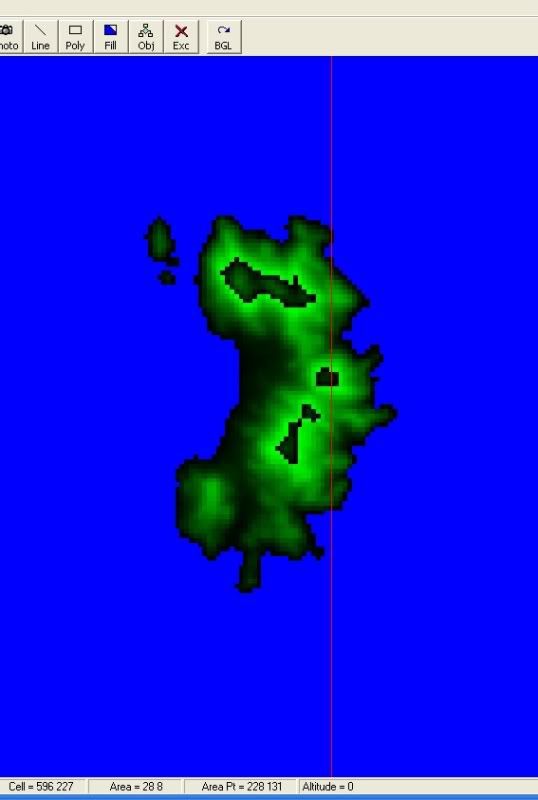
mesh.jpg


FS9 looking at the small island on the right corner. It is completely flat.
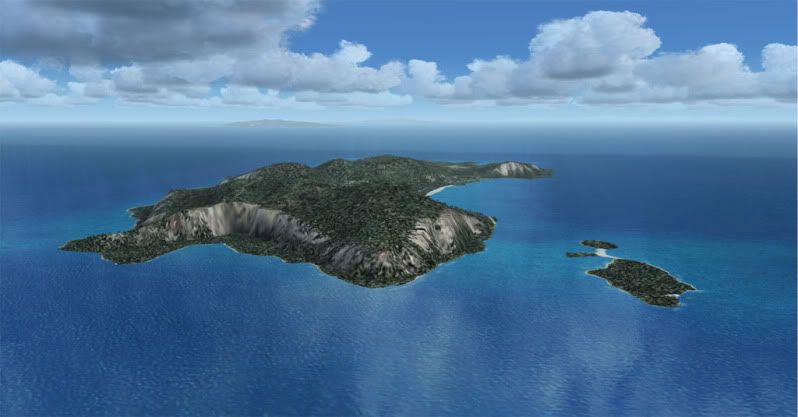
koh-1.jpg


And this is HL974280.bgl No water, no fill. Nothing there.
HL974280.jpg


How to correct that?
Regards,
Tic
 
Last edited:
:( No solution at all.

I think may be FS9 engine does not show up some detail mesh. That why it become flat since the small islands at that size face the same problem.
I try to use LOD10, LOD11 mesh in S-builder. It came out some spike of mountains here and there.
 
How do you solve the problem with the bigger island as I can see you get the island with his mesh, the other island little in size is common see them as flat terrain, this is so in fsx.
 
At first you have your map in S-builder, looking at the status bar below the window. There are information that you need.
You have to go to FS9/scenery/.......(continent where your project is)/scenery.
Mine is in asia so the folder is FS9/Scenery/asia/scenery.
There are a lot of files there. HLxxxxxx.bgl is the type that you are looking for.

Look at the status bar below the windows of S-builder, the number indicate where is your file is there. I don't have s-builder with me now sorry about the pictures to show you where to look at but I'll post them later.

In mine area, it is 7428 . Just add 9 before and 0 after this four letters, you will have your file.

The file of my area is HL974280.bgl. If you used Sbuilder 2.05 (fs9), you use command "Append->LWM bgl" then this file will load up to your screen. Put your map from google on it and remove all the water polygon which is under the land in google. The water will be out. Then you mesh will show up. You need to draw LWM poly and make height of that to -9999 (4 of "9") and the mesh will show.

There is a tutorial for this. Please take a look in S-builder folder, there is one doc in there somewhere.
Regards,
Tic
 
All right, thanks for the replly, I've been working with FsxKml, is good for certain task, but making island I'm lost completely with this tool, look as if not work absolutely, then I'm looking at sbuilder. ii's is an issue at which I'm stuck, some day could be :rolleyes:, well greetings and thanks.
 
Hi Brenado,
I have tried to make island in FSX came out pretty good.
You need to make exclusion first and then draw body of water bigger than exclusion. After that draw polygon of your island and make it a hole to the water. All the mesh comes up nicely.
kohkaig.jpg
 
Back
Top