
-
Which the release of FS2020 we see an explosition of activity on the forun and of course we are very happy to see this. But having all questions about FS2020 in one forum becomes a bit messy. So therefore we would like to ask you all to use the following guidelines when posting your questions:
- Tag FS2020 specific questions with the MSFS2020 tag.
- Questions about making 3D assets can be posted in the 3D asset design forum. Either post them in the subforum of the modelling tool you use or in the general forum if they are general.
- Questions about aircraft design can be posted in the Aircraft design forum
- Questions about airport design can be posted in the FS2020 airport design forum. Once airport development tools have been updated for FS2020 you can post tool speciifc questions in the subforums of those tools as well of course.
- Questions about terrain design can be posted in the FS2020 terrain design forum.
- Questions about SimConnect can be posted in the SimConnect forum.
Any other question that is not specific to an aspect of development or tool can be posted in the General chat forum.
By following these guidelines we make sure that the forums remain easy to read for everybody and also that the right people can find your post to answer it.
You are using an out of date browser. It may not display this or other websites correctly.
You should upgrade or use an alternative browser.
You should upgrade or use an alternative browser.
Mipmaps
- Thread starter Shaun
- Start date

jtanabodee
Resource contributor
- Messages
- 3,924
- Country

Forget about that advice in mipmap in this tutorial. From my experience, I do mipmap for all the scenery without any problems. I never encounter any blurry texture at all.
Other scenery designers please comment on this. I think this is a FAQ from this tutorial. The tutorial is excellent, except at this point.
If it is airplane painting, mipmap should be avoided. But for scenery making, you should do mipmap for all the textures you use.
Other scenery designers please comment on this. I think this is a FAQ from this tutorial. The tutorial is excellent, except at this point.
If it is airplane painting, mipmap should be avoided. But for scenery making, you should do mipmap for all the textures you use.


- Messages
- 502
- Country

Hi Shaun,
Yeah - I mipmap everything - I think the shimmering is called Moire Effect... It seems even some payware developers don't use them as I've had to go back through and mipmap the textures after purchase... It greatly improves the look/performance of the textures... I've been using ConVimX myself to do it...
Regards,
Scott
Yeah - I mipmap everything - I think the shimmering is called Moire Effect... It seems even some payware developers don't use them as I've had to go back through and mipmap the textures after purchase... It greatly improves the look/performance of the textures... I've been using ConVimX myself to do it...
Regards,
Scott

- Messages
- 1,964
- Country

Ah thanks a lot. I have been using mipmaps until this point. Yes the Moire effect; I was reading about that the other day.
I have a problem with the taxiway edge, it's a lofted line with a DXT5 texture. It works fine up close but when it stretches off into the distance you can see the outline of the whole loft for some reason. I'm not sure what it's down to. I've put a picture up.
I have a problem with the taxiway edge, it's a lofted line with a DXT5 texture. It works fine up close but when it stretches off into the distance you can see the outline of the whole loft for some reason. I'm not sure what it's down to. I've put a picture up.
Attachments

jtanabodee
Resource contributor
- Messages
- 3,924
- Country
You will get that either you use mipmap on not.
That's the way it is because the texture repeat along the way.
The only solution that I can think of is you need a satellite photo to overlay on the asphalt texture. It will diminish the repeating of the texture.
If it is FSX you need to make another layer of satellite photo to eliminate the repeating texture. This is my work in VTBS and KLIA. The way to do this is the tutorial from Bill Womack. It is in the sticky here: http://www.fsdeveloper.com/forum/showthread.php?t=14039
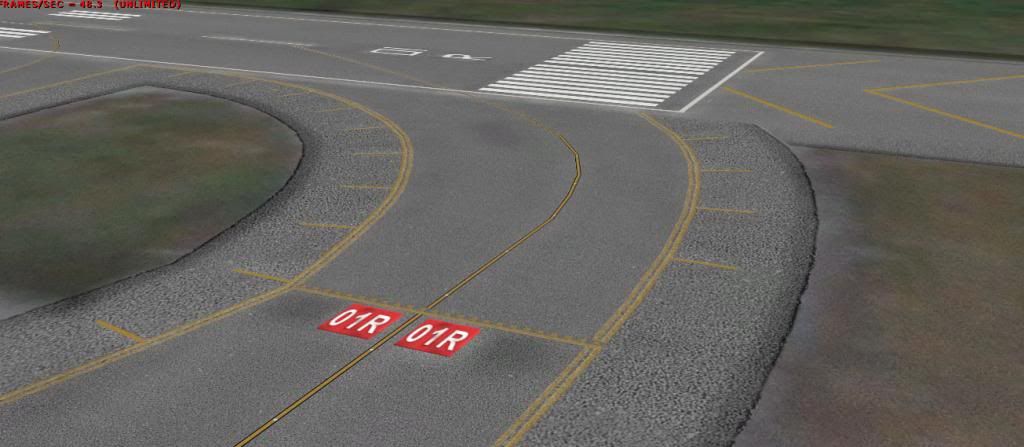
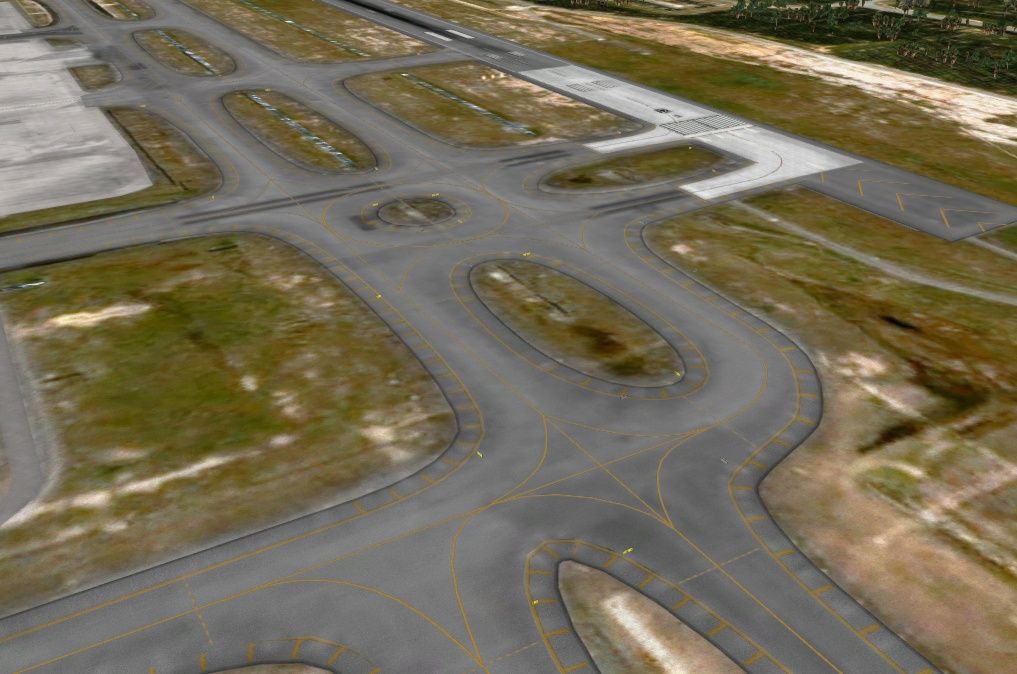


In FS9, if you make ground poly for satellite photo, you can make alpha texture to be some degree of transparent to see the underlying satellite photo ground poly.
That's the way it is because the texture repeat along the way.
The only solution that I can think of is you need a satellite photo to overlay on the asphalt texture. It will diminish the repeating of the texture.
If it is FSX you need to make another layer of satellite photo to eliminate the repeating texture. This is my work in VTBS and KLIA. The way to do this is the tutorial from Bill Womack. It is in the sticky here: http://www.fsdeveloper.com/forum/showthread.php?t=14039
In FS9, if you make ground poly for satellite photo, you can make alpha texture to be some degree of transparent to see the underlying satellite photo ground poly.
Last edited:

jtanabodee
Resource contributor
- Messages
- 3,924
- Country
I don't know either what causes it.
But if you do the edge and the edge does not fit with the taxi way of runway, this can happen.
But if you do the edge and the edge does not fit with the taxi way of runway, this can happen.
Can you post your edge texture. I suspect I know what's going on. The alpha for the mipmap is picking up part of your texture that doesn't have the 'asphalt'. This is common with mipmaps (and there's a tutorial around illustrating it). The solution is to make your entire RGB channel the 'asphalt' texture, and make your edits only in the alpha channel.
Hope that makes sense.
Hope that makes sense.
jtanabodee
Resource contributor
- Messages
- 3,924
- Country
I agree with you, Ztimbre.
I have made lines texture with white background. When I was far away, my line turn from yellow to white. So the background of the texture should be the same background of the surface that line place over. If you place the line on asphalt, the background of that texture should be asphalt too. I think the same apply to the texture sheet that use for the edge.
I have made lines texture with white background. When I was far away, my line turn from yellow to white. So the background of the texture should be the same background of the surface that line place over. If you place the line on asphalt, the background of that texture should be asphalt too. I think the same apply to the texture sheet that use for the edge.
Last edited: