• Which the release of FS2020 we see an explosition of activity on the forun and of course we are very happy to see this. But having all questions about FS2020 in one forum becomes a bit messy. So therefore we would like to ask you all to use the following guidelines when posting your questions:

    • Tag FS2020 specific questions with the MSFS2020 tag.
    • Questions about making 3D assets can be posted in the 3D asset design forum. Either post them in the subforum of the modelling tool you use or in the general forum if they are general.
    • Questions about aircraft design can be posted in the Aircraft design forum
    • Questions about airport design can be posted in the FS2020 airport design forum. Once airport development tools have been updated for FS2020 you can post tool speciifc questions in the subforums of those tools as well of course.
    • Questions about terrain design can be posted in the FS2020 terrain design forum.
    • Questions about SimConnect can be posted in the SimConnect forum.

    Any other question that is not specific to an aspect of development or tool can be posted in the General chat forum.

    By following these guidelines we make sure that the forums remain easy to read for everybody and also that the right people can find your post to answer it.

SDK MSFS 2024 SimAttachement

Messages
12
Country
ukraine
Gentlemen

I have a question about using SimAttachment in MSFS 2024.
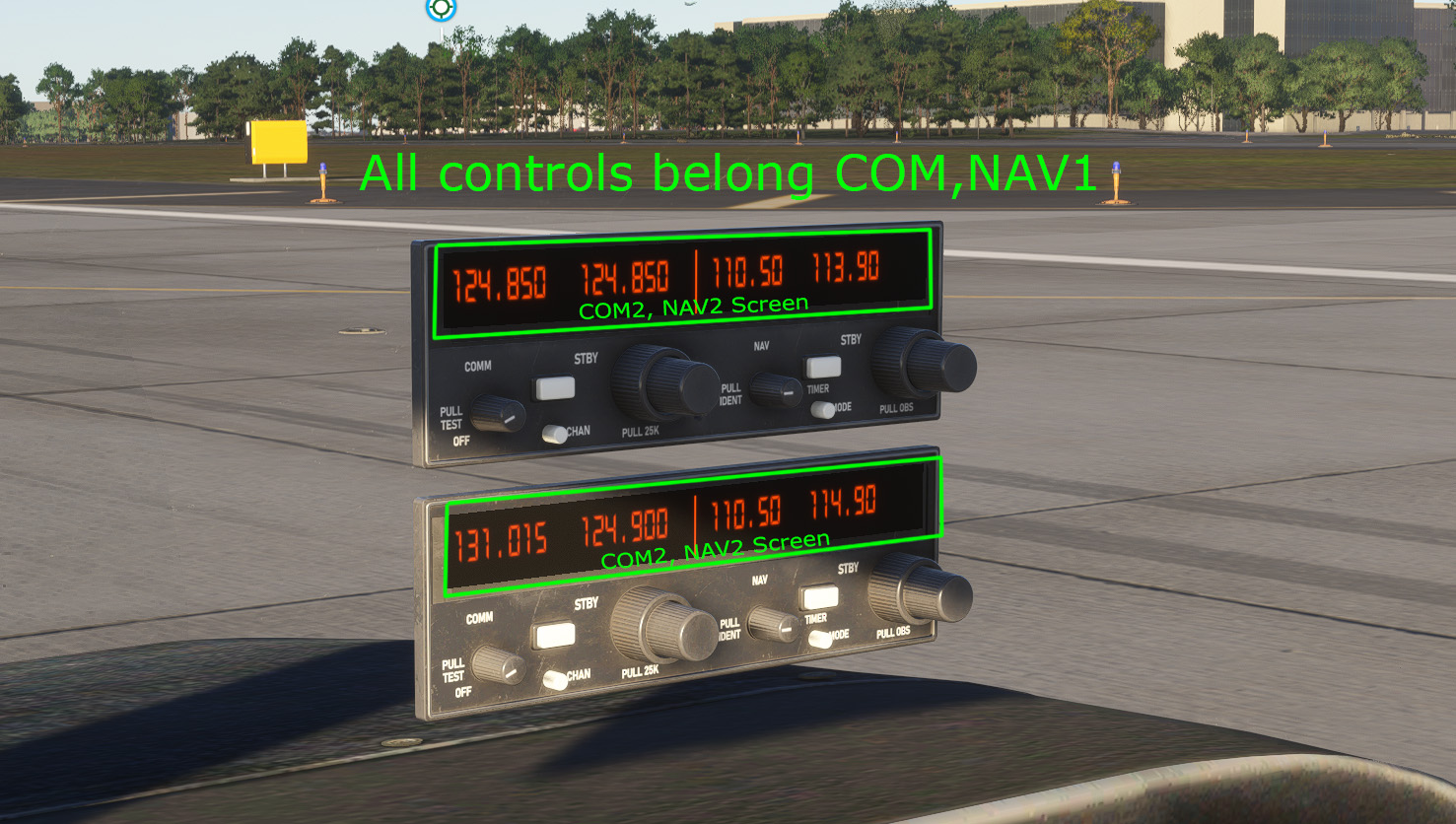
I'm trying to integrate the Asobo_comnav_as155 in my airaft, and the device's screens are working correctly,
but the controls, in both cases, are related to COM1 and NAV1.

Where can I configure the properties of a connected device? and change controls properies?

I need to connect contrlos to COM2-NAV2 screens,
check out the video here:

Please help!

COM-NAV-Mess.jpg


SimAttachement.jpg


SimAttachement2.jpg
 
i think you need to add a 'suffix' <id> number to separate them
so left of the green circle you made click the + sign at the bottom of that field and add <id>1</id> and <id>2</id> respectively

then you have to rename all the parts and anims in blender by adding the _1 or _2 (underscore and id number) suffix to all the node and animation names
in the code this variable suffix is represented by #SUFFIX_ID#

you should probably look these templates up in the sdk if possible, here is one on the navcoms
 

Attachments

  • 2025-11-26 16_12_33-AS92.xml — Mozilla Firefox.jpg
    2025-11-26 16_12_33-AS92.xml — Mozilla Firefox.jpg
    82.3 KB · Views: 83
  • 2025-11-26 16_13_00-NavComSystem.xml — Mozilla Firefox.jpg
    2025-11-26 16_13_00-NavComSystem.xml — Mozilla Firefox.jpg
    203.6 KB · Views: 97
Last edited:
Thanks for the reply and your suggestion!

Yes, I used to create a copy of the device and assign an animation with the desired prefix "_1" or "_2", and then add code like this to _interior.xml:

<UseTemplate Name="ASOBO_NAVCOM_Screens_Template">
<ID>1</ID>
<NODE_ID>NavCom1_Screen</NODE_ID>
</UseTemplate>

<UseTemplate Name="ASOBO_NAVCOM_Screens_Template">
<ID>2</ID>
<NODE_ID>NavCom2_Screen</NODE_ID>
</UseTemplate>

and everything worked correctly of I use my 3d model and direct animation connection.

Now I'm trying to use the concept described here

The instrument with all controls is correctly integrated into the aircraft. I make the screen separately and specify what it will display in the panel. CFG

[VCockpit01]
size_mm = 512.70
pixel_size = 512.70
texture = $NavCom1_Screens
htmlgauge00=Generic/Radios/KX155A/KX155A.html?Index=1, 0, 0, 512, 70

[VCockpit02]
size_mm = 512.70
pixel_size = 512.70
texture = $NavCom2_Screens
htmlgauge00=Generic/Radios/KX155A/KX155A.html?Index=2, 0, 0, 512, 70

and the screens work correctly.

I tried to change properties in behavior_parameter - see pic. All changes stored in attached_objects.cfg


attach_to_node = WatchTimer
attach_offset = -0.000326,-0.002916,-0.000242
attach_scale = 1.05

[SIM_ATTACHMENT.4]
attachment_root = simattachments\instruments\asobo_comnav_as155
attachment_file = model/asobo_comnav_as155.xml
attach_to_model = interior
attach_to_node = KX155A_1
;[REMOVED]attach_offset = 0.001048,0.006441,-0.003874
;behavior_parameter.0 = "<ID>1</ID>"
behavior_parameter.0="COM_INDEX,1"
behavior_parameter.1="NAV_INDEX,1"

[SIM_ATTACHMENT.5]
attachment_root = simattachments\instruments\asobo_comnav_as155
attachment_file = model/asobo_comnav_as155.xml
attach_to_model = interior
attach_to_node = KX155A_2
behavior_parameter.0="COM_INDEX,2"
behavior_parameter.1="NAV_INDEX,2"

you can see I tried different ways but have the same problem.

It would be nice to use new conception to attach already exists instruments in the model but how change their behavour?
 

Attachments

  • COM2-NAV2.jpg
    COM2-NAV2.jpg
    25.8 KB · Views: 76
Back
Top