
-
Which the release of FS2020 we see an explosition of activity on the forun and of course we are very happy to see this. But having all questions about FS2020 in one forum becomes a bit messy. So therefore we would like to ask you all to use the following guidelines when posting your questions:
- Tag FS2020 specific questions with the MSFS2020 tag.
- Questions about making 3D assets can be posted in the 3D asset design forum. Either post them in the subforum of the modelling tool you use or in the general forum if they are general.
- Questions about aircraft design can be posted in the Aircraft design forum
- Questions about airport design can be posted in the FS2020 airport design forum. Once airport development tools have been updated for FS2020 you can post tool speciifc questions in the subforums of those tools as well of course.
- Questions about terrain design can be posted in the FS2020 terrain design forum.
- Questions about SimConnect can be posted in the SimConnect forum.
Any other question that is not specific to an aspect of development or tool can be posted in the General chat forum.
By following these guidelines we make sure that the forums remain easy to read for everybody and also that the right people can find your post to answer it.
You are using an out of date browser. It may not display this or other websites correctly.
You should upgrade or use an alternative browser.
You should upgrade or use an alternative browser.
New Ground Poly Tutorial for the year 2014
- Thread starter jtanabodee
- Start date


jtanabodee
Resource contributor
- Messages
- 3,924
- Country

You need to check your ground if it is perfectly flat. Sometimes it is not flat as we think even we flatten it in ADE.
You need TcalX to check the elevation and re-flatten it again by choosing the height above the highest value that you find in TcalX.
You need TcalX to check the elevation and re-flatten it again by choosing the height above the highest value that you find in TcalX.

- Messages
- 36
- Country

I solved that problem too! because I have unchecked that slice polygon option in MCX and my rwy line was a long continuous polygon without any vertical segments, rwy line was acting like that. whatever I've started to like this gaming world, its full of mysteries!
Thanks
Thanks
- Messages
- 48
- Country

Both links do not work.
jtanabodee
Resource contributor
- Messages
- 3,924
- Country
I have corrected that.Both links do not work.
- Messages
- 48
- Country
Thank you very much, now I can get on to woking on my Ground Polys!I have corrected that.


- Messages
- 85
- Country

Hi, I'm following this tutorial but I have a problem with UVW mapping my background reference image.
As you can see it appears "pixelated" so much so that it's virtually useless to use as a reference.

I thought maybe the image was too large for GMAX but that is not the problem. Any ideas?
Thanks
As you can see it appears "pixelated" so much so that it's virtually useless to use as a reference.
I thought maybe the image was too large for GMAX but that is not the problem. Any ideas?
Thanks

jtanabodee
Resource contributor
- Messages
- 3,924
- Country
I should have added this to the tutorial. I though it is common setting when you first work with Gmax. So everybody should have known this for a long time.
You need to go to the menu Customize->Preferences.
Then click on Viewports tab and click on Choose Driver as this figure. Make sure that it is either D3D or OpenGL. Personally, I think D3D cause less problem.
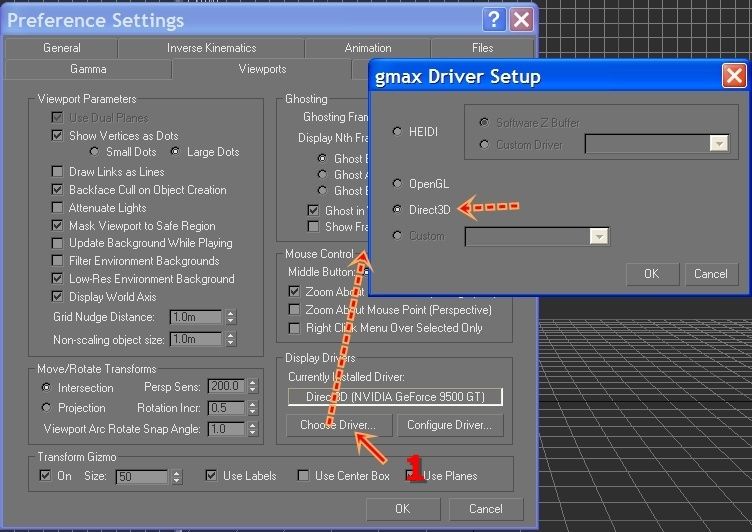
Then come back and configure driver. Set up everything to max. Gmax is 10+ year old, so they have this setting for a very limited resource computer which is not exist nowadays.

You resolution will be much better.
You need to go to the menu Customize->Preferences.
Then click on Viewports tab and click on Choose Driver as this figure. Make sure that it is either D3D or OpenGL. Personally, I think D3D cause less problem.

Then come back and configure driver. Set up everything to max. Gmax is 10+ year old, so they have this setting for a very limited resource computer which is not exist nowadays.

You resolution will be much better.


jtanabodee
Resource contributor
- Messages
- 3,924
- Country
I have changed the links. Dropbox has changed their policy, no public folder. So I have move the file to Mediafire and edited the links already.

- Messages
- 15
- Country

Okay, never mind. I bothered to click the coloured titlesWhere are the links? Am I missing sth?
