• Which the release of FS2020 we see an explosition of activity on the forun and of course we are very happy to see this. But having all questions about FS2020 in one forum becomes a bit messy. So therefore we would like to ask you all to use the following guidelines when posting your questions:

    • Tag FS2020 specific questions with the MSFS2020 tag.
    • Questions about making 3D assets can be posted in the 3D asset design forum. Either post them in the subforum of the modelling tool you use or in the general forum if they are general.
    • Questions about aircraft design can be posted in the Aircraft design forum
    • Questions about airport design can be posted in the FS2020 airport design forum. Once airport development tools have been updated for FS2020 you can post tool speciifc questions in the subforums of those tools as well of course.
    • Questions about terrain design can be posted in the FS2020 terrain design forum.
    • Questions about SimConnect can be posted in the SimConnect forum.

    Any other question that is not specific to an aspect of development or tool can be posted in the General chat forum.

    By following these guidelines we make sure that the forums remain easy to read for everybody and also that the right people can find your post to answer it.

FSX No Objects Found in File?

Messages
55
Country
germany
Hello again,

I'm trying to edit some of the scenery from "Helipack X" (all BGL files), mostly in order to reduce the size of the crash boxes. Since it turned out many of the models come from FS9, it made sense to me converting them into true FSX models in the same go.

Unfortunately MCX (current dev release) doesn't want to open many of the files, and I have no clue why. Trying to examine with disassembler tools like "NewBGLAnalyze" I got an XML object list for a file where MCX states "No objects found in file" (please see first 2 pictures). It's the same with many of the files in the package.

Is that a probable bug in MCX? I realize that I only get the XML from ScruffyDucks NewBGLAnalyze, but no model data extracted, so it might as well have to do with corrupt files.

EDIT: While NewBGLAnalyze reports an object to be "Type: NewBGLFormat" (containing objects), the newer BGLAnalyzeX reports the same object to be of "Type: BGLXFormat" (containing objects). Decompilation isn't possible with the newer tool: it reports an error due to FS9-code found.

In case someone has deeper knowledge on the issue, I enclose two sample files (which show the same effect but probably for different reasons) for further investigation.

Thank you very much for helping,
Mick
 

Attachments

  • objects_in_file.jpg
    objects_in_file.jpg
    72.9 KB · Views: 686
  • objects_in_file_2.jpg
    objects_in_file_2.jpg
    139.7 KB · Views: 570
  • Klinikum_Neuperlach_veg.bgl
    Klinikum_Neuperlach_veg.bgl
    860 bytes · Views: 567
  • Klinikum_Fulda.bgl
    Klinikum_Fulda.bgl
    22 KB · Views: 554
Last edited:
.bgl files can be placement or flattens and many things without contained models. A placement .bgl contains positional and identification data for items in a separate library object .bgl. Difficult to tell externally but one clue is the size. If it is a few hundred bytes or a few kb, like you'd expect a modest text document list to be, then it is probably not an object .bgl. Your XML looks like it might be placement data, hard to tell as the writing is small and my eyes are bad.
 
EDIT: While NewBGLAnalyze reports an object to be "Type: NewBGLFormat" (containing objects), the newer BGLAnalyzeX reports the same object to be of "Type: BGLXFormat" (containing objects). Decompilation isn't possible with the newer tool: it reports an error due to FS9-code found.

Try BglAnalyze9 instead.
 
Your XML looks like it might be placement data
@Rick: It's placement data combined with <LibraryObject> data, referring to model GUIDs. The MDL data named after these GUIDs were obviously not extracted by the tool (or they are stored in any of the libraries). What I wanted to point out is that both tools report objects (and hold references) while MCX reports there were no objects.

Sorry for the pic being too small.

@Essex: I did. The result is the same kind of XML list with references to LibraryObject GUIDs. And, as well, reporting there are objects in the file.

One more question arose: Once I have the GUIDs in my XML file (as in the picture), how can I find out where (i.e. in which library BGL) the MDL data with this GUID are stored?
 
Last edited:
Hi,

MCX only calls the actual MDL file an object. A reference to the object is called a placement in MCX. So if the BGL file only contains this placement information, it will report no objects have been found. Since there is no MDL object in the file that MCX can display.
 
MCX does not tell lies.

There are no objects in either of those bgls, only placement information.

Unfortunately, I don't have the scenery for Fulda hospital, but, the objects referenced by Klinikum_Neuperlach_veg.bgl are defined in FSX\Scenery\Global\scenery\vegetation.bgl

 
Thank you, Arno and George.

@arno: Sorry, different interpretations of "No objects found" in different tools. I realized that MCX uses the "BGLXReader", that's why I thought there's something in the file making MCX "think" it were FSX format... and therefore not be able to read it.

EDIT: @George: In the comparison it seems to me that there's more going wrong with my installation... yours is much nicer, I think. It seems the photoreal ground isn't loaded in mine, and I guess you use a newer tree library as well, no?

Neuperlach_Anflug.jpg
 
Last edited:
Hi Mick:

A few important points to consider as you are working in the current phase of your project in this same thread, and also in the work you were doing in this thread:

http://www.fsdeveloper.com/forum/threads/meaning-of-variable-33b.437764/. ;)


The FlightPort scenery team is very knowledgeable, and has likely used a number of files from the FS9 version of their Helipack scenery for FS2004 in the Helipack_X FSX version with any needed updates as to positioning, texture format to correct transparency issues etc., so converting some or all of their scenery objects to FSX MDL format 'may' result in a loss of functionality.

Since most if not all of the FS9 versions of their Helipack scenery for FS2004 included in the Helipack_X FSX version are likely to have been utilized because they could not otherwise be displayed as intended by the authors when converted into FSX format MDLs, one must be aware of the possibility that one may not achieve quite the same display and functionality in FSX at run time that one would by using the FS2004-format 3D scenery objects ...as provided in the original Helipack_X scenery package.

http://www.flightport.de/szenerien/helipack-deutschland/

https://translate.googleusercontent...hland/&usg=ALkJrhiLBc_g6eDzhlqdpIG2kP4Hurr2hw


FYI
: The above web page has a Red frame insert section with links to download the Helipack 'base' scenery, which also requires a separate download of the actual 3D scenery object libraries for proper display:

http://www.flightport.de/libraries/helipack-library/

https://translate.googleusercontent...brary/&usg=ALkJrhhdurKGzP7NSDZkCBbIYGfUIM9Wxw


BTW: I have not downloaded and looked at the above cited Helipack 'base' scenery or the Helipack object library, but it is not an impossibility that you may also find numerous custom coded BGL files which cannot simply be converted by MCX ex: in order to utilize FSX format textures, as this also may not achieve quite the same display and functionality in FSX at run time that one would by using the FS2004-format 3D scenery objects ...as provided in the original Helipack_X scenery package.

And if your project is primarily intended to minimize the extent of "crash-boxes" on buildings having helipads in the Helipack scenery to make it easier to avoid crashes etc., you may need to confirm whether it is possible to adjust such crash-boxes and re-export the 3D models with all features and functionality intact after export by MCX ...to FSX MDL format.


NOTE: One should, IMHO, work with "copies" (made from 'original' files downloaded directly from the Flightport website) of the pertinent scenery objects BGLs; and such copies should be kept- only on your own computer.

Such files may be either stand-alone 'geo-locked' BGLs containing both the 3D object with placement of the object in the same BGL, or multiple 3D objects packaged inside a scenery library object BGL (and separate from the BGL which "places" those objects in FS) ...when performing such 'tests' and any related de-compilation / re-compilation.


CAVEAT: While this scenery is 'freeware', it would be important to get permission from the authors before distributing any modified versions of their scenery "packages" or "location-specific sub-packages" ...outside your own computer.

AFAIK, the FightPort team at the very least, take pride in producing scenery that displays as intended in the various versions of FS, and would likely not want any other versions of their scenery re-distributed in a modified form ...for a number of valid reasons.


That said, if one is merely analyzing the FlightPort Helipack_X scenery for purposes of learning about scenery making from exceptionally skilled authors, and/or modifying it for use exclusively on ones own computer, one may wish to utilize another decompiler by Jon Masterson (aka "Scruffyduck"), author of Airport Design Engine (aka "ADE9X"):

"
Bgl2Xml

Bgl2Xml is a tool to decompile Bgl files into their XML Source. Any model files in the Bgl file can also be saved. Be sure that you not infringing any copyrights when using this tool"

http://www.scruffyduck.org/bgl2xml/4584282773


[EDITED] <...dead link >

PS: If you are utilizing the Helipack_X scenery for flight simulation activities in user aircraft and would like to have an additional over view of the various locations featured in the Helipack_X package outside of FSX, you might also be interested in this Google Earth KMZ file:

http://forum.aerosoft.com/index.php?/topic/50070-helipack-x-v2-freeware-von-flightport/

https://translate.google.com/translate?hl=en&sl=de&u=http://forum.aerosoft.com/index.php?/topic/50070-helipack-x-v2-freeware-von-flightport/&prev=search


[END_EDIT]


Hope these considerations help with the learning process ! :)

GaryGB
 
Last edited:
Hi,

It might be confusing, but the BGLXReader stands for the BGL XML based format reader. So it does also read FS2004 files made with BGLComp.
 
I think it would be less confusing if we did not cross link threads that have only the author in common. One might try exploring one's own cross links in order to understand my suggestion.
In the comparison it seems to me that there's more going wrong with my installation... yours is much nicer, I think. It seems the photoreal ground isn't loaded in mine, and I guess you use a newer tree library as well, no?
The trees might be replacements using the same GUID's as the originals, or your trees might be the replacements and his are the originals. The absence of the photo ground raises the second possibility in my mind.
 
Thank you again!

@Gary: All I want is land the heli, but unfortunately in some of the sceneries experience sudden crashes despite a larger distance (20m +) from any objects. BTW I do this only on my computer and not for distribution, as well as keeping the original download aside and work with copies only. Thanks for all the additional explanations on the HelipackX. Just to let you know: The follow-up-link to the KML-file is outdated and not working anymore.

@arno: It's so easy to get on a wrong track ;)

@Rick: I tried to avoid cross linking and keep the technical issues separated, despite (as Gary found) it's the same project. Regarding the trees I will see if George answers again... he will know for sure.
 
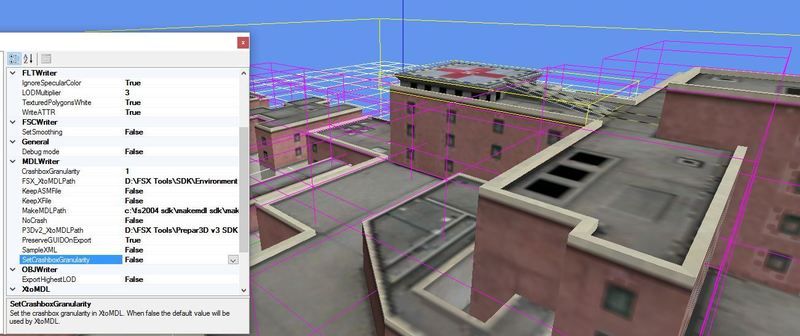
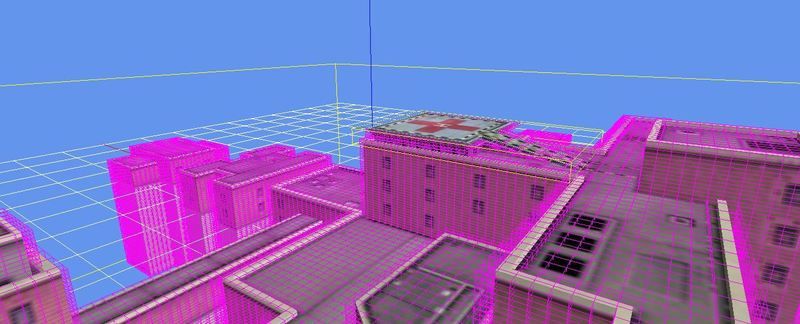
Mick it is your thread to do as you will and I hope to help as I'm sure we all do. I have seen other threads with this crash box issue. one of the solutions I suggested in the past is to change crash box granularity, I don't know if it is adequate for your problem. The circumstance is that the boxes are like large blocks and they are oriented to North, I believe, and if your model is diagonal to North, the box can protrude significantly. Increasing the granularity in the MCX options reduces the size of the boxes and increases the number. The effect is as if you replaced stone blocks with bricks and can suddenly add porticoes, balconies and windows. It also adds some nominal complexity to the model so one might have to be careful with settings. the two images below might help, note in this case, the OP was asking about triggering crashes unless he was perfectly aligned with the helo pad:
MCX%20crash%20box.jpg


default%20crash%20box.jpg
 
I have seen other threads with this crash box issue
Thanks again, Rick. The other thread might have been mine and I remember your same picture helping me (there was a platform included which was covered by the crash boxes). What you suggest is what I did on some buildings already (experimenting with the Granularity size parameter), eventually rotating the building inside its bounding box (with the transform tool) to put it straight north and then only rotating it during placement.

Right now I have the crash issue when landing over the vegetation surrounding "Klinikum_Neuperlach": Even when I manage to land almost in the center over the Helipad, I only make it in 20% of my tries to NOT (invisibly) touch anything of the surrounding plants crash boxes...
 
Right now I have the crash issue when landing over the vegetation surrounding "Klinikum_Neuperlach": Even when I manage to land almost in the center over the Helipad, I only make it in 20% of my tries to NOT (invisibly) touch anything of the surrounding plants crash boxes...
You could add a "NoCrash" tag to the tree placements.
 
This sounds interesting, George! How would I do that without potentially "corrupting" the bgl files?
 
Decompile Klinikum_Neuperlach_veg.bgl and place <NoCrash/> immediately before each <LibraryObject and recompile:

<SceneryObject
lat="48.0945745110512"
lon="11.6550542414188"
alt="0.0M"
altitudeIsAgl="TRUE"
pitch="0"
bank="0"
heading="27.9986572265625"
imageComplexity="NORMAL">
<NoCrash/>
<LibraryObject
name="2cbbba274cdf4123f667a29978ca30e8"
scale="1.27879"
/>
</SceneryObject>
 
Back
Top