• Which the release of FS2020 we see an explosition of activity on the forun and of course we are very happy to see this. But having all questions about FS2020 in one forum becomes a bit messy. So therefore we would like to ask you all to use the following guidelines when posting your questions:

    • Tag FS2020 specific questions with the MSFS2020 tag.
    • Questions about making 3D assets can be posted in the 3D asset design forum. Either post them in the subforum of the modelling tool you use or in the general forum if they are general.
    • Questions about aircraft design can be posted in the Aircraft design forum
    • Questions about airport design can be posted in the FS2020 airport design forum. Once airport development tools have been updated for FS2020 you can post tool speciifc questions in the subforums of those tools as well of course.
    • Questions about terrain design can be posted in the FS2020 terrain design forum.
    • Questions about SimConnect can be posted in the SimConnect forum.

    Any other question that is not specific to an aspect of development or tool can be posted in the General chat forum.

    By following these guidelines we make sure that the forums remain easy to read for everybody and also that the right people can find your post to answer it.

Nose wheel steering only one way HJG DC9 series FS9-FSX conversion *private use

Messages
34
Country
us-minnesota
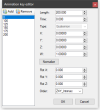
Hi guys. Im new to MCX but i managed to get alot done by reading forum posts and tutorials. Anyways, I cant seem to figure out why the nose gear is only steering one way and not the other. It only goes to the left and not the right when using the aircraft in P3Dv4. Ive attached a few screenshots below showing what the settings are. MCX shows it doing a full 360 when using the animation slider. Im using MCX version 1.5

** NOTE: Im not going to release any of these models, they are for my own private use on P3Dv4.
 

Attachments

  • Screenshot 2022-03-16 23.25.27.png
    Screenshot 2022-03-16 23.25.27.png
    35 KB · Views: 223
  • Screenshot 2022-03-16 23.27.55.png
    Screenshot 2022-03-16 23.27.55.png
    13.4 KB · Views: 197
Last edited:
Hi,

The animation of the c_wheel name is different between FS9 and FSX. You must use an animation tag different from c_wheel. From my conversion tutorial:

"24. One more task, and that's to re-assign any parts that have a different animation in FSX than they did in FS2004. An example of this is the steerable nosewheel using the c_wheel animation definition. The FS2004 SDK specifies it to be animated differently than the FSX SDK does (see the Appendix for details if you are interested). So open the Animation Editor and type in c_wheel in the Select Name Containing box and press the button. Normally there will be only one line, but I guess there could be more. Select c_wheel_FS9 from the drop down box to the right of the Assign Animation Type and click that button. The c_wheel entries should change to c_wheel_FS9."

Here is the xml code I use for that animation tag:

XML:
    <Animation name="c_wheel_FS9" guid="BC935F16-43CD-4042-8EF3-06E44A5940AB" length="200" type="Sim" typeparam2="c_wheel_FS9" typeparam="AutoPlay" />

    <PartInfo>
        <Name>c_wheel_FS9</Name>
        <AnimLength>200</AnimLength>
        <Animation>
            <Parameter>
          <Code>
            (A:GEAR CENTER STEER ANGLE, grads) 0 &gt; if{ (A:GEAR CENTER STEER ANGLE, grads) 0.5 * 100 + } els{ (A:GEAR CENTER STEER ANGLE, grads) 0.5 * 200 + }
          </Code>
            </Parameter>
        </Animation>
    </PartInfo>
 
Hi,

The animation of the c_wheel name is different between FS9 and FSX. You must use an animation tag different from c_wheel. From my conversion tutorial:

"24. One more task, and that's to re-assign any parts that have a different animation in FSX than they did in FS2004. An example of this is the steerable nosewheel using the c_wheel animation definition. The FS2004 SDK specifies it to be animated differently than the FSX SDK does (see the Appendix for details if you are interested). So open the Animation Editor and type in c_wheel in the Select Name Containing box and press the button. Normally there will be only one line, but I guess there could be more. Select c_wheel_FS9 from the drop down box to the right of the Assign Animation Type and click that button. The c_wheel entries should change to c_wheel_FS9."

Here is the xml code I use for that animation tag:

XML:
    <Animation name="c_wheel_FS9" guid="BC935F16-43CD-4042-8EF3-06E44A5940AB" length="200" type="Sim" typeparam2="c_wheel_FS9" typeparam="AutoPlay" />

    <PartInfo>
        <Name>c_wheel_FS9</Name>
        <AnimLength>200</AnimLength>
        <Animation>
            <Parameter>
          <Code>
            (A:GEAR CENTER STEER ANGLE, grads) 0 &gt; if{ (A:GEAR CENTER STEER ANGLE, grads) 0.5 * 100 + } els{ (A:GEAR CENTER STEER ANGLE, grads) 0.5 * 200 + }
          </Code>
            </Parameter>
        </Animation>
    </PartInfo>
I just tried this and it works. Now the only issue is "oversteer". Would i go to the aircraft cfg or edit that in the animation within MCX or in the modeldef xml file? Aircraft cfg contact point is set to 65 degrees. In the sim its turning more like 120-130 degrees.
 
Last edited:
I would first try to reduce the turning angle in the aircraft.cfg file. If that results in the plane not turning sharply enough, then I would then try editing the modeldef.xml entry to reduce the keyframe output. If not successful I would reduce the animation movement in MCX.

A possible edit of the modeldef line may be something like:

XML:
 (A:GEAR CENTER STEER ANGLE, grads) 0 &gt; if{ (A:GEAR CENTER STEER ANGLE, grads) 0.25 * 100 + } els{ (A:GEAR CENTER STEER ANGLE, grads) 0.25 * 200 + }

Note that if you use this for the conversion of another plane you may need to edit this again.
 
I would first try to reduce the turning angle in the aircraft.cfg file. If that results in the plane not turning sharply enough, then I would then try editing the modeldef.xml entry to reduce the keyframe output. If not successful I would reduce the animation movement in MCX.

A possible edit of the modeldef line may be something like:

XML:
 (A:GEAR CENTER STEER ANGLE, grads) 0 &gt; if{ (A:GEAR CENTER STEER ANGLE, grads) 0.25 * 100 + } els{ (A:GEAR CENTER STEER ANGLE, grads) 0.25 * 200 + }

Note that if you use this for the conversion of another plane you may need to edit this again.
Thanks for the help. That fixed the problem. Now i know what to tweak for the rest of them.
 
Oh wow, I used to love these DC-9s in FS9. Just curious, what cockpit setup would you use them them?

Good luck with the conversion.
 
Im using a generic MD90 glass cockpit with the MD80s. As for the DC9s and 717, im using a 717 glass cockpit. I didnt want to use analog gauges. Just think of it as "Upgraded".... Ive converted their entire MD80 lineup, 717, and DC9s and all work just fine in P3Dv4.
 
Interesting, I may need to dig into it. Would love to have a DC-9 classic fleet of Northwest planes again that I had in FS9. Thanks!
 
Back
Top