• Which the release of FS2020 we see an explosition of activity on the forun and of course we are very happy to see this. But having all questions about FS2020 in one forum becomes a bit messy. So therefore we would like to ask you all to use the following guidelines when posting your questions:

    • Tag FS2020 specific questions with the MSFS2020 tag.
    • Questions about making 3D assets can be posted in the 3D asset design forum. Either post them in the subforum of the modelling tool you use or in the general forum if they are general.
    • Questions about aircraft design can be posted in the Aircraft design forum
    • Questions about airport design can be posted in the FS2020 airport design forum. Once airport development tools have been updated for FS2020 you can post tool speciifc questions in the subforums of those tools as well of course.
    • Questions about terrain design can be posted in the FS2020 terrain design forum.
    • Questions about SimConnect can be posted in the SimConnect forum.

    Any other question that is not specific to an aspect of development or tool can be posted in the General chat forum.

    By following these guidelines we make sure that the forums remain easy to read for everybody and also that the right people can find your post to answer it.

Oil spots under RampLights

Messages
216
I have placed some oilspots (from cc_airport_utilities library in Rwy21) on the apron which is lighted by RampLights (download from the Resources of this forum).

When lights are on (dawn/dusk/night), and for various viewing angles. the oilspots appear as a dark rectangle, i.e. the whole texture becomes visible (this is in FSX).

Is there something I have to modify in materials properties in order to avoid this (since the cc_airport_utilities library was originally for FS9) ?
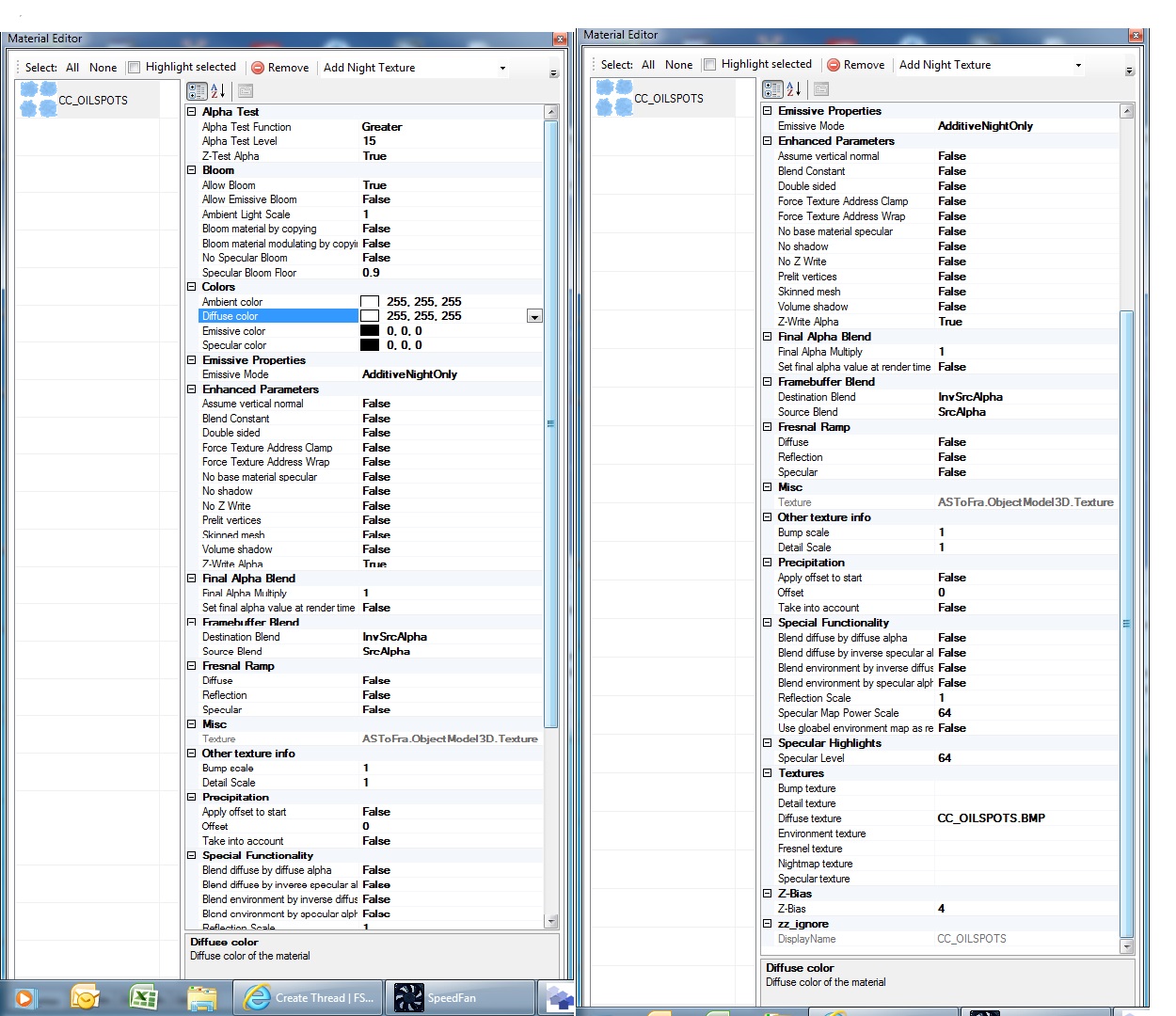
Material.jpg
 
Hi,

I found the behavior of the oilspots during the day in FSX was better if I left them in FS2004 format. I never checked them at night, I guess (I don't remember).

To convert them to FSX format all that is needed is to choose Use Default Transparent from the drop down box at the top of the Material, and click Apply (for each oilspot). Then Export Scenery (not Export Object) as an FSX BGL file. You'll have to decide which format is less of a problem for you. As I remember there were visual problems with a flyable aircraft parked at FSX formatted oilspots, but that's from a while ago.

BTW on my scenery page, we have already converted many of the Classic Libraries mega download to FSX format. As I said this one wasn't converted though.

Hope this helps,
 
Hi,

I found the behavior of the oilspots during the day in FSX was better if I left them in FS2004 format. I never checked them at night, I guess (I don't remember).

To convert them to FSX format all that is needed is to choose Use Default Transparent from the drop down box at the top of the Material, and click Apply (for each oilspot). Then Export Scenery (not Export Object) as an FSX BGL file. You'll have to decide which format is less of a problem for you. As I remember there were visual problems with a flyable aircraft parked at FSX formatted oilspots, but that's from a while ago.

BTW on my scenery page, we have already converted many of the Classic Libraries mega download to FSX format. As I said this one wasn't converted though.

Hope this helps,

I tried the advised method (almost): I extracted all oilspots as FSX mdl (before doing so I clicked Use Default Transparent for each one). I then compiled a bgl library (of all the oilspots) with LibraryCreatorXML.

At night (and under the artificial lighting of RampLights), the new FSX oilspots do not show the dark rectangle, BUT during the day
  1. there is no shadow of the aircraft when on top (while on the FS9 originals, shadows are cast alright)
  2. there is a flickering of the texture when viewed from a distance (again not present with the original FS9 objects).
Is there any other refinement I could try?

Notes:
  • flickering is worst when almost perpendicular to the surface (e.g. overflying).
  • Even with an added LOD40, is not much better (if any).
 
Last edited:
Hi,

Nope, you are seeing what I saw. I don't know of a way to fix them... One remote possibility is keep them in FS2004 format and add an LM texture (just a black square with the same alpha channel as the day texture) to see if that fixes the behavior at night. Worth a try.

Note that your oilspots now all have new GUIDs, so they cannot be used to replace spots at airports that have already placed the FS2004 versions. That's the difference between your technique and mine.

If the behavior is unacceptable you will just have to avoid using them.

Sorry,
 
PS. My oilspots (directly from the Classic Libraries package) do not have this problem on my machine. FSX SP2, no Acceleration. A picture showing Ramplights on top of oilspots:


So it must be something with your video card/driver, FSX settings, FSX version, or something else?
 
PS. My oilspots (directly from the Classic Libraries package) do not have this problem on my machine. FSX SP2, no Acceleration. A picture showing Ramplights on top of oilspots:
So it must be something with your video card/driver, FSX settings, FSX version, or something else?

It is SP2 for me also.
Just for sanity check:
  1. I am using the FSX version of RampLights (downloadable from Resources, not the ones originally included in Rwy21)
  2. Is it visible as in the picture, in all viewing angles and distances?
Additional info for post#3:
The original objects have a Z value (bounding box) equals 0, and a Z-bias (in material properties) equals 4.
The FSX converted ones take a Z value of 0.04, and Z-bias=0.

When placed with alt=0, the y do not cast shadows, but they do not flicker also (very little).
When placed with alt=-0.03 (or around that), shadows are back but a lot of flickering also.
 
Last edited:
One remote possibility is keep them in FS2004 format and add an LM texture (just a black square with the same alpha channel as the day texture) to see if that fixes the behavior at night. Worth a try.
Tried it, but no honey.
Not sure though, because when I saved in ModelConverterX (export scenery, as FS9 bgl), the resulted bgl had some visual differences (in other objects though).

For the moment, I have compromised with a FSX version, with LODs. Placed at alt=-0.012m, gives minimum flickering and still shadows are cast in daytime (uses the original textures).
 

Attachments

Hi again,

Back from a trip. I use the FS2004 Ramplight Library, not the FSX version.

I have checked, and they are fine from every angle and direction.

Glad you have found a compromise solution.
 
Ok, agreed. We see same things when using the same models (good to know that :rotfl:).
Thanks for the feedback.
 
Back
Top