• Which the release of FS2020 we see an explosition of activity on the forun and of course we are very happy to see this. But having all questions about FS2020 in one forum becomes a bit messy. So therefore we would like to ask you all to use the following guidelines when posting your questions:

    • Tag FS2020 specific questions with the MSFS2020 tag.
    • Questions about making 3D assets can be posted in the 3D asset design forum. Either post them in the subforum of the modelling tool you use or in the general forum if they are general.
    • Questions about aircraft design can be posted in the Aircraft design forum
    • Questions about airport design can be posted in the FS2020 airport design forum. Once airport development tools have been updated for FS2020 you can post tool speciifc questions in the subforums of those tools as well of course.
    • Questions about terrain design can be posted in the FS2020 terrain design forum.
    • Questions about SimConnect can be posted in the SimConnect forum.

    Any other question that is not specific to an aspect of development or tool can be posted in the General chat forum.

    By following these guidelines we make sure that the forums remain easy to read for everybody and also that the right people can find your post to answer it.

P3D v4 Oversize Footprint

Messages
142
Country
us-texas
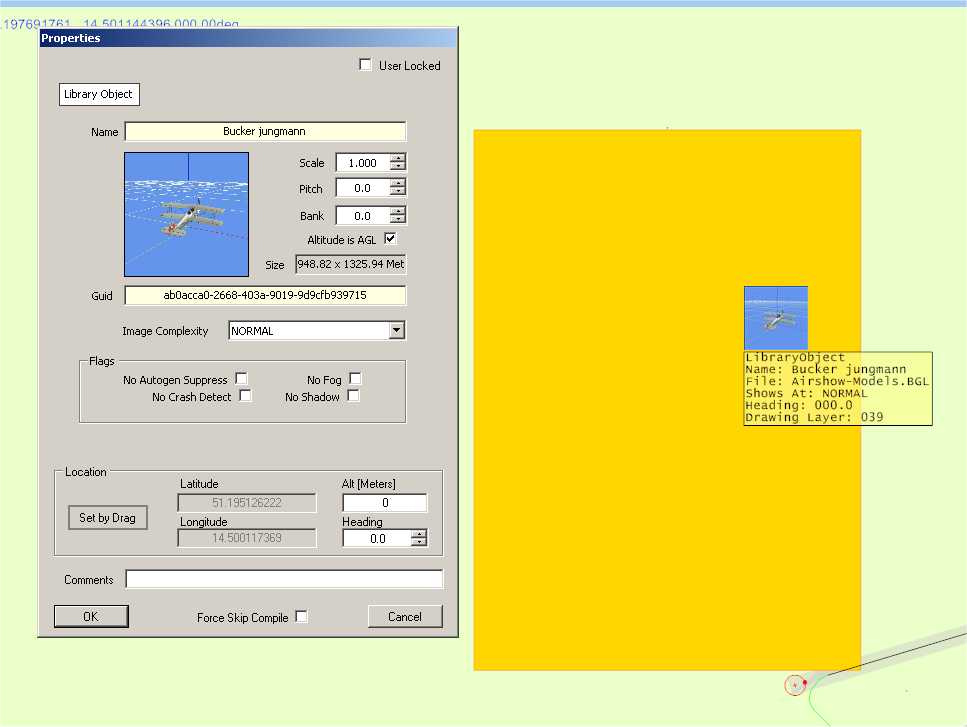
I am in the process of converting some AI Traffic to .mdls using Model Converter X. I am then placing them in my scenery using the latest ADEX. The conversion has been going as planned until last night. One of the aircraft that I converted showed up with two wings and the other one looked like a Kligon Bird of Prey and was approximately 13,000 feet long (almost same length as my runway). Needless to say the Bird of Prey wiped out my scenery. I was able to place the aircraft in the position I wanted and the .mdl appears as I had hoped. The aircraft with two wings was converted to an .mdl a couple of days back and displayed correctly in ADEX. The only change in the last couple of days was an upgrade from MCX yesterday. So I'm not sure if it's an ADEX problem, an MCX problem or something I've done wrong. Before the issues yesterday I had converted and placed 5 mdls without any issues.

Any suggestions for the oversize footprint and fixing the double wing would be helpful. All the models do appear correctly in my scenery.
 
Have you tried SAMM for converting your AI aircraft to scenery models?

I have, but with mixed results. SAMM was easier and cleaner, but occasionally I just didn't have the talent to make it work. :)

Right now I'd just like to figure out how to fix the Bird of Prey. :confused:
 
So the problem is just the footprint? Is so then ADE uses Arno's code to generate them so perhaps he will come by and take a look at your model?

Also check that the scale of the object is sensible:

1584353128071.png
 
Last edited:
ksps.jpg


This is what I am seeing. The C-130 shows up in P3d without any issues.

If the footprint issue can't be resolved. How do I place my mdl file?
 
It would be interesting to see if it is just the footprint or the entire model that has this scale.

What kind of sizes do you see in the object information form in MCX?
 
It would be interesting to see if it is just the footprint or the entire model that has this scale.

What kind of sizes do you see in the object information form in MCX?

The model displays correctly in MCX and P3d. The only adjustment I had to make was to raise the aircraft 2.5 meters to get away from the submerged display.
 
If my oversize footprint can not be adjusted, what is my work-around for placing my scenery objects? :confused:
 
Does this apply to just one object or are all of them oversized?
 
And would you be able to provide the MDL file for debugging?
 
Hi,

I have loaded the object here in MCX and generated a footprint (that's the same code Jon uses in ADE) and I do get a normal size footprint in that case. So I'm afraid I can't reproduce the issue.
 
Hi,

I have loaded the object here in MCX and generated a footprint (that's the same code Jon uses in ADE) and I do get a normal size footprint in that case. So I'm afraid I can't reproduce the issue.

Thanks Arno for getting back to me.

I just tried a footprint in MCX and it also appears normal.

This would lead me to believe the problem is ADEX related. Can you or Jon give me some ideas in ADEX to research?

I am currently running .7298 (Pro).

Bill
 
Jon,

I have a version of 1.76 that I'm not using. I started it up today and all my mdl footprints loaded correctly in it. So for me the issue appears to be related to an ADE v01.78.7298 (Pro).

What is your recommendation for addressing this issue? :confused:
 
try re building the footprint but first save the mfdb. dbs in the 1.78 global folder safe and then replace it with the database from 1.76. See if that makes a difference
 
try re building the footprint but first save the mfdb. dbs in the 1.78 global folder safe and then replace it with the database from 1.76. See if that makes a difference

Replaced it with 1.76 and that worked. Do I need to take the mfdb.dbs out and let the program rebuild the foot print file?
 
Back
Top