
You seem to be absolutely correct. I have uninstalled the premium/de luxe installation to get the modified taxiways and signs visible. That works, but the airports look very dull compared to the enhanced. And it is not only the airports one aims at that go missing. For us naives that payed for a de luxe enhanced sim to uninstall and on top of that modify the airports for taxiways and signs - well...I'm seeing some confusion around standard and premium or premium deluxe versions of airports. While airports that are available in the premium or premium deluxe editions are also available in the standard edition, they are "enhanced" or "hand crafted" in the premium or premium deluxe editions, BUT those enhancements are encrypted (hence the *.fsarchive files). While it is possible to modify a standard edition airport via the usual means, it is not possible (at this time) to modify an enhanced airport for those that have the premium or premium deluxe edition.
From what I understand, if one has the premium or premium deluxe edition, when MSFS is loading an airport into the virtual file system, it loads the standard edition data, then loads the premium data over that, then loads the community addon data over all that. But, since the community addon does not know anything about the premium or premium deluxe data, lots of weird things can happen. Which is why one must uninstall the premium airport from content manager in order to use a community addon airport.
The upshot of this is that if one simply wants to fix up the parking spaces and/or taxiways at an airport that is enhanced and encrypted for the premium or premium deluxe editions, one would have to start with the standard edition airport, make the changes to the parking and/or taxiways and then add in everything that the premium or premium deluxe airport adds/changes without knowing exactly what those changes are. And then instruct the end user to uninstall the premium or premium deluxe airport.
Of course, I could be completely wrong about all this.
...jim

-
Which the release of FS2020 we see an explosition of activity on the forun and of course we are very happy to see this. But having all questions about FS2020 in one forum becomes a bit messy. So therefore we would like to ask you all to use the following guidelines when posting your questions:
- Tag FS2020 specific questions with the MSFS2020 tag.
- Questions about making 3D assets can be posted in the 3D asset design forum. Either post them in the subforum of the modelling tool you use or in the general forum if they are general.
- Questions about aircraft design can be posted in the Aircraft design forum
- Questions about airport design can be posted in the FS2020 airport design forum. Once airport development tools have been updated for FS2020 you can post tool speciifc questions in the subforums of those tools as well of course.
- Questions about terrain design can be posted in the FS2020 terrain design forum.
- Questions about SimConnect can be posted in the SimConnect forum.
Any other question that is not specific to an aspect of development or tool can be posted in the General chat forum.
By following these guidelines we make sure that the forums remain easy to read for everybody and also that the right people can find your post to answer it.
You are using an out of date browser. It may not display this or other websites correctly.
You should upgrade or use an alternative browser.
You should upgrade or use an alternative browser.
MSFS20 Premium vs Default airports in ADE
- Thread starter Olly Pollard
- Start date

- Messages
- 34,981
- Country

I'm seeing some confusion around standard and premium or premium deluxe versions of airports. While airports that are available in the premium or premium deluxe editions are also available in the standard edition, they are "enhanced" or "hand crafted" in the premium or premium deluxe editions, BUT those enhancements are encrypted (hence the *.fsarchive files). While it is possible to modify a standard edition airport via the usual means, it is not possible (at this time) to modify an enhanced airport for those that have the premium or premium deluxe edition.
From what I understand, if one has the premium or premium deluxe edition, when MSFS is loading an airport into the virtual file system, it loads the standard edition data, then loads the premium data over that, then loads the community addon data over all that. But, since the community addon does not know anything about the premium or premium deluxe data, lots of weird things can happen. Which is why one must uninstall the premium airport from content manager in order to use a community addon airport.
The upshot of this is that if one simply wants to fix up the parking spaces and/or taxiways at an airport that is enhanced and encrypted for the premium or premium deluxe editions, one would have to start with the standard edition airport, make the changes to the parking and/or taxiways and then add in everything that the premium or premium deluxe airport adds/changes without knowing exactly what those changes are. And then instruct the end user to uninstall the premium or premium deluxe airport.
Of course, I could be completely wrong about all this.
...jim
I think you are correct.

- Messages
- 28
- Country
Interesting read. It bothers me greatly that with Asobo and payware scenery designers that they spend much time and effort into creating addon scenery's that they totaly neglect the afcad file, it's really frustrating. I am getting quite a few requests now to edit the premium airports such as EHAM and LHR, at least i can give them some sort of explanation as to why i cannot give them what they want.I'm seeing some confusion around standard and premium or premium deluxe versions of airports. While airports that are available in the premium or premium deluxe editions are also available in the standard edition, they are "enhanced" or "hand crafted" in the premium or premium deluxe editions, BUT those enhancements are encrypted (hence the *.fsarchive files). While it is possible to modify a standard edition airport via the usual means, it is not possible (at this time) to modify an enhanced airport for those that have the premium or premium deluxe edition.
From what I understand, if one has the premium or premium deluxe edition, when MSFS is loading an airport into the virtual file system, it loads the standard edition data, then loads the premium data over that, then loads the community addon data over all that. But, since the community addon does not know anything about the premium or premium deluxe data, lots of weird things can happen. Which is why one must uninstall the premium airport from content manager in order to use a community addon airport.
The upshot of this is that if one simply wants to fix up the parking spaces and/or taxiways at an airport that is enhanced and encrypted for the premium or premium deluxe editions, one would have to start with the standard edition airport, make the changes to the parking and/or taxiways and then add in everything that the premium or premium deluxe airport adds/changes without knowing exactly what those changes are. And then instruct the end user to uninstall the premium or premium deluxe airport.
Of course, I could be completely wrong about all this.
...jim

- Messages
- 36
- Country

I don't think it is the designers fault. The fault is with Asobo when they decided to integrate all that stuff into a single airport BGL file. There are pros and cons to the way scenery is loaded in the sim. One of the pros is that it is much easier to package and distribute mods to stock airports using a small package placed in the community folder. One of the cons is that it does not work for non-stock (encrypted payware and "hand crafted" but not encrypted) airports.they totaly neglect the afcad file
I recently tried to fix some issues at KATL. Got a nice working mod all done, but when I used the mod, it wiped out the changes made by the US World Update that included a "hand crafted" KATL, even though that "hand crafted" airport was not encrypted.
What appears to be missing right now is a way to mod an airport that has its own folder in the "Official" folder, ie; is not a "stock" airport. My best guess on how ADE might be able to do that, when creating a new project, is to pull the data from the stock airport, then pull the data from the airport's folder that is in the "Official" folder, then merging the two data sets with the "Official" folder data taking precedent. Of course, if the "Official" folder airport has models and/or textures, that would have to be taken into consideration as well. I have no idea how that would be done.
...jim

- Messages
- 6
- Country

I had also tried using ADE to assign airline codes to parking spots throughout KATL. After building the package and moving to the community folder however, the sim CTDs as soon as KATL is selected as a departure airport, or even when viewing the airport on the world map for that matter. Since KATL is not a "premium" airport, I would assume it doesn't have the encryption that the premium airports do. I am a little lost on what where to go from here (I am rather new to ADE and scenery editing in general, admittedly). I had imported KATL-airport.bgl from the Official folder into ADE, and only have "Airport and Scenery" checked in Asset Groups. Since the compiled .bgl is named differently than the MSFS version, I assume the issue is not a conflict of naming or in the layout.xml file, but rather some conflict between data coming from the ADE-compiled .bgl and the original .bgl file that was imported. The .xml of my project is attached.I recently tried to fix some issues at KATL. Got a nice working mod all done, but when I used the mod, it wiped out the changes made by the US World Update that included a "hand crafted" KATL, even though that "hand crafted" airport was not encrypted.
--
Shiv
Attachments
Last edited:
- Messages
- 36
- Country
My understanding of the issue is that the katl-airport.bgl in the official folder does not contain the entire airport, it only contains the changes and additions from the stock airport. The sim loads the stock airport information first, then loads the official folder addon information, merging it with the information from the stock airport.I had also tried using ADE to assign airline codes to parking spots throughout KATL. After building the package and moving to the community folder however, the sim CTDs as soon as KATL is selected as a departure airport, or even when viewing the airport on the world map for that matter. Since KATL is not a "premium" airport, I would assume it doesn't have the encryption that the premium airports do. I am a little lost on what where to go from here (I am rather new to ADE and scenery editing in general, admittedly). I had imported KATL-airport.bgl from the Official folder into ADE, and only have "Airport and Scenery" checked in Asset Groups. Since the compiled .bgl is named differently than the MSFS version, I assume the issue is not a conflict of naming or in the layout.xml file, but rather some conflict between data coming from the ADE-compiled .bgl and the original .bgl file that was imported. The .xml of my project is attached.
--
Shiv
My best guess is that the sim loads the stock airport, then loads the official folder extra info, then tries to load your community addon, but your community addon is missing stuff causing it to CTD.
In my case, I had loaded the stock airport into ADE, made my modifications, built that and added my stuff to the community folder. As I said, it worked, but it removed the official folder changes. Again, my best guess is that ADE adds a bunch of deletes so that it can import what it has deleted ready for modification, but because it is reading only the stock airport, it does not import what the official folder changes are. So, the sim loads the stock airport, then loads the official folder changes, then loads the community folder addon but because the community folder addon deletes a bunch of stuff but did not import the official folder changes, those changes are lost.
...jim

- Messages
- 6,534
- Country

microsoft-airport-katl-atlanta might be something Patrick could look at. It doesn't decompile properly.
- Messages
- 6,534
- Country
Concerning the KATL hand made by Microsoft:
There are no Hold-Shorts... they need to be added whenever a taxiway is going to cross a runway.
Here's the default setup for taxiways:

Here's the Microsoft version:
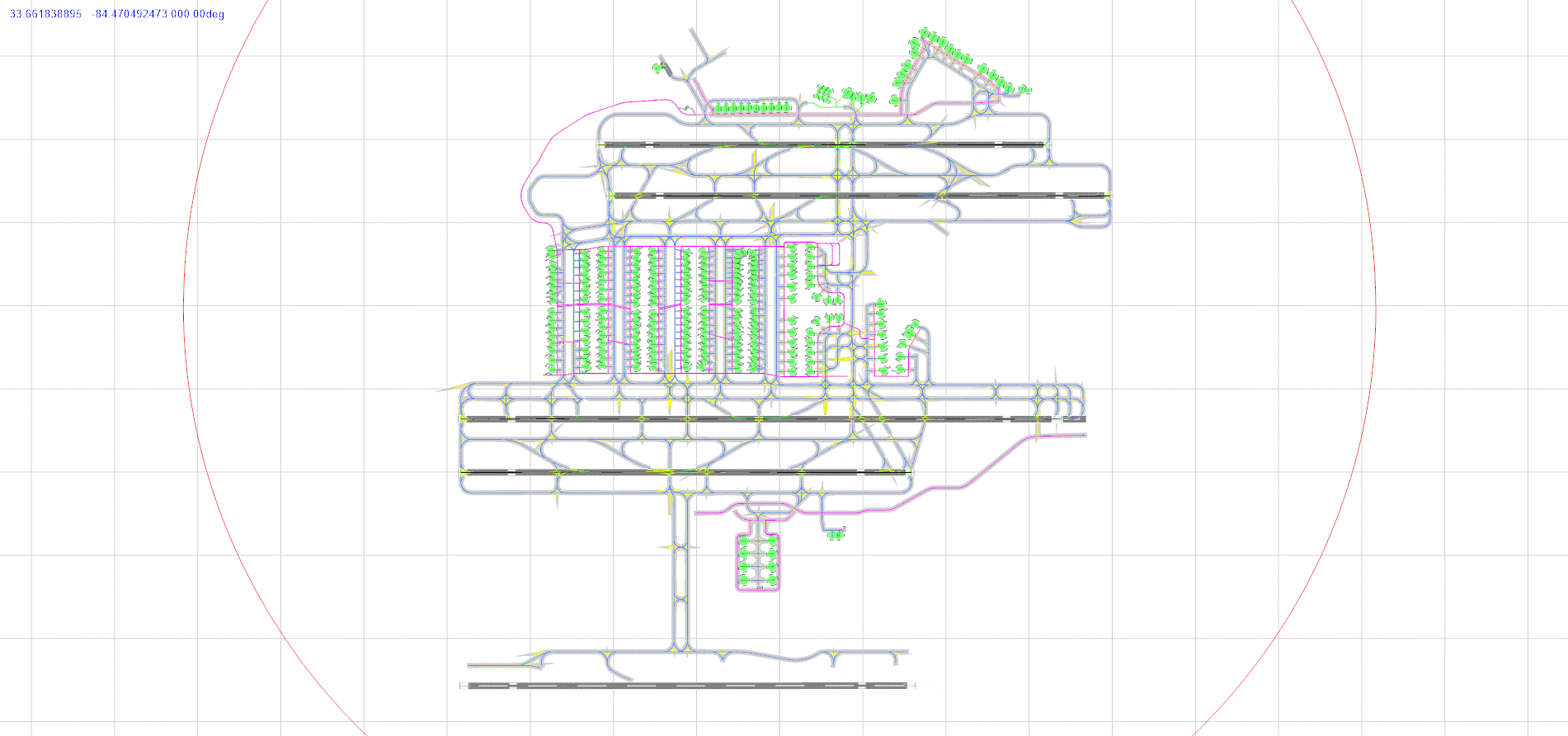
... no hold-shorts.
Also the jetway for F-14 is compiled as a library object, instead of a jetway:
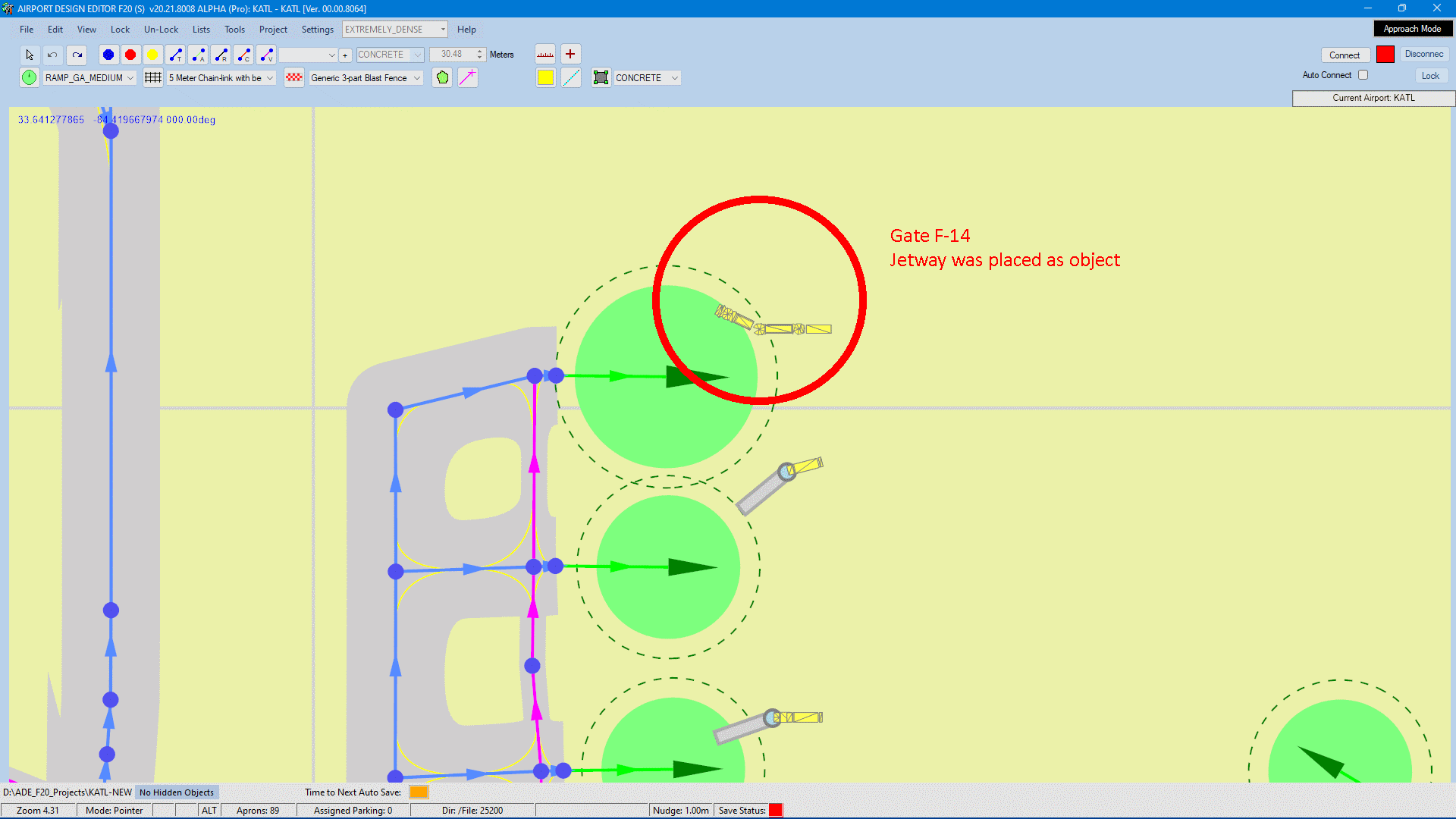
So this might be a problem.
Another concern is the BGL from the handmade Microsoft version is a lot larger than the compiled output from either ADE or A2P. That makes me think something is either missing in the decompilation, or there is some sort of file protection going on (or Microsoft screwed it up somehow).
There are no Hold-Shorts... they need to be added whenever a taxiway is going to cross a runway.
Here's the default setup for taxiways:
Here's the Microsoft version:
... no hold-shorts.
Also the jetway for F-14 is compiled as a library object, instead of a jetway:
So this might be a problem.
Another concern is the BGL from the handmade Microsoft version is a lot larger than the compiled output from either ADE or A2P. That makes me think something is either missing in the decompilation, or there is some sort of file protection going on (or Microsoft screwed it up somehow).
- Messages
- 6
- Country
Interesting for sure. I was wondering why no 3rd party had released a package with AI gate assignments on freeware distribution websites like flightsim.to--looks like I found my answer. Has anyone else had any luck editing even standard airports, or do they also have issues decompiling in ADE? Frustrating how difficult it seems to be to change things in MSFS that would be so simple to do in P3D/FSX with a quick AFCAD edit.That makes me think something is either missing in the decompilation, or there is some sort of file protection going on (or Microsoft screwed it up somehow).
- Messages
- 28
- Country
I have been doing default airports if you would like to take a look. https://flightsim.to/profile/Ollymsfs2020Interesting for sure. I was wondering why no 3rd party had released a package with AI gate assignments on freeware distribution websites like flightsim.to--looks like I found my answer. Has anyone else had any luck editing even standard airports, or do they also have issues decompiling in ADE? Frustrating how difficult it seems to be to change things in MSFS that would be so simple to do in P3D/FSX with a quick AFCAD edit.
- Messages
- 36
- Country
I've also done a few default airports. Mostly just removing extraneous hold short nodes. A couple have parking updates, but none have parking codes (don't know where to get those).Interesting for sure. I was wondering why no 3rd party had released a package with AI gate assignments on freeware distribution websites like flightsim.to--looks like I found my answer. Has anyone else had any luck editing even standard airports, or do they also have issues decompiling in ADE? Frustrating how difficult it seems to be to change things in MSFS that would be so simple to do in P3D/FSX with a quick AFCAD edit.
...jim