• Which the release of FS2020 we see an explosition of activity on the forun and of course we are very happy to see this. But having all questions about FS2020 in one forum becomes a bit messy. So therefore we would like to ask you all to use the following guidelines when posting your questions:

    • Tag FS2020 specific questions with the MSFS2020 tag.
    • Questions about making 3D assets can be posted in the 3D asset design forum. Either post them in the subforum of the modelling tool you use or in the general forum if they are general.
    • Questions about aircraft design can be posted in the Aircraft design forum
    • Questions about airport design can be posted in the FS2020 airport design forum. Once airport development tools have been updated for FS2020 you can post tool speciifc questions in the subforums of those tools as well of course.
    • Questions about terrain design can be posted in the FS2020 terrain design forum.
    • Questions about SimConnect can be posted in the SimConnect forum.

    Any other question that is not specific to an aspect of development or tool can be posted in the General chat forum.

    By following these guidelines we make sure that the forums remain easy to read for everybody and also that the right people can find your post to answer it.

Runway Displaced

Messages
254
Country
unitedkingdom
Hi Jon,

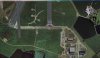
I've discovered a little funny while working on a New airfield. I'm sure its something I've done, but I cant figure it out. I'm using FSXA and ADE 1.60.5194. this issue is only affecting one runway, the one with an overrun. The overrun at the secondary end is 720FT. I have FSX and ADE connected in these screen shots. One shows the few from FSX, the other from ADE. notice the displaced? Any suggestions would be gratefully received.
2014-3-30_18-14-21-403.jpg

EGVW - Bedford 0.Jpg
 
Can you upload the project file (.ad3) to a post here so that we can take a look at it.
 
Check the start location for rwy 07. It is before the runway and not where your picture shows it. ADE and FSX align properly for me when connected.
 
Hi Guys,

Just started placing some position markers and noticed they weren't positioning where I was clicking, they were clicking placing a few feet off, so closed ADE and opened the file again and everything is were it should be. Strange, but true. Thanks for your help.
 
Back
Top