• Which the release of FS2020 we see an explosition of activity on the forun and of course we are very happy to see this. But having all questions about FS2020 in one forum becomes a bit messy. So therefore we would like to ask you all to use the following guidelines when posting your questions:

    • Tag FS2020 specific questions with the MSFS2020 tag.
    • Questions about making 3D assets can be posted in the 3D asset design forum. Either post them in the subforum of the modelling tool you use or in the general forum if they are general.
    • Questions about aircraft design can be posted in the Aircraft design forum
    • Questions about airport design can be posted in the FS2020 airport design forum. Once airport development tools have been updated for FS2020 you can post tool speciifc questions in the subforums of those tools as well of course.
    • Questions about terrain design can be posted in the FS2020 terrain design forum.
    • Questions about SimConnect can be posted in the SimConnect forum.

    Any other question that is not specific to an aspect of development or tool can be posted in the General chat forum.

    By following these guidelines we make sure that the forums remain easy to read for everybody and also that the right people can find your post to answer it.

scenProc updated filter syntax

arno

Administrator
Staff member
FSDevConf team
Resource contributor
Messages
34,550
Country
netherlands
The next development release of scenProc will contain the new filter syntax. Please have a good look at the updated manual, as it shows how the new syntax works and contains updated samples of all steps. Here are just the highlights of the changes:

  • Besides And conditions, you can now also do Or or Not conditions.
  • Different attribute types are now supported, before every attribute was seen as a string, but now you can also have integers or doubles.
  • You can do math within your filters, so for example sum two attributes or apply a math function on an attribute.
  • scenProc will automatically try to update the old filter syntax and in 95% of the cases that should work fine.
  • One of the biggest changes to be aware of when writing the filter is that if you compare to a text, you need to put quotes around it

I hope you all get used quickly to the new syntax, because it is a lot more powerful. And if there are any questions just post them in the forum.
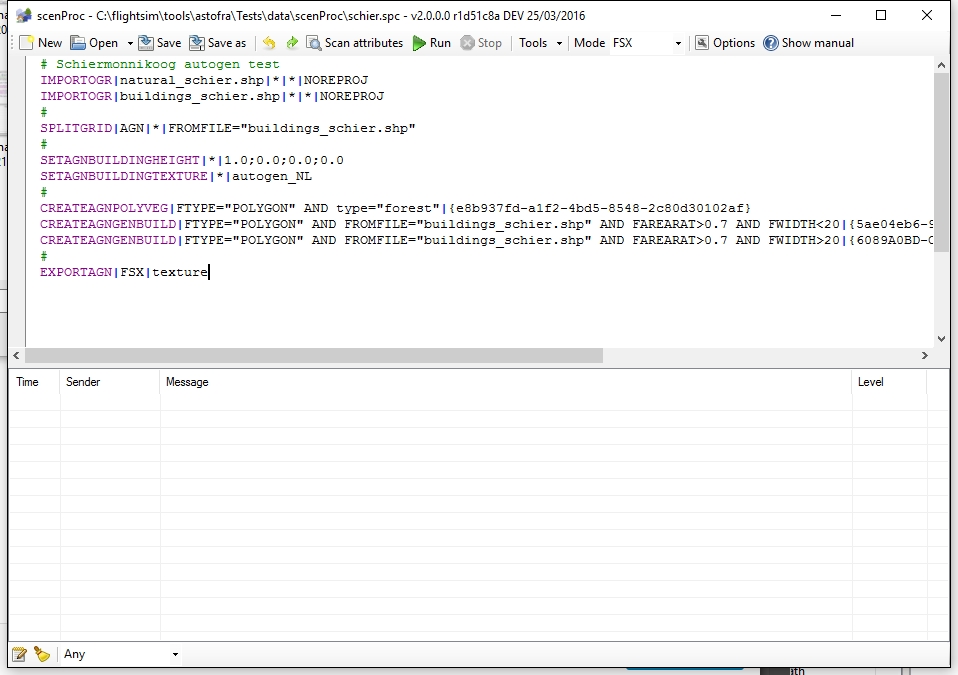
Image2016-03-25-2133.56.161.jpg


Continue reading...
 
Looks great, Arno. Let us know when it's ready and will download and start using immediately! :)
 
The new development release is available already, it's build automatically every night.
 
Hi Arno,

Thanks for those great enhancements!

My question: Is it possible to define operation priority, for example with parenthesis, to use in the same attribute group both AND & OR.
Example:
Code:
SUBTRACTFEATURES|FTYPE="POLYGON" AND (type="forest" OR type="park" )|...

I have 2 problems also:
  1. With the last build I have many exceptions raised as soon as I use the mouse wheel to scroll into the editor. Then after the first one, exceptions come again with any mouse operation (selection, move...). Is it only me?
  2. Since the 2 or 3 last Beta's, my building creation scripts crash all the time. I had to reverse to the last stable 1.1 to compute buildings. (I've send crash message notification). I think the crash occurs during REPLACEPOLYGONBYBUILDINGRECTANGLES operation.
 
Hi,

Yes, using parentheses as you write should work to prioritise conditions.

What kind of errors do you get while scrolling with the mouse?

I got the error report from the building step. I'll check, but I'm not sure I can reproduce it without the data.
 
Here is the exception report after the mouse issue:

System.NullReferenceException: La référence d'objet n'est pas définie à une instance d'un objet.
à ASToFra.scenProc.MainWindow.txtConfiguration_ToolTipRequest(Object sender, ToolTipRequestEventArgs e)
à System.EventHandler`1.Invoke(Object sender, TEventArgs e)
à DigitalRune.Windows.TextEditor.TextArea.RequestToolTip(Point mousePos)
à DigitalRune.Windows.TextEditor.TextArea.OnMouseHover(EventArgs e)
à System.Windows.Forms.Control.WndProc(Message& m)
à System.Windows.Forms.NativeWindow.Callback(IntPtr hWnd, Int32 msg, IntPtr wparam, IntPtr lparam)


************** Assemblys chargés **************
mscorlib
Version de l'assembly : 4.0.0.0
Version Win32 : 4.0.30319.34209 built by: FX452RTMGDR
CodeBase : file:///C:/Windows/Microsoft.NET/Framework64/v4.0.30319/mscorlib.dll
----------------------------------------
scenProc
Version de l'assembly : 1.0.0.0
Version Win32 : 2.0.0.0
CodeBase : file:///F:/JEUX/SimuTools/scenproc_latest_development_release_x64/scenProc.exe
----------------------------------------
System.Windows.Forms
Version de l'assembly : 4.0.0.0
Version Win32 : 4.0.30319.34251 built by: FX452RTMGDR
CodeBase : file:///C:/Windows/Microsoft.Net/assembly/GAC_MSIL/System.Windows.Forms/v4.0_4.0.0.0__b77a5c561934e089/System.Windows.Forms.dll
----------------------------------------
System.Drawing
Version de l'assembly : 4.0.0.0
Version Win32 : 4.0.30319.34209 built by: FX452RTMGDR
CodeBase : file:///C:/Windows/Microsoft.Net/assembly/GAC_MSIL/System.Drawing/v4.0_4.0.0.0__b03f5f7f11d50a3a/System.Drawing.dll
----------------------------------------
System
Version de l'assembly : 4.0.0.0
Version Win32 : 4.0.30319.34238 built by: FX452RTMGDR
CodeBase : file:///C:/Windows/Microsoft.Net/assembly/GAC_MSIL/System/v4.0_4.0.0.0__b77a5c561934e089/System.dll
----------------------------------------
ASToFra.Interfaces
Version de l'assembly : 1.0.0.0
Version Win32 : 1.4.0.0
CodeBase : file:///F:/JEUX/SimuTools/scenproc_latest_development_release_x64/ASToFra.Interfaces.DLL
----------------------------------------
ASToFra.Utils
Version de l'assembly : 1.0.0.0
Version Win32 : 1.4.0.0
CodeBase : file:///F:/JEUX/SimuTools/scenproc_latest_development_release_x64/ASToFra.Utils.DLL
----------------------------------------
DigitalRune.Windows.TextEditor
Version de l'assembly : 1.3.0.0
Version Win32 : 1.3.0.0
CodeBase : file:///F:/JEUX/SimuTools/scenproc_latest_development_release_x64/DigitalRune.Windows.TextEditor.DLL
----------------------------------------
gdal_csharp
Version de l'assembly : 1.0.5806.41203
Version Win32 : 1.0.5806.41203
CodeBase : file:///F:/JEUX/SimuTools/scenproc_latest_development_release_x64/gdal_csharp.DLL
----------------------------------------
ogr_csharp
Version de l'assembly : 1.0.5806.41203
Version Win32 : 1.0.5806.41203
CodeBase : file:///F:/JEUX/SimuTools/scenproc_latest_development_release_x64/ogr_csharp.DLL
----------------------------------------
ASToFra.EventLog
Version de l'assembly : 1.0.0.0
Version Win32 : 1.4.0.0
CodeBase : file:///F:/JEUX/SimuTools/scenproc_latest_development_release_x64/ASToFra.EventLog.DLL
----------------------------------------
ASToFra.ObjectModel3D
Version de l'assembly : 1.0.0.0
Version Win32 : 1.4.0.0
CodeBase : file:///F:/JEUX/SimuTools/scenproc_latest_development_release_x64/ASToFra.ObjectModel3D.DLL
----------------------------------------
System.Xml
Version de l'assembly : 4.0.0.0
Version Win32 : 4.0.30319.34234 built by: FX452RTMGDR
CodeBase : file:///C:/Windows/Microsoft.Net/assembly/GAC_MSIL/System.Xml/v4.0_4.0.0.0__b77a5c561934e089/System.Xml.dll
----------------------------------------
System.Configuration
Version de l'assembly : 4.0.0.0
Version Win32 : 4.0.30319.34209 built by: FX452RTMGDR
CodeBase : file:///C:/Windows/Microsoft.Net/assembly/GAC_MSIL/System.Configuration/v4.0_4.0.0.0__b03f5f7f11d50a3a/System.Configuration.dll
----------------------------------------
ASToFra.FSUtils
Version de l'assembly : 1.0.0.0
Version Win32 : 1.4.0.0
CodeBase : file:///F:/JEUX/SimuTools/scenproc_latest_development_release_x64/ASToFra.FSUtils.DLL
----------------------------------------
ASToFra.ObjectWriter
Version de l'assembly : 1.0.0.0
Version Win32 : 1.4.0.0
CodeBase : file:///F:/JEUX/SimuTools/scenproc_latest_development_release_x64/ASToFra.ObjectWriter.DLL
----------------------------------------
ASToFra.AutogenConfiguration
Version de l'assembly : 1.0.0.0
Version Win32 : 1.1.0.0
CodeBase : file:///F:/JEUX/SimuTools/scenproc_latest_development_release_x64/ASToFra.AutogenConfiguration.DLL
----------------------------------------
FlightToolkit.SimProp
Version de l'assembly : 1.0.5.0
Version Win32 : 1.0.5.0
CodeBase : file:///F:/JEUX/SimuTools/scenproc_latest_development_release_x64/FlightToolkit.SimProp.DLL
----------------------------------------
System.Xml.Linq
Version de l'assembly : 4.0.0.0
Version Win32 : 4.0.30319.34209 built by: FX452RTMGDR
CodeBase : file:///C:/Windows/Microsoft.Net/assembly/GAC_MSIL/System.Xml.Linq/v4.0_4.0.0.0__b77a5c561934e089/System.Xml.Linq.dll
----------------------------------------
System.Core
Version de l'assembly : 4.0.0.0
Version Win32 : 4.0.30319.34209 built by: FX452RTMGDR
CodeBase : file:///C:/Windows/Microsoft.Net/assembly/GAC_MSIL/System.Core/v4.0_4.0.0.0__b77a5c561934e089/System.Core.dll
----------------------------------------
Ciloci.Flee
Version de l'assembly : 0.9.26.0
Version Win32 : 0.9.26.0
CodeBase : file:///F:/JEUX/SimuTools/scenproc_latest_development_release_x64/Ciloci.Flee.DLL
----------------------------------------
Microsoft.VisualBasic
Version de l'assembly : 10.0.0.0
Version Win32 : 12.0.51209.34209 built by: FX452RTMGDR
CodeBase : file:///C:/Windows/Microsoft.Net/assembly/GAC_MSIL/Microsoft.VisualBasic/v4.0_10.0.0.0__b03f5f7f11d50a3a/Microsoft.VisualBasic.dll
----------------------------------------
mscorlib.resources
Version de l'assembly : 4.0.0.0
Version Win32 : 4.0.30319.34209 built by: FX452RTMGDR
CodeBase : file:///C:/Windows/Microsoft.Net/assembly/GAC_MSIL/mscorlib.resources/v4.0_4.0.0.0_fr_b77a5c561934e089/mscorlib.resources.dll
----------------------------------------
System.Windows.Forms.resources
Version de l'assembly : 4.0.0.0
Version Win32 : 4.0.30319.34209 built by: FX452RTMGDR
CodeBase : file:///C:/Windows/Microsoft.Net/assembly/GAC_MSIL/System.Windows.Forms.resources/v4.0_4.0.0.0_fr_b77a5c561934e089/System.Windows.Forms.resources.dll
----------------------------------------

************** Débogage JIT **************
Pour activer le débogage juste-à-temps (JIT), le fichier de configuration pour cette
application ou cet ordinateur (machine.config) doit avoir la valeur
jitDebugging définie dans la section system.windows.forms.
L'application doit également être compilée avec le débogage
activé.

Par exemple :

<configuration>
<system.windows.forms jitDebugging="true" />
</configuration>

Lorsque le débogage juste-à-temps est activé, les exceptions non gérées
seront envoyées au débogueur JIT inscrit sur l'ordinateur
plutôt que d'être gérées par cette boîte de dialogue.
 
Thanks, I'll try to reproduce it.
 
Hi,

What are you exactly doing with the mouse when it crashes? I have tried scrolling with my mouse wheel and hovering over tooltips, but I get no crashes. What part of the configuration file is the mouse over when the crash happens?
 
I can't reproduce the crash with the building step either. The data is too big to effectively reproduce it.
 
For the building crash, it occurs with 100% of tries with this type of script:

Code:
ADDATTRIBUTE|FTYPE=POLYGON;FAREARAT>0.85|BUILDTYPE|1
ADDATTRIBUTE|FTYPE=POLYGON;BUILDTYPE!1;FNUMVERT<10;FNUMPERPANG>3;FNUMNOTPAR<3|BUILDTYPE|3
ADDATTRIBUTE|FTYPE=POLYGON;BUILDTYPE!1;BUILDTYPE!3;FCONVEX=1|BUILDTYPE|4
ADDATTRIBUTE|FTYPE=POLYGON;BUILDTYPE!1;BUILDTYPE!3;BUILDTYPE!4|BUILDTYPE|5
#
RemoveAttribute|BUILDTYPE=4
RemoveAttribute|BUILDTYPE=5
#
# Remove complex buildings
REPLACEPOLYGONBYBUILDINGRECTANGLES|BUILDTYPE=3|0.75;60;5|0.25;2.0;0.2|BUILDTYPE|2
It works fine with stable version 1.1


About the mouse exception: I just had one over IMPORTOGR line after I select a new file using the context menu. But it seems that it's not linked to a unique mouse action.
 
Last edited:
Hi,

But the crash is probably related to some specific building feature. Without that it's hard to reproduce.

Your script looks ok. Only the RemoveAttribute step makes no sense. It is designed to remove attributes, not entire features. And there is no feature with the name of the filter you provided. So does steps do nothing.

I'll see if I can reproduce the issue with the context menu.
 
I taught it was a way to free some memory with unused datas :):(

About the crash, it occurs on any of the OSM building extracted from Geofabrik in shapefile format, and it was working fine with the Beta 2 weeks ago.
(I'm finishing the Germany with last region, already done full Belgium, Luxembourg, Italy without problem until 2 weeks last betas)
 
OK, I'll try with a small section of OSM data. I tried with the Brandenburg data yesterday but 1 million buildings was too much for easy debugging :)

RemoveAttribute indeed frees memory. But you can't specify a filter. You can list an attribute name (e.g. BUILDTYPE) and than that attribute will be removed from all features.
 
I finished Brandeburg region yesterday. I'm using both CORINE 2012 & OSM data for vegetation and it gives very good results.
I think you can try with the Berlin sub-region, it's quite small and you will probably reproduce the issue.
 
Hi,

Using a smaller file worked well, I think I have been able to fix both issues now. So give the development release tomorrow a try.
 
Thanks for reporting :). I have also added a test case now for these steps, so that I can regularly check if it all still works.
 
Is there any way to get the previous version just before you added this new filter? It has rendered all my scripts non-usable. Can't run them with this version. Even if I try to make a single text/character edit, it appears to be going through the whole script repeating all the new error and warnings which makes editing impossible do to lag time. In the meantime, I am way back to version 1. Dang, and the one time I did not make a backup of the previous version. Is there a certain section in the manual about this filter or do I just need to start reading from page one?
 
Read section 3.4, it explains the filter syntax.

And why does the auto update of the filter syntax not work for you? It should in most cases.

The stable release 1.1 was released as a fallback for this change. So that's the last version with the old filter syntax you can use.
 
Can't say why exactly they are not running. Did a late night update, probably why I got lazy and did not make a simple back-up,ha! It goes through the motion of processing but does not complete. Will have to take a deeper look and start reading today. I will look for my 1.1 version in the meantime.
 
Back
Top