
-
Which the release of FS2020 we see an explosition of activity on the forun and of course we are very happy to see this. But having all questions about FS2020 in one forum becomes a bit messy. So therefore we would like to ask you all to use the following guidelines when posting your questions:
- Tag FS2020 specific questions with the MSFS2020 tag.
- Questions about making 3D assets can be posted in the 3D asset design forum. Either post them in the subforum of the modelling tool you use or in the general forum if they are general.
- Questions about aircraft design can be posted in the Aircraft design forum
- Questions about airport design can be posted in the FS2020 airport design forum. Once airport development tools have been updated for FS2020 you can post tool speciifc questions in the subforums of those tools as well of course.
- Questions about terrain design can be posted in the FS2020 terrain design forum.
- Questions about SimConnect can be posted in the SimConnect forum.
Any other question that is not specific to an aspect of development or tool can be posted in the General chat forum.
By following these guidelines we make sure that the forums remain easy to read for everybody and also that the right people can find your post to answer it.
You are using an out of date browser. It may not display this or other websites correctly.
You should upgrade or use an alternative browser.
You should upgrade or use an alternative browser.
Stacking Fonts; Screen
- Thread starter lionheart
- Start date

n4gix
Resource contributor
- Messages
- 11,674
- Country

HINT: Use "Formatted Text" and use the 'newline characters' \n to linespace...
See the SDK:
See the SDK:
The standard escape codes, such as \n for newline and \t for tab, work in gauge strings, along with a number of special escape codes.
Code:
            <Element>
              <Position X="213" Y="40"/>
              <FormattedText X="45" Y="20" Length="3" Font="Arial Bold" FontSize="17" Adjust="Right" VerticalAdjust="Center" Color="#00FF00" Multiline="No" Bright="Yes">
                <String>
                     A%\n
                     R%\n
                     M%
                 </String>
              </FormattedText>
            </Element>
- Messages
- 10,163
- Country

This is the worst gauge project I have dealt with yet. Your stacked font didnt work. Only the A appeared. The fonts keep disappearing. I comment out something and they reappear. I reboot the sim and the gauge is suddenly broken again, refusing to work and it was doing just fine.
I am using P3D V3, some small fonts set to size 27. Is it that P3D sometimes will not show some TTF Fonts? Is V3 buggy with fonts? I cannot believe I have lost an entire day with the fonts turning on and off....
I am using P3D V3, some small fonts set to size 27. Is it that P3D sometimes will not show some TTF Fonts? Is V3 buggy with fonts? I cannot believe I have lost an entire day with the fonts turning on and off....


Luka
Resource contributor
- Messages
- 216
- Country

Only the A appeared.
Y is too small (...FormattedText X="45" Y="20"...). Try to replace with Y="60".

- Messages
- 1,468
- Country

Formatted text is a pain!!! This a sample of placarding P7 on the Po's chinagraph pad.
Code:
<Element>

   <FormattedText X="236" Y="310" Font="Arial" FontSize="100" LineSpacing="120" Adjust="Center" Color="#661914" Bright="Yes">>
   <String>
   %((L:scratchpadxzzx,bool) 0 !=)
  %{if}
%P7%\n
  %((L:P7_limit,number))%!d!%--%((L:Eng_1_P7,number))%!3.2f!%
  %{else}
  %{end}
  </String>
   </FormattedText>

</Element>
- Messages
- 542
- Country

Yes it can be a pain , it is important to get the (...FormattedText X="45" Y="60" ..) text box dimensions right and to understand
how Tabs sets the horizontal placement of some text components if that is desired .
But ... you can do some neat things with it .
Cheers
Karol
1. example of multiple colours and bold ,
2. example of multiple colours and varied text size ,
how Tabs sets the horizontal placement of some text components if that is desired .
But ... you can do some neat things with it .
Cheers
Karol
1. example of multiple colours and bold ,
Code:
<!-- INTERCEPT position data OVERLAY    TEXT Display  -->
     <Element>
        <Visible>(L:InterceptDisplay,enum) 1 == (L:Intercept Dist,enum) 0 == and</Visible>
   <Element>
     <Position X="160" Y="32"/>
     <FormattedText X="41" Y="73" Font="Tahoma" FontSize="9" LineSpacing="10" Color="#2F912F" BackgroundColor="#151918" Bright="Yes" Tabs="0,1L">
    <Color Value="#A1A9A6"/>
    <Color Value="#00C0FF"/>
    <Color Value="#9BD5FF"/>
     <String>
      \t%Intercept%
      \n\t%Dist% %\{clr4}%((L:RunInDistance, nmiles))%!4.1f!%
     \n\t%\{bo}%\{clr3}%* SET *%\{nr}%
     \n\t%\{clr1}%Brg% %\{clr2}%((L:BearingInterceptPos,radians) (A:GPS MAGVAR, radians) - pi - rddg dnor )%!03d!%
     \n\t%\{clr1}%Dist% %\{clr2}%((L:DistanceInterceptPos,nmiles))%!4.1f!%
     \n\t%\{clr1}%at S-Ht%
     \n\t%\{clr2}%((L:RunInDistance, feet) (L:Set_GSangle, radians) atg *)%!5d!%
     </String>
     </FormattedText>
    </Element>
    </Element>
2. example of multiple colours and varied text size ,
Code:
    <!--Button %.160 - 340.% Runway heading toggle display  Text-->
   <Element>
              <Position X="28" Y="10"/>
              <FormattedText X="55" Y="13" Font="Tahoma" FontSize="9" Tabs="3L,31L" LineSpacing="12" Adjust="Left" Color="#A1A9A6" BackgroundColor="#123712" Bright="Yes">
             <Font FontSize="12"/>
             <Color Value="#ED7300"/>
             <Color Value="#FCD116"/>
               <String>
                %((L:RwyEndSelect) 0 ==)%{if}%\{fnt1}%\{clr2}%((@c:WaypointAirportRunwayDirection, degrees) (A:GPS MAGVAR, degrees) - d360)%!03d!%{else}%\{fnt}%\{clr1}%((@c:WaypointAirportRunwayDirection, degrees) (A:GPS MAGVAR, degrees) - d360 )%!03d!% -%{end}%
                \t%((L:RwyEndSelect) 1 ==)%{if}%\{fnt1}%\{clr3}%((@c:WaypointAirportRunwayDirection, degrees) (A:GPS MAGVAR, degrees) - 180 - d360)%!03d!%{else}%\{fnt}%\{clr1}%-%((@c:WaypointAirportRunwayDirection, degrees) (A:GPS MAGVAR, degrees) - 180 - d360)%!03d!%{end}%
                </String>
              </FormattedText>
            </Element>
Last edited:
- Messages
- 1,468
- Country
I've toyed with the idea of having one font in bold and the other normal
for example
How would I get (L: P7_limit,number) to be bold?
for example
Code:
   <FormattedText X="236" Y="310" Font="Arial" FontSize="100" LineSpacing="120" Adjust="Center" Color="#661914" Bright="Yes">>
   <String>
   %((L:scratchpadxzzx,bool) 0 !=)
  %{if}
%P7%\n
  %((L:P7_limit,number))%!d!%--%((L:Eng_1_P7,number))%!3.2f!%
  %{else}
  %{end}
  </String>
   </FormattedText>
How would I get (L: P7_limit,number) to be bold?

- Messages
- 1,564
- Country

Building on Luka's response pointing out that Y="20" was too small, I would like to point out the usefulness of BackgroundColor that Karol includes is his response #8 examples. Using it, you can easily see if the text box dimensions are too small or too big.
Here's a recent thread showing what I mean. See the picture in response 4 of that thread.
Bob
Here's a recent thread showing what I mean. See the picture in response 4 of that thread.
Bob
- Messages
- 542
- Country
Try this ,
see if that works
EDIT: in the first line above I have added ( \{nr} ) this normalises the bold back to normal text, if that was not there the second figure would also be bold .
Cheers
Karol
Bob , that was a good pointer about using background as a guide .
Code:
%\{bo}%((L:P7_limit,number))%!d!%\{nr}%--%((L:Eng_1_P7,number))%!3.2f!%
       or
%((L:P7_limit,number))%!d!%--%\{bo}%((L:Eng_1_P7,number))%!3.2f!%EDIT: in the first line above I have added ( \{nr} ) this normalises the bold back to normal text, if that was not there the second figure would also be bold .
Cheers
Karol
Bob , that was a good pointer about using background as a guide .
Last edited:
- Messages
- 10,163
- Country
Sorry Bill, but when I posted that example I thought about the Y=20 and planned to increase it to accommodate three lines, but just forgot to do so. That's what happens when one cut and pastes script quickly to create an example...
No problem Bill, and it was too late. I had slipped into depression by then. I am also sorry if I sounded like your solution was the one that did it. It wasnt. The dang gauge had been doing that all day long. I am so glad to hear that its the box size. I hope that AP is done by this evening. Its so basic. It should have been done in perhaps 3 hours. Here I have been doing this for years....... and I still take over a day with such a simple gauge. (kicks the dirt).
- Messages
- 10,163
- Country
Crazy. Still not working.
I turned off a background image/layer and the fonts all became visible. The layer was on top of these, so I know it wasnt the layer blocking them. So to test it, I rebooted the sim to see if they would appear, and no, they are gone again.
So its a visibility thing, probably something to do with my graphics card. But why would these not work, but my other screens and GPS work perfect? I have always mixed Text with Formatted Text. I converted my text to formatted text, that did nothing. I deleted FontWeight, that did nothing. I fine tuned my 'font boxes', that did nothing. So far, I got FD to show back again, a single font script of perhaps 50 that need to appear.
Last edited:
- Messages
- 10,163
- Country
Thank you Jesus... Working and even rendering its triangles as well.
The gaps between the vertical letters was too tall, so I created packs of individual Elements to make the vertical font sets, using a single location for each pack. That way I could tuck them in tighter to match the original.

The gaps between the vertical letters was too tall, so I created packs of individual Elements to make the vertical font sets, using a single location for each pack. That way I could tuck them in tighter to match the original.
- Messages
- 1,564
- Country
Bill,
Looks great, as always.
For line spacing, there is another way that you can try next time, if you want. Use the \{lsp= } escape sequence. A picture explains better than words:
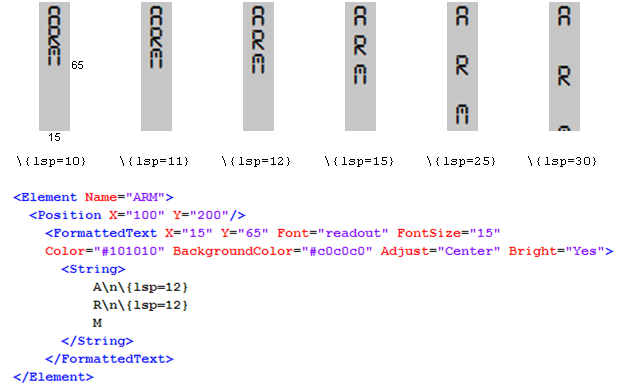
To align letter centers, add Adjust="Center" to the FormattedText tag line.
Adjust the FormattedText X=" " and Y=" " sizes to fit the text more precisely. As mentioned before, BackgroundColor can help q/c the text box size as shown by the light gray #c0c0c0 background color in the pic above. For example, when \{lsp=30}, the text box size is too short, Y="65" is too small, to fully display the letter M, and the light gray BackgroundColor clearly shows what's happening.
For reference, there is a wiki entry in the panel and gauges section (courtesy Mr. Leaming) entitled XML: Escape Sequences that lists the escape codes. These can also be found in the online FSX "SDK" and the old Engauged blog by Susan Ashcroft for those that remember the days when Microsoft's ACES studio was still in business.
Rgds,
Bob
Looks great, as always.
For line spacing, there is another way that you can try next time, if you want. Use the \{lsp= } escape sequence. A picture explains better than words:
To align letter centers, add Adjust="Center" to the FormattedText tag line.
Adjust the FormattedText X=" " and Y=" " sizes to fit the text more precisely. As mentioned before, BackgroundColor can help q/c the text box size as shown by the light gray #c0c0c0 background color in the pic above. For example, when \{lsp=30}, the text box size is too short, Y="65" is too small, to fully display the letter M, and the light gray BackgroundColor clearly shows what's happening.
For reference, there is a wiki entry in the panel and gauges section (courtesy Mr. Leaming) entitled XML: Escape Sequences that lists the escape codes. These can also be found in the online FSX "SDK" and the old Engauged blog by Susan Ashcroft for those that remember the days when Microsoft's ACES studio was still in business.
Rgds,
Bob
Last edited: