
Hi,
After exporting my project from Sketchup, the texture on the 1932 old terminal looks nothing like it was originally. I downloaded this texture from SketchupTextures and it pretty much matches the bricks on the real terminal. Here's the original texture:

I applied this texture to the old 1932 terminal and it looks fine in Sketchup. But just a soon as I export the model from Sketchup and import it into MCX, the texture looks very grainy and looks like a repeated carpet map rather than the brick. In the file name, it says it's seamless and it seems to me that things should look exactly the same as they were originally. Here's the model in Sketchup:

This is way it should look, even after exporting. Now noticed what it looks like after importing into MCX:

As you can see, it is totally different and it has the appearance of for every 3 or 4 rows, the bricks are pushed in and starts another row where they are even. This looks nothing like the original texture that I've downloaded. Here's what it looks like in the sim:
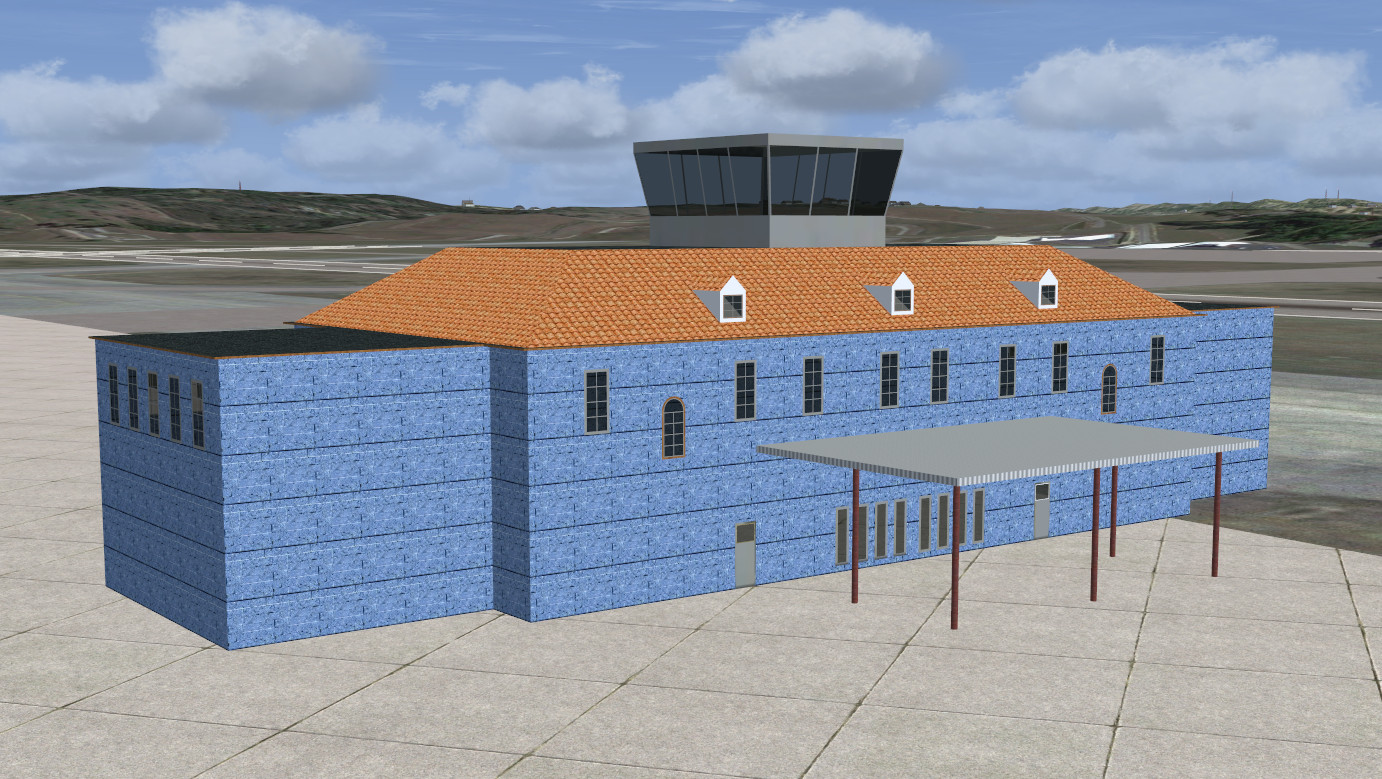
I've always and used textures like this, and in the past, I've never had issues like this until recently. Is there a setting in MCX that will prevent this? I don't think MCX is causing the problem since all the other textures look good. But I don't understand why this texture in MCX looks nothing like the original texture file. I would upload a kmz file but for some reason when I import the kmz or dea into Sketchup, it says Import Failed, and I don't understand why it won't import. I've read where it has something to do with the edges, and I don't see anything wrong with my edges. The edges are turned on or checked.
Ken.
After exporting my project from Sketchup, the texture on the 1932 old terminal looks nothing like it was originally. I downloaded this texture from SketchupTextures and it pretty much matches the bricks on the real terminal. Here's the original texture:
I applied this texture to the old 1932 terminal and it looks fine in Sketchup. But just a soon as I export the model from Sketchup and import it into MCX, the texture looks very grainy and looks like a repeated carpet map rather than the brick. In the file name, it says it's seamless and it seems to me that things should look exactly the same as they were originally. Here's the model in Sketchup:
This is way it should look, even after exporting. Now noticed what it looks like after importing into MCX:
As you can see, it is totally different and it has the appearance of for every 3 or 4 rows, the bricks are pushed in and starts another row where they are even. This looks nothing like the original texture that I've downloaded. Here's what it looks like in the sim:
I've always and used textures like this, and in the past, I've never had issues like this until recently. Is there a setting in MCX that will prevent this? I don't think MCX is causing the problem since all the other textures look good. But I don't understand why this texture in MCX looks nothing like the original texture file. I would upload a kmz file but for some reason when I import the kmz or dea into Sketchup, it says Import Failed, and I don't understand why it won't import. I've read where it has something to do with the edges, and I don't see anything wrong with my edges. The edges are turned on or checked.
Ken.
Last edited:


