

krispy1001
Resource contributor
- Messages
- 707
- Country

Hi Everyone!
I am working on texturing my Ultralight and I want to do a good job texturing it for FSX. I have made my textures Diffused, specular, and bump and everything looks great in Blender. But when I export my model and look at it in FSX it looks dark. Specular and bump maps are not working in FSX.
When I used 3DS Max I had no problem getting my textures to work in FSX. But Blender does not have the same methods for applying your texture maps. The image below is how I am used to applying textures to a material.

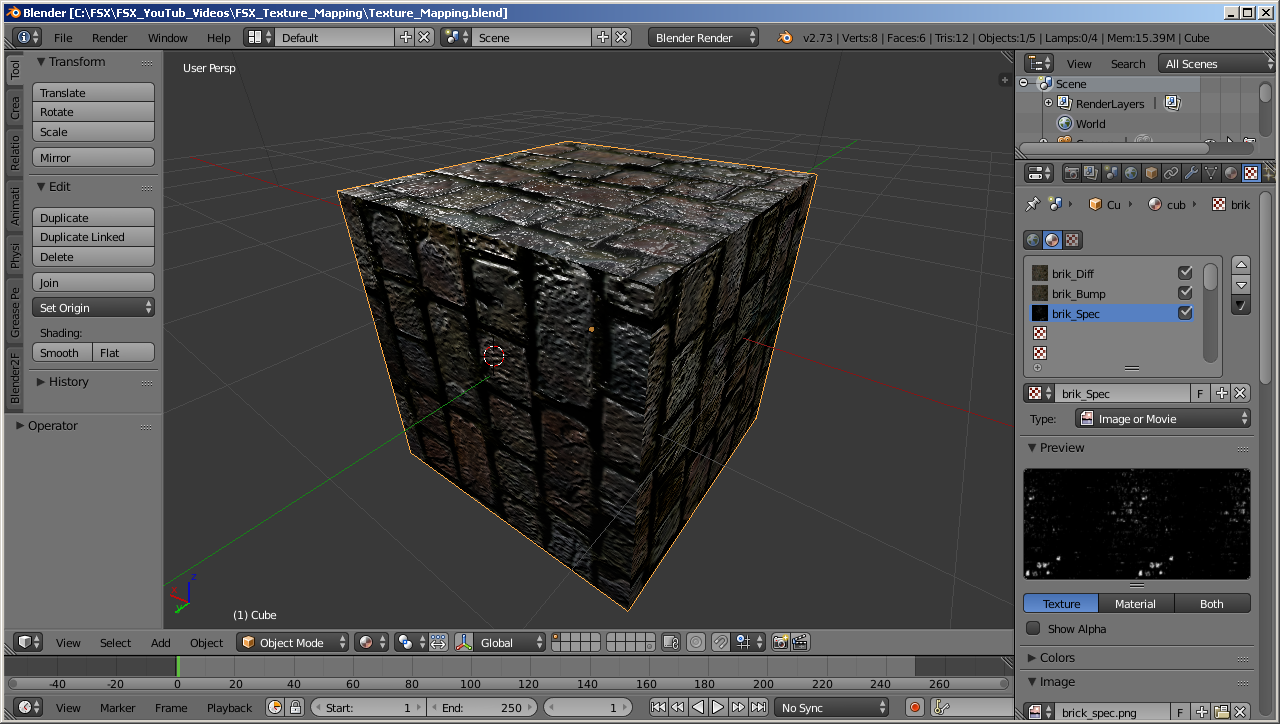
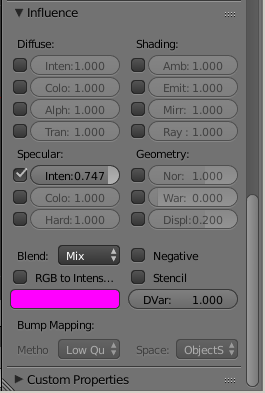
Now in Blender it is a little different. In Blender you have to create a new texture for each process that you want to add to a material. Below two images showing what I mean. As you can see below by the blue highlighted area, I have my specular map selected. Image 2 shows how you setup the influence that the map will set.
As you can see in image 1 the cube that I have textured looks good, all of the texture maps are working. I have made all of my .dds files for each texture and I have placed them in my textures folder for my aircraft. But in FSX the cube is dark, you can see the diffused texture, but the specular and bump maps do not work.
Can anyone tell me what I am doing wrong!
Thank you, Kris
I am working on texturing my Ultralight and I want to do a good job texturing it for FSX. I have made my textures Diffused, specular, and bump and everything looks great in Blender. But when I export my model and look at it in FSX it looks dark. Specular and bump maps are not working in FSX.
When I used 3DS Max I had no problem getting my textures to work in FSX. But Blender does not have the same methods for applying your texture maps. The image below is how I am used to applying textures to a material.
Now in Blender it is a little different. In Blender you have to create a new texture for each process that you want to add to a material. Below two images showing what I mean. As you can see below by the blue highlighted area, I have my specular map selected. Image 2 shows how you setup the influence that the map will set.
As you can see in image 1 the cube that I have textured looks good, all of the texture maps are working. I have made all of my .dds files for each texture and I have placed them in my textures folder for my aircraft. But in FSX the cube is dark, you can see the diffused texture, but the specular and bump maps do not work.
Can anyone tell me what I am doing wrong!
Thank you, Kris


