• Which the release of FS2020 we see an explosition of activity on the forun and of course we are very happy to see this. But having all questions about FS2020 in one forum becomes a bit messy. So therefore we would like to ask you all to use the following guidelines when posting your questions:

    • Tag FS2020 specific questions with the MSFS2020 tag.
    • Questions about making 3D assets can be posted in the 3D asset design forum. Either post them in the subforum of the modelling tool you use or in the general forum if they are general.
    • Questions about aircraft design can be posted in the Aircraft design forum
    • Questions about airport design can be posted in the FS2020 airport design forum. Once airport development tools have been updated for FS2020 you can post tool speciifc questions in the subforums of those tools as well of course.
    • Questions about terrain design can be posted in the FS2020 terrain design forum.
    • Questions about SimConnect can be posted in the SimConnect forum.

    Any other question that is not specific to an aspect of development or tool can be posted in the General chat forum.

    By following these guidelines we make sure that the forums remain easy to read for everybody and also that the right people can find your post to answer it.

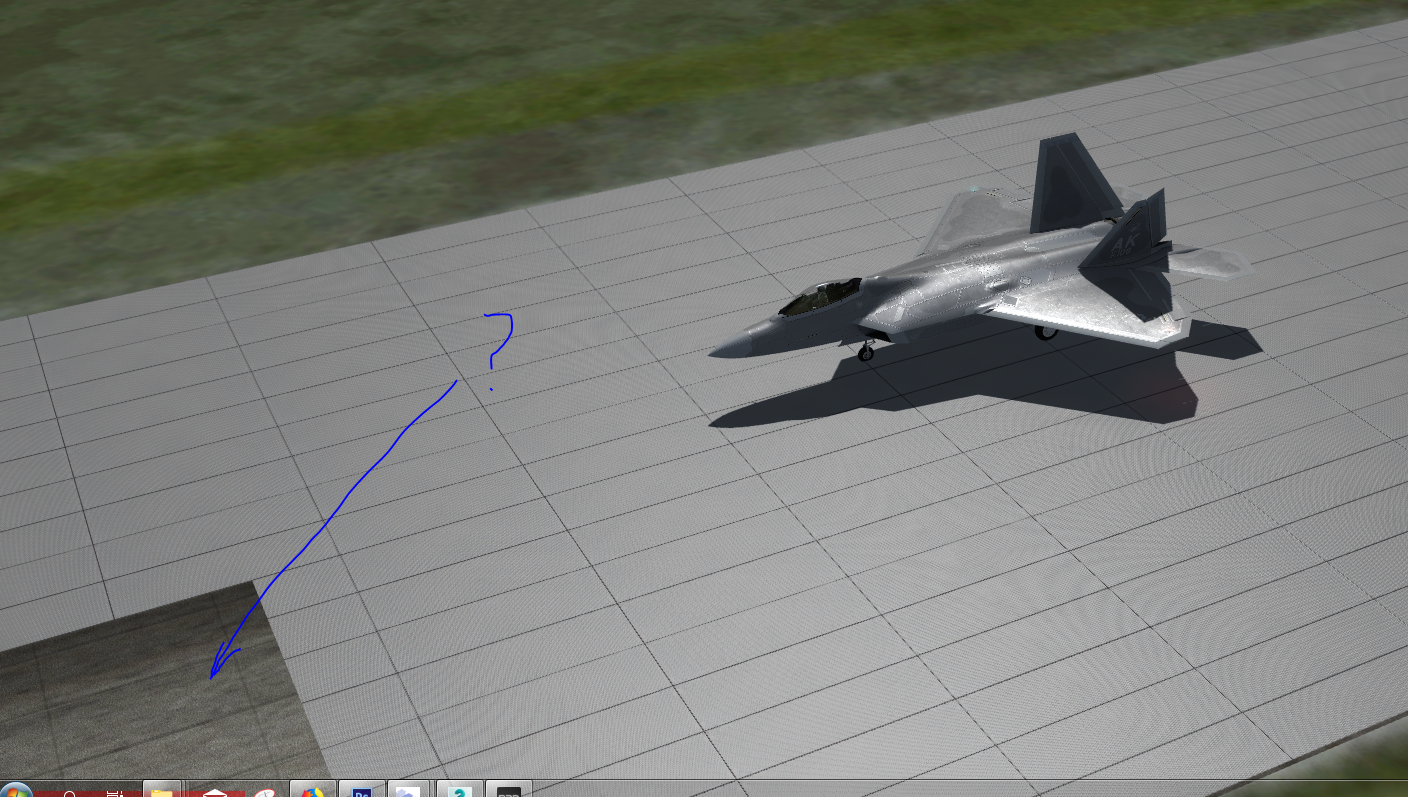
P3D v4 The texture display on the runway partially disappears.

Messages
98
Country
russia
Hi guys! Please tell me what could be the problem? Already tried everything, alignment made in ADE, the result is zero. Take the zoom away, everything is fine. During the runway runway, there are places where this happens, but it is so fast that then you have to return the plane to the slave and look for this place to see what is happening there.
I noticed that the texture disappears just in the place where the "slice of 100m" and the grouping of polygons of 500m worked. Nothing flickers, just disappears and appears from a certain angle.
When building a runway, I always use GPW, maybe I’m doing something wrong, but it never happened before with proper observance of overlaying polygon layers. But here we are talking about one polygon. Please tell me how to correctly put a polygon layer on the runway.
Thank you in advance!
Снимок2.PNG
Снимок1.PNG
 
I tried all the options, I do not understand what's the matter ... to have an idea more please watch the video
 
Last edited:
To visualize the volume of concrete slabs, I added a normal bump texture to the cell. In Prepar 4.3 it works, and in 4.4 it also works in the earlier (prior to release 4.4) test airport I created for 4.3. But if I create a new project using the new SDK and repeat it in the same order, then in 4.4 it does not work!
 
Back
Top