
-
Which the release of FS2020 we see an explosition of activity on the forun and of course we are very happy to see this. But having all questions about FS2020 in one forum becomes a bit messy. So therefore we would like to ask you all to use the following guidelines when posting your questions:
- Tag FS2020 specific questions with the MSFS2020 tag.
- Questions about making 3D assets can be posted in the 3D asset design forum. Either post them in the subforum of the modelling tool you use or in the general forum if they are general.
- Questions about aircraft design can be posted in the Aircraft design forum
- Questions about airport design can be posted in the FS2020 airport design forum. Once airport development tools have been updated for FS2020 you can post tool speciifc questions in the subforums of those tools as well of course.
- Questions about terrain design can be posted in the FS2020 terrain design forum.
- Questions about SimConnect can be posted in the SimConnect forum.
Any other question that is not specific to an aspect of development or tool can be posted in the General chat forum.
By following these guidelines we make sure that the forums remain easy to read for everybody and also that the right people can find your post to answer it.
You are using an out of date browser. It may not display this or other websites correctly.
You should upgrade or use an alternative browser.
You should upgrade or use an alternative browser.
Tips and tricks from an idiot savant
- Thread starter ErickC
- Start date

hairyspin
Resource contributor
- Messages
- 3,253
- Country

Match marks are a good idea. Here's an alternative: aligning mappings with a reference point. I place a dummy where it suits me and align the UVW Map gizmo with it. Then all mappings for the top surface of a wing - aileron, flap, trim tab, the wing itself - match up however many times I redo them. Another dummy aligns the bottom surfaces. Can be fiddly to set up just right but once done the mappings are repeatable every time.
In 3ds Max 2008 and newer you can then UVW Unwrap a pile of mappings simultaneously.
In 3ds Max 2008 and newer you can then UVW Unwrap a pile of mappings simultaneously.

- Messages
- 242
- Country

I once worked with a guy who said that he wanted the tires on his car to simultaneously blow just as he pulled into Tires Plus, so he'd know he got the maximum value out of them before he bought new ones. How does this apply to us? It's basically our next topic.
It's a big one that comes in a little package: Resolution. Not just of the images you project on your model, but also of the mesh. If there is a mismatch, you did it wrong. I want you to load your current project and zoom in until the textures are on the verge of looking bad. How does the model look? If it looks fine, great, we'll continue in a second. If it already looks bad, you may want to up the resolution of the mesh. Maybe, if it's feasible, you might want to back off the texture resolution and conserve on space (and possibly the number of textures applied if you play your cards right). Keep zooming in. Does it still look OK? Well, that's getting to be less of a good thing. How good? Passable? You're borderline. Not just passable, but Paul Gilbert rock guitar god good? Well, now we have a problem - you're wasting triangles. You're already past the point where it looks like crap. The textures did that for you. There's no point in viewing the model at this distance. Either you need to jack up the texture resolution, or you need to back off on the mesh resolution.
Prior planning prevents poor performance. Consider resolution when you're gathering resources, before you build anything. I guarantee that alpha-channel windows will look as good as modelled windows when your engines only have 18 sides, because the suspension of disbelief will be lost at about the same time for the windows as it will be for the engines. You don't have to get the relationship perfect, but thinking about it will pay dividends.
It's a big one that comes in a little package: Resolution. Not just of the images you project on your model, but also of the mesh. If there is a mismatch, you did it wrong. I want you to load your current project and zoom in until the textures are on the verge of looking bad. How does the model look? If it looks fine, great, we'll continue in a second. If it already looks bad, you may want to up the resolution of the mesh. Maybe, if it's feasible, you might want to back off the texture resolution and conserve on space (and possibly the number of textures applied if you play your cards right). Keep zooming in. Does it still look OK? Well, that's getting to be less of a good thing. How good? Passable? You're borderline. Not just passable, but Paul Gilbert rock guitar god good? Well, now we have a problem - you're wasting triangles. You're already past the point where it looks like crap. The textures did that for you. There's no point in viewing the model at this distance. Either you need to jack up the texture resolution, or you need to back off on the mesh resolution.
Prior planning prevents poor performance. Consider resolution when you're gathering resources, before you build anything. I guarantee that alpha-channel windows will look as good as modelled windows when your engines only have 18 sides, because the suspension of disbelief will be lost at about the same time for the windows as it will be for the engines. You don't have to get the relationship perfect, but thinking about it will pay dividends.
Last edited:
- Messages
- 242
- Country
"HERESY!" You cry: "you're just an old FS2000-era fuddy-duddy who can't comprehend the photorealism of a Learjet 25 with 180,000 polygons! It more than makes up for the texture resolution, especially when things go all blurry like with anti-aliasing! I modelled the tire tread and the little kink in the first officer's nose! I am impressive!"
Okay.
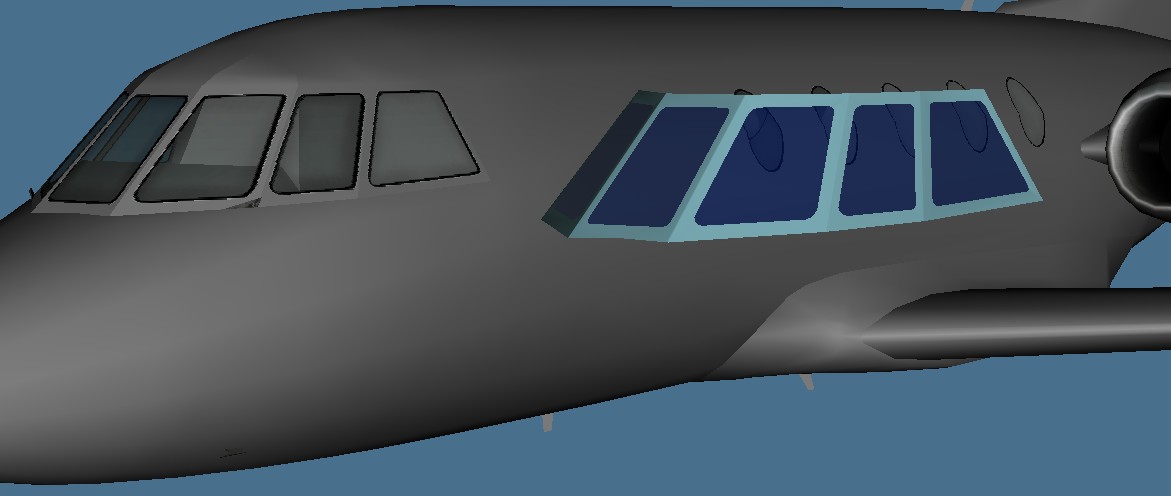
Here's a DA20 AI model with the original full-resolution model's windows next to it. Clear advantage: modelled windows. But look at the inlet - that this is a low-polygon model is readily apparent.

The advantage begins to diminish.

And now they look the same, just as the engine starts to look round. You can view this model from any distance up to here and it will look more or less the same as if it had five times the faces and ten times the texture resolution (better if I didn't have an unfortunate seam in the middle of the cabin windows: I could elect to chamfer this seam and re-map and it'd look a bit better, but I don't think we'll have to zoom out much further to see the problem diminish from most angles). Anti-aliasing in FSX will improve the distance somewhat (for both the textures and the mesh). Form follows function. Know your model's purpose and design every part of it accordingly - texture mapping is not an afterthought, and too many model builders treat it that way. As a model builder, you want to be Quentin Tarantino. You want every minor character to have a specific actor's personality in mind. You want to build Kill Bill, not Attack of the Clones.
This brings up another point: why did I say that anti-aliasing would help the mesh? It will make the edges look smoother. That helps a little bit. Edges count. What's behind them is fungible. If I made a concave bowl with 32 sides, but decreased the number of sides to 20 everywhere but the edge, you'd probably never notice.
Okay.
Here's a DA20 AI model with the original full-resolution model's windows next to it. Clear advantage: modelled windows. But look at the inlet - that this is a low-polygon model is readily apparent.
The advantage begins to diminish.
And now they look the same, just as the engine starts to look round. You can view this model from any distance up to here and it will look more or less the same as if it had five times the faces and ten times the texture resolution (better if I didn't have an unfortunate seam in the middle of the cabin windows: I could elect to chamfer this seam and re-map and it'd look a bit better, but I don't think we'll have to zoom out much further to see the problem diminish from most angles). Anti-aliasing in FSX will improve the distance somewhat (for both the textures and the mesh). Form follows function. Know your model's purpose and design every part of it accordingly - texture mapping is not an afterthought, and too many model builders treat it that way. As a model builder, you want to be Quentin Tarantino. You want every minor character to have a specific actor's personality in mind. You want to build Kill Bill, not Attack of the Clones.
This brings up another point: why did I say that anti-aliasing would help the mesh? It will make the edges look smoother. That helps a little bit. Edges count. What's behind them is fungible. If I made a concave bowl with 32 sides, but decreased the number of sides to 20 everywhere but the edge, you'd probably never notice.
Last edited:
- Messages
- 242
- Country
Saving
I've recently began writing my zeroes differently. My handwriting is an all-caps script (with half-size lowercase letters) that I came up with for the purposes of legibility and minimizing strokes. This is for two reasons: one, because I have spent the majority of my life in factories dealing with illegible handwriting on a daily basis (and it pisses me off), and two, because I'm lazy and efficient letters make writing faster. Some of you might remember Adam Stanger, my partner-in-crime at FFX (and in several other unsuccessful non-simulation-related ventures after we both quit simming). Some of you might have been the odd ones who thought we were the same person. Well, we weren't, and, like an idiot, I didn't get a picture of us when I spent a day in Vegas in 2015 and he drove up from Pahrump to meet me. I say "like an idiot" because he died from complications of surgery that December. Anyway, his parents had a celebration for him on what would have been his next birthday this last October, and I dragged my best friend along because flying alone is boring. Well. That was a long way of getting to the fact that we were discussing the idea of legibility in handwriting, and ensuring that numbers were distinct to avoid confusion. It was a couple of weeks later that I realized that my "zero" and "O" looked the exact same. So I started putting a little slash through my zero. Start at the bottom, move clockwise, and then draw a diagonal slash when I meet where I started.
Habits. Take the time to develop good ones and it all becomes automatic. I recently "discovered" that I could right-click on a viewport's name to turn edged faces on or off or switch rendering modes. It took me a good month to stop using the viewport properties dialog box to do this. I had to teach myself a new habit.
Here are some of my other habits:
-I never scale a full part unless I know it's getting attached to something else later (and rarely even then).
-I always align the pivot to world after creating a new primitive.
-I always create materials and then apply them. Dragging and dropping is how absent-minded you ends up with uncommanded multimaterials, so don't do it.
-I always plan ahead with materials and mapping. If I need a multimaterial, it gets created before the sub-materials do, and the sub-materials become what I use for objects that require only them. I then apply the multimaterial on the parts that need it and modify the material IDs in polygon mode until the right polygons have the right materials.
-Similarly, I know what the mapping layout is going to look like long before the process of mapping actually starts.
-I use incremental saves, which is the subject of this post.
I learned, a long time ago, not to trust GMax's autosave feature. This is because it autosaved while I was in the middle of doing something on the original FFX 737-200, and, for whatever reason, corrupted the project file. When I tried to open it - "This application has performed an illegal operation and will now close." I had a backup, itself autromatically created when GMax had crashed a few days prior, but it was a much earlier iteration. I almost cried - days of work had been lost.
So, working from the expectation that GMax would FUBAR a file on save every once in a while, I quickly disabled that little autosave prick and implemented an incremental save procedure like Jon at SGA was using. I quickly realized that my meager hard drive space (calling us "poor" would have not been inaccurate - threat of eviction and having the electricity shut off were routine things in my childhood and teenage years, and you'd be amazed at how many files were sent and received as split up zips on 3.5" floppy disks from school because internet was a luxury) would be consumed by incremental saves. As a compromise, I developed the system that I use now.
You might have noticed, if you downloaded all the files I uploaded some time ago, that every file ends in a _(letter). A 737-200 Advanced project file might, for example, be B73S_Q.gmax. This is because I only save 26 files for a given project, A through Z, and then begin back at A and overwrite. I developed a procedure for when I would save, as well. I save:
-When I decide I'm done for the day or otherwise walk away
-Before performing any boolean operation
-Before performing any difficult-to-reverse operation
-Any time I want to rename a material (guess when GMax loves to crash?)
-When I feel like I don't know when the last time I saved was
-When I finish a part
-Before attaching a part to another part (GMax loves to corrupt parts here)
I recommend keeping your preferred application's stability in mind when jumping into the world of creating game content, and creating a procedure that works for your process flow. Know when it is most likely to crash, and save when you think it might happen in the near future.
I've recently began writing my zeroes differently. My handwriting is an all-caps script (with half-size lowercase letters) that I came up with for the purposes of legibility and minimizing strokes. This is for two reasons: one, because I have spent the majority of my life in factories dealing with illegible handwriting on a daily basis (and it pisses me off), and two, because I'm lazy and efficient letters make writing faster. Some of you might remember Adam Stanger, my partner-in-crime at FFX (and in several other unsuccessful non-simulation-related ventures after we both quit simming). Some of you might have been the odd ones who thought we were the same person. Well, we weren't, and, like an idiot, I didn't get a picture of us when I spent a day in Vegas in 2015 and he drove up from Pahrump to meet me. I say "like an idiot" because he died from complications of surgery that December. Anyway, his parents had a celebration for him on what would have been his next birthday this last October, and I dragged my best friend along because flying alone is boring. Well. That was a long way of getting to the fact that we were discussing the idea of legibility in handwriting, and ensuring that numbers were distinct to avoid confusion. It was a couple of weeks later that I realized that my "zero" and "O" looked the exact same. So I started putting a little slash through my zero. Start at the bottom, move clockwise, and then draw a diagonal slash when I meet where I started.
Habits. Take the time to develop good ones and it all becomes automatic. I recently "discovered" that I could right-click on a viewport's name to turn edged faces on or off or switch rendering modes. It took me a good month to stop using the viewport properties dialog box to do this. I had to teach myself a new habit.
Here are some of my other habits:
-I never scale a full part unless I know it's getting attached to something else later (and rarely even then).
-I always align the pivot to world after creating a new primitive.
-I always create materials and then apply them. Dragging and dropping is how absent-minded you ends up with uncommanded multimaterials, so don't do it.
-I always plan ahead with materials and mapping. If I need a multimaterial, it gets created before the sub-materials do, and the sub-materials become what I use for objects that require only them. I then apply the multimaterial on the parts that need it and modify the material IDs in polygon mode until the right polygons have the right materials.
-Similarly, I know what the mapping layout is going to look like long before the process of mapping actually starts.
-I use incremental saves, which is the subject of this post.
I learned, a long time ago, not to trust GMax's autosave feature. This is because it autosaved while I was in the middle of doing something on the original FFX 737-200, and, for whatever reason, corrupted the project file. When I tried to open it - "This application has performed an illegal operation and will now close." I had a backup, itself autromatically created when GMax had crashed a few days prior, but it was a much earlier iteration. I almost cried - days of work had been lost.
So, working from the expectation that GMax would FUBAR a file on save every once in a while, I quickly disabled that little autosave prick and implemented an incremental save procedure like Jon at SGA was using. I quickly realized that my meager hard drive space (calling us "poor" would have not been inaccurate - threat of eviction and having the electricity shut off were routine things in my childhood and teenage years, and you'd be amazed at how many files were sent and received as split up zips on 3.5" floppy disks from school because internet was a luxury) would be consumed by incremental saves. As a compromise, I developed the system that I use now.
You might have noticed, if you downloaded all the files I uploaded some time ago, that every file ends in a _(letter). A 737-200 Advanced project file might, for example, be B73S_Q.gmax. This is because I only save 26 files for a given project, A through Z, and then begin back at A and overwrite. I developed a procedure for when I would save, as well. I save:
-When I decide I'm done for the day or otherwise walk away
-Before performing any boolean operation
-Before performing any difficult-to-reverse operation
-Any time I want to rename a material (guess when GMax loves to crash?)
-When I feel like I don't know when the last time I saved was
-When I finish a part
-Before attaching a part to another part (GMax loves to corrupt parts here)
I recommend keeping your preferred application's stability in mind when jumping into the world of creating game content, and creating a procedure that works for your process flow. Know when it is most likely to crash, and save when you think it might happen in the near future.
Last edited:
hairyspin
Resource contributor
- Messages
- 3,253
- Country
In Gmax, the default key map toggles between wireframe and shaded with F3. F4 toggles between shaded and edged views. (YMMV)
I use Increment-on-save which saves gronkyModel01 as gronkyModel02, then 03, etc up to 200 when it resets to 01 iirc. Autosave is also set to every few minutes and the maximum number of backups, so I can step back about half an hour before resorting to my last deliberate save.
I use Increment-on-save which saves gronkyModel01 as gronkyModel02, then 03, etc up to 200 when it resets to 01 iirc. Autosave is also set to every few minutes and the maximum number of backups, so I can step back about half an hour before resorting to my last deliberate save.
Last edited:
- Messages
- 242
- Country
That's handy to know, thanks! I'm really good at finding things out late - I just barely learned today that I can specify remote directories for my FSX simobjects folders. This is great, because I installed FSX on my laptop's SSD to ease up on load times (FS9 is my old installation from 2003, having been moved three or four times when my old computers blew up, now resting happily on an external USB drive), and capacity is a bit limited...In Gmax, the default key map toggles between wireframe and shaded with F3. F4 toggles between shaded and edged views. (YMMV)

n4gix
Resource contributor
- Messages
- 11,674
- Country
I use all three 'backup systems' as well.I use Increment-on-save which saves gronkyModel01 as gronkyModel02, then 03, etc up to 200 when it resets to 01 iirc. Autosave is also set to every few minutes and the maximum number of backups, so I can step back about half an hour before resorting to my last deliberate save.
- Timed "Autoback" saves every five minutes, rotating between max 10 saves.
- Incremental numeric saves as I command, with automatic incremental save on quitting Max.
- Autoback on program crash
All types have at one time or another saved my bacon more than once. The most time I've ever lost was the last 5 minutes of work.

Erick, I commend you for sharing your "Tips and Tricks" with the community at large. It's something I feel very strongly about. Knowledge shared ensures that it doesn't become knowledge lost.


hairyspin
Resource contributor
- Messages
- 3,253
- Country
I think the highest incremental save of the B732 project was probably this one: 737-200_Interior_SP177_WX_370.max
I think Milton will raise you there: one of his projects got to 900+ saves, although it'd be for FS9 and not separate exterior and VC models as for FSX/P3D.
Use of Named Selection sets can also save your bacon with a complex model when Gmax starts coughing at the number of textured objects. Organise the different areas with their own sets and you can summon or hide them at will.

- Messages
- 1,451
- Country

Another one: you don't need to crowd a scene with everything. I learned from you, that you can have scenes for precise systems and finally merge and adjust when the work in that area is done.
Since I discovered the ULE export system, things can go crazy when a model turns large and this little trick helped me a lot. In short, when model sizes are getting larger than Gmax "standards", why should you stay with all your precious work in the same scene, right? Well, at least my in this regard.
Since I discovered the ULE export system, things can go crazy when a model turns large and this little trick helped me a lot. In short, when model sizes are getting larger than Gmax "standards", why should you stay with all your precious work in the same scene, right? Well, at least my
in this regard.
- Messages
- 242
- Country
Part of that is a holdover from FS8, where the interior and exterior had to be separate x files that were combined with MakeMDL. With FS9, we got a much more sensible system, though I'll often put interiors in a separate scene until they're ready for final mating. In FSX, of course, we got the most sensible system of all - separate models. You're right, though, in that I'd never dream of building a 3D instrument panel with the rest of the cockpit, I'd build the panels first, in their own dedicated file in dedicated folders, then merge them into the cockpit WIP after they were finished. I often build particularly complex sub-assemblies this way as well.
I'm a big proponent of not keeping much in the way of secrets, mostly because I was pretty dependent on help from others when I started out. I learned by reverse-engineering FSDS files from Freeflight and asking other builders questions. When I made the move to GMax, I got a lot of help from other builders, too, because the curve was so steep (these days, I've re-learned a lot of the things I've forgotten from Mr. Igami!). I figure the less time spent on fighting the tools, the more time spent on the results. Granted, my methods probably seem crude to most, but they are based in years of experience in manufacturing and a generous helping of common sense, and do seem to work well enough - although others' methods might be a bit more efficient (read: a lot more efficient). My techniques, of course, have the advantage of producing somewhat rough results that often look for all the world like sheet metal that has been ruthlessly hammered into shape! To wit:

I was thinking one of the next subjects might be how I build wings. I do it completely differently than most... it involves a lot of math.
Erick, I commend you for sharing your "Tips and Tricks" with the community at large. It's something I feel very strongly about. Knowledge shared ensures that it doesn't become knowledge lost.
I'm a big proponent of not keeping much in the way of secrets, mostly because I was pretty dependent on help from others when I started out. I learned by reverse-engineering FSDS files from Freeflight and asking other builders questions. When I made the move to GMax, I got a lot of help from other builders, too, because the curve was so steep (these days, I've re-learned a lot of the things I've forgotten from Mr. Igami!). I figure the less time spent on fighting the tools, the more time spent on the results. Granted, my methods probably seem crude to most, but they are based in years of experience in manufacturing and a generous helping of common sense, and do seem to work well enough - although others' methods might be a bit more efficient (read: a lot more efficient). My techniques, of course, have the advantage of producing somewhat rough results that often look for all the world like sheet metal that has been ruthlessly hammered into shape! To wit:
I was thinking one of the next subjects might be how I build wings. I do it completely differently than most... it involves a lot of math.
Last edited:

- Messages
- 242
- Country
Well, I've learned, as I previously wrote, to never trust drawings.
I decided, around the time Adam Stanger died, that I should, between school, work, music, and other things, do a couple of projects that I had in the back of my mind, filed under "someday." I never really stopped collecting data and reference materials, the problem is that it's hard to figure out where to start sometimes. So, I did what I always do when I'm completely lost and out of my league (and even if we compare the 727 and L1011 to contemporary models, I was definitely out of my league): I started a DC-9. Why? Because it's just about the simplest commercial airplane that you can build, I have tons of data (most old, some new), and I've already made a whole bunch of them, so there wouldn't be too many surprises. Now that I've mostly remembered how to do things, it's again on the back burner, back in the "someday" category, but the important thing is that I had four or five different drawings of the DC-9-10 wing and not a single one matched another one. So I used the engineering data to construct a four-segment trapezoidal plane with the right taper ratio, and then tilted the whole thing using the 25% chord line sweep (because it's a four-segment plane, it had divisions at the 25%, 50%, and 75% chord lines). I compared the end result to near-orthogonal telefoto photographs, and it matched the real wing precisely. When I built the actual wing geometry from this reference plane, I used a chart of thickness:chord:span percent to flesh it out. I used the same process for the stabilizers. The AI F-104 wing was constructed the same way, but I was able to dig up airfoil coordinates for even closer results.
When I have some time, I'll demonstrate the process, but that's the basic methodology. I will note one caveat: I don't care for lofting, so it's a very meat-and-potatoes manual process (which is par for the course, I guess).
I decided, around the time Adam Stanger died, that I should, between school, work, music, and other things, do a couple of projects that I had in the back of my mind, filed under "someday." I never really stopped collecting data and reference materials, the problem is that it's hard to figure out where to start sometimes. So, I did what I always do when I'm completely lost and out of my league (and even if we compare the 727 and L1011 to contemporary models, I was definitely out of my league): I started a DC-9. Why? Because it's just about the simplest commercial airplane that you can build, I have tons of data (most old, some new), and I've already made a whole bunch of them, so there wouldn't be too many surprises. Now that I've mostly remembered how to do things, it's again on the back burner, back in the "someday" category, but the important thing is that I had four or five different drawings of the DC-9-10 wing and not a single one matched another one. So I used the engineering data to construct a four-segment trapezoidal plane with the right taper ratio, and then tilted the whole thing using the 25% chord line sweep (because it's a four-segment plane, it had divisions at the 25%, 50%, and 75% chord lines). I compared the end result to near-orthogonal telefoto photographs, and it matched the real wing precisely. When I built the actual wing geometry from this reference plane, I used a chart of thickness:chord:span percent to flesh it out. I used the same process for the stabilizers. The AI F-104 wing was constructed the same way, but I was able to dig up airfoil coordinates for even closer results.
When I have some time, I'll demonstrate the process, but that's the basic methodology. I will note one caveat: I don't care for lofting, so it's a very meat-and-potatoes manual process (which is par for the course, I guess).
hairyspin
Resource contributor
- Messages
- 3,253
- Country
No maths here, just another quick feature: if you move, rotate or whatever an object and realise you've done it wrong before letting go the left mouse button, immediately click the right mouse button and – Instant Undo! If I had tuppence for every time that's been used...


SixGhost
Resource contributor
- Messages
- 103
- Country

based in years of experience in manufacturing and a generous helping of common sense
The most underrated trait of a working man, common freaking sense. Some say it doesn't exist anymore, in fact I nearly lost you there.

- Messages
- 663
- Country

Lots of handy tips. Before shutting down Gmax I always check that my last save is not corrupted by opening another Gmax window & opening the last saved file.
I remember back when I first started using Gmax, when close to having completed my first aircraft exterior, getting a message that said my .gmax file was corrupted. This was after turning off the autosave features that were causing Gmax to crash at unsustainable intervals.
But in the end I could have lived with the crashes...had I known the scene could have been corrupted, rendering months of work totally useless. I guess sometimes you just have to pick your poison...oh well. Live and learn.
Moral of the story: SAVE OFTEN! Even if you end up with hundreds of files in one folder, you can always either compress them, archive them somewhere else, or do what I do and just highlight/delete 2 of the 4 rows of .max files (just not the row containing your current save of course.) Although I AM lazy when it comes to organizing files and my folder was approaching 12gb at one point...

- Messages
- 242
- Country
Building wings without guessing
If you're building jet airliners, chances are very, very good that you will be able to find theoretical wing data. This can make it easier to build your wing geometry without any regard to your drawings and their likely inaccuracies. So what's a theoretical wing? It's sometimes called a trapezoidal wing and is the basic planform without any respect to the fuselage, Yehudi flap (if any), wingtip shape, leading edge extensions, whatever. It's the wing in its most basic form. Here's a DC-9-20/30/40/50 wing station diagram to illustrate what I'm on about:
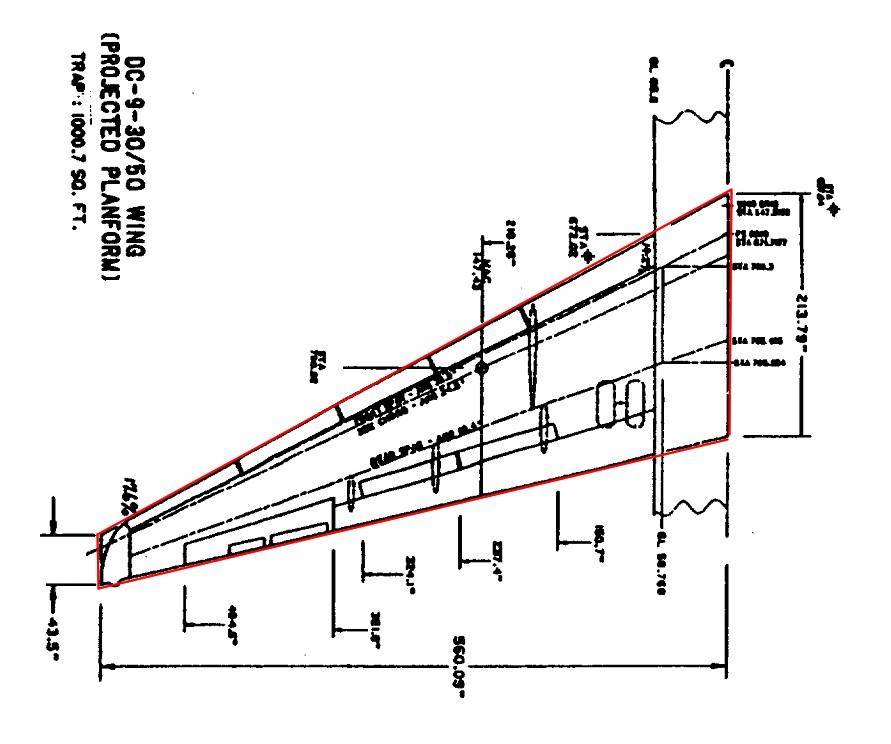
I have outlined the theoretical wing in red. Notice that it extends all the way to the fuselage centerline, and also notice that the real wing is clipped a bit, as it ends in a Kuchemann tip.
"You've lost me. What in tarnation is a damned Yehudi flap!?"
It's the triangular wing trailing edge extension that conveniently provides a place to mount the landing gear. Here's the same diagram, but modified to give an idea of what MacDac did when they designed the Super 80 wing:
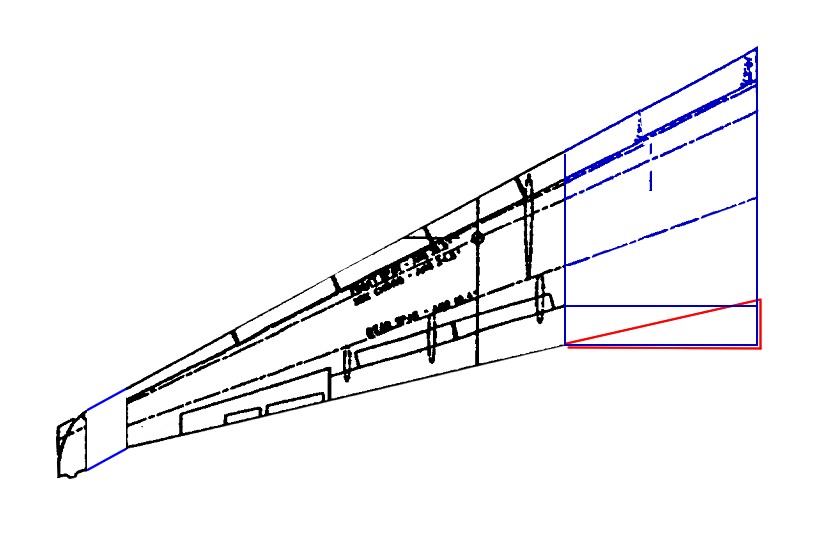
I outlined the Yehudi flap in red. It won't be part of the theoretical wing. Neither will the leading edge extension on the 737. Be aware - the theoretical wing is used to construct the basic geometry, and the rest ought to be done later. Incidentally, if you didn't believe me about the DC-9s "ride cymbal" wing profile, here's a genuine Douglas diagram for you to look at (with some annotations by me):
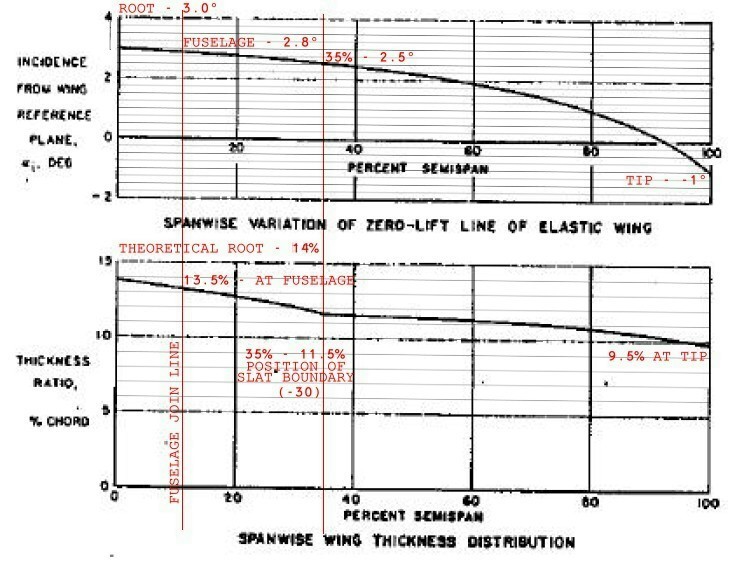
That sudden change in the profile is located, very conveniently, at the vortilon. Here's a couple more pictures (taken by me) for the skeptics:


It's the most obvious with the slats down.
For a simple airliner like a DC-9, all you have to do is create the wing cross-sections (you could loft if you want, I don't, but it's up to you), use the data at-hand to create a theoretical wing, then somehow make everything match in terms of thickness/chord, incidence/chord, and the wing planform. There aren't any root or tip extensions, so all you have to do after your basic wing is done is cut the contours where the wing should meet the fuselage (or, more likely, a wing/body fairing), delete everything beyond that point, and then fair it in. More complex wings, like on the 727, will require additional work after the basic wing is done (and if you have the airfoils handy, it might be best to only create the outer wing using this method). But it's nice to have a good base to work from. This is also how I create vertical and horizontal stabilizers these days.
Don't worry: creating a wing from numbers is actually really easy, and our good friends FFD, plane, angle snap, and slice plane will make the task relatively painless. The end result will be more accurate than what you'd have created otherwise. In the next post, which I'll write after I've had something to eat, I'll make up some data and show you how to turn it into some honest-to-Bob-Mould geometry.
If you're building jet airliners, chances are very, very good that you will be able to find theoretical wing data. This can make it easier to build your wing geometry without any regard to your drawings and their likely inaccuracies. So what's a theoretical wing? It's sometimes called a trapezoidal wing and is the basic planform without any respect to the fuselage, Yehudi flap (if any), wingtip shape, leading edge extensions, whatever. It's the wing in its most basic form. Here's a DC-9-20/30/40/50 wing station diagram to illustrate what I'm on about:
I have outlined the theoretical wing in red. Notice that it extends all the way to the fuselage centerline, and also notice that the real wing is clipped a bit, as it ends in a Kuchemann tip.
"You've lost me. What in tarnation is a damned Yehudi flap!?"
It's the triangular wing trailing edge extension that conveniently provides a place to mount the landing gear. Here's the same diagram, but modified to give an idea of what MacDac did when they designed the Super 80 wing:
I outlined the Yehudi flap in red. It won't be part of the theoretical wing. Neither will the leading edge extension on the 737. Be aware - the theoretical wing is used to construct the basic geometry, and the rest ought to be done later. Incidentally, if you didn't believe me about the DC-9s "ride cymbal" wing profile, here's a genuine Douglas diagram for you to look at (with some annotations by me):
That sudden change in the profile is located, very conveniently, at the vortilon. Here's a couple more pictures (taken by me) for the skeptics:
It's the most obvious with the slats down.
For a simple airliner like a DC-9, all you have to do is create the wing cross-sections (you could loft if you want, I don't, but it's up to you), use the data at-hand to create a theoretical wing, then somehow make everything match in terms of thickness/chord, incidence/chord, and the wing planform. There aren't any root or tip extensions, so all you have to do after your basic wing is done is cut the contours where the wing should meet the fuselage (or, more likely, a wing/body fairing), delete everything beyond that point, and then fair it in. More complex wings, like on the 727, will require additional work after the basic wing is done (and if you have the airfoils handy, it might be best to only create the outer wing using this method). But it's nice to have a good base to work from. This is also how I create vertical and horizontal stabilizers these days.
Don't worry: creating a wing from numbers is actually really easy, and our good friends FFD, plane, angle snap, and slice plane will make the task relatively painless. The end result will be more accurate than what you'd have created otherwise. In the next post, which I'll write after I've had something to eat, I'll make up some data and show you how to turn it into some honest-to-Bob-Mould geometry.
Last edited: