• Which the release of FS2020 we see an explosition of activity on the forun and of course we are very happy to see this. But having all questions about FS2020 in one forum becomes a bit messy. So therefore we would like to ask you all to use the following guidelines when posting your questions:

    • Tag FS2020 specific questions with the MSFS2020 tag.
    • Questions about making 3D assets can be posted in the 3D asset design forum. Either post them in the subforum of the modelling tool you use or in the general forum if they are general.
    • Questions about aircraft design can be posted in the Aircraft design forum
    • Questions about airport design can be posted in the FS2020 airport design forum. Once airport development tools have been updated for FS2020 you can post tool speciifc questions in the subforums of those tools as well of course.
    • Questions about terrain design can be posted in the FS2020 terrain design forum.
    • Questions about SimConnect can be posted in the SimConnect forum.

    Any other question that is not specific to an aspect of development or tool can be posted in the General chat forum.

    By following these guidelines we make sure that the forums remain easy to read for everybody and also that the right people can find your post to answer it.

MCX Weird FS2004 import issue

Messages
166
Hi,
I have been having issues trying to convert some models from FS2004 to FSX/P3D.
When it is imported into MCX there is an issue with the way small parts are rendered.
This is the model in FS2004
FS2004 original.jpg


And when I import it it comes in like this (ignore the texture issues for now)
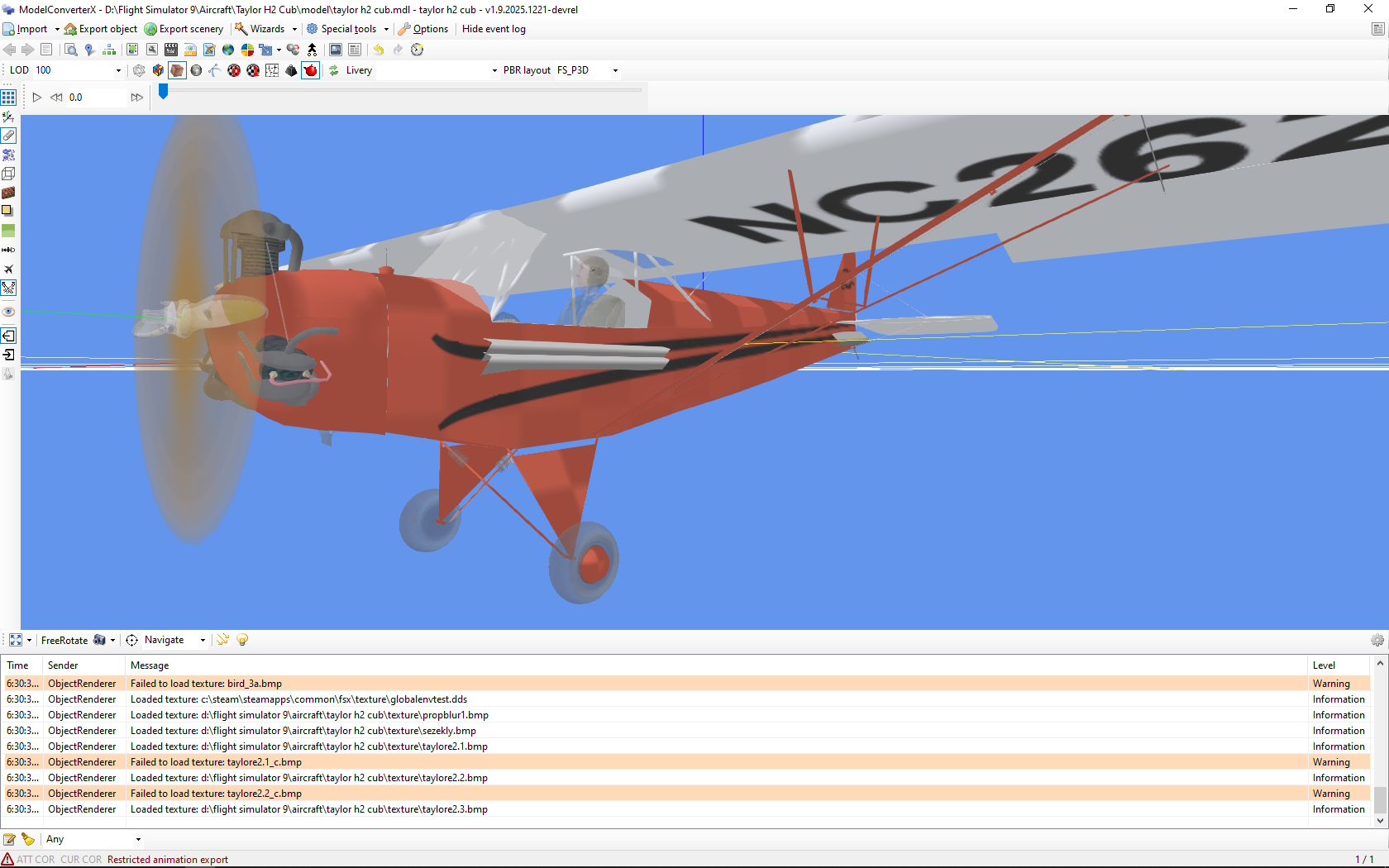
MCX import.jpg


The small control wire under the rear elevator is being turned into that large object and I have no idea what is causing the 2 objects under the pilot window.
If I export the model to FSX or P3D those objects are still there.

I have attached the original FS2004 model.

Thanks
Gavin
 

Attachments

I imported your mdl file into MCX 1.70 and I don't see that problem. Hopefully Arno will figure it out.

mcx_cub.jpg
 
Gavin, are you using the default settings for use conditions or did you change them? Default would be visibility conditions.
 
Hi Arno,
Sorry should have specified.
I am using the default settings (visiblility conditions) on the latest 1.9 dev release. I pulled the model into an archaic 1.6 release that I had on another machine and it doesn't create the weird artifacts but it also doesn't render the wire for the elevator control.

Have a good Christmas Arno and we can pick this issue up in the new year.

thanks
Gavin
 
Thanks Gavin, I'll check it (somewhere after Christmas indeed). :santahat:
 
Quick update (I got some "me" time as an xmas gift)
- Using the old 1.6 release it does import and renders the elevator wires very fine. I set the line extrude radius on import options to 0.5 and it creates a visible cable. Just FYI
 
I suspect it has something to do with line extrusion indeed. Earlier this year I fixed a bug in that logic. Setting the radius to 0.5 meter sounds a bit much for wires on a plane.
 
Hi,

I do see the artefacts as well, it seems that they are a few lines in the model.

One is this red segment near the tail that runs between two pieces of geometry that are modelled with triangles.

1766820483068.png


The other two are inside the cockpit (the two gray lines), again running between some geometry modelled with triangles.

1766820606636.png


The default extrusion radius is 0.1 meter, but that would give a 20 cm thick cable. In these situations that does not seem realistic. So I changed the radius to 0.005 m, which gives a 1 cm thick cable. And then you get the representation as show in these screenshots, which looks OK to me.
 
Thanks for checking it out Arno.
You are right (of course), dropping the extrusion radius down fixed the representation nicely.

Good to know for the future if I get those issues on other models.
 
Back
Top