
-
Which the release of FS2020 we see an explosition of activity on the forun and of course we are very happy to see this. But having all questions about FS2020 in one forum becomes a bit messy. So therefore we would like to ask you all to use the following guidelines when posting your questions:
- Tag FS2020 specific questions with the MSFS2020 tag.
- Questions about making 3D assets can be posted in the 3D asset design forum. Either post them in the subforum of the modelling tool you use or in the general forum if they are general.
- Questions about aircraft design can be posted in the Aircraft design forum
- Questions about airport design can be posted in the FS2020 airport design forum. Once airport development tools have been updated for FS2020 you can post tool speciifc questions in the subforums of those tools as well of course.
- Questions about terrain design can be posted in the FS2020 terrain design forum.
- Questions about SimConnect can be posted in the SimConnect forum.
Any other question that is not specific to an aspect of development or tool can be posted in the General chat forum.
By following these guidelines we make sure that the forums remain easy to read for everybody and also that the right people can find your post to answer it.
You are using an out of date browser. It may not display this or other websites correctly.
You should upgrade or use an alternative browser.
You should upgrade or use an alternative browser.
Where are the trees?
- Thread starter TerryW
- Start date


- Messages
- 777
- Country

Looking at the terrain.cfg I see...
[Texture.1202] // Forest Park
Type=1
Size=4
ExcludeAutogen=1
Textures=134
Also, texture 134 doesn't have an autogen file.
cheers,
Lane
[Texture.1202] // Forest Park
Type=1
Size=4
ExcludeAutogen=1
Textures=134
Also, texture 134 doesn't have an autogen file.
cheers,
Lane
- Messages
- 777
- Country
Sort of a technical way of saying that 1202 does not have any trees.
Sorry about that.
cheers,
Lane
Sorry about that.
cheers,
Lane
- Messages
- 777
- Country
OK, it's been a while since I used SBuilder9 so I had to fire it up and test for myself.
As I remember now some of the ground textures, like these park textures, have autogen assigned to them even though they have no .agn file.
As for the amount of trees you see, most likely it is a result of the hard coded limit of how much autogen FS9 will display on each tile and where you place these polys.
As a test place a poly using this park texture out in the middle of the desert and it will be rich with trees.
Place it in the middle of say New York City and there should be far fewer trees.
BTW, Forest Park and City Park both use the same texture, 134b2(seasonal variant)1.bmp. Place a large poly of each, side by side, and you will be hard pressed to tell them apart.
cheers,
Lane
As I remember now some of the ground textures, like these park textures, have autogen assigned to them even though they have no .agn file.
As for the amount of trees you see, most likely it is a result of the hard coded limit of how much autogen FS9 will display on each tile and where you place these polys.
As a test place a poly using this park texture out in the middle of the desert and it will be rich with trees.
Place it in the middle of say New York City and there should be far fewer trees.
BTW, Forest Park and City Park both use the same texture, 134b2(seasonal variant)1.bmp. Place a large poly of each, side by side, and you will be hard pressed to tell them apart.
cheers,
Lane

- Messages
- 324
- Country

Hello Lane,
I've been using sbuilder for 4 yrs or so & have seen the most trees with Forest Park, less with City, & less with Grass Park. These 2 grabs will show you how 2 area differ. In 036 there are no trees but I chose Forest, where in the area in 046 with Forest I have trees in abundance.
I have changes to city & grass but nothing shows.
My airfield is an accurate representation of nearby WW2 RAF Ibsley, home to the RAF & units of the 8th USAF leading to D Day. grab 036 should be showing more trees than the lack I see right now. I'm intrigued as to why they don't show. Thanks for your interesting info.
Terry.
I've been using sbuilder for 4 yrs or so & have seen the most trees with Forest Park, less with City, & less with Grass Park. These 2 grabs will show you how 2 area differ. In 036 there are no trees but I chose Forest, where in the area in 046 with Forest I have trees in abundance.
I have changes to city & grass but nothing shows.
My airfield is an accurate representation of nearby WW2 RAF Ibsley, home to the RAF & units of the 8th USAF leading to D Day. grab 036 should be showing more trees than the lack I see right now. I'm intrigued as to why they don't show. Thanks for your interesting info.
Terry.
Attachments


- Messages
- 777
- Country
Any chance of an exclude file somewhere?
What layers are your polys?
cheers,
Lane
What layers are your polys?
cheers,
Lane
- Messages
- 777
- Country
Is/was there by any chance a default airport in the treeless area in grab 036?
Layer 4 is the default layer for vector lines such as rivers, streams and utilities.
You should always place your scenery on layers higher than the default layers. I always start at layer 20.
cheers,
Lane
Layer 4 is the default layer for vector lines such as rivers, streams and utilities.
You should always place your scenery on layers higher than the default layers. I always start at layer 20.
cheers,
Lane
- Messages
- 324
- Country
Hello Lane,
Nothing default there. This is a new ADE/Sbuilder airfield, well, new 4 yrs ago!
The nearest default is EGHH, where I made RAF Hurn, with areas of Forest Park with trees!
I learn something every day so thanks for the layer info. Layer 4 is what sbuilder is doing. Are you saying changing it might help? I didn't know layer levels can be changed.
Terry.
Nothing default there. This is a new ADE/Sbuilder airfield, well, new 4 yrs ago!
The nearest default is EGHH, where I made RAF Hurn, with areas of Forest Park with trees!
I learn something every day so thanks for the layer info. Layer 4 is what sbuilder is doing. Are you saying changing it might help? I didn't know layer levels can be changed.
Terry.
- Messages
- 777
- Country
I don't know if changing the layer will help or not. I only know that you should place your polys above the default layers. As I said, I start at 20.
You can set the layer number on the VTP2 tab, where you assign your poly a texture.
Your custom textures may have something to do with it.
If you want to post your VTP2 poly .bgl I will be happy to test it on my system.
cheers,
Lane
You can set the layer number on the VTP2 tab, where you assign your poly a texture.
Your custom textures may have something to do with it.
If you want to post your VTP2 poly .bgl I will be happy to test it on my system.
cheers,
Lane

Hi again:
Terry, for a 'refresher' on some of the considerations of working with FS9 land class Vector Textured Polygons (aka "VTP") and the VTP layering scheme, you might wish to take another look at the info addressed in another thread wherein we discussed Compton Abbas:
Of particular note might be the link to Luis Feliz-Tirado's excellent tutorial "Ground2K for Beginners", which addresses working with various FS9 terrain vector line and polygon land class textures as well as "vector excludes" ...within the context of the FS VTP layer numbering system (which IIUC, still applies regardless of whether one uses G2K, ADE, SBuilder etc. to make this particular type of terrain scenery):
http://library.avsim.net/search.php?SearchTerm=Ground2K for Beginners&CatID=root&Go=Search
[EDITED]
Also to be considered is the info within the original Ground2K4 for FS9 manual "Ground2K4_US.doc" in:
Ground2K4 V5.1
http://library.avsim.net/download.php?DLID=39207
...and other documents within 5 "official" updates / patches released by author Christian Fumey:
Ground24K V5.30
http://library.avsim.net/download.php?DLID=41110
Ground2K4 V5.32
http://library.avsim.net/download.php?DLID=41426
Patch Ground2K4 V5.33
http://library.avsim.net/download.php?DLID=45391
Ground2K4 V5.40
http://library.avsim.net/download.php?DLID=58600
Patch Ground2K4 V5.6
http://library.avsim.net/download.php?DLID=87880
Of course, the above are supplements to numerous references for VTP scenery found in the SBuilder for FS9 help file via:
SBuilderX Menu > Help > [Search Tab] > Search String: "VTP" click 'List Topics' > [click topic title] > (topic shows in right window pane)
And then we have Holger's modifications of the "default" VTP layering scheme:
http://forum.avsim.net/topic/79970-sbuilder-201-blns-and-missing-airport-masksvtp-layer/
Additionally, whether one makes terrain scenery content for a airport area via ex: ADE, AFX, SBuilder etc., one may need to be certain that any BGLComp-compiled XML exclude "rectangles" utilized (these are distinct from VTP excludes ! ) at /near an airport scenery do not have an "Exclude All" attribute where one wishes to allow FS9 autogen trees to be displayed normally.
IIUC, this caveat would apply regardless of whether that autogen is to be displayed on default land class texture 'tiles' used in default mode, with custom VTP polygons which use default land class 'textures', or on custom resample-generated photoreal land class scenery with autogen Annotations applied via *an.agn files in the local paired \Texture folder.
In airport creation / modification, one might find it appropriate to use a number of small BGLComp-compiled XML exclude rectangles with specific locally-needed exclude attributes rather than 1 large exclude rectangle which excludes "all" ...as discussed here:
http://www.fsdeveloper.com/forum/threads/autogen-exclude-trouble.21467/
http://www.fsdeveloper.com/forum/th...-autogen-trees-oddly-enough-it-worked.113508/
...and as explained in detail by Jim Vile's excellent tutorial here in the context of FSX airport modification:
http://www.fsdeveloper.com/forum/threads/landclass-visibility-problem.15173/
BTW: Of incidental note is Scott Smart's explanation of FS9 Airport Background texture polygons being implemented by ACES via use of VTP2 land class polygons (which are duplicates of the default airport flatten poly, and which utilize default land class textures # 1182 through 1200 that are also designed to remove autogen) ...on VTP layer 7:
http://www.fsdeveloper.com/forum/threads/autogen-exclude-trouble.21467/#post-142154
[END_EDIT]
Hope this might help with better understanding some quirks of the FS VTP (internal) layering system with regard to excludes.
GaryGB
Terry, for a 'refresher' on some of the considerations of working with FS9 land class Vector Textured Polygons (aka "VTP") and the VTP layering scheme, you might wish to take another look at the info addressed in another thread wherein we discussed Compton Abbas:
http://www.fsdeveloper.com/forum/threads/tutorial.426486/
NOTE: The internal layer number of a VTP BGL is a separate binary attribute (stored inside the BGL) and is distinct from the priority number associated with a BGLs physical position within the FS9 Scenery Library GUI stack of layers.
http://www.fsdeveloper.com/forum/showpost.php?p=639049&postcount=2
Of particular note might be the link to Luis Feliz-Tirado's excellent tutorial "Ground2K for Beginners", which addresses working with various FS9 terrain vector line and polygon land class textures as well as "vector excludes" ...within the context of the FS VTP layer numbering system (which IIUC, still applies regardless of whether one uses G2K, ADE, SBuilder etc. to make this particular type of terrain scenery):
http://library.avsim.net/search.php?SearchTerm=Ground2K for Beginners&CatID=root&Go=Search
[EDITED]
Also to be considered is the info within the original Ground2K4 for FS9 manual "Ground2K4_US.doc" in:
Ground2K4 V5.1
http://library.avsim.net/download.php?DLID=39207
...and other documents within 5 "official" updates / patches released by author Christian Fumey:
Ground24K V5.30
http://library.avsim.net/download.php?DLID=41110
Ground2K4 V5.32
http://library.avsim.net/download.php?DLID=41426
Patch Ground2K4 V5.33
http://library.avsim.net/download.php?DLID=45391
Ground2K4 V5.40
http://library.avsim.net/download.php?DLID=58600
Patch Ground2K4 V5.6
http://library.avsim.net/download.php?DLID=87880
Of course, the above are supplements to numerous references for VTP scenery found in the SBuilder for FS9 help file via:
SBuilderX Menu > Help > [Search Tab] > Search String: "VTP" click 'List Topics' > [click topic title] > (topic shows in right window pane)
And then we have Holger's modifications of the "default" VTP layering scheme:
http://forum.avsim.net/topic/79970-sbuilder-201-blns-and-missing-airport-masksvtp-layer/
Additionally, whether one makes terrain scenery content for a airport area via ex: ADE, AFX, SBuilder etc., one may need to be certain that any BGLComp-compiled XML exclude "rectangles" utilized (these are distinct from VTP excludes !
) at /near an airport scenery do not have an "Exclude All" attribute where one wishes to allow FS9 autogen trees to be displayed normally.IIUC, this caveat would apply regardless of whether that autogen is to be displayed on default land class texture 'tiles' used in default mode, with custom VTP polygons which use default land class 'textures', or on custom resample-generated photoreal land class scenery with autogen Annotations applied via *an.agn files in the local paired \Texture folder.
In airport creation / modification, one might find it appropriate to use a number of small BGLComp-compiled XML exclude rectangles with specific locally-needed exclude attributes rather than 1 large exclude rectangle which excludes "all" ...as discussed here:
http://www.fsdeveloper.com/forum/threads/autogen-exclude-trouble.21467/
http://www.fsdeveloper.com/forum/th...-autogen-trees-oddly-enough-it-worked.113508/
...and as explained in detail by Jim Vile's excellent tutorial here in the context of FSX airport modification:
http://www.fsdeveloper.com/forum/threads/landclass-visibility-problem.15173/
BTW: Of incidental note is Scott Smart's explanation of FS9 Airport Background texture polygons being implemented by ACES via use of VTP2 land class polygons (which are duplicates of the default airport flatten poly, and which utilize default land class textures # 1182 through 1200 that are also designed to remove autogen) ...on VTP layer 7:
http://www.fsdeveloper.com/forum/threads/autogen-exclude-trouble.21467/#post-142154
[END_EDIT]
Hope this might help with better understanding some quirks of the FS VTP (internal) layering system with regard to excludes.
GaryGB
Last edited:
- Messages
- 777
- Country
OK, here is a shot taken south of the area, looking north.
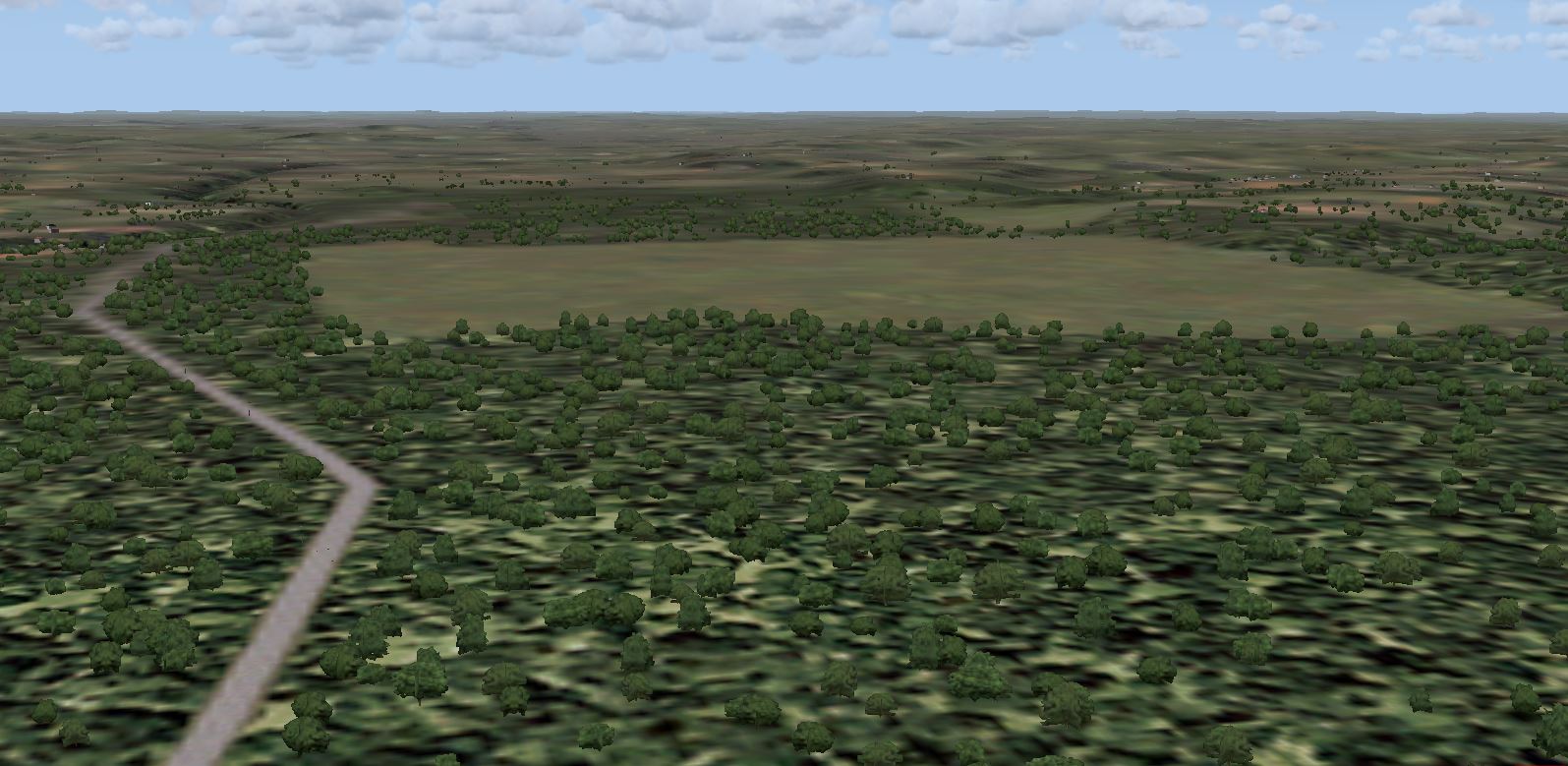
I have trees everywhere you placed the park polys. This points to a cause outside of the VTPP .bgl.
Time to look elsewhere. I see you have non-default roads and rivers. Are they of your creation or is this something like Ultimate Terrain?
If you have an addon for the custom vectors (roads, rivers, etc.) try disabling them and testing.
You might also have an/some objects that are causing loss of autogen.
I would recommend that you remove all addon files for the area, returning it to stock form, except for the VTPP .bgl and test. If you have trees where you want trees add the other elements back in a few at a time and test. This way you can hopefully find the cause through process of elimination.
Keep us posted.
cheers,
Lane
I have trees everywhere you placed the park polys. This points to a cause outside of the VTPP .bgl.
Time to look elsewhere. I see you have non-default roads and rivers. Are they of your creation or is this something like Ultimate Terrain?
If you have an addon for the custom vectors (roads, rivers, etc.) try disabling them and testing.
You might also have an/some objects that are causing loss of autogen.
I would recommend that you remove all addon files for the area, returning it to stock form, except for the VTPP .bgl and test. If you have trees where you want trees add the other elements back in a few at a time and test. This way you can hopefully find the cause through process of elimination.
Keep us posted.
cheers,
Lane
- Messages
- 324
- Country
Thanks Gary - I'll look at your links again.
Lane: The original airfield was made by a chap who's in a team making pay for airfields. He answered a forum ? I'd asked, & out of the blue offered to start me off with the first airfield package. He even included a sbuilder tutorial he'd made me.
The non-default stuff came with this original airfield.
The odd thing is having made 30+ airfields, Ibsley is the only time trees haven't appeared!
Loss of autogen: I put just the ADE airfield file & the VTPP.bgl in the scenery folder & no trees appeared in that area. I have to accept that the trees will not appear so I'm going to replace the other scenery files one by one.
I'll update you later today when I have all the necessary files back in situ.
Lane: The original airfield was made by a chap who's in a team making pay for airfields. He answered a forum ? I'd asked, & out of the blue offered to start me off with the first airfield package. He even included a sbuilder tutorial he'd made me.
The non-default stuff came with this original airfield.
The odd thing is having made 30+ airfields, Ibsley is the only time trees haven't appeared!
Loss of autogen: I put just the ADE airfield file & the VTPP.bgl in the scenery folder & no trees appeared in that area. I have to accept that the trees will not appear so I'm going to replace the other scenery files one by one.
I'll update you later today when I have all the necessary files back in situ.
- Messages
- 777
- Country
Are there any models being placed in that ADE file?Loss of autogen: I put just the ADE airfield file & the VTPP.bgl in the scenery folder & no trees appeared in that area.
cheers,
Lane
- Messages
- 777
- Country
No change with the ADE file, I still have trees everywhere they should be.
cheers,
Lane
cheers,
Lane