
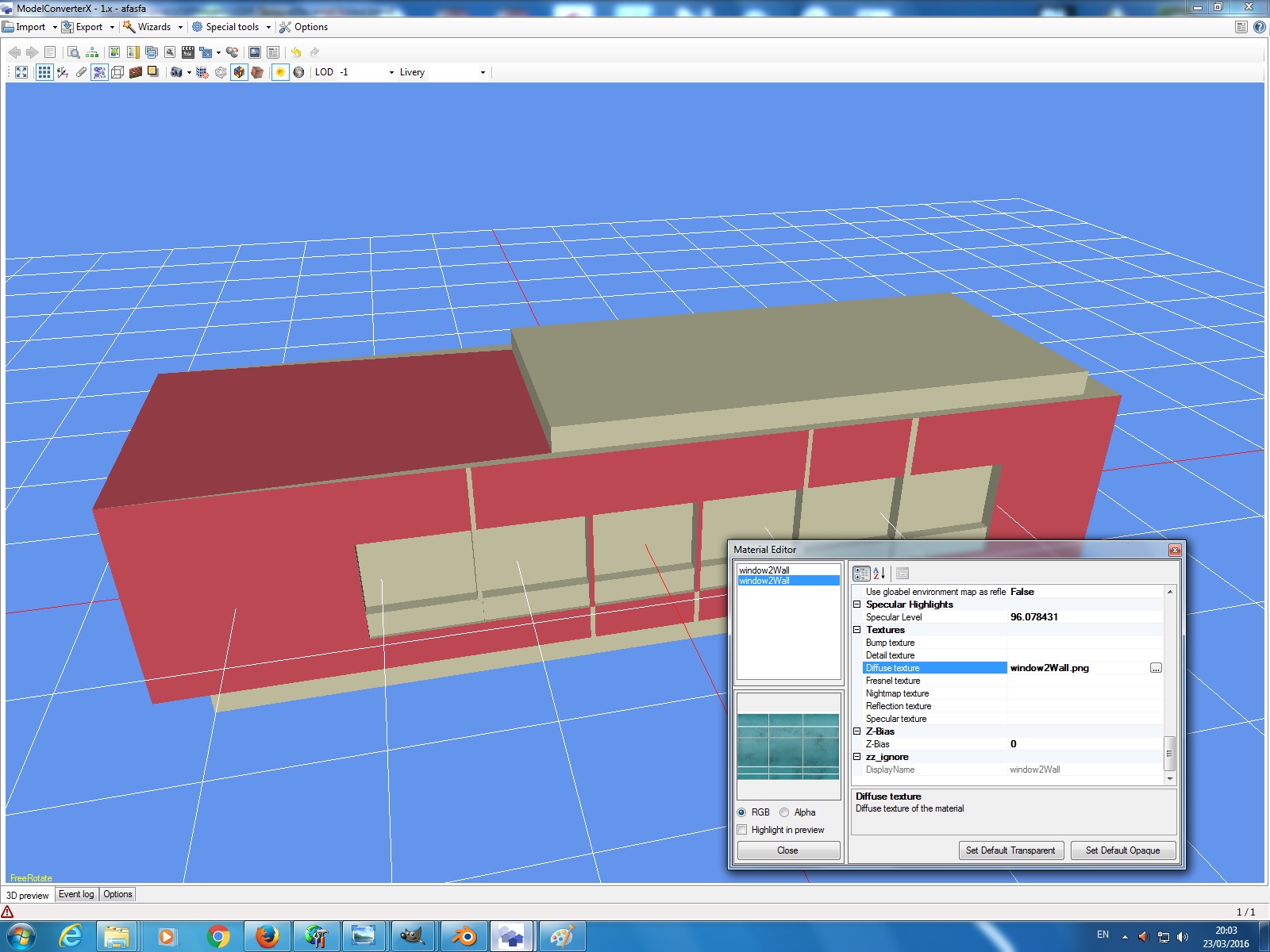
Hi guys. Im using blender and when i export my texture, it doesnt show on MCX. I tried the unwrap method but everything doesnt work. The texture on blender is not the original texture. I wanted to test out if the texture i made will appear on MCS but this is how it looked like.


-
Which the release of FS2020 we see an explosition of activity on the forun and of course we are very happy to see this. But having all questions about FS2020 in one forum becomes a bit messy. So therefore we would like to ask you all to use the following guidelines when posting your questions:
- Tag FS2020 specific questions with the MSFS2020 tag.
- Questions about making 3D assets can be posted in the 3D asset design forum. Either post them in the subforum of the modelling tool you use or in the general forum if they are general.
- Questions about aircraft design can be posted in the Aircraft design forum
- Questions about airport design can be posted in the FS2020 airport design forum. Once airport development tools have been updated for FS2020 you can post tool speciifc questions in the subforums of those tools as well of course.
- Questions about terrain design can be posted in the FS2020 terrain design forum.
- Questions about SimConnect can be posted in the SimConnect forum.
Any other question that is not specific to an aspect of development or tool can be posted in the General chat forum.
By following these guidelines we make sure that the forums remain easy to read for everybody and also that the right people can find your post to answer it.
You are using an out of date browser. It may not display this or other websites correctly.
You should upgrade or use an alternative browser.
You should upgrade or use an alternative browser.
WIERD TEXTURE!
- Thread starter PikoSim
- Start date


It doesn't look like MCX can't find the texture. So I think the texture was not exported from blender. Which format did you export to?
hmm. In that case how do i export the texture from blender? I export it to png..


Hello...
What format were the textures prior to exporting to .png ? And what file format is the model being exported from blender ?
The texture you see here in the blender is in PNG. I export my model both in dae and x file. Im not sure if the texture is being export because i assume when i export the model, it will export the uv map texture too. im not sure if i did the uv right because i follow all the tutorials in youtube but nothing seems to work.


- Messages
- 94
- Country

When you export as a collada .dae there is an option menu to the right where you can export your textures along with the model.
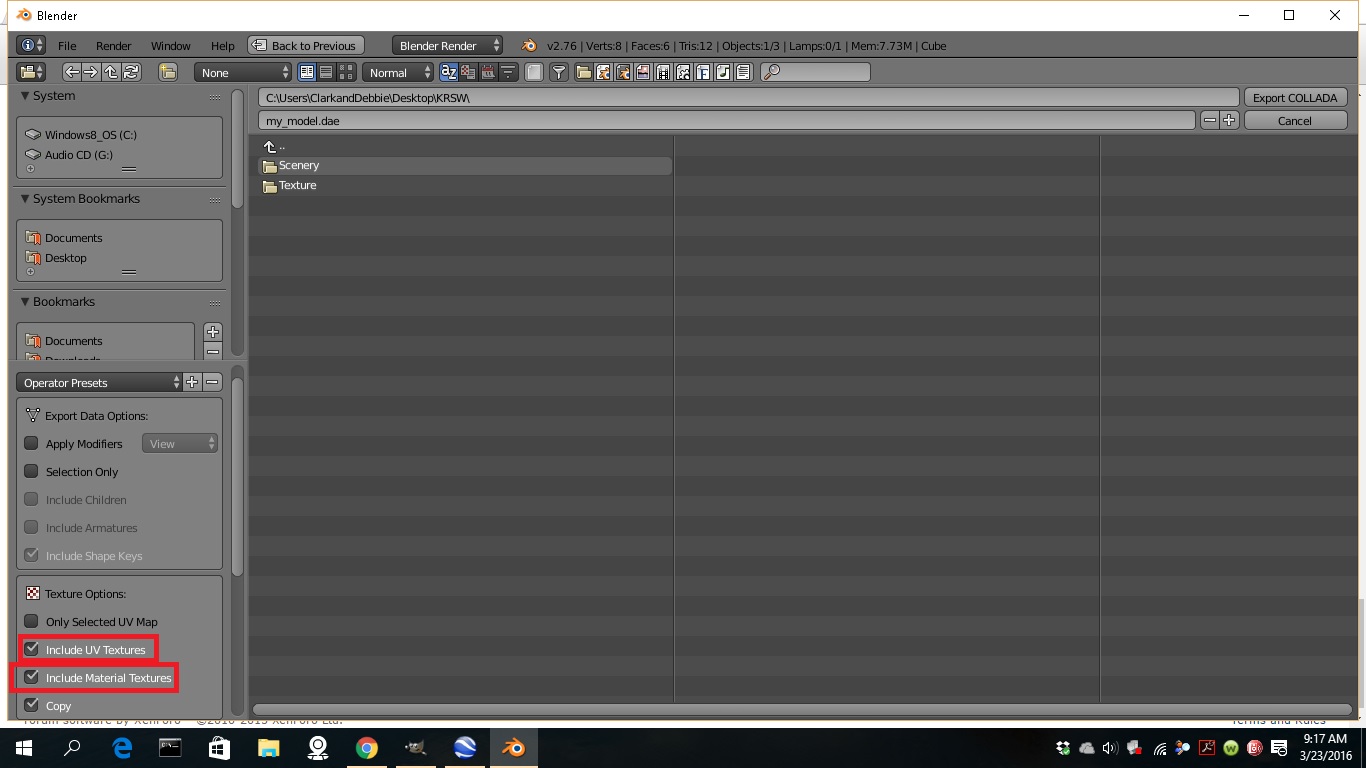
After you have checked the boxes, I do recommend creating a new folder, and in that folder that you just created, make two folders, one called Scenery and the other called Texture. After you have done that, go ahead save your .dae with all the textures to the Scenery folder. Then open the Scenery folder and move the textures over to the Textures folder. I have found this to be the best way for MCX to find my textures. There is probably a better way, but this is how I do it.
After you have checked the boxes, I do recommend creating a new folder, and in that folder that you just created, make two folders, one called Scenery and the other called Texture. After you have done that, go ahead save your .dae with all the textures to the Scenery folder. Then open the Scenery folder and move the textures over to the Textures folder. I have found this to be the best way for MCX to find my textures. There is probably a better way, but this is how I do it.
First of all, thanks everyone. I can now look at model in MCX with full texture. Now, i have a problem. I used ADE to place my object. My textures are in png. this is how it looked like. The main model seems gone and whats left is the window texture which.... doesnt look like a window that i wanted to see.
First picture is the model seen in MCX.
Second picture is that is seen in FSX.


First picture is the model seen in MCX.
Second picture is that is seen in FSX.
Last edited:
- Messages
- 94
- Country
I also noticed in the log in MCX it says:
The size of window2Wall.png.001.png is not a power of 2, this is required by fsx
The size of wall.bmp is not a power of 2, this is required by fsx
For fsx to work with your textures correctly, your going to need to size your textures to a power of 2, such as 1024x1024, 2048x2048.
The size of window2Wall.png.001.png is not a power of 2, this is required by fsx
The size of wall.bmp is not a power of 2, this is required by fsx
For fsx to work with your textures correctly, your going to need to size your textures to a power of 2, such as 1024x1024, 2048x2048.


The MCX material editor can do this all for you btw
The one in the development release is better then in the 1.3 release that you are using now.
When i export my scenery, there's 2 files. Scenery & Texture. Those files in texture are all in .dds file. But when i assign them in MCX, i used png. When i try to assign using .dds, the colour looks sooo wrong!

tgibson
Resource contributor
- Messages
- 11,792
- Country

You don't need to assign DDS textures, you should use the MCX Material editor to convert them to DDS and to resize them to a power of 2. Then export and copy the DDS textures created by MCX to the scenery's TEXTURE folder if not already there.
They may look wrong because DDS textures should be flipped vertically vs PNG or other formats. MCX should do this automatically if you let it make the conversion.
They may look wrong because DDS textures should be flipped vertically vs PNG or other formats. MCX should do this automatically if you let it make the conversion.
Let me try hold on.You don't need to assign DDS textures, you should use the MCX Material editor to convert them to DDS and to resize them to a power of 2. Then export and copy the DDS textures created by MCX to the scenery's TEXTURE folder if not already there.
They may look wrong because DDS textures should be flipped vertically vs PNG or other formats. MCX should do this automatically if you let it make the conversion.
The black one on the right , i used ADE to place my object model.
On the left is used by MCX. When i used MCX to place, everything lookos good. Texture and model. When i used ADE, black texture or model will appear.
I did try and import the model placed by ADE into MCX and there's texture.
Any help?
Last edited: