• Which the release of FS2020 we see an explosition of activity on the forun and of course we are very happy to see this. But having all questions about FS2020 in one forum becomes a bit messy. So therefore we would like to ask you all to use the following guidelines when posting your questions:

    • Tag FS2020 specific questions with the MSFS2020 tag.
    • Questions about making 3D assets can be posted in the 3D asset design forum. Either post them in the subforum of the modelling tool you use or in the general forum if they are general.
    • Questions about aircraft design can be posted in the Aircraft design forum
    • Questions about airport design can be posted in the FS2020 airport design forum. Once airport development tools have been updated for FS2020 you can post tool speciifc questions in the subforums of those tools as well of course.
    • Questions about terrain design can be posted in the FS2020 terrain design forum.
    • Questions about SimConnect can be posted in the SimConnect forum.

    Any other question that is not specific to an aspect of development or tool can be posted in the General chat forum.

    By following these guidelines we make sure that the forums remain easy to read for everybody and also that the right people can find your post to answer it.

Decrease polygon / edges / lines.

Messages
142
Country
bangladesh
sddsdss.jpg


I am making a model where I need to use all these pillars, but the number of lines / edges or polygons (I forgot the term) is just too much.

Is there a way to decrease it? I have smoothened it, but still the same. FS isn't accepting it.

Untitled.jpg
 
Hello:

Did you make (1) object of each size, save it as a "Component", then use "instancing" to place copies of the Components ? ;)

GaryGB
 
You have far too many polygons. I believe Gary is suggesting you make one pillar model, then place the single model many times into you scenery; the way you might place the same tree for example, but in the pattern you need.
As another approach, try to imagine that you have a four sided pyramid and you inverted it and placed it one a four sided column. Although rough, it would loosely resemble the pillar you made, agreed? That model is made from eight polygons and you could copy it many times into your larger model before you exceed the polygon limit. I am not suggesting you use an eight sided pillar, I am just trying to give you an understanding of the condition.

Also, make sure you remove all the unnecessary polygons, like the colored ones. Your image shows what looks like a default SketchUp texture. Although adequate, you will not need any colors, which you can easily strip in the MCX Material Editor/Properties pane; just delete anything that isn't your exterior texture. If you haven't already done so, it can cut your polygon count by as much as one half.
 
You have far too many polygons. I believe Gary is suggesting you make one pillar model, then place the single model many times into you scenery; the way you might place the same tree for example, but in the pattern you need.

Actually I was referring to using multiple instances of an object within Sketchup itself (what Sketchup refers to as a "Component"); this is Sketchup's version of a MSFS "Scenery library object" ...which is essentially 'read once and written many times' via "instancing" by the 3D world rendering engine.

However, to 'heavy-handedly' ensure that ModelConverterX does not convert the component "instancing" of a Sketchup into multiple copies of all the original component geometry so that the polygon / triangle / vertex limits are exceeded, the method =RK= suggested is the safest and most practical to do (...until we find out from Arno whether Sketchup "component instancing" and ex: 'mirroring by reverse instancing' is actually kept intact when exports to MSFS MDLs are performed in MCX):

* Make 1 object for each pillar size

* Place those objects repeatedly as multiple "instances" of each scenery library object ...in a MSFS object placement utility.


As another approach, try to imagine that you have a four sided pyramid and you inverted it and placed it one a four sided column. Although rough, it would loosely resemble the pillar you made, agreed? That model is made from eight polygons and you could copy it many times into your larger model before you exceed the polygon limit. I am not suggesting you use an eight sided pillar, I am just trying to give you an understanding of the condition.

Sketchup refers to such a substitute entity as a "Proxy" (temporary use of highly-simplified versions of a original object used to speed up rendering while working with scenes containing many copies of an otherwise complex object).

Proxies are intended to be replaced by the full-detail objects when each proxy object is exported to ex: MCX < there are Ruby plugin scripts which can do this semi-automatically, BTW ! ;) >.

Components can also be used as Proxies for original full-detail objects. :idea:

Also, make sure you remove all the unnecessary polygons, like the colored ones. Your image shows what looks like a default SketchUp texture. Although adequate, you will not need any colors, which you can easily strip in the MCX Material Editor/Properties pane; just delete anything that isn't your exterior texture. If you haven't already done so, it can cut your polygon count by as much as one half.

Would you please explain this a bit more ? This reads as though it is suggesting the OP may use an un-textured object when exporting to MCX. :scratchch

IIUC the object in the foreground of the OP's 2nd screenshot simply has its edges / vertices showing due to being 'selected' within its group (but that group 'bounding box' is not seen within the field of view for the image submitted). :twocents:

GaryGB
 
Last edited:
SU component instances are not supported by MCX to my knowledge, individual models must be coordinated within the FS system and obviously you can invoke multiple instances of the same model with different coordinates. In our example, the "proxy" is used to demonstrate the difference in rendering capability between simple and complex models. As another example, scenery designers texture the image of a vehicle onto a flattish box to create a 5 polygon automobile scenery object.
By default, all SU polygons are colored. This default color is often replaced by texture. Since the render engine ignores untextured/uncolored polygons, it is a very simple procedure to eliminate these within the MCX Material Editor.
 
SU component instances are not supported by MCX to my knowledge, individual models must be coordinated within the FS system and obviously you can invoke multiple instances of the same model with different coordinates.
Indeed, the use of scenery library objects placed via BGLComp or via Autogen seems required to implement "instancing" in MSFS.

BTW: see this concurrent ongoing discussion... :idea:

http://www.fsdeveloper.com/forum/threads/triangles-vertices-and-drawcalls.434086/#post-711534


By default, all SU polygons are colored. This default color is often replaced by texture. Since the render engine ignores untextured/uncolored polygons, it is a very simple procedure to eliminate these within the MCX Material Editor.

Sorry, =RK=; maybe I just need a (3rd) cup of coffee this morning to better grasp what you are describing here. :confused: :coffee::coffee::coffee:

Could you please explain a bit more clearly:

* what in the OP's screenies above suggests he is using a default Sketchup "colored" texture ?


Also, make sure you remove all the unnecessary polygons, like the colored ones. Your image shows what looks like a default SketchUp texture. Although adequate, you will not need any colors, which you can easily strip in the MCX Material Editor/Properties pane; just delete anything that isn't your exterior texture. If you haven't already done so, it can cut your polygon count by as much as one half.


Thanks in advance for your further clarification of what you are alluding to with regard to this latter issue. :)

GaryGB
 
Last edited:
To be clear, every rendered polygon places demand on the graphics engine as Arno stated in the other thread. That said, one can use "instancing," to circumvent the max polygon limit for individual models; to understand that we can use the example of a static aircraft carrier model as a scenery object. A single model of an F-18 may be invoked multiple times using any scenery placement tool, effectively rendering the carrier with far more polygons than the maximum number for any single model.
It is clear from the images provided that the intended model has far, far too many polygons. Simply examine the detail on the selected pillar, the one that displays the dashed polygon edges and then project that geometry into all the others; even if the OP does remove all colored polygons - an assumption based on his relative understanding of polygons - the number will still be to high to render to model. Below is a magnified view of a small portion of the pillar highlighted above:
pillar.jpg

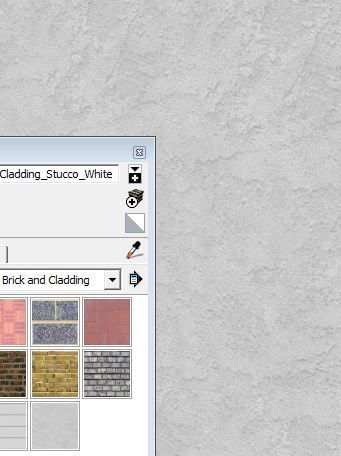
The dashed lines represent polygon edges. The variation across each polygon indicates it is textured with what looks very much like SU's default "Cladding_Stucco_White" texture:
cladding.jpg

Glad to help.
 
It is clear from the images provided that the intended model has far, far too many polygons. Simply examine the detail on the selected pillar, the one that displays the dashed polygon edges and then project that geometry into all the others; even if the OP does remove all colored polygons - an assumption based on his relative understanding of polygons - the number will still be to high to render to model. Below is a magnified view of a small portion of the pillar highlighted above:
pillar.jpg

The dashed lines represent polygon edges. The variation across each polygon indicates it is textured with what looks very much like SU's default "Cladding_Stucco_White" texture:
Indeed, we agree that the best procedure to reduce the potential MDL geometry load is to export only (1) of each Pillar objects, and place them as individual MSFS scenery library objects after each such object is imported / exported by MCX.


FYI: The part I'm trying to clarify has to do with what you refer to as "colored polygons" in the area of the object which IMHO the OP has 'selected', and which you have enlarged greatly to create your attached image above.

I believe what we all can see (within the area you have enlarged greatly to create your attached image above) ...is the "tapered" portion of the flared "horn" shape located at the top / skyward position of the pillar.

IMHO, the "polygons" you refer to in your attached image above are normal "curved dual triangle" vertices and face geometry with both horizontal and "variable vertical" oriented edges, which AFAIK would always be required to be utilized when creating and displaying that type of flared "horn" shape shape in a Sketchup object.

As we have not seen graphical anomalies in the OP's screenshots of the pillars (such as Moire' patterns etc.) in the area of those faces in the 'flared horn', it is doubtful that there are duplicate / co-planar textured faces super-imposed over the face of the pillar's core Geometry.


IIUC, the Sketchup display engine does not (by default) show the diagonal of the interposed edge between the 2 triangles for such a "smoothed" type of 'pseudo-quad' face in this particular example of a face within a flared horn object shape, whereas the "column" portion of the object, as you may know, only requires parallel vertical edges to allow the formation of the faces for the pillar (yet 'internally', even these rectangular faces are likely triangulated "pseudo-quads").

And of course we agree that what you reported as the default Sketchup colored material "Cladding_Stucco_White" is indeed applied and visible on the faces of the object in the OP's model.


Are you aware of any other way (either via use of Sketchup default tools or via use of a Ruby plugin script) to create the flared horn object shape ...which does NOT require use of both horizontal and "variable vertical" oriented edges ? :scratchch

Thanks again for sharing your observations on this issue of methodology and terminology for this interesting Sketchup project. :)

GaryGB
 
Last edited:
Thanks for the replies :).

Though I didn't understand most of the things you discussed except for "too much polygons", but as far as "instancing" is concerned, I don't really understand what it means. I know the use of components in SketchUp, but I prefer groups. What I did was, I made a pillar, selected it as a whole to make a group, copied it as many times I needed.

Does instancing mean to make one pillar, export as .mdl / .bgl and use ADE to place them? Well the pillars are in different positions in the building, actually at different heights so I believe it will be very unrealistic to do that.

However the pyramid idea seems good, but in real world the pillars are perfectly spherical, hence that will look unrealistic much.

Any other option or anything that you both described which I couldn't understand? Please do explain then, am very new to this and this is our first project. :)

And, the texture is not default SKP "Cladding_Stucco_White" texture, it's a different texture. It is our self collected one and not a copyright one, hence we used it :).
Untitled.jpg
 
Thanks for the replies :).

Does instancing mean to make one pillar, export as .mdl / .bgl and use ADE to place them?

Yes; the MDL for the pillar should be packaged into a MSFS "scenery object library", then it can be placed as many times as needed.

AFAIK, MSFS will read the MDL inside the library once, then place and display multiple "instances" of that object from system memory ...wherever it is instructed to by a separate set of XML code inside a "scenery object placement BGL".

Both the scenery object library and the scenery object placement BGLs are able to be created from XML source code by ModelConverterX (aka "MCX") using the FS SDK BGLComp compiler.

Well the pillars are in different positions in the building, actually at different heights so I believe it will be very unrealistic to do that.

ADE and other FS scenery utilities capable of BGLComp-type scenery library object placement such as Instant Scenery can place scenery library objects with control over both the Geographic Lon-Lat and the Altitude (elevation Above local Ground Level {aka "AGL"} or an assigned elevation Above Mean Sea Level {aka "AMSL"}).

IIUC, that should allow you to place multiple instances of your pillars in the required locations relative to your airport building using a MSFS version of "instancing" (...without the heavy burden on the FS run time 3D rendering engine imposed by having multiple copies of the geometry for actual pillar objects used inside the Sketchup file and in the MDL file itself when exported by MCX).

However, Arno raises some questions (based on his renowned and extensive experience with MSFS 3D MDLs and various 'placement' methods for such objects) as to which may be more efficient:

* placement of multiple instances for repetitive identical objects from scenery object libraries using BGLComp

...or:

* having multiple copies of all geometry for repetitive identical objects used inside a MDL file


http://www.fsdeveloper.com/forum/threads/triangles-vertices-and-drawcalls.434086/#post-711546


However the pyramid idea seems good, but in real world the pillars are perfectly spherical < 'circular' ...when seen in cross-section >, hence that will look unrealistic much.

Although Sketchup can be told to make the cross-section of the pillars with less sides on the circular polygon before it is extruded, IMHO, you may not necessarily need to reduce the number of sides to less than 12, 16, 24, or even 30 sides ...if they are made as a single model and placed via MSFS as multiple 'instances' of a scenery library object. :idea:


And, the texture is not default SKP "Cladding_Stucco_White" texture, it's a different texture. It is our self collected one and not a copyright one, hence we used it :).

AFAIK there are no restrictions whatsoever on use of Sketchup default materials / textures for commercial use; but I'm glad to see that you also have your 'own' texture to use (yours looks better, anyway).

Hope this helps ! :)

GaryGB
 
Last edited:
Are you aware of any other way (either via use of Sketchup default tools or via use of a Ruby plugin script) to create the flared horn object shape ...which does NOT require use of both horizontal and "variable vertical" oriented edges ?

GaryGB
Two techniques come to mind that modelers have used to represent more complex shapes. The first technique would be to incorporate all the pillars into a single model that has outside dimensions of the area covered by the pillars. Then an image of the entire structure including pillars is textured onto the model.

The other technique that works relatively well for symmetrical objects like trees or apron lights, is to combine several 2 dimensional profile images of the intended model and rotate them in the horizontal plane to give the appearance of a solid 3 dimensional object. In this example, we've taken a silhouette image of the pillar, forgive the inaccuracies and placed two copies, rotated 60 degrees along the vertical axis:
pillar2.jpg
 
Hi Rick:

Although I believe the OP and me both were inquiring about modeling a 3D "closed solid" or 'manifest' pillar object with a circular column and flared horn which has a lesser number of "sides" and faces, the idea you showed above is a very good idea for the OP to consider for his project ...in an effort to keep Geometry complexity to a minimum size. :idea:

It is unlikely that the end user is going to see the pillar closeup from a taxiing pilot-able aircraft such that they need a "solid" pillar structure, and being under a roof in a terminal, the pillars will also be in shadows ...where object surface details are otherwise less visible in a MSFS flight session.


PS
: Imagine how challenging it would be to keep Geometry complexity to a minimum size if the OP were to model this: :yikes:

http://www.travelnewsdigest.in/?p=11958\

2014-01-10-08-13-40-B13-4col-cmyk-mumbai-airport.jpg


...More pics of the above terminal:

https://www.google.com/search?tbm=isch&q=architecture airport terminal flared pillar images&ei=nhBtVcitN5PfsATjtoKoBw#tbm=isch&tbs=rimg:CTVU4VQtPybeIji0lqD3FXLIcyxR0B55SkaUvOMqB4Qf-sA-AqntUVOv4rqlyptq3DNOHhOQGugqWDp68lw0DV3kdCoSCbSWoPcVcshzERezSXU7VhZCKhIJLFHQHnlKRpQRJLAx6PykbbgqEgm84yoHhB_16wBHkTIOpopga6yoSCT4Cqe1RU6_1iETn4T9MjI4P0KhIJuqXKm2rcM04RpLfhD74fg4UqEgkeE5Aa6CpYOhE1i68z8hBViCoSCXryXDQNXeR0ETgo6nH5r72k&q=architecture airport terminal flared pillar images


Thanks for sharing your ideas. :)

GaryGB
 
Last edited:
I'm pretty sure the pillars are not circular. Rather harlequin (diamond) shaped, rounded at two non-adjacent corner.

Just like GaryGB suggested, I'll go for one single model export per pillar shape and size (Pillar_Height10.mdl, Pillar_Height12.mdl, Pillar_Height_08.mdl, Pillar_TerminalCorner.mdl, etc.) and compile those as bgl library (library resource, with one GUID per pillar) and place the produced bgl file and textures in a declared low level scenery library. Then invoke those library models from another bgl in the actual airport scenery.
You have two ways to do that (I understood there's a third one I don't know about called "graphic injection" for FSX and P3D only, that you can do with 3D objects and AI traffic)
- either use a bgl referencing each pillar in lat/lon, orientation and altitude (0m above AGL, since you would have several pillars with different height) You can use several tools to do that like ObPlacer, SBuilder, probably MCX aswell...
- or use directly your 3D terminal scene, and attach the library models directly within Sketchup (if possible) This will avoid you the hassle of looking for lat/lon coordinates of each pillar. Though, I'm not (yet) an user of Sketchup ! I use GMax and much less 3DS since I don't model for anything other than FS9 ATM. In GMax you can attach any library object you want by placing a small box, and tagging it with a specific name and the GUID of the model you want to attach. Then the compiler will do the job by actually converting that box to an attach reference in the simulator code/language.

^^ that's the instance concept of the simulator which is exactly the same as Sketchup in an abstract way : have an actual 3D source object (the mdl) then invoke as many ghost representations as required when rendering the scenery in view. However, neither the SDK compiler or MCX are able to convert/port/migrate/transform Sketchup definitions of instances to simulator definitions of instances. Instead, they actually recreate each pillar as actual 3D objects with as many points (vertices) and polygons (triangles) as required before exporting the scenery to FS native language (with all the extra drawcalls for materials/textures definitions)


Side note : Being ghost representation instances, or actual independant 3D objects, the amount of points and triangles to be processed by the graphic engine will be the same. The main difference in the two concepts is the optimization made when you use ghost instances. The rendering pipeline is shorter because only one object and a few triangles are taken as reference to draw the others. Smaller source object boundingbox size and few amount of triangles means faster Z-index computations, so the rendering goes faster. By the way, the amount of memory required both in RAM and hard drive/swap/cache is much less.


So in the end, you'll definately need to reduce the amount of polygons for a given pillar. Whatever number of polygons stated by Sketchup or other 3D modeling tool, never believe them ! The simulators thinks in triangles = 3 points. So, quads/square polygons, either shaded or not, are not triangles. They are actually two triangles. Double sided quads may be shown as one unique polygon, they are actually four triangles. So a scenery containing 3000 quads is at least 6000 triangles.


I would suggest you to go for the mdl library, and :
  1. Make simplier shaped pillars (*) At least, don't make them that detailed. Since I think they are not that curved, you can save polygons where the faces would be rather flat. Applying a good texture and nice shading will surely soften the angular looking edges.
  2. Use LODs (Level Of Detail) which is a technique to make an object looking even simplier the farther from them you get (or the smaller they are on screen) That's the principle used for AI Aricraft models. You can create LODs on any scenery library model.
  3. The planar faces suggested by =rk= is a nice technique. They are extensively used in LODs. However, bear in mind that those planes are double sided, which doubles the number of polygons/triangles involved. Planar faces techniques works well with objects that requires a lot of polygons if they were to be designed as they are in reality. Objects like vegetation, fences, non cantilever bridges, lights beams, clouds/smoke, curved/circular objects (tires, modern cars, balls, San Francisco bridge...) Always make two samples of one object before deciding to go on with the planar technique. If you can't get less triangles in planar mode, choose the 3D volumic object version instead and drop the planar one.
(*) Basic, low detailed pillars will indeed affect the general "realistic" look of the scenery. But bear in mind that users won't spend hours to contemplate one pillar and measure its height, but rather check the docking system, taxiway markings, watch out for moving vehicles, and like the nice blending between taxiway edges and grass. Furthermore, they'll ultimately hate framerate losses on final, the critical moment of the flight, or an OOM (out of memory) exception when they load PMDG and 100% AI traffic on your airport... Especially those who use the simulator with WideFS and multiple monitors. The best scenery is the one that looks sooooo real and alive, while being able to sustain decent framerates whatever the maximum sliders settings the user have defined...


EDIT :
Just made an attempt at a rather very low poly one (GMax) :

305392FlaredPillar.png


This is a 32 triangles pillar.
The (unfinished) texture is a very basic one. Even not really convincing, you can actually use it as the 3rd or fourth LOD. From far, you won't notice the edges much. You can go for example up to 300 polygons for the first LOD. Each 6 or 7 pillars will then induce as much workload as one common AI aircraft. If you have 300 pillars, it would be like having an airport overview with 46 extra AI aircraft on screen (so 300 triangles could be a bit high. Would go for 200 max instead) Assuming your first attempt on the pillars has 28-sided cylinder base, with the curvature of the horn, you would end with 952 triangles !!! per pillar. Even if it's LOD-ed, 300 pillars at 952 LOD1 is like seeing at least 146 AI aircraft at the same time (much more in fact because a 952 triangles LOD1 pillar will have slower polycount decrease in further LODs than a 200 or 300 triangles LOD1 version...)

Hope you understand the importance of balance between details/accuracy and performance. Quality is somwhere in between.
 
Last edited:
Thank you all for your immense help. I will surely look after all the steps, specially the one with low polygons and then making instances of it. I will let you know when am successful, thanks a lot once again, all of you.
 
This is a very interesting discussion, with some great ideas being exchanged. :)

I have recently been researching additional ways to maintain model detail via relatively complex geometry, while also striving for better performance.

I was intrigued by issues related to grouping, welding, smoothing ...and MDL statistics for "polygons" (triangles) and vertices versus run time performance. :scratchch

[EDITED]

First an explanation of differences between a few of the above related Sketchup features:


Soft vs Smooth vs Hidden Edges

http://www.thomthom.net/thoughts/2012/06/soft-vs-smooth-vs-hidden-edges/


I found yet another workflow for the OP's project, to preserve detail while also minimizing adverse impact on performance ....explained in this tutorial: :idea:


Reversible Smoothing in SketchUp via Grouping, Triangulation, and 'Soften Co-planar' Methods

http://rctlounge.com/forums/showthread.php?t=5511


NOTE: If there are graphical anomalies with "smoothing groups" when displayed in MSFS at run time, one may try using "Sketchup Loop Subdivision Smooth Plugin" instead of Sketchup default tools for 'smoothing':

http://sketchucation.com/forums/viewtopic.php?t=43556

http://www.guitar-list.com/download-software/sketchup-loop-subdivision-smooth-plugin

[END_EDIT]

Hope this helps ! :cool:

GaryGB
 
Last edited:
Hi,

I have more or less the same problem as the OP but in my case it is a simple canvas shading an open air terrace against the sun.
For now (the follow me did not work in this case or I have not figured it out how to:(), I have solved it like this:

tent.jpg
.

Maybe that is also a solution for those pillars and bows of the OP (do not know what OP stands for but I see it used to refer to the person that started the thread;)) ?
Other suggestions are welcome because I am afraid my solution will cost me lots of triangles and work because I still have to do the other two sides and soften the whole thing.
Cheers,
Roby

PS (So that you know it is me): You will notice from the screenshot that this is a small part of the terminal of Zadar airport in Croatia (LDZD). It is not available for FSX and the FS9 version is awful (as is the default FSX one), the pittoresque city of Zadar is not in the default scenery and the coast line was probably done by the ACES team by the time they had already heard they would be fired. Just go and take a look and then go to GE and see what it is like in reality and then you will see what I mean. I was there 2 years ago ( like hundreds of thousands more tourists:eek:) and enjoyed it very much. So that is my next project (for the coming years, unless I find somebody to help me out with this 'to-be-freeware' scenery in which case you could send me a PM if you are interested and have nothing else to do, thanks).
PS2 (So that it is really me): Keep on getting bumped, Gary. The result is what counts:).
 
Hi Roby:

OP = Opening Post (the post which opens / starts the discussion thread; sometimes also refers to the person who starts the discussion thread)


BTW: The more pertinent and helpful ideas posted in discussion threads ...the better. :)


PS: I've been "bumped" many times as an alumnus of the "School of Hard Knocks" ! :laughing:

https://en.wikipedia.org/wiki/School_of_Hard_Knocks

GaryGB
 
Last edited:
Made some experiments with Sketchup. Would be interesting to read your opinion its wrong or not.

1. If I draw a rounded object in SU I choose the tool, than enter the number of corners in the field where I can enter lenght or other things. If it's a small object, I use 5 or 8 corners and for bigger objects maybe up to 24. Best way is to use a number which can be divided by 4.

2. With SU 2015 I can do this with the N-Side Polygon tool.

3. I select the rounded objects and set soften edges to zero.

4. For texturing I use the way Austin Sass did it. One face textured, than making a component and place it around the center with duplicate. Much easier than to get a texture on a round object with projection.

5. For not textured faces I set the style to RED outside and Blue inside. This way I can see which faces are outside of a object. It would make much trouble with transparency if there is the wrong side outside.

6. Before exporting a 3D Model I use the free cleanup plugin, but not with merge faces with same UV texture option.

7. I check all my not visible faces have NO textures. I found many AddOn airports with textured not visible parts.

Now the question was, is there a difference between exporting a model with components or not?

Yes there is:

A) Exporting without cleanup is the worst.
B) Exporting with components file size: 7.68 MB
C) Exporting without components, all groups exploded: 12.94 MB

The exported 3D Model is much bigger. And what happens in MCX?

Importing the 7.68 MB File resulting in 54350 texture vertices in MCX
Importing the 12.94 MB File resulting in 59269 texture vertices in MCX

The next trap. Because a roof structure was very tiny, I choosed colors in Sketcup for this.
With MCX now I get 7 dawcalls more for this colors. After reducing drawcalls I've got one texture more and get rid of all the drawcalls.

But now the texture vertices are increase. In case of the 7.68 MB file more than 72000 and in the 12.94 MB file more than 82000 texture vertices. And I couldn't export to FS9 files.

My conclusions

I do not explode the components in Sketchup before exporting! This would increase the texture vertices in MCX, which would be a limitation if you export a FS9 scenery. And if I explode the components with colors, it makes the situation much more worst.

Now I'm not sure what I should do. Divide the Terminal in two objects (much work) or use the object with the colors and 7 drawcalls more?
 
Back
Top