

tgibson
Resource contributor
- Messages
- 11,757
- Country

Hi all,
I have been working on converting FS2004 aircraft to FSX and have gotten as far as the materials and textures.
My question is how do you create material settings that mimic the bare metal reflection effect of FS2004? My current efforts have been pretty lame...
What I've done:
I originally get no reflections at all. In ModelConverterX the day texture is duplicated in the Specular Texture slot, and no Nightmap is present at all. I understand that, since in FS2004 the nightmap of aircraft is not specified in the MDL file. I don't know why the day texture is in the Specular slot.
So in the Material Editor I choose a material that should have reflections, the amount of reflection based on the darkness of the alpha channel of the diffuse texture.
I make these setting changes, based on some forum reading:
Ambient Color: 149, 149, 149
Diffuse Color: 149, 149, 149
Specular Color: 49, 49, 49
Blend environment by inverse diffuse alpha: True
Reflection Scale: 2 (much less than this and I can barely see it)
Specular Map Power Scale: 0
Use Global environment map as reflection: True (Arno, "global" is misspelled in this line).
Nightmap Texture: added to line
Specular Texture: day texture name removed from line (it didn't seem to make much difference either way).
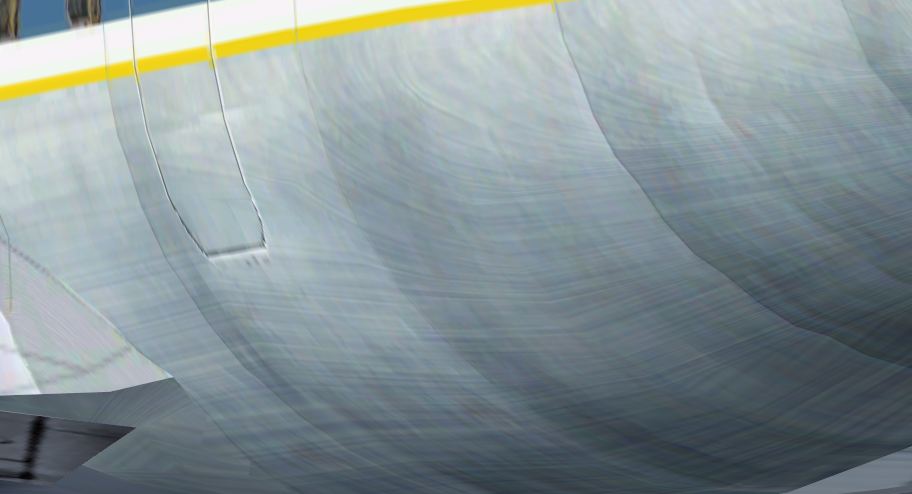
When I do this, I get this effect - it is not smooth, but has lines in it (using the FS2004 MDL file and darkening the alpha channel does not have this lined effect):
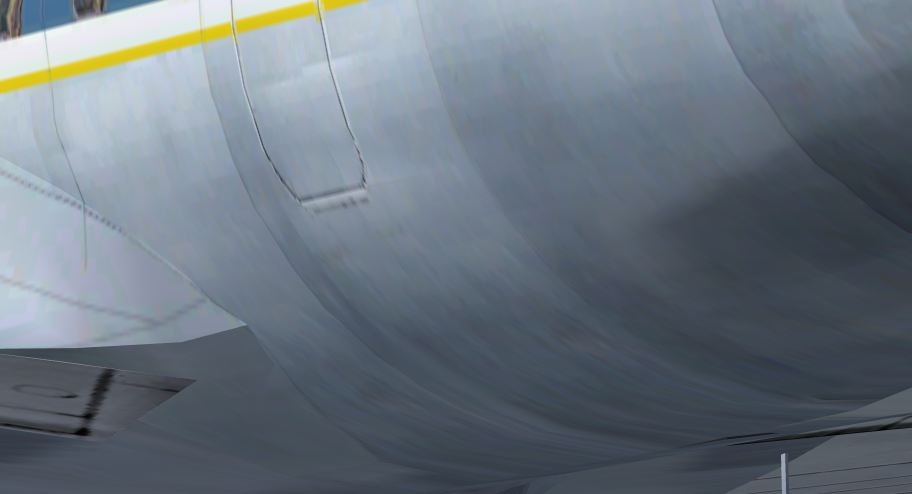
It also has turned my metal a bit green, compared to the FS9 starting point seen below (using the FS2004 MDL file and darkening the alpha channel has the same green effect):
In addition, I see a ghosting of the white top in the reflection when viewed from a low angle (not present in FS2004, but it is present using the FS2004 MDL file in FSX). The forward fuselage has no reflections in comparison:

I have four questions:
1. Are these settings correct? Are there more I need to change?
2. Are these visual problems because I have to raise the Reflection Scale higher than the typical 0.1 to 0.8 value? And if it has to stay in this range, does this mean I have to darken the alpha channel of the texture to see much effect at all?
3. Is there no way to get the effect that is present in FS2004 without repainting the alpha channel?
4. Can I avoid it turning green?
5. Is there a way to avoid the ghosting in the image above?
PS. I do know how to turn the props transparent, that much I've learned.
Thanks,
I have been working on converting FS2004 aircraft to FSX and have gotten as far as the materials and textures.
My question is how do you create material settings that mimic the bare metal reflection effect of FS2004? My current efforts have been pretty lame...
What I've done:
I originally get no reflections at all. In ModelConverterX the day texture is duplicated in the Specular Texture slot, and no Nightmap is present at all. I understand that, since in FS2004 the nightmap of aircraft is not specified in the MDL file. I don't know why the day texture is in the Specular slot.
So in the Material Editor I choose a material that should have reflections, the amount of reflection based on the darkness of the alpha channel of the diffuse texture.
I make these setting changes, based on some forum reading:
Ambient Color: 149, 149, 149
Diffuse Color: 149, 149, 149
Specular Color: 49, 49, 49
Blend environment by inverse diffuse alpha: True
Reflection Scale: 2 (much less than this and I can barely see it)
Specular Map Power Scale: 0
Use Global environment map as reflection: True (Arno, "global" is misspelled in this line).
Nightmap Texture: added to line
Specular Texture: day texture name removed from line (it didn't seem to make much difference either way).
When I do this, I get this effect - it is not smooth, but has lines in it (using the FS2004 MDL file and darkening the alpha channel does not have this lined effect):
It also has turned my metal a bit green, compared to the FS9 starting point seen below (using the FS2004 MDL file and darkening the alpha channel has the same green effect):
In addition, I see a ghosting of the white top in the reflection when viewed from a low angle (not present in FS2004, but it is present using the FS2004 MDL file in FSX). The forward fuselage has no reflections in comparison:
I have four questions:
1. Are these settings correct? Are there more I need to change?
2. Are these visual problems because I have to raise the Reflection Scale higher than the typical 0.1 to 0.8 value? And if it has to stay in this range, does this mean I have to darken the alpha channel of the texture to see much effect at all?
3. Is there no way to get the effect that is present in FS2004 without repainting the alpha channel?
4. Can I avoid it turning green?
5. Is there a way to avoid the ghosting in the image above?
PS. I do know how to turn the props transparent, that much I've learned.
Thanks,
Last edited:

