• Which the release of FS2020 we see an explosition of activity on the forun and of course we are very happy to see this. But having all questions about FS2020 in one forum becomes a bit messy. So therefore we would like to ask you all to use the following guidelines when posting your questions:

    • Tag FS2020 specific questions with the MSFS2020 tag.
    • Questions about making 3D assets can be posted in the 3D asset design forum. Either post them in the subforum of the modelling tool you use or in the general forum if they are general.
    • Questions about aircraft design can be posted in the Aircraft design forum
    • Questions about airport design can be posted in the FS2020 airport design forum. Once airport development tools have been updated for FS2020 you can post tool speciifc questions in the subforums of those tools as well of course.
    • Questions about terrain design can be posted in the FS2020 terrain design forum.
    • Questions about SimConnect can be posted in the SimConnect forum.

    Any other question that is not specific to an aspect of development or tool can be posted in the General chat forum.

    By following these guidelines we make sure that the forums remain easy to read for everybody and also that the right people can find your post to answer it.

MSFS20 MSFS Asobo Official Blender exporter

Hello everyone.

I have a question regarding Blender and exporting animated people.
What version of Blender and Asobo Exporter are currently running?
2020 or 2024?

For 2020 I'm fine with 3.6.16 and the 2020 plugin version 1.3.3 (Asobo)
The resulting products are working correctly in 2024 too
 
First for MSFS, later possibly for MSFS24.
Now I need to get a little familiar with exporting from Blender.

Thank you so much for your answer, Francesco! :)
 
Hi all

Not sure if this has been raised in this chat but I can't find it from a search, I am trying to export a gltf via the MSFS exporter (v1.3.3) which includes instances in the object (i.e. the SDK docs where switches duplicated multiple times) , however these are appearing blank when exporting them to the sim.

If I convert these to a mesh, all works as expected (ofc that is not great from an efficiency standpoint). So my question is is this possible? if so, is there a specific set of export settings needed? and will this work for more than duplicate linked objects i.e. I create an array path and use the vertex function of instancing to greatly reduce the mesh count.

Any insights I would be very grateful

Thanks
 
Hi all

Not sure if this has been raised in this chat but I can't find it from a search, I am trying to export a gltf via the MSFS exporter (v1.3.3) which includes instances in the object (i.e. the SDK docs where switches duplicated multiple times) , however these are appearing blank when exporting them to the sim.

If I convert these to a mesh, all works as expected (ofc that is not great from an efficiency standpoint). So my question is is this possible? if so, is there a specific set of export settings needed? and will this work for more than duplicate linked objects i.e. I create an array path and use the vertex function of instancing to greatly reduce the mesh count.

Any insights I would be very grateful

Thanks
No unfortunately you really need to apply modifiers/make instances real

Or you can use vector placement if possible for your specific object

Or if you use 2024 you can use Simpropcontainer
 
Last edited:
No unfortunately you really need to apply modifiers/make instances real

Or you can use vector placement if possible for your specific object

Or if you use 2024 you can use Simpropcontainer

That's unfortunate, thanks anyway. Guess I'll have to play with modular simobjects as I have something grand in mind with a lot of replicated detail
 
2020 or 2024?

For 2020 I'm fine with 3.6.16 and the 2020 plugin version 1.3.3 (Asobo)
The resulting products are working correctly in 2024 too
Are you using the LTS version of Blender? I don’t remember why, but I recall only the LTS version working with the exporter, or am I mistaken?

Thanks!

TB2
 
Are you using the LTS version of Blender? I don’t remember why, but I recall only the LTS version working with the exporter, or am I mistaken?

Thanks!

TB2
Blender 3.6 is an LTS (long term support) version of Blender, not the only LTS version. It’s up to 3.6.20 now so that’s what I would get now. 3.6 works well with the 1.3.3 exporter so that’s what most people use, as there probably aren’t many new features that are super important for MSFS in 4.x but there are probably some annoying incompatibilities with the exporters (unless someone here wants to vouch for a particular combination).
 
Blender 3.6 is an LTS (long term support) version of Blender, not the only LTS version. It’s up to 3.6.20 now so that’s what I would get now. 3.6 works well with the 1.3.3 exporter so that’s what most people use, as there probably aren’t many new features that are super important for MSFS in 4.x but there are probably some annoying incompatibilities with the exporters (unless someone here wants to vouch for a particular combination).
Thanks, I just tried it with Blender 3.6.21 and it works. I wasn't sure you were referring to the LTS version in your original post above.

TB2
 
Last edited:
I'm just starting to take an airport (40+ models) made for MSFS 2020 and "convert" them for MSFS 2024. I have Blender 3.6.21 with both 2024 glTF (rev 2.3.3) and MSFS glTF extension (rev 1.3.3) installed. I know how to make models, export models, compile them with no errors and import and place them into MSFS, LOD's included. What I don't know is the new procedure to convert and export them for MSFS 2024.

What is the correct procedure to take my models in Blender and convert them for use in 2024, and the correct settings for the exporter? When the 2024 exporter is enabled, I have a new tag on the top that allows me to convert the "scene" to 2024. States I must have BOTH glTF exporters enabled, which I do. When I click on the warning, it does its conversion and adds "new" spotlights into the scene collection that I have from the individual LOD's. I'm not sure what to do with those.

When it's time to export, Do I leave BOTH exporters active all of the time when I'm ready to export? I'll assume, (yes, I know), that I use the MSFS 2024 tool to export into 2024, and NOT the 1.3.3 version?

Can I trust the "Auto LOD" feature?

Does everything else work just the same as it did when exporting / importing a model into MSFS 2020? I wouldn't expect too much of a difference. It's the conversion process that I'm concerned about.

Are there any "gotchas" or issues that "we" need to know ahead of time and what are they?

Thanks in advance!
 
When it's time to export, Do I leave BOTH exporters active all of the time when I'm ready to export?
No. After conversion, deactivate the 2020 exporter. Auto LOD does not work. Everything else should be familiar.
 
Hi folks.

I have - as always when I end up here - an "interesting" problem. The MSFS2020 official exporter has stopped working in Blender, whether I try 3.3 or 3.6 (now on 3.6.22, for the record).

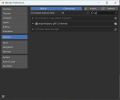
What makes it interesting is that the entire "scene" category has disappeared from the Add-ons section in preferences which means that, as the MSFS plugin is in that category, even though it is installed and present in the correct folder, evidently Blender just isn't trying to load it.

I have downloaded a new copy of the exporter, I have downloaded and installed a new copy of Blender 3.6 LTS (which it used to work in) from Steam, and the "scene" category is not present. Nor is the plugin, in the list of add-ons. I have downloaded a portable copy of Blender 3.6 and tried that, with the same result. I have installed Blender 3.6 on a different PC and tried that, with the same result.

When I download and install the standalone version of 3.3 with the plugin pre-installed, from a couple of pages ago on this thread, that worked...

Unfortunately, all my models have been updated to 3.6, so going back to the portable 3.3 install isn't really an option.

Has anyone seen this before, or am I missing something extremely obvious?

Thanks.

Ian P.
 
I am unsure of this "scenes" category in the Preferences - why not change to All and do a search on gl.


DA40CGDFQ_2025.05.06_17h42m16s.png


or check you program files folder and make sure there is no io_scene_gltf2_msfs folder there. it should only be in the

C:\Users\your user id\AppData\Roaming\Blender Foundation\Blender\3.6\scripts\addons

DA40CGDFQ_2025.05.06_17h46m58s.png
 
Hi Ron,

The scenes thing is a bit of an oddity, but as your screenshot shows, it should be under Import-Export anyway, so forget that, it's a non-issue.

However, that doesn't help, unfortunately, as the plugin is just not showing up at all in Blender.

- It's not present under Program Files (or x86) - ruling that out was part of why I tried the portable versions, running completely outside the installation routine, as well as trying it on a second PC which has never had it installed before - it's my work PC.

- It is present under C:\Users\[username]\AppData\Roaming\Blender Foundation\Blender\3.6\scripts\addons.

For some reason, Blender just isn't reading that folder - which it has happily read for years. The only thing I'm aware of that's changed is that Steam updated my 3.6 LTS version to 3.6.22, rather than 3.6.21. The fact that I can backdate that to 3.3 Stable LTS (3.3.21), install the plugin to that either through preferences or a direct copy and paste and it still doesn't work in that, even though it is present in C:\Users\[username]\AppData\Roaming\Blender Foundation\Blender\3.3\scripts\addons, isn't helping.

[Edited to add: On my desktop PC, Blenderkit is also in C:\Users\[username]\AppData\Roaming\Blender Foundation\Blender\3.6\scripts\addons and that >is< working. It's just the MSFS plugin that isn't.]

Cheers,

Ian P.
 

Attachments

  • Screenshot 2025-05-06 234225.png
    Screenshot 2025-05-06 234225.png
    79.1 KB · Views: 148
  • Screenshot 2025-05-06 234544.png
    Screenshot 2025-05-06 234544.png
    33.6 KB · Views: 143
Your second pic. I believe the name of the folder needs to be specific. There have been changes to Blender 3.6 in the addon part (I believe)

How do you install the addon? you should download the zip from ASOBO git.
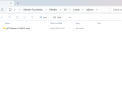
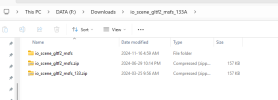
Then you need to un zip it and zip up only the folder that is named "io_scene_gltf2_msfs"

Then use that zip to install it via the install button in the preferences dialog.

I believe you have a "second" level to your exporter folder structure.

only rezip this folder from the "main" downloaded zip

DA40CGDFQ_2025.05.07_10h1m9s.png
 

Attachments

  • DA40CGDFQ_2025.05.07_9h55m21s.png
    DA40CGDFQ_2025.05.07_9h55m21s.png
    21.8 KB · Views: 143
Last edited:
That's the one. Thanks Ron.

It was always going to be something I was doing wrong.

Right. Back to Nissen Huts...

Cheers,

Ian P.
 
Would someone be willing to take a few minutes and list for "us" what plug-in versions are "current" and goes with which version of Blender? There seems to be so many flavors of Blender and importers / exporters that it gets confusing. It would be nice to have some kind of table to get a quick glance on what versions of plug-ins are the latest (with links of course) to specific Blender versions.

I would like to eliminate the "older" versions of Blender, but I experience or read where some others have issues and I'm not really sure what's a good solution. I DO export for MSFS 2020 and 2024 so both need to be considered. I'm reworking an entire airport and face the issue where I've saved some models in later versions of Blender and would like to export them into MSFS 2024. I'll add the exporter to 4.2.8 and see what I get.

I have Blender 3.3.12 with MSFS glTF Importer 0.3, Import-Export for 2024 rev 2.3.3, Import-Export for 2020 rev 1.3.3, and Import-Export glTF 2.0 format version 3.3.36
ALSO Blender 3.6.12 with MSFS glTF Importer 0.3, Import-Export for 2024 rev 2.3.3, Import-Export for 2020 rev 1.6.3.0, and Import- Export glTF 2.0 format version 3.6.28
ALSO Blender 4.2.8 with MSFS glTF Importer 0.3, Import-Export for 2024 (not yet installed), Import-Export for 2020 rev1.6.3.0,

Thanks in advance,

TB2
 
To resume, IMO (and following the advice of people who have already posted on this topic) the best solution is to take
- Blender 3.6.18 (or the last 3.6.21) in conjonction with
- Asobo v1.3.3 plugin (you have the links below).
This solution is 2020 & 2024 compliant.

1) Blender:

The old release of Blender are here: https://download.blender.org/release

2) Export plugin:
a) The last official version of Asobo plugin is the v1.3.3 : https://github.com/AsoboStudio/glTF-Blender-IO-MSFS and it can be use with Blender 3.6.x (https://download.blender.org/release/Blender3.6)

b) The version 1.6.13.0 is a fork of RonH (Ronh991) devlopments but I don't think that it is yet released. The last released of RonH is the 1.6.12.0 : https://github.com/ronh991/glTF-Blender-IO-MSFS/releases (go to the middle of the page : Feb 18 to find it)

c) Always in the github of RonH you can find the branch v2.x.y which is for Blender 4.2 LTS but if I remember it is experimental !!! I have tested this version two weeks ago, something works but they are yet some problems (aircraft creation).

"Blender 3.6.18 + Asobo v1.3.3" is the choice that I adopted knowing that I was still working last week with Vitus plugin and Blender 2.83.18.
Saturday, I migrate my last aircraft and the export works fine under 2020 & 2024.

PS1 : If you want to use several versions to solve specific problems, make as me, use as many portable version that you need and the plugin adapted. Currently I have on my SSD:
- Blender 2.83.18 + last Vitus plugin (https://www.fsdeveloper.com/forum/threads/blender2msfs-support-thread.448402)
- Blender 2.93.X + FlyByWire plugin for Import (https://github.com/flybywiresim/msfs2blender2msfs/tree/rewrite)
- Blender 3.6.18 + Asobo v1.3.3
- Blender 4.2 + PBR Painter for texturing tasks

PS2 : Blender 3.3.x is out of date and Export plugin for Blender 4.2 are experimental.

If theses informations can answer your questions ;)
 
Last edited:
Blender:
The old release of Blender are here: https://download.blender.org/release

Export plugin:
a) The last official version of Asobo plugin is the v1.3.3 : https://github.com/AsoboStudio/glTF-Blender-IO-MSFS and it can be use with Blender 3.6.x (https://download.blender.org/release/Blender3.6)

b) The version 1.6.13.0 is a fork of RonH (Ronh991) devlopments but I don't think that it is yet released. The last released of RonH is the 1.6.12.0 : https://github.com/ronh991/glTF-Blender-IO-MSFS/releases (go to the middle of the page : Feb 18 to find it)

c) Always in the github of RonH you can find the branch v2.x.y which is for Blender 4.2 LTS but if I remember it is experimental !!! I have tested this version but with some problems.

To resume, IMO (and following the advice of people who have already posted on this topic) the best solution is to take Blender 3.6.18 (or the last 3.6.21) in conjonction with the Asobo 1.3.3 (you habe the links above). This solution is 2020 & 2024 compliant.
It is the choice that I adopted knowing that I was still working last week with Vitus plugin and Blender 2.83.18. Saturday, I have migrate my last aircraft and the export works fine under 2020 & 2024.

PS: Blender 3.3.x is out of date and Blender 4.2 is experimental.
Blender 4.5 comes out in June 2025, BUT that one really messes up the exporter - don't even try it. The ASOBO exporter is reliant on the core Khronos code and they changed the names of all function py file from gltf2_ixxxx_funtion.py to just function.py
 
Back
Top