
-
Which the release of FS2020 we see an explosition of activity on the forun and of course we are very happy to see this. But having all questions about FS2020 in one forum becomes a bit messy. So therefore we would like to ask you all to use the following guidelines when posting your questions:
- Tag FS2020 specific questions with the MSFS2020 tag.
- Questions about making 3D assets can be posted in the 3D asset design forum. Either post them in the subforum of the modelling tool you use or in the general forum if they are general.
- Questions about aircraft design can be posted in the Aircraft design forum
- Questions about airport design can be posted in the FS2020 airport design forum. Once airport development tools have been updated for FS2020 you can post tool speciifc questions in the subforums of those tools as well of course.
- Questions about terrain design can be posted in the FS2020 terrain design forum.
- Questions about SimConnect can be posted in the SimConnect forum.
Any other question that is not specific to an aspect of development or tool can be posted in the General chat forum.
By following these guidelines we make sure that the forums remain easy to read for everybody and also that the right people can find your post to answer it.
You are using an out of date browser. It may not display this or other websites correctly.
You should upgrade or use an alternative browser.
You should upgrade or use an alternative browser.
Latest MCX version.
- Thread starter Butch1
- Start date

It doesn't look like what you mentioned is not installed.Do you have . NET 8.0 runtimes installed on your computer? For the latest development release that is a requirement, version 1.7 still used .NET Framework 4.8.
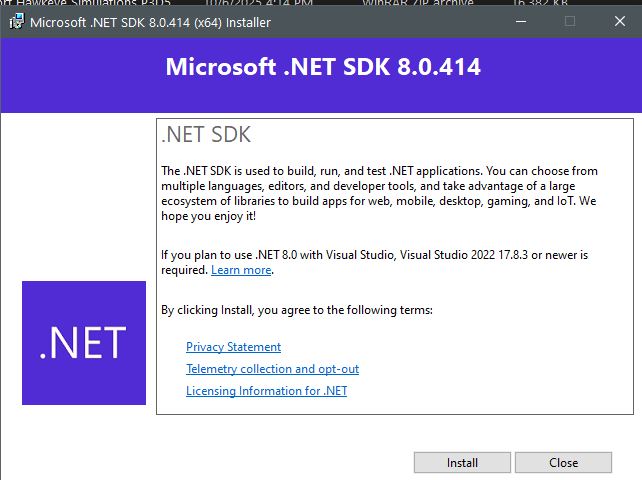
Is this the program you asked about? I D/L but before I install this wanted to make sure
we are on the same page.......

Hi Butch:
We are fortunate to have any version of MCX made available by Arno, who is more over-committed than many of us here; thus the occasional typo:
https://www.fsdeveloper.com/forum/threads/download-modelconverterx.14215/
"This thread will contain all information about where the download ModelConverterX. There are two versions available, version1.6 is the stable release, while version 1.7 is the development release.
Stable release
The stable release is intended for users who want a well tested version of the tool.
Download latest stable release: ModelConverterX 1.7
The manual is included in the ZIP file of the tool.
Development release
The development release is updated automatically every night based on the improvements I have made. This means that you will always be able to benefit for the latest features and bug fixes. The downside of this is that this version has not been tested properly yet, so it will be more buggy. If that does not bother you, please feel free to try this version.
Get more information about the latest development release. Here you find the changes and find the download link. You can also download this version directly from the download section.
The latest (aka"Development") version 1.8x of MCX download is here:
https://www.scenerydesign.org/latest-release/modelconverterx_latest_development_release.zip
The latest .NET 8.x (X-64 aka "64-Bit") Runtime download is here:
https://dotnet.microsoft.com/en-us/.../runtime-desktop-8.0.19-windows-x64-installer
Be aware that there 'may' be other optional Windows components that you require in order to run MCX 1.8x (...if they are not already installed).
If this does not get you up and running in MCX version 1.8, please report back here again.
GaryGB
We are fortunate to have any version of MCX made available by Arno, who is more over-committed than many of us here; thus the occasional typo:
https://www.fsdeveloper.com/forum/threads/download-modelconverterx.14215/
"This thread will contain all information about where the download ModelConverterX. There are two versions available, version
Stable release
The stable release is intended for users who want a well tested version of the tool.
Download latest stable release: ModelConverterX 1.7
The manual is included in the ZIP file of the tool.
Development release
The development release is updated automatically every night based on the improvements I have made. This means that you will always be able to benefit for the latest features and bug fixes. The downside of this is that this version has not been tested properly yet, so it will be more buggy. If that does not bother you, please feel free to try this version.
Get more information about the latest development release. Here you find the changes and find the download link. You can also download this version directly from the download section.
The latest (aka"Development") version 1.8x of MCX download is here:
https://www.scenerydesign.org/latest-release/modelconverterx_latest_development_release.zip
The latest .NET 8.x (X-64 aka "64-Bit") Runtime download is here:
https://dotnet.microsoft.com/en-us/.../runtime-desktop-8.0.19-windows-x64-installer
Be aware that there 'may' be other optional Windows components that you require in order to run MCX 1.8x (...if they are not already installed).
If this does not get you up and running in MCX version 1.8, please report back here again.
GaryGB
Last edited:

- Messages
- 34,342
- Country

As Gary explained the latest stable release is 1.7. But the latest development release that contains all recent improvements (and now and then a little bug) is version 1.8.Latest version of MCX I searched for and found was this (V 1.7)
Both are available through the scenerydesign.org page that you linked to or via the resource section here at fsdeveloper.
Ok, I took the plunge and installed the v 1.8 and it will not open/run, I copied all the 1.8 files over my 1.7 version.
I did download and install the prerequisite programs mentioned in the users manual
I use windows 10
Windows specifications
Edition Windows 10 Home
Version 22H2
Installed on ?8/?8/?2020
OS build 19045.4291
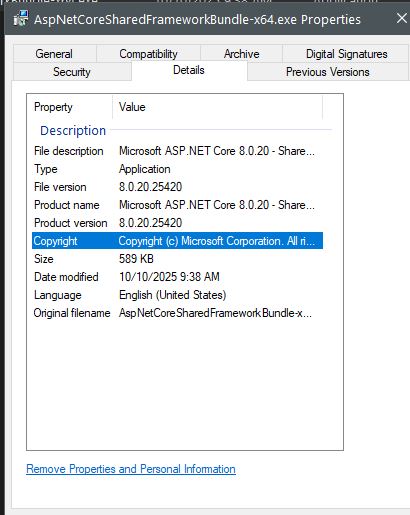
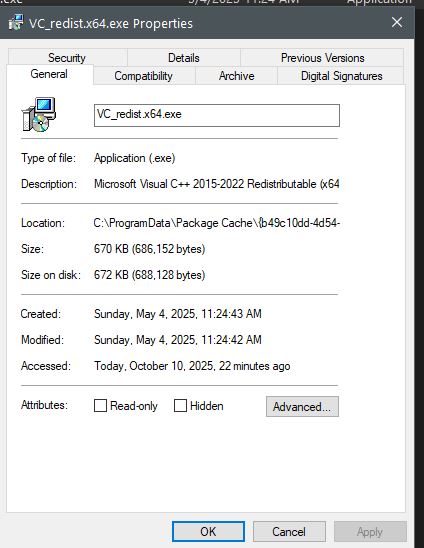
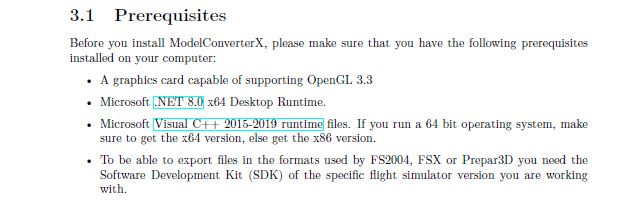
What sayeth you?
BTW, the link in your 1.8 manual for the VIsual ++ is dead.
I did download and install the prerequisite programs mentioned in the users manual
I use windows 10
Windows specifications
Edition Windows 10 Home
Version 22H2
Installed on ?8/?8/?2020
OS build 19045.4291
What sayeth you?
BTW, the link in your 1.8 manual for the VIsual ++ is dead.
- Messages
- 34,342
- Country
You don't need the ASP.net runtime, but the desktop runtime. The link is below:

 dotnet.microsoft.com
Thanks for reporting the broken link, I'll check it.
Download .NET 8.0 Desktop Runtime (v8.0.20) - Windows x64 Installer
dotnet.microsoft.com
Thanks for reporting the broken link, I'll check it.
Thanks, it works now.You don't need the ASP.net runtime, but the desktop runtime. The link is below:
Download .NET 8.0 Desktop Runtime (v8.0.20) - Windows x64 Installer
Thanks for reporting the broken link, I'll check it.


- Messages
- 34,342
- Country
I'll check, it should run the PDF file as process and then it normally opens with your default PDF application.The manual will not open from opened MCX program I see the manual icon in upper right but when I clicked on it I see message as per attached:
- Messages
- 34,342
- Country
I think you selected the wrong BGL format from the list. I don't think you want to export as a ground polygon BGL, but as a P3D BGL file.How do I fix this in 1.8?
The manual will not open from opened MCX program I see the manual icon in upper right but when I clicked on it I see message as per attached:
No I didn't, there is a white icon on upper right corner and when I placed the mouse cursor over it, it said Manual, so I clicked on it and the error 'can not find' came up.
Butch:
AFAIK, MCX 'should' automatically find- and create links to- file / folder paths such as the one seen in the message above.
Note that the path shown shows a double back-slash in front of the file name for the MCX manual; did you type that in manually by any chance ?
UPDATE: I can confirm the error above does occur on my MCX 1.8 install as well (with / without Admin permissions), if I click [ Explore Manual ].
Butch again: (would that be the same as "double trouble" ?
 )
)Work-around while we await a fix by Arno for this minor inconvenience:
With Windows Explorer (aka File Manager, This PC, My Computer etc):
Browse into the MCX install folder on your computer at C:\modelconverterx_1.8
Create a new shortcut directly to the MCX manual at:
C:\modelconverterx_1.8\ModelConverterX.pdf ...(notice I only have used (1) back-slash in the path)
Copy that new shortcut link file into Windows Clipboard with <Ctrl+C> keys
"Paste Shortcut" onto your Windows 10 Desktop or wherever you find it most convenient
Arno: Is this a coding typo ?

AFAIK, at this position in a path string, double back-slash = double trouble.
GaryGB
Last edited:
How do I fix this in 1.8?
I think you selected the wrong BGL format from the list. I don't think you want to export as a ground polygon BGL, but as a P3D BGL file.
Arno:
Would we normally see "reader" messages at any time except when loading a file (is that possible during a "write" operation in MCX) ?).
Also, does a G-Poly "normally" ever have globalenvtest.dds mapped to it ?

GaryGB
No I didn't, there is a white icon on upper right corner and when I placed the mouse cursor over it, it said Manual, so I clicked on it and the error can not fine came up.Butch:
AFAIK, MCX 'should' automatically find- and create links to- file / folder paths such as the one seen in the message above.
Note that the path shown shows a double back-slash in front of the file name for the MCX manual; did you type that in manually by any chance ?
GaryGB
I found the configure dialog with info as to where all my sims are located. It wanted to use the ship2vec.exe from a non installed FSX program so I pointed it to my P3DV5 SDK where this file was located andHow do I fix this in 1.8?
that made it happy.
With 1.7 I use to export the bgl to a scenery and it would remember where it came from. The export to scenery in this new 1.8 seems to want to place the file in my P3d scenery or so it seems.

- Messages
- 6,520
- Country

The pdf is in the same folder as modelconverterx. I also get an error when clicking on the view button.
I found the configure dialog with info as to where all my sims are located. It wanted to use the ship2vec.exe from a non installed FSX program so I pointed it to my P3DV5 SDK where this file was located and that made it happy.
MCX 'should' still have found your installation path for P3Dv5 SDK, and the installed copy of SDK SHP2VEC.exe; something is weird with your Win-10.
(FYI: I also run MCX 1.8 on Windows-10 Pro, and MCX does everything it should, aside from find the PDF manual via the 'convenience link button').
Or perhaps you ran MCX without first granting Admin privileges via the {Compatibility} tab when making the shortcut to your installation of MCX ?:
C:\modelconverterx_1.8\ModelConverterX.exe
This is potentially baffling, as you have correctly installed MCX somewhere outside the dreaded Windows 'excessively-protected' system folder chain.
With 1.7 I use to export the bgl to a scenery and it would remember where it came from. The export to scenery in this new 1.8 seems to want to place the file in my P3d scenery or so it seems.
One must always manually select the output path for textures and BGLs etc in MCX, when we reach the 'compile' phase of working on a 3D model.
GaryGB
Last edited: