• Which the release of FS2020 we see an explosition of activity on the forun and of course we are very happy to see this. But having all questions about FS2020 in one forum becomes a bit messy. So therefore we would like to ask you all to use the following guidelines when posting your questions:

    • Tag FS2020 specific questions with the MSFS2020 tag.
    • Questions about making 3D assets can be posted in the 3D asset design forum. Either post them in the subforum of the modelling tool you use or in the general forum if they are general.
    • Questions about aircraft design can be posted in the Aircraft design forum
    • Questions about airport design can be posted in the FS2020 airport design forum. Once airport development tools have been updated for FS2020 you can post tool speciifc questions in the subforums of those tools as well of course.
    • Questions about terrain design can be posted in the FS2020 terrain design forum.
    • Questions about SimConnect can be posted in the SimConnect forum.

    Any other question that is not specific to an aspect of development or tool can be posted in the General chat forum.

    By following these guidelines we make sure that the forums remain easy to read for everybody and also that the right people can find your post to answer it.

P3D v4 3D grass Transparency

Messages
283
Country
france
Hello !

So i'm trying to make a progressive transparent grass texture, from the texturing to the compiling, everythings looks good, even in MCX where i see a beautifull grass texture with a nicely made degraded transparent,and, after that, in P3D, i see an ugly texture, like if my degrading transparent texture had a straith "Cut" :

1535314541-sans-titre.jpg


1535314816-2018-8-26-21-0-25-863.jpg


Any idea why i see this ?

Thank you !
 
Is your texture saved as DDS DXT5 instead of DXT1?
DXT5 allows transparency gradients. DXT1 does not.
 
It wasn’t but i converted it with DXTBMP and it still don’t work ... the Alpha Mask is still looking good and the model in MCX look’s perfect !
I tried to make a ground polygon with the gp wizard of mcx with some transparency gradient and it surprisely worked !

I’ll search more tomorrow, thank you for your help !
 
Converting the texture from DXT1 to DXT5 will not work because the texture gradient does not exist in the DXT1 texture to begin with. You will just have a DXT1 texture with no gradient in DXT5 format. Start with your original texture (PNG, TGA, etc) and use the texture tab of the material editor in MCX to convert to DDS format.
Also be sure that the DDS DXT5 texture loaded by MCX is the same loaded by the sim (copy over the texture from the location MCX loads from, to the sim if necessary).
If that still does not work, maybe you can try attaching the grass objects with textures here for someone else to take a look. Maybe they will have ideas.
 
Yeah absolutely, I didn’t convert directly my dds dxt1 file, I saved another png files with the transparency and after that I converted it to a DDS Dxt5 file in DXTBMP.
Let me attach it there so you can take a look, but I see no problem !
 
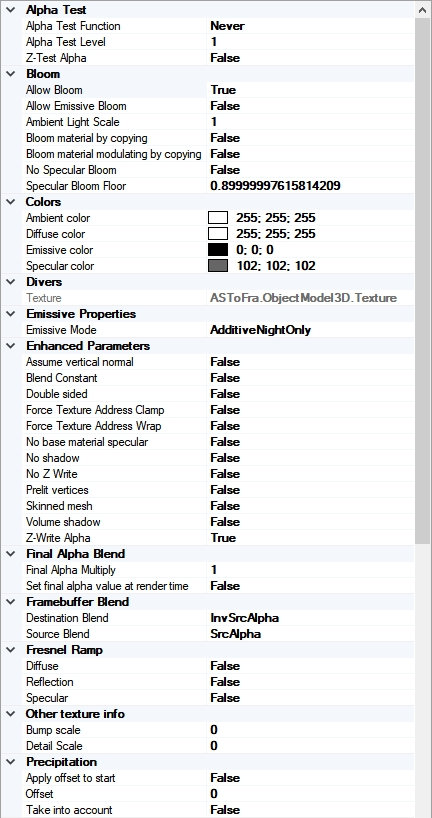
I'd recommend not to Z-test alpha. As a consequence also not to Z-write alpha.
(See material settings in MCX)
 
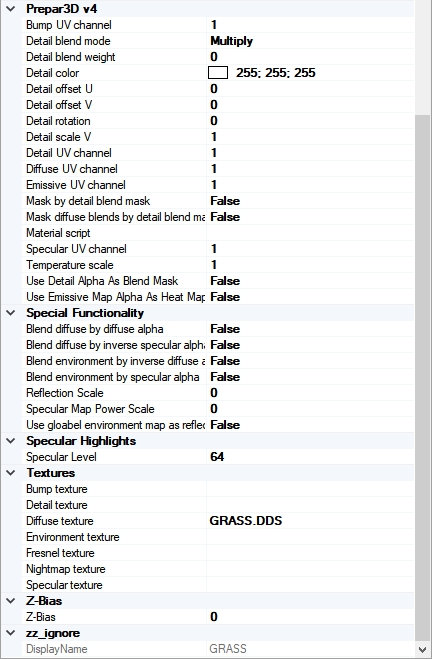
grass.DDS looks okay. Maybe show your full material settings as displayed in MCX's material editor?
 
Z-Alpha on false didn't worked, MJahn, after looking at my texture settings i saw this last line that seems to be interresting, wich value should i set ? (AlphaDetectionTreshold)

0q4u.jpg


ddw5.jpg
 
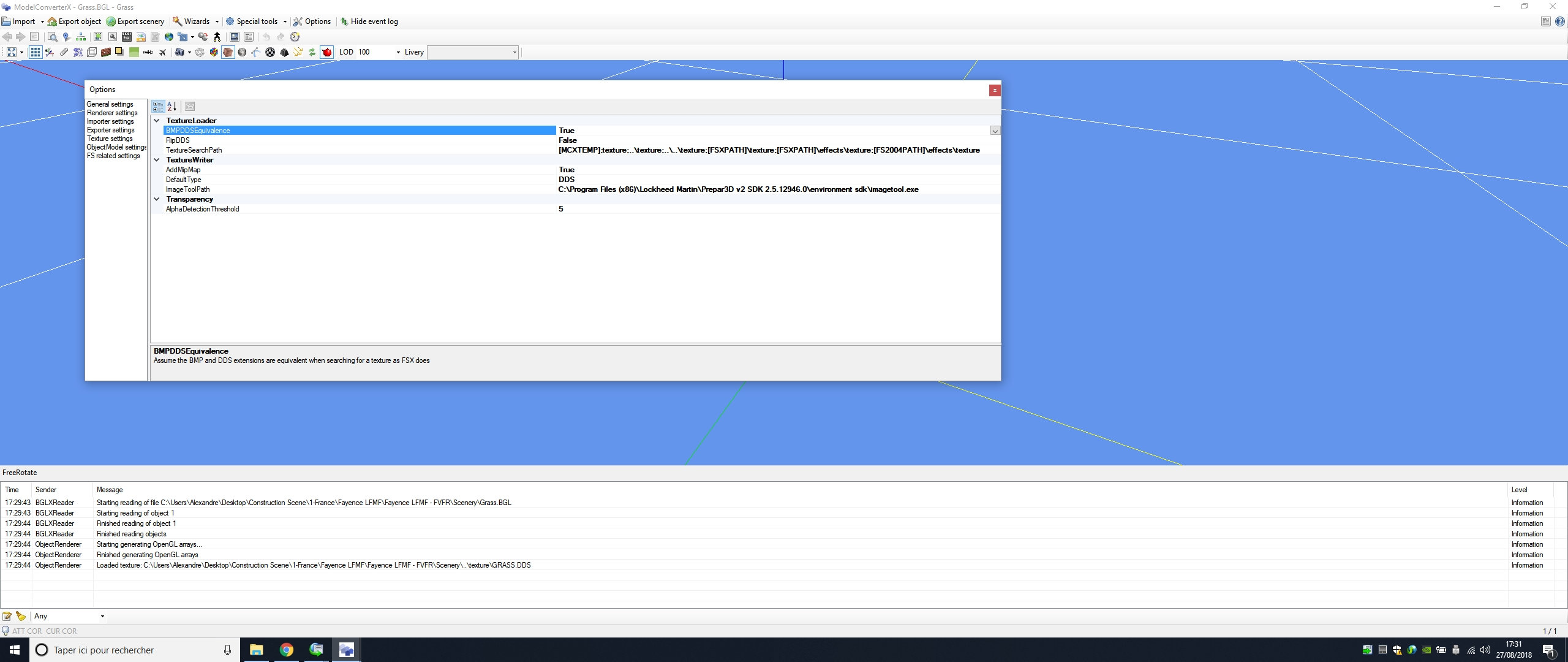
That's not the material editor entry. Do you know how to get that? I'd be interested to know if you used "set default transparent" when you applied the texture. There may be other causes, too, so the full set of material settings could be relevant. Usually takes two screenshots.
 
Thanks, that was it. I was specifically looking for the "framebuffer blend" settings, for which apps like max and gmax offer the "set default transparent" trigger. However, the values as shown in the two slots are correct for transparency. Maybe somebody else can see something that could be wrong.
 
Why would you want an alpha gradient on your grass? It will look like the grass is floating. If you are trying to blend with photoreal, just add similar tones to the base of the grass texture.
 
another cool trick is to make the whole texture 5-7% semi transparent. It blends well with environment.

32235407_1584806974974958_2699046191420669952_o.jpg
 
So what did this command do ?

As far as I can guess it lets the texture's alpha channel determine (and not only the actual Z depth) whether to render the object in front of others or not. It is meant to be used with the alpha test functions.
the decision of rendering in front or not is obviously a binary one, hence the unwanted sharpness.
 
As far as I can guess it lets the texture's alpha channel determine (and not only the actual Z depth) whether to render the object in front of others or not. It is meant to be used with the alpha test functions.
the decision of rendering in front or not is obviously a binary one, hence the unwanted sharpness.

I see :scratchch
So i can let it on false for my other compilation ? I mean that won't affect the framerate for some buildings that actually don't need it ?

Why would you want an alpha gradient on your grass? It will look like the grass is floating. If you are trying to blend with photoreal, just add similar tones to the base of the grass texture.

I actually saw this trick (Alpha Gradient) for the first time in some Orbx sceneries and it looks very nice,


Like this we clearly see the "Impact" between the ground and the Grass texture that made it look kinda unrealistic, look at what i got, i wasn't really expecting such a beautifull result !:

1535476809-2018-8-28-17-39-37-536.jpg


1535476890-2018-8-28-18-6-51-728.jpg


1535476874-2018-8-28-17-24-59-492.jpg
 
Last edited:
Back
Top