• Which the release of FS2020 we see an explosition of activity on the forun and of course we are very happy to see this. But having all questions about FS2020 in one forum becomes a bit messy. So therefore we would like to ask you all to use the following guidelines when posting your questions:

    • Tag FS2020 specific questions with the MSFS2020 tag.
    • Questions about making 3D assets can be posted in the 3D asset design forum. Either post them in the subforum of the modelling tool you use or in the general forum if they are general.
    • Questions about aircraft design can be posted in the Aircraft design forum
    • Questions about airport design can be posted in the FS2020 airport design forum. Once airport development tools have been updated for FS2020 you can post tool speciifc questions in the subforums of those tools as well of course.
    • Questions about terrain design can be posted in the FS2020 terrain design forum.
    • Questions about SimConnect can be posted in the SimConnect forum.

    Any other question that is not specific to an aspect of development or tool can be posted in the General chat forum.

    By following these guidelines we make sure that the forums remain easy to read for everybody and also that the right people can find your post to answer it.

FS2004 ADE loading error

Messages
287
Country
ireland
Thanks for having me back on these boards after a long absence.

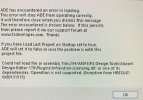
I run Windows 11 Home. When I close ADE I get this error message.
I cannot open the program again in order to check the setting for the last project comment!

I would be grateful for advice. Thanks.

John

ADE error.jpg
 

Attachments

  • ADE error.jpg
    ADE error.jpg
    34.6 KB · Views: 83
Hi John:

Good to see you here again. :)

It is quite likely you may find all the info you need regarding that message in ADE, within- or linked via- this thread:

https://www.fsdeveloper.com/forum/t...-and-commercial-use.453946/page-2#post-930140


First, you may wish to upgrade ADE to the last FS2Kx compatible version 1.79x, released by Jon before he opted to "retire":

https://www.fsdeveloper.com/forum/t...rsion-1-79-7475-available.448076/#post-848280


The post by ADE author Jon Masterson (aka "Scruffyduck") that includes links to ADE and in particular, the "ProKey" ...is here:

https://www.fsdeveloper.com/forum/threads/ade-downloads-page.459372/post-929105


Jon indicates the ProKey Infralution Licensing files must be in the ADE Plugins folder before Windows Security allows ADE to run:

https://www.fsdeveloper.com/forum/threads/ade-1-79-prokey-fault.448146/post-848809


Jon's ScreenStepLive is offline now so we access the archived website pages via Wayback Machine:

http://web.archive.org/web/20240807...ependencies-exception-from-hresult-0x80131515


If you require any additional assistance resolving this matter, feel free to inquire further. ;)


GaryGB
 
Last edited:
Success! :)

The bottom link to the archived website pages was what I needed most. Unblocking was a piece of cake and I guess I should have worked it out for myself.


Thanks also for the link to the 1.79x test version. This is now in use with the 1.78 backed up using the clever little back up tool.

The Prokey files were already in my Plugin folder.

Great support! Many thanks.
 
Back
Top