• Which the release of FS2020 we see an explosition of activity on the forun and of course we are very happy to see this. But having all questions about FS2020 in one forum becomes a bit messy. So therefore we would like to ask you all to use the following guidelines when posting your questions:

    • Tag FS2020 specific questions with the MSFS2020 tag.
    • Questions about making 3D assets can be posted in the 3D asset design forum. Either post them in the subforum of the modelling tool you use or in the general forum if they are general.
    • Questions about aircraft design can be posted in the Aircraft design forum
    • Questions about airport design can be posted in the FS2020 airport design forum. Once airport development tools have been updated for FS2020 you can post tool speciifc questions in the subforums of those tools as well of course.
    • Questions about terrain design can be posted in the FS2020 terrain design forum.
    • Questions about SimConnect can be posted in the SimConnect forum.

    Any other question that is not specific to an aspect of development or tool can be posted in the General chat forum.

    By following these guidelines we make sure that the forums remain easy to read for everybody and also that the right people can find your post to answer it.

FSX Building disappear, please help

Messages
41
Country
unitedstates
Hi to all, I have done this building with GMax for FSX, exported to MDL and make it to BGL with the Library Creator X (placed with the Object Placement Tool), never happen before with others aiports I designed, here you guys, have been helpful before and very nice people, what could be causing this disappearance? please help... :( cause I have no idea.


BTW. Only happens when the zoom is set to 2.0 or higher, in 1.5 nothing happen, i dont know if that matters to say, I dont know what to do, what to search, what I do know is that is very annoying...
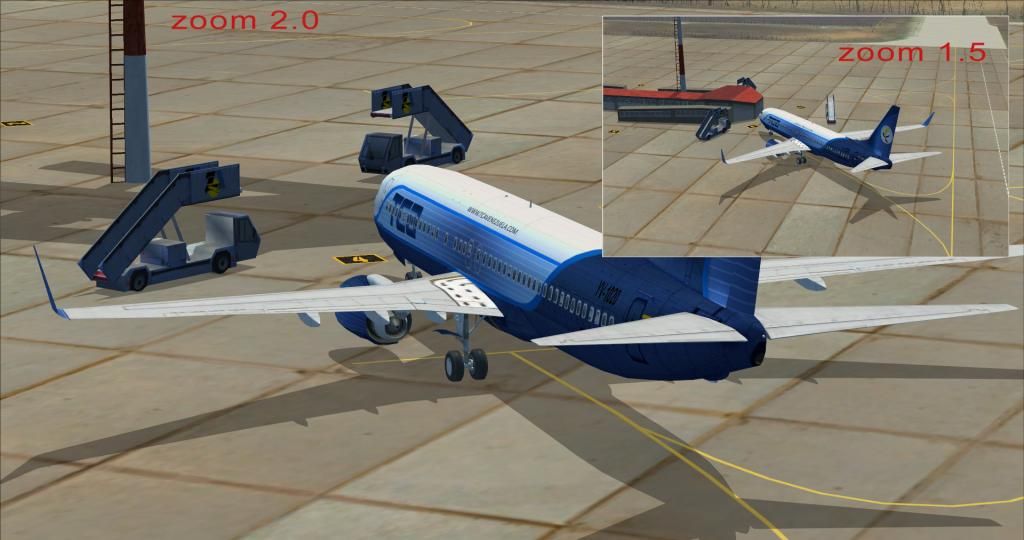
Zoom.jpg
 
Last edited:
Do you have DX10 preview turned on? I see the shadow of the building on the ground. I have seen this problem with aircraft the have textures that are not compatible with DX10 preview. You only see the shadow. I'm just guessing.
 
Thanks Ronh, I'll try that, but after looking on "drawcall", "drawcall batching" and stuff, apparently its the main cause, but I do not understand the solution itself.
 
Well, ronh... I place that building at another far airport and happens the exact same annoying thing in the video, just to rule out that there were some geographical bug or something, I guess that is a good news somehow, because it means thats the model itself has the problem (and the solution). Other buildings uses some of the textures used in this terminal, but by placing the terminal all alone without the "others buildings" in other airport tells me that its a model/texture issue and not geographical problem.

Tejal, thanks for the help, but I already read that thread and dont thing it is my case, I have work here with only ADE for the afcad, no possible conflict; I read about changing the name of the textures, but I'm not sure if that will help, cause in the thread I read, the original texture name was "LFML_container2.bmp" and changed to "LFML_container_2.dds" (add an underscore to separate the number) and all my textures have already the "right kind of name", an underscore separating the number; but yet... the words "drawcall" thing and "drawcall batching" keep coming in every single thread I found, and I have no idea what is that, is a little frustrated to me :(, the Wiki of the MCX only say:

"DrawcallBatching
Determines whether the object will have drawcall batching or working LODs."

Can you guys look at this picture and tell me if I'm in the right path searching for the "drawcall thing"? its my instinct at least right? honestly I dont know if there having a 9 drawcall its a good thing or a bad thing, I read that building can dissapear if the sum of all those object's triangles exceed 43690, I have no idea what that means but I can tell I have 6350 triangles since the picture of the MCX says so.

MCX1.jpg


MCX2.jpg
 
Last edited:
No. all seem correct for a building like that, Drawcall is just the different materials applied to the object, which usually match with the number of textures for that object. Can't be of more help, the case is very weird really, because the object appear and desappear. good luck.
Here is a very interesting thread, the case seem to be the same http://www.google.es/url?sa=t&rct=j...ef__MwczJUnhPgmDQ&sig2=Qx0QMYgy3Xn-2Di5gUsjoQ
 
Last edited:
Drawcall batching will likely stop the disappearing I believe. Just try exporting the model with MCX, compile it back into your library with Library Creator XML and try it out in the sim. Gmax will never batch a model (although 3DS Max can), I process all my gmax exports through MCX just to apply drawcall batching. I've noticed my models will disappear in the peripheral view as I slew or taxi past when they aren't batched. On larger models the reference point will be farther away from the user view which seems to exagerate the problem.

BTW there are settings for drawcall batching in Options > Exporter settings in MCX, by default MCX will batch models that don't contain LODs.

Also you can use the Drawcall monitor (available on the same page where you download MCX) to detect if a model is batched or not. When you load a model in the drawcall monitor you'll see either "Working LOD" or "DrawCallBatching" in green in the status bar, if "Working LOD" is green it means the model isn't batched and vice versa.

Jim
 
Solved!!! BTW Thanks Tejal, again...

What I do was export the MDL from Gmax like always do, then open the MDL with MCX and export again as "FSX MDL Object" and the problem was solved.

PD: JRobinson, thakns to you too
 
Back
Top